Yes, you can deploy to Cloudflare Pages from your phone in 2026. wrangler, Cloudflare's CLI, runs fine from a cloud Ubuntu workspace you reach
from a native app: authenticate with an API token instead of a browser login,
run npx wrangler pages deploy ./dist, and your site ships to
Cloudflare's network. If your project is wired to a GitHub repo, Cloudflare
Pages Git integration means one git push from that same workspace
deploys with no CLI at all. The one thing you cannot do is build and ship code
from a Cloudflare app, because there is no first-party app that deploys a Pages
project. This guide covers the token that works on a phone, the exact wrangler
commands, and the git-push path.
tl;dr
The phone-friendly auth: a Cloudflare API token with Pages:Edit,
exported as CLOUDFLARE_API_TOKEN, not wrangler login
(that is browser OAuth). The workspace: a cloud Ubuntu container
with wrangler, reached from iPhone or Android. The two deploy paths: npx wrangler pages deploy ./dist on demand, or git push to a repo connected via Pages Git integration. We ship Cosyra with a Cloudflare connector that stores the token and installs wrangler for
you; plans start at $20/month, and eligible new users can start a 7-day free
trial in the App Store app.
The two real paths: wrangler Direct Upload or git push
"Deploy to Cloudflare Pages from my phone" is really two questions, because Pages ships in two ways and both work from a phone once you have somewhere to run them. The first is Direct Upload with wrangler: you build the site, then run one command that uploads the output folder, git remote or not. The second is Cloudflare Pages Git integration: connect the repo once in the dashboard and every push to the production branch rebuilds and deploys. The phone does not change either mechanism. It only changes where you run them, which is a cloud workspace reached from a native app rather than a laptop on the train.
| Path | What ships it | Best when | Setup |
|---|---|---|---|
| wrangler Direct Upload from a cloud workspace | npx wrangler pages deploy ./dist | Any project; you built the output and want to ship that exact build | CLOUDFLARE_API_TOKEN connector, wrangler, project created once |
| Git integration auto-deploy | git push to the production branch | The repo is connected to Pages in the dashboard | GitHub connected, Pages project linked to the repo |
Our honest read: from a phone we reach for Direct Upload more than Git integration, which is the opposite of what we recommend for Netlify. On Cloudflare, Direct Upload ships the exact folder you just built and previewed, so there is no remote build to wait on and no CI log to scroll on a small screen when something breaks. Plenty of people will disagree — Git integration is tidier and gives you rollbacks in the dashboard — but on glass, fewer moving parts wins. The git path still earns its place when a whole team pushes to the same repo and you want every commit built the same way. This guide sets up both, starting with the token, since Direct Upload wants it and a clean workspace does too. That push is the last stage of a longer loop; our git from phone guide covers the clone, commit, and push steps that come before a deploy.
Step 1: Create a Cloudflare API token (not wrangler login)
The phone-friendly way to authenticate wrangler is a token, not
wrangler login. Cloudflare's
general commands docs are explicit: wrangler login "will attempt to automatically open
your web browser to login," and for "headless or continuous integration environments"
you should use API tokens instead. A phone terminal is a headless environment
as far as OAuth is concerned — there is no good way to bounce out to a browser,
approve scopes, and bounce back. So skip it.
In the Cloudflare dashboard open My Profile, API Tokens, and create a token with the Cloudflare Pages: Edit permission (Cloudflare's CI/CD guide calls out this exact permission). Copy the token once. You will also want your account ID, which is on the same dashboard. Cloudflare tokens are scoped and revocable, so this one can only touch Pages, and you can delete it the moment you stop trusting the device it lives on.
Step 2: Connect Cloudflare in Cosyra
In the app, open Settings, then Connectors, pick Cloudflare, and paste the
token and account ID. Cosyra stores them in a secure vault, exports them
into the workspace shell as CLOUDFLARE_API_TOKEN and
CLOUDFLARE_ACCOUNT_ID, and installs wrangler in the background.
Disconnecting later deletes the token and removes the env vars, so nothing
lingers in the shell. The deploy connectors docs cover the same flow for every provider.
Under the hood the workspace is an isolated Ubuntu 24.04 container on Azure,
x86_64, reached from the iPhone, Android, or web app, with git, Node.js,
Python, and the AI CLIs already installed. wrangler 4 needs Node 22 or
newer; the workspace ships a current Node (we saw node-v22 when we verified
the netlify CLI in the same workspace on 2026-07-24), and you can always
confirm with node --version. It hibernates when idle and
resumes right where you left it, so a half-finished deploy is still there
when you reopen the app in the waiting room an hour later.
Step 3: Create the Pages project, then deploy
Direct Upload projects have to exist before you deploy to them, so there is
a one-time create step. We checked the current release on 2026-07-25:
wrangler is at 4.114.0 on npm, it needs Node 22+, and the token path
below is the one Cloudflare documents for headless use. Here is the whole sequence
from the workspace:
# Inside a Cosyra workspace, reached from the iOS/Android app.
# CLOUDFLARE_API_TOKEN and CLOUDFLARE_ACCOUNT_ID are set by the connector.

# wrangler 4.114.0, requires Node 22+ (npm, verified 2026-07-25)
$ npx wrangler --version

# Create the Pages project once (Direct Upload needs it to exist first)
$ npx wrangler pages project create my-site --production-branch=main

# Build your site, then deploy the output folder
$ npm run build
$ npx wrangler pages deploy ./dist --project-name=my-site
# ...wrangler uploads ./dist and prints a preview URL when it finishes
The non-interactive Pages deploy sequence, verified against Cloudflare's Direct Upload and CI/CD docs and the npm registry (wrangler 4.114.0), 2026-07-25.
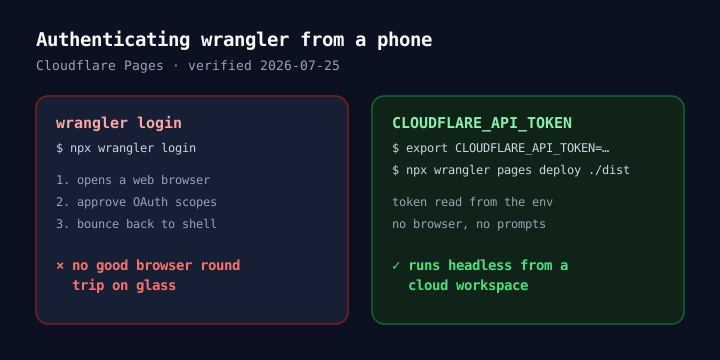
npx wrangler pages deploy ./dist is Direct Upload: it takes the folder
you built and uploads it straight to Cloudflare's global network, then prints
a preview URL you can open from the phone. If you want to see the build before
you ship it, dev servers running in the workspace are previewable in-app: our
localhost preview puts localhost:3000 on your phone screen, so you check the build first and deploy second.
Step 4: Preview branches and production
By default the production branch ships live and any other branch ships to a
preview URL, which is the same draft-first habit worth keeping from a phone:
push a preview, open it, promote only when it looks right. The
Pages commands reference documents the --branch flag that picks which one you are shipping,
plus --commit-dirty for deploying a workspace with uncommitted changes.
# Ship a preview from a feature branch
$ npx wrangler pages deploy ./dist --project-name=my-site --branch=preview

# Ship to production (the production branch you set at create time)
$ npx wrangler pages deploy ./dist --project-name=my-site --branch=main

# List what this token can reach
$ npx wrangler pages project list
That is the whole Direct Upload loop from a phone: build, deploy a preview,
deploy production, and lean on wrangler pages project list when something
looks off. The Ctrl-b and flag-typing friction of a phone keyboard
is handled by a terminal toolbar pinned above the keyboard with dedicated CTRL,
ESC, TAB, ALT, and arrow keys.
Ship a Cloudflare Pages deploy from your phone in a few minutes.
Plans start at $20/month, and eligible new users can start a 7-day free trial
in the App Store app. Connect Cloudflare in Settings, run npx wrangler pages deploy ./dist from the workspace, and your site is live from an iPhone or Android.
Step 5 (optional): let git push auto-deploy
Cloudflare Pages also has a Git-integration path. Connect the repo to a Pages project once in the dashboard, and every push to the production branch rebuilds and deploys with no CLI at all. From Cosyra that is a normal push from the workspace, once your GitHub account is connected in the app:
# After connecting the repo to Pages in the Cloudflare dashboard once,
# deploying is just pushing from the workspace:
$ git add -p
$ git commit -m "Ship the new landing section"
$ git push origin main            # Cloudflare Pages builds and deploys on push
Our git from phone guide covers the clone, commit, and push workflow in the workspace. This push-to-deploy model is the whole story on some providers: our deploy to Render from phone guide walks through one built around it, our deploy to Netlify from phone guide covers a provider with two paths like this one, and our deploy to Vercel from phone guide covers a provider with an official monitoring app. If you are weighing providers, the deploy a website from your phone pillar lays out where each one stops short from a phone.
No first-party deploy app: what monitors a deploy
Here is the honest limit. Cloudflare's dashboard is a responsive web app, so you can open it on a phone and watch a deploy go green. What you cannot do is build and ship code from it — a dashboard shows status, it does not run your build. As of 2026-07-25 there is no first-party Cloudflare app on the App Store or Google Play that deploys a Pages project, and the Pages overview documents the dashboard and CLI paths, not an app.
That is the gap a workspace fills. If your entire loop is "check whether the
last deploy is green," the web dashboard is fine on a phone. If it is "fix
the typo on the couch and redeploy," you need somewhere to run the build and
the deploy, and that is what a cloud Ubuntu container gives you — the deploy
runs on the container, not the phone, so a big npm run build does
not heat up a handset on the train.
FAQ
Can I deploy to Cloudflare Pages from my iPhone?
Yes, and the same method works on Android. The catch is where wrangler runs. iOS has no local Linux shell for it, so you run wrangler in a cloud Ubuntu workspace reached from a native app, authenticate with a CLOUDFLARE_API_TOKEN, and run npx wrangler pages deploy ./dist. The iPhone is the client; the deploy runs in the cloud. Our deploy a website from your phone pillar covers this pattern across providers.
Does wrangler need a browser login, or can I use an API token?
A token is the phone-friendly one. wrangler login uses OAuth and, in Cloudflare's own words, "will attempt to automatically open your web browser to login" — awkward on glass. The general commands docs say plainly that for "headless or continuous integration environments" you should use API tokens via CLOUDFLARE_API_TOKEN. Developers hit exactly this wall: a wrangler issue on Cloudflare's workers-sdk repo is someone whose OAuth login and token auth both refused to work from a headless box.
Does the Cloudflare Pages project need to exist before I deploy?
For Direct Upload, yes. Cloudflare's Direct Upload guide has you run npx wrangler pages project create once, then npx wrangler pages deploy <BUILD_OUTPUT_DIRECTORY> for every deploy after that. The create step is one-time; the deploy step is what you repeat from the phone. Git-integration projects are created for you when you connect the repo in the dashboard instead.
What's the difference between Direct Upload and Git integration?
Direct Upload ships a folder you already built: wrangler uploads ./dist straight to Cloudflare's network, git remote or not. Git integration connects a repo once and rebuilds on every push. Cloudflare's docs describe Direct Upload as a way to "upload your prebuilt assets to Pages and deploy them to the Cloudflare global network," and recommend it when you want to drive the build yourself. We usually pick Direct Upload from a phone — you ship the exact build you just previewed, with no CI queue to babysit.
Is there an official Cloudflare app that deploys Pages?
No. As of 2026-07-25 there is no first-party Cloudflare mobile app that builds and ships a Pages project; the dashboard is a responsive web app, and management on a phone means the browser. That's fine for checking a deploy's status, but it does not build code. To edit, build, and deploy, you need a shell — which is the gap a cloud workspace fills. Cloudflare's Pages overview documents the dashboard and CLI paths, not an app.
Can I deploy a specific branch or preview from my phone?
Yes. wrangler pages deploy takes a --branch flag, documented in the Pages commands reference, so a non-production branch ships to a preview URL and the production branch ships live. From a phone that means you can push a preview from the couch, open the URL, and only promote to production once it looks right — the same draft-first habit that keeps a glass-keyboard typo from going straight to prod.
Recap
Deploy to Cloudflare Pages from a phone two ways, both run from a cloud
Ubuntu workspace. The wrangler path: create a
Pages:Edit API token, connect it in Cosyra, run npx wrangler pages project create
once, then npx wrangler pages deploy ./dist for every deploy; wrangler
reads CLOUDFLARE_API_TOKEN on its own, no browser. The git path:
connect the repo to Pages once and git push to auto-deploy. There
is no first-party Cloudflare deploy app, so a workspace is where you build and
ship.
We built Cosyra for the part a dashboard leaves out: editing and shipping from the phone. Core is $20/month and Pro is $30/month, with 120 hours of compute and 30 GB of persistent storage. Eligible new users can start a 7-day free trial in the App Store app.