You can use git from your phone, and on Android you can run a real, current
git on the device itself. The catch is that "git on phone" is really a
question about where the git binary runs. On Android, Termux gives you an on-device git with pkg install git. On iPhone
there is no native Linux shell at all, so a command-line git has to run
somewhere else: a cloud Linux container you reach from the app, or a slow
i386 emulator. This guide walks each honest path for using git and GitHub
from a phone, including the full gh CLI and pull-request flow, and
is current as of 2026-06-26.
This sits under our mobile coding terminal pillar. If your actual goal is reviewing and merging a teammate's work, the review pull requests from your phone guide is the focused companion. For reaching a machine you already own, see SSH from your phone, and for the wider Android dev-environment picture, the coding on Android pillar.
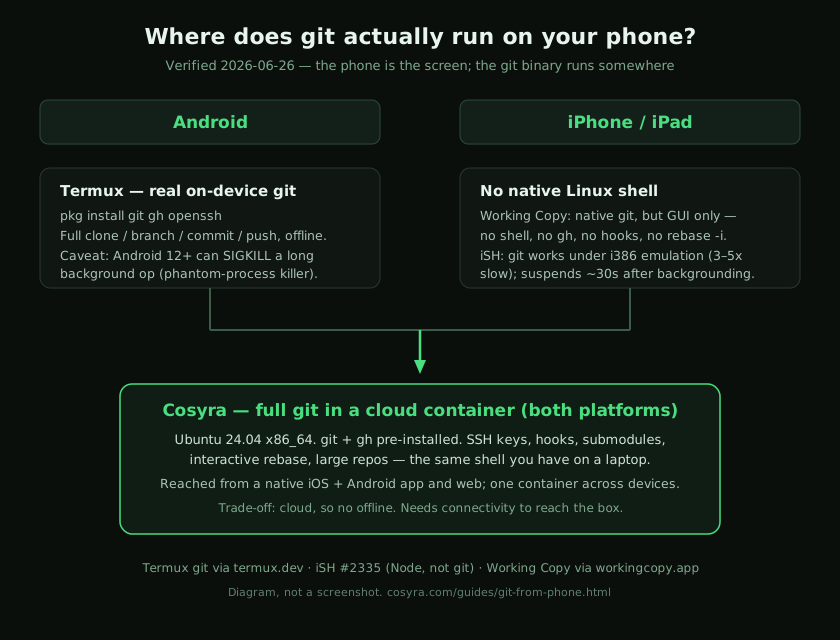
Quick decision. Jump to the part that matches you:
- You are on Android and want free, local git. Termux runs a real git on the device. Git on Android ↓
- You are on iPhone and just need clone, commit, push. A native GUI client covers it; a full shell does not exist on iOS. Git on iPhone ↓
- You want the full command line: gh, rebase, hooks, big repos. Run git in a cloud container reachable from either phone. Full git in the cloud ↓
Why is git on a phone harder than it sounds?
git is one binary and a folder of plumbing, so in principle it runs anywhere
there is a POSIX-ish shell. The friction is the operating system underneath.
Android is Linux, so a terminal app can ship a normal git. iOS is not a
place you get a shell: Apple's App Store rules forbid runtime fork/exec of downloaded code and just-in-time compilation for normal
apps, which is exactly what a general-purpose terminal needs. That single rule
is why every "terminal on iPhone" is either a remote connection to another machine
or a sandboxed emulator, never a native local shell. The official git project
documents the same Linux, macOS, and Windows targets and no iOS build (git-scm.com downloads).
So the real choices split by platform. On Android you decide between local (Termux) and remote (a cloud container). On iPhone you decide between a native GUI client that wraps libgit2, a slow local emulator, or a remote shell. We build the remote-shell option, so we will be straight about where the local ones are the better call.
How do you use git on Android?
On Android, install Termux (open source, GPLv3) and you have a real git in two commands. This is the genuinely free, offline-capable path, and for most git work on a Pixel or Galaxy it is all you need.
$ pkg install git gh openssh -y
Installing git... done
$ git clone https://github.com/your-org/api.git
Cloning into 'api'...
$ cd api && git checkout -b fix/expired-token
Switched to a new branch 'fix/expired-token'
Termux ships current packages, so git, gh, and
ssh all behave the way they do on a desktop. The one caveat to know
is the Android 12+ phantom-process killer: the OS kills background and high-CPU
processes and you can see [Process completed (signal 9)] mid-operation.
A quick git commit is rarely affected, but a long clone of a multi-gigabyte
monorepo can be. Android 14+ lets you disable it under Developer Options; we cover
the exact toggle in the Claude Code on Android guide and the broader story in Cosyra vs Termux. The trade-off is honest: Termux is Android-only, so none of this helps an
iPhone.
How do you use git on an iPhone?
On iOS there is no native shell, so git takes one of three shapes, and they
are not equivalent. The first is a native GUI client. Working Copy is the well-known one: it wraps git into an iOS app and does clone, commit,
branch, push, and even pull-request browsing through a touch interface. For moving
commits around it is genuinely good, and on an iPad it integrates with the Files
app. What it is not is a shell. There is no gh CLI, no
git rebase -i in an editor, no pre-commit hook running your test
script, no piping git output into another command.
The second shape is a local emulator. iSH runs Alpine Linux on iOS through i386 user-mode emulation, and apk add git gives you a working command-line git. The honest problems: the emulator carries
3-5x overhead, the app suspends about 30 seconds after you background it, which
can end a clone or fetch, and the App Store build has been frozen at 1.3.2 since
2023 even though the repo stays active. git the C program runs; anything Node-based
you might want next to it crashes with an Illegal instruction error
(iSH issue #2335, open since 2024).
The third shape is a remote shell, which is the one that gives you the full command line on an iPhone. That is what we built, and it is the same answer as coding on iPhone generally: when the device cannot host the toolchain, you reach a Linux box that can.
Full git and gh in a cloud container
We ship git and the GitHub CLI pre-installed in every Cosyra container,
because the thing that kills mobile git is setup friction, not the keyboard.
The container is Ubuntu 24.04 on x86_64, so git rebase -i,
submodules, LFS, pre-commit hooks, and a 4 GB clone all behave exactly as
they do on a laptop. You reach the same container from a native iPhone app,
an Android app, an iPad, or a browser, and it keeps running when the screen
locks. BYOK applies to the AI agents we also pre-install, but git and
gh are just there. We do not proxy your GitHub traffic; your SSH
key and gh token live in your container.
Here is the opinion the local-tooling crowd will push back on: for anything
past commit-and-push, a GUI git client on iOS is the wrong tool, and the
"real terminal on iPhone" apps cannot back it with a working modern
toolchain. The moment you need an interactive rebase, a hook that runs your
linter, or gh pr create with a real editor for the body, you want
an actual shell. On an iPhone that means a remote one. We resolve a three-way
merge conflict from the train this way, and the phone keyboard is fine for it,
because git is mostly short commands, not 40-line functions.
- Works when: you want the full git command line, the same on iPhone and Android, with nothing to install and your credentials persisting across devices.
- Breaks when: you have no internet. The container is in the cloud, so there is no offline mode. That is the real trade-off versus a local Termux git.
- Cost: Core is $20/month and Pro is $30/month. Eligible new users can start a 7-day free trial in the App Store app. See pricing.
How do you run a full git workflow from your phone with Cosyra?
You set it up in about three minutes: install the app, authenticate to GitHub once, then clone, branch, commit, push, and open a pull request. The steps below are exactly what we run on a fresh phone.
Step 1: Install Cosyra and open the terminal
Install Cosyra from the App Store or Google Play. Sign in with Apple, Google, or email and the app provisions an Ubuntu
24.04 container with git and gh already on it. Open
the terminal tab.
Step 2: Authenticate to GitHub
Run gh auth login and choose the device-code flow. The CLI prints
a short code, you paste it into the browser tab it opens, and you are authenticated
without typing a password into the phone keyboard. The token persists in the container,
so you do this once.
$ gh auth login
? Authenticate Git with your GitHub credentials? Yes
! First copy your one-time code: 7F4A-9C2B
Press Enter to open github.com in your browser...
✓ Logged in as your-username
Step 3: Clone, branch, commit, push, open a PR
$ git clone https://github.com/your-org/api.git
Cloning into 'api'...
$ cd api && git checkout -b fix/expired-token
$ git commit -am 'Reject expired refresh tokens'
[fix/expired-token 1a2b3c4] Reject expired refresh tokens
$ git push -u origin fix/expired-token
$ gh pr create --fill
https://github.com/your-org/api/pull/482
That is a complete branch-to-pull-request loop with no laptop in the room.
When the screen locks the container keeps running, so the push finishes even
if you put the phone away to find your seat. Reopen the app later and the
repo, the branch, and your shell history are exactly where you left them.
The push kicks off CI, and the same gh binary follows it: we measured
which of its commands stay under 40 columns in
watching GitHub Actions from your phone. And when the branch is ready to ship, the same container deploys it: our
deploy a website from your phone guide covers running a provider CLI or a git push to a live URL.
One thing worth fixing before you run any of this regularly: git's default
output is far wider than a phone screen. We measured
git log --oneline at 119 columns against our own repository, and
two git config lines bring it to 36. The measurements and the aliases
are in
the full ship-from-phone workflow, which also walks the remaining stages, CI and deploy included.
Try Cosyra. Eligible new users can start a 7-day free trial in the App Store app. App Store / Google Play / Pricing details
How do the phone git options compare?
The terminal git options line up against what matters for real work: whether
git installs and runs, whether you get the gh CLI next to it, whether
the shell survives backgrounding, and whether it works offline. The table covers
the state as of 2026-06-26. Working Copy sits outside it because it is a GUI client,
not a terminal, and is the better answer when all you need is commit and push
on iOS.
| Capability | Cosyra (cloud) | Termux (Android) | iSH (iOS) |
|---|---|---|---|
| Real command-line git | Yes (pre-installed) | Yes (pkg install) | Yes (apk add, emulated) |
| gh CLI alongside | Pre-installed | pkg install gh | Node parts crash (#2335) |
| Works on iPhone | Yes | No (Android only) | Yes |
| Survives backgrounding | Yes (cloud) | Mostly (signal 9 risk) | No (suspends ~30s) |
| Works offline | No | Yes | Yes |
| Speed | Native x86_64 | Native arm64 | 3-5x emulation |
| Cost | From $20/mo | Free | Free |
Choose Termux if you are on Android and want free, local, offline git and do
not mind the phantom-killer caveat on long operations. Choose Working Copy
if you are on iPhone and your git needs stop at clone, commit, and push
through a GUI. Choose a cloud container if you want the full command line, gh, rebase, hooks, big repos, identical on iPhone and Android, which is the
case we built for. For the agent side once you are in that shell, see AI coding agents on mobile.
Frequently asked questions
Can you run git on an iPhone?
Yes, but not as a native command-line tool, because iOS has no Linux shell
and the App Store forbids the fork/exec that a normal
git install needs. Working Copy is a native iOS app that does clone, commit,
and push through a GUI. For a real git command line on iPhone you run it inside
a cloud Linux container such as Cosyra, or under i386 emulation in iSH, which
is slow and suspends when backgrounded.
[source: Working Copy, native git client for iOS]
Does Termux have git?
Yes. On Android, Termux installs a current, real git with pkg install git, and you can add the GitHub CLI with pkg install gh and OpenSSH
with pkg install openssh. It runs on-device on arm64 and
works offline. The main caveat is the Android 12+ phantom-process killer,
which can end a long-running git operation in the background.
[source: Termux Wiki, packages and pkg usage]
How do I use the GitHub CLI (gh) on my phone?
The gh CLI is a Go binary that runs anywhere you have a Linux or
Android shell. On Android, pkg install gh in Termux. On iPhone
there is no native shell, so you run gh inside a cloud container;
in Cosyra it is pre-installed, and gh auth login
with the device-code flow logs you in without typing a password on the phone
keyboard.
[source: GitHub CLI, official site and install targets]
Can I do an interactive rebase from my phone?
You need a real shell and a text editor that git can launch, which rules
out a GUI-only client like Working Copy. git rebase -i works in
any terminal git: Termux on Android, or a cloud container on iPhone where git
opens your configured editor. iSH can technically do it but the emulation overhead
makes a multi-commit rebase sluggish.
[source: Pro Git book, Rewriting History, interactive rebase]
Why does node or an AI agent crash on iSH but git is fine?
git is a C program that Alpine ships as an i386 binary, so it runs under
iSH's emulator. Modern Node.js prebuilt binaries emit instructions the
i386 emulator does not implement and crash with an Illegal instruction error, a bug open as iSH issue #2335 since 2024. So git works on iSH, but
Node-based tooling like gh extensions or AI coding CLIs does not.
[source: GitHub, ish-app/ish issue #2335, Node illegal instruction, open since 2024]
How do I set up SSH keys for git on my phone?
In a shell, run ssh-keygen -t ed25519, then add the public
key to GitHub under Settings, SSH and GPG keys, and clone with the SSH
URL. In Termux the key lives on the device; in a Cosyra container it lives
in the container and persists across sessions and devices, so you generate
it once and every device you sign in from inherits it.
tl;dr
Using git from your phone in 2026 depends on the OS. On Android, Termux
runs a real on-device git (pkg install git gh), free and
offline, with the phantom-killer caveat on long operations. On iPhone
there is no native shell: Working Copy covers clone, commit, and push
through a GUI, iSH runs git under slow i386 emulation, and the full
command line,
gh, rebase, hooks, comes from a cloud container you reach
from the app. Cosyra ships git and gh pre-installed, identical
on iPhone and Android, persistent across devices.
App Store / Google Play. Sign up and pick a plan. Eligible new users can start a 7-day free trial in the App Store app.
Run a full git and GitHub workflow from your phone.
Install Cosyra, gh auth login, then clone, branch, commit,
push, and gh pr create.