You can ship code from your phone today, end to end: clone, edit, run tests, commit, push, open the pull request, watch CI, deploy. We do it on the train most mornings. The part that stops people is not the keyboard and not the screen size, it is that two of the seven stages quietly break on a phone and the failure looks like the tool being bad rather than a setting being wrong. This page walks the whole loop, names which stages break, and gives the two-line fix for the one that breaks worst. Get the app on the App Store or Google Play. Plans start at $20/month.
This is the pillar page for the mobile development workflow. If you want the terminal itself rather than the workflow around it, start with mobile coding terminal. If you want the agent side, start with AI coding agents on mobile. This page assumes you have a shell and asks what you do with it.
Jump to the stage you are stuck on:
- Everything wraps and I cannot read anything. This is the big one and it is a config problem, not a hardware problem. Column width ↓
- My session dies when I lock the phone. Depends entirely on whether the shell is on the handset or on a server. Where it breaks ↓
- I can review pull requests but not run anything. That is the GitHub mobile app's designed boundary. Where it breaks ↓
- I just want the deploy command. Deploying ↓
- I want to know which setup to pick. Decision framework ↓
The seven stages of shipping a change from a phone
A change goes through the same seven stages whether you are on a laptop or a handset. What differs is that on a phone, three of them are fine, two are awkward, and two are genuinely broken unless you change something. Here is the honest breakdown, based on running this loop against our own production repository rather than on a toy project.
| Stage | On a phone | What actually goes wrong |
|---|---|---|
| 1. Clone | Fine | One command, one line of output. Needs a real filesystem and real git, which rules out most "git client" apps that only sync a working copy. |
| 2. Edit | Fine | Typing is the thing people expect to hate and it is the thing that matters least, because with an agent your input is prompts and yes/no decisions, not code. |
| 3. Read the diff | Broken |
Raw git show output on a real commit ran 1757 columns wide
in our measurement. Every line wraps two or three times and the diff becomes
unreadable.
|
| 4. Run tests | Broken locally | On Android the phantom-process killer can send signal 9 mid-run. On iOS, emulated x86 breaks Node. Both are fine on a server-side container. |
| 5. Commit and push | Fine | Identical to desktop, as long as your keys persist between sessions. Credential re-entry is what makes this feel bad, not the push itself. |
| 6. Pull request and review | Awkward |
The GitHub app reviews and merges but cannot run anything;
gh in a terminal does both but you need the terminal.
|
| 7. Deploy | Awkward | Provider CLIs assume a TTY by default. They all have a non-interactive flag, but you have to know to pass it. |
Stages 1, 2, and 5 work anywhere. Stage 6 and 7 are a matter of knowing two flags. Stages 3 and 4 are where people give up, and they give up for different reasons on each platform: on Android the process gets killed, on iOS the runtime does not exist, and on both the output does not fit. We think stage 3 is the underrated one, so it gets its own section.
The real constraint is column width, not the keyboard
Every article about coding from a phone talks about the keyboard. We think that is the wrong target. The keyboard is a problem you notice immediately and adapt to in a week. Line width is a problem you never consciously diagnose, because wrapped text still technically renders, so you conclude the whole idea is unworkable and go back to the laptop.
So we measured it. On 2026-07-23 we ran the everyday git commands against
the repository that builds this site, a real codebase of 174 pages, and
piped each result through awk to record the longest line and how
many lines exceeded 40 columns, roughly what a phone shows in portrait.
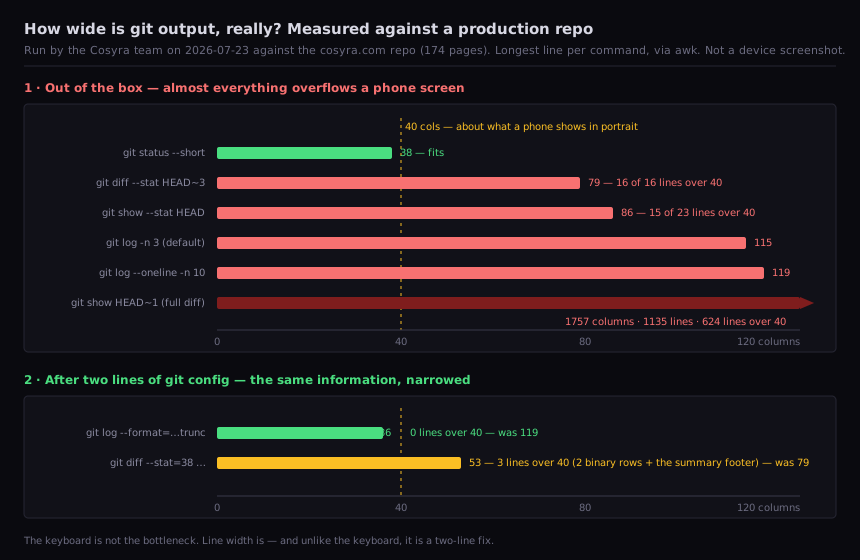
awk '{print length}'. This is a data figure
from our own terminal, not a device screenshot.
The numbers that matter: git status --short came out 38 columns and
fits a phone screen unchanged. Everything else does not.
git diff --stat was 79 columns with all 16 of its lines over 40.
git log --oneline, the command everyone reaches for precisely
because it sounds compact, was 119 columns and every single line overflowed.
A full git show of one real content commit measured 1757 columns
across 1135 lines, 624 of them over 40. That is not a diff you read on a train,
that is a wall.
The fix is two lines of config, and it recovers almost all of it. Git's
pretty-format language has a left-pad-and-truncate directive,
%<(N,trunc), and --stat takes an explicit width.
Set both as aliases once and they persist in the container:
$ git config --global alias.l \
"log --format='%h %<(28,trunc)%s'"
$ git config --global alias.st \
"diff --stat=38 --stat-name-width=18"
$ git l -n 5
8a7bd48 docs(growth): log run-20260..
9017175 feat(growth): ship cosyra-..
750ced5 docs(growth): log run-20260..
f607608 fix(growth-accuracy): corre..
c84286d docs(growth): log run-20260..
After that, git l measured 36 columns with zero lines over 40, down
from 119. git st measured 53 columns with three lines over 40, down
from 79. We want to be precise about those three: they are the two binary-file
rows and the N files changed summary footer, which
--stat does not narrow. So the file list fits and the footer still
wraps once. That is a real remaining rough edge, not something we are going to
pretend we solved.
For reading an actual diff rather than a summary, the honest answer is that
you mostly should not, on a phone. Read
git st to see which files moved, then ask the agent what it changed
and why. That inverts the desktop habit, and it is the single biggest workflow
adjustment we have made. More on the agent side in
AI pair programming on a phone.
Where each setup breaks
There are four common ways people try this, and each one fails at a different stage. Knowing which failure belongs to which setup saves a lot of time blaming the wrong component.
Local terminal on Android
Termux gives Android a genuine shell and a package manager, free and
GPL-3.0, and it is the right answer for offline work. It fails at stage 4.
Android 12 added a phantom-process killer that terminates long-running child
processes, and the resulting
[Process completed (signal 9) - press Enter] has its own notice in
the Termux README. The tracking issue is closed, not because the behaviour changed
but because it is an OS decision Termux cannot patch around. There is an ADB workaround;
the trap is that on Android 12 it silently reverts when Play Services re-syncs
device_config three or four minutes after boot, so the fix appears
to work and then dies the same afternoon. We wrote that up separately in
the Termux signal 9 fix, and
it is exactly why a test suite is the stage-4 job most likely to be reaped —
more in running tests from your phone. Also worth knowing before you plan around it:
Docker on Termux needs root, and
root is frequently still not enough.
Local terminal on iOS
iSH runs Alpine through a user-mode i386 emulator on the device,
and the emulator's instruction coverage is the whole story. Modern Node's prebuilt
binaries emit instructions iSH does not implement, SSE2 among them, so node --version can die with Illegal instruction before you get anywhere near an
agent. That is an emulator-coverage problem, not a musl-versus-glibc one, which
is why swapping package sources does not rescue it. The report was opened 2024-01-21
and is still open. Since most AI coding agents are Node packages, this rules out
the agent workflow specifically. iSH remains a decent pocket shell for ssh, text editing, and shell scripting.
The GitHub mobile app
This one does not break so much as stop where it was designed to stop. GitHub's own product page describes reviewing pull requests, approving and merging, notifications, code search, and handing work to Copilot, and the app has opened Actions runs, jobs, and completed-step logs since 2022. What is missing is a terminal and code execution. You can therefore approve a pull request from a queue at the pharmacy, and see which CI step went red, but you cannot check the branch out, run the failing test, and fix it. It covers stages 6 and 7's read-only half, which is genuinely useful if that is your bottleneck. We go deeper on that split in reviewing pull requests from your phone, and on the CI half in watching GitHub Actions from your phone.
SSH to a machine you own
This works, and if you already run an always-on Linux box it is the cheapest path. It fails at stage 4 in a subtler way: connection churn. Plain SSH drops on every network change, mosh fixes most of that, and mosh plus tmux is still not airtight. The mosh issue tracker has a report titled "tmux session over mosh is inconsistent" describing exactly the case where you move networks, try to reattach, and mosh insists there is no connection while plain SSH to the same host and session works. We should be even-handed here, because this is a category where mosh beats us: its UDP session is purpose-built for wifi-to-cellular hand-off, and on a genuinely flaky train connection that roaming is better than what we do. We reconnect at the application layer over TLS instead, which is a deliberate trade and not a strict win. Details in SSH from your phone and remote-control coding.
A cloud container reached from a native app
This is what we build, so read the following knowing that. The shell runs server-side on Ubuntu 24.04 x86_64, which removes stages 3 and 4 as platform problems: no phantom-process killer, no emulator, and locking the phone does not touch a process running in Azure. Containers hibernate after 10 minutes of inactivity and resume right where you left them, so the commute pattern of "start something, put the phone away, come back at the office" survives. The honest cost is that there is no offline mode at all. No internet, no terminal. On a plane or in a tunnel, Termux wins and we lose, and no amount of hibernation changes that.
 scan to install
 Deploying: the flags that make CLIs work without a TTY
Provider CLIs are written for a laptop, which means they assume they can ask you questions. On a phone, an unexpected interactive prompt in a wrapped 80-column layout is where a deploy stalls. Every major provider has a non-interactive path; you just have to ask for it explicitly.
For Vercel, the deploy documentation (last updated 2026-03-17) lists
--yes to accept inferred defaults for the setup questions,
--prod for the production domain, --no-wait to return
without blocking on the build, and --logs to print build logs. It
also documents that standard output is always the deployment URL, which is the
detail that makes this pleasant on a phone:
vercel --prod --yes > url.txt gives you one line instead of a
screen. The full walkthrough including token auth is in
deploy to Vercel from your phone, and the Render equivalent is in
deploy to Render from your phone.
The other path is to not run a deploy command at all. If the project already auto-deploys on push to main, then stage 7 collapses into stage 5 and there is nothing extra to do from the phone. That is the setup we would choose for anything you expect to ship from a handset regularly. The broader survey of options lives in deploying a website from your phone.
For watching the result, gh pr checks --watch is the one command
worth memorising. It streams check status in a narrow, mostly-fixed-width layout
that survives a portrait screen far better than provider build logs do, and it
works against any CI that reports through GitHub checks.
The two-minute version
If you want to try the whole loop before reading further, this is the shortest path from nothing to a pushed commit.
# 1. install the app, open it,
# container provisions (~15s)
$ git clone git@github.com:me/api.git
$ cd api
# 2. narrow git once, it persists
$ git config --global alias.l \
"log --format='%h %<(28,trunc)%s'"
# 3. let an agent do the typing
$ claude
> add a /health endpoint + a test
# 4. ship it
$ git add -A && git commit -m \
"feat: health endpoint"
$ git push -u origin HEAD
$ gh pr create --fill
$ gh pr checks --watch
Claude Code, Codex CLI, OpenCode, and Antigravity CLI are already installed,
so step 3 needs no npm install. It is bring-your-own-key:
export your provider key into ~/.bashrc once and it persists with
the rest of your 30 GB. Pricing detail is on pricing. Sign up and pick a plan. Eligible new users can start a 7-day free trial
in the App Store app.
Which setup should you actually pick?
Three questions, in this order. They resolve almost every case we have run into.
- Do you need to work with no internet? If yes, stop here and use Termux on Android. Nothing cloud-based competes with a local shell on a plane, and we are not going to pretend otherwise. On iOS the honest answer is that offline agent work is not currently practical at all.
- Do you already run an always-on Linux machine? If yes, an SSH client plus mosh and tmux is the cheapest good answer. Budget an evening for the reconnection edge cases, and read SSH from your phone first.
- Otherwise, a cloud container in a native app is the shortest path, because stages 3 and 4 stop being platform problems and the agents are already installed. That is the case we built for.
A fourth case worth naming: if your bottleneck is purely reviewing other people's work rather than writing your own, install the GitHub mobile app and stop. It does that one job well and costs nothing. Adding a terminal to a review-only workflow is solving a problem you do not have.
Where the alternatives beat us
Three places, plainly. Offline. Termux runs with the radio off; we do not run at all. If you commute through tunnels or fly often, that is not a small gap. Cost. Termux and iSH are free and open-source, and a $5/month VPS with an SSH client undercuts us substantially. Host choice. Our containers run on Azure and there is no self-hosted or on-prem option, so if your code cannot leave infrastructure you control, we are not a candidate and an SSH client pointed at your own hardware is the correct answer.
Try one of those first if any of the three describes you. We would rather you land on the right tool than churn out after a week.
Frequently asked questions
Will Android kill a long build if I switch apps?
On a local Android terminal, often yes. Android 12 introduced the
phantom-process killer, and reporters see the kill both during active
script runs and while sitting idle with the screen off. There is an ADB
workaround, but it is reverted when Play Services re-syncs
device_config a few minutes after boot, which is why it looks like
it worked and then stops. A server-side container is unaffected, because the
build is not running on the handset.
[source: termux-app issue 2366, "[Bug]: Android 12 Phantom Processes Killed"]
Can I run Node and npm locally on an iPhone?
Not reliably. iSH emulates i386 in user mode on iOS, and the
emulator does not implement every instruction modern Node's prebuilt binaries
emit, SSE2 among them, so node --version can die with
Illegal instruction. That is emulator coverage, not a
musl-versus-glibc problem, so changing package sources does not fix it.
The report was opened 2024-01-21 and is still open. Because most AI coding
agents ship as Node packages, this specifically rules out the agent
workflow on a local iOS shell. Running Node on a real x86_64 container
over the network is the workaround that stops fighting the emulator.
[source: iSH issue 2335, "Node/NPM giving illegal instructions error"]
Can the GitHub mobile app do the whole workflow?
It covers review, merge, and CI monitoring, not execution. GitHub's own mobile page describes reviewing pull requests, approving and merging, notifications, code search, and Copilot tasks, and GitHub's changelog adds Actions runs, jobs, completed-step logs, rerun, and cancel from 2022-10-04. There is no terminal and no code execution. You can approve, merge, and see the red step from the app; you cannot check the branch out and run the failing test. Our watching GitHub Actions from your phone guide measures where each side stops.
[source: GitHub Mobile product page, stated capabilities] · [source: GitHub changelog, Introducing Actions on GitHub Mobile]
Can I deploy to Vercel from a phone without an interactive prompt?
Yes. The vercel deploy docs document --yes to accept
inferred defaults, --prod for the production domain,
--no-wait to skip blocking on the build, and
--logs for build output. Standard output is always the deployment
URL, so redirecting it gives you one readable line rather than a wrapped screenful.
[source: Vercel CLI deploy reference, last updated 2026-03-17]
What happens if I switch from wifi to cellular mid-command?
With plain SSH the session dies, because SSH stays on TCP throughout. Mosh is the usual fix and it is genuinely good at this: the interactive session runs over UDP precisely so it survives a hand-off. Not universally, though. There is a report of reattaching to a tmux session after a network move where mosh claims no connection while direct SSH to the same host and session still works. We reconnect at the application layer over TLS instead, which keeps the shell process server-side. On raw cellular roaming mosh is still ahead of us; that is a trade we made, not a win we are claiming.
[source: mosh issue 921, "tmux session over mosh is inconsistent"]
Do I need a Bluetooth keyboard?
We do not use one. The measurement that predicts frustration is line
width, not typing speed: on our own repository
git log --oneline came out 119 columns and a full
git show hit 1757 columns across 1135 lines. Two
git config lines bring those to 36 and 53. Fix output width first;
buy the keyboard only if the workflow still annoys you afterwards.
tl;dr
Seven stages. Clone, edit, commit, and push work anywhere. Pull request
and deploy need one flag each (gh pr create --fill,
--yes). Reading diffs and running tests are the two that
break, and they break for platform reasons on a handset and not at all on
a server-side container. Before anything else, run the two
git config lines: 119 columns down to 36 is the highest-value two
minutes in this whole page.
Use Termux if you need offline. Use SSH + mosh if you already own a Linux box. Use Cosyra if you want the loop to work without owning or configuring a server.
App Store / Google Play / pricing. Sign up and pick a plan. Eligible new users can start a 7-day free trial in the App Store app.
scan to install