Yes, you can run tests from your phone in 2026 — the reliable way is to
run the suite in a cloud Ubuntu workspace you reach from a native app, not
on the phone's own CPU. The commands are the same ones you type on a laptop: pytest -q,
npm test, go test ./.... What changes on a phone
is not the syntax, it is whether the run survives. On a local Android
terminal the OS kills long runs when you lock the screen; on iSH the Node
runners will not even start. Move the run server-side and both problems
disappear, because there is no phone process for Android to reap and no
emulator in the way. This guide covers where each phone setup breaks and the
exact steps to run a suite that finishes.
tl;dr
The real blocker is not typing, it is the run getting killed.
Termux dies with signal 9 when you lock the phone; iSH can't start
Node; SSH drops on every network change. The fix: run the suite
in a cloud Ubuntu container reached from an iPhone or Android app, with a streaming
reporter (pytest -q,
--test-reporter=tap) so failures stay readable on a narrow
screen. We ship Cosyra with the runners and CLIs
pre-installed; plans start at $20/month, and eligible new users can start a
7-day free trial in the App Store app.
The blocker isn't the keyboard, it's the kill
People assume the hard part of running tests from a phone is typing flags on glass. It isn't — a terminal toolbar with CTRL, ESC, TAB and arrow keys handles that, and most test commands are short. The hard part is that a test suite is exactly the kind of workload a phone's operating system is built to shut down. Suites run for tens of seconds to minutes, they spawn worker processes, and you naturally lock the phone while they run. Every one of those is a trigger for Android's background-process limits.
This is the honest thing desktop-centric blogs miss: on a laptop a test run is unremarkable, so nobody writes about it. On a phone the run is the interesting part, because finishing it is not guaranteed. We think running tests from a phone is genuinely useful — you can kick off the suite from the train, lock the phone, and read the result when you get off — but only if the run outlives the screen. That is the whole design problem, and it is why the answer is where the run lives, not how you type.
Where each phone setup breaks
There are four common ways people try to run tests from a phone, and each fails at a different point. We have hit all four; here is the honest map.
| Setup | Where it breaks | Root cause |
|---|---|---|
| Termux (Android) | Long runs die when the screen locks | Phantom-process killer sends signal 9 |
| iSH (iOS) | Node runners never start | i386 emulator lacks the instructions Node emits |
| SSH to your own box | Output drops mid-run | Connection churns on every network change |
| GitHub mobile app | Can't run anything | Reviews and merges only; no terminal |
Termux: the run dies when you lock the phone
Termux is a real Linux userland on Android and pytest runs fine in it for a
few seconds. The problem is Android 12's phantom-process killer, which
terminates apps whose child-process count crosses a system-wide limit. A
test runner spawning workers is a fast way to cross it, and users report the
run ending with [Process completed (signal 9) - press Enter],
specifically when the screen is locked, even after turning off child-process
restrictions (Termux issue #5050). There is an ADB workaround, but it has an ordering trap on Android 12 —
we wrote up the exact sequence in
the Termux signal 9 fix. Even
applied, it is a mitigation, not a guarantee.
iSH: Node test runners can't even start
iSH runs Alpine Linux on iOS through a user-mode i386 emulator. Modern
Node's prebuilt binaries emit instructions that emulator does not implement,
so
node --version can die with Illegal instruction
before you get anywhere near a test (iSH issue #2335, open since January 2024). Jest and Vitest are Node programs, so they
inherit the crash. It is not a package-source problem, so swapping
registries does not rescue it. iSH stays a decent pocket shell for editing
and
ssh; it is just not a JavaScript test host, as our
Node.js on your phone guide explains.
Run the suite in a cloud workspace
The setup that finishes is a cloud Ubuntu container reached from a native app. The shell runs server-side on Ubuntu 24.04 x86_64, which removes the two hard failures above at once: no phantom killer, because there is no phone process to reap, and no emulator, because it is real x86_64 hardware where prebuilt binaries install normally. Here is the whole loop.
# Inside a Cosyra workspace, reached from the iOS/Android app
git clone https://github.com/you/your-app.git
cd your-app

# Node: install and run with a streaming reporter
npm install
node --test --test-reporter=tap        # or: npx vitest run --reporter=dot

# Python: pytest behaves exactly like it does on a laptop
pip install pytest
pytest -q
Then lock the phone. The run is a process on the container, not on the phone, so the screen turning off is irrelevant. The container hibernates after 10 minutes of inactivity and resumes with your files intact, so the pattern of "start the suite, put the phone in your pocket, read the result at the office" just works. The honest trade-off: there is no offline mode. In a tunnel with no signal, a local Termux run is the only option, and there the phantom killer is a price you pay. That is a real gap and we are not going to pretend it away.
Run your suite from your phone and lock the screen.
Plans start at $20/month, and eligible new users can start a 7-day free trial
in the App Store app. Clone your repo in the workspace, run pytest -q or node --test, and the run finishes server-side whether
the phone is awake or not.
Reading a failure on a 40-column screen
A run that finishes is only useful if you can read the failure on a phone. So we measured it. We wrote a two-test file, ran it through node's built-in runner three ways on 2026-07-23 (node v22.22.1), and looked at how wide the output gets against a portrait phone's roughly 40-column width.
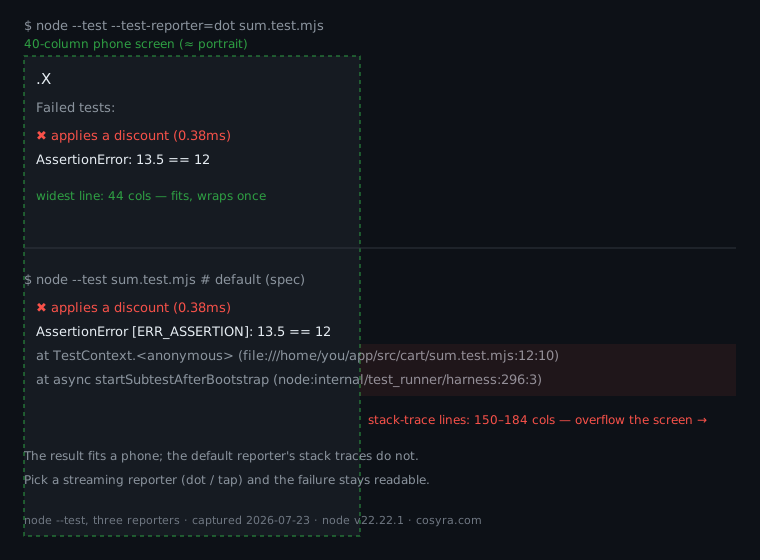
The result was clear. With the dot reporter the entire run drew as
.X — one character per test — and the failure block topped out at
44 columns, so it wraps once and stays readable. The default
spec reporter printed the same failure with a full stack trace, and
those lines ran 150 to 184 columns wide. The width there comes from the absolute
file paths the runtime embeds, so it is a floor you hit on any machine, not something
a wider phone fixes. The takeaway for phone testing: pick a streaming reporter.
pytest -q, node --test --test-reporter=tap, and vitest run --reporter=dot all stream one short line per test instead of repainting the screen, which is
what you want when the "screen" is 40 columns wide on a couch. The
node:test reporter docs list the built-in options.
Let an agent run the tests and fix the failure
Because the workspace has Claude Code, Codex CLI, OpenCode, and Antigravity CLI installed next to your project, the natural phone move is to hand the whole loop to an agent. You prompt "run the test suite and fix whatever is red," it runs the runner, reads the failing assertion, edits the code, and reruns — all server-side while you watch from the phone. That closes the gap the GitHub mobile app leaves open: the app lets you approve a pull request from a queue at the pharmacy, but it cannot check out the branch, run the failing test, and fix it. Running the tests where an agent can also fix them is the point. The edit-commit-review steps that surround the run are covered in our shipping code from your phone pillar, and the clone-and-push mechanics in git from your phone. And once you push, the same suite runs again in CI — you can watch that GitHub Actions run go green from your phone without opening a laptop.
FAQ
Does a long test run keep going when I lock my phone?
In a cloud workspace, yes — the run is a process on an Ubuntu container in Azure, so the phone locking does not touch it. On a local Android terminal it is the opposite problem: Termux users report the run dying with [Process completed (signal 9) - press Enter] specifically when the screen is locked, even after disabling child-process restrictions (Termux issue #5050). That signal-9 kill is the single most common reason a phone test run does not finish. Running server-side sidesteps it because there is no phone process for Android to reap.
Why does Termux kill my tests after a while on Android 12+?
Android 12 added a phantom-process killer: the OS terminates apps whose child-process count climbs past a system limit, and a test runner that spawns workers hits it fast. The Termux README warns about it directly, and users see the same signal-9 message mid-run (Termux issue #2366). There is an ADB workaround to raise the phantom-process ceiling, but on Android 12 the value is re-synced away by Google Play Services a few minutes after boot unless you disable device-config sync first — our Termux signal 9 fix covers the exact ordering. A cloud container has no phantom killer at all.
Can I run Jest, Vitest, or any Node test runner on iSH?
Not reliably. iSH emulates a 32-bit i386 CPU, and modern Node's prebuilt binaries emit instructions the emulator does not implement, so node --version can die with Illegal instruction before a test ever runs (iSH issue #2335, open since 2024). Jest and Vitest are Node programs, so they inherit the crash. iSH is a fine pocket shell for editing and ssh; it is not where you run a JavaScript test suite. Our Node.js on your phone guide covers the same limit in detail.
How do I keep a test run alive when the screen turns off?
On a local terminal the usual advice is tmux plus a wakelock, and there is a long-standing Termux request to keep the screen on for exactly this reason (Termux issue #897). It helps, but the phantom killer can still reap the run on Android 12+, and keeping the screen lit drains the battery. In a cloud workspace the run is not tied to the screen at all, so we do not keep the screen on — you lock the phone, the container keeps working, and the output is there when you come back.
Can I run pytest on my Android phone?
You can install Python and pytest inside Termux and run a suite locally (a walkthrough of Python in Termux shows the setup). It works for short runs. The catch is the same signal-9 kill above on longer suites, plus native wheels that sometimes need compiling on-device. In a cloud workspace pip install pytest && pytest -q behaves like it does on a laptop because the container is a normal x86_64 Ubuntu box. The pytest docs apply unchanged.
Recap
Running tests from a phone is a question of where the run lives, not how
you type. Local terminals lose the run: Termux gets killed with
signal 9 when you lock the screen, and iSH can't start Node runners
at all. Run the suite in a cloud Ubuntu workspace reached from a native app
and it finishes server-side, with a streaming reporter (pytest -q, --test-reporter=tap) keeping failures readable on a narrow
screen.
We built Cosyra for exactly this — the runners and
AI CLIs are pre-installed, so pytest -q behaves like it does on
a laptop. Core is $20/month and Pro is $30/month, with 120 hours of compute
and 30 GB of persistent storage. Eligible new users can start a 7-day free trial
in the App Store app.