You can watch GitHub Actions from your phone two ways, and they answer
different questions. The GitHub Mobile app tells you whether the run is red or green and lets you
rerun or cancel it. A terminal with the gh CLI tells you
which step failed and lets you fix it in the same session. The app has
had Actions support since October 2022, so the old advice that mobile can't see
CI is out of date. The real gap is narrower and more annoying: the app can't put
you in the repository. This guide covers what each one does, the four commands
worth memorising, and the output-width problem nobody warns you about.
tl;dr
Use the app for the signal, a terminal for the fix.
GitHub Mobile shows runs, jobs, and completed-step logs, and can rerun or cancel.
For anything past reading, use gh run view --log-failed,
gh run rerun --failed, and gh run watch --compact. Avoid the default gh run list table on a phone: we measured
its rows at 165–167 columns. We built
Cosyra so that terminal is one tap away. Plans start
at $20/month, and eligible new users can start a 7-day free trial in the App
Store app.
What the GitHub Mobile app actually does
Start here, because a lot of blog advice on this topic is stale. On 2022-10-04 GitHub added Actions to the mobile app. From the repository view you get a list of workflows, and from a run you get its jobs and the logs of completed steps. You can rerun a single job, rerun just the failed jobs, rerun the whole workflow, or cancel a run that is still going. That is documented in GitHub's own changelog entry, Introducing Actions on GitHub Mobile.
For the common case that is genuinely enough. You push from a laptop, walk to the station, the notification arrives, you tap it, the build is green, you put the phone away. Nothing about that needs a terminal.
Two things the app will not do. The first is approvals: if a deployment environment has a protection rule requiring manual sign-off, you cannot approve it from the workflow-run screen. The request for that is community discussion #110751, filed on 2024-03-02, sitting at 33 upvotes, still open, with a commenter in mid-2026 counting how many days it has been. The second is the one that matters more day to day: the app has no shell, so when the failure is a typo in a config file, the app can show you the typo and cannot let you change it.
The four commands worth knowing
Everything CI-related in the gh CLI collapses into four verbs. We
are on gh version 2.88.1 (released 2026-03-12) as of 2026-07-24,
and these are stable across recent versions:
-
gh run list— which runs exist and how they ended. -
gh run view <id>— jobs, timings, annotations for one run. Add--log-failedfor only the failing job's output. -
gh run rerun <id> --failed— retry the failed jobs and their dependencies, not the whole matrix. -
gh run watch <id> --compact— follow a run to completion, showing only the relevant and failed steps.
There is a fifth for pull requests: gh pr checks --watch shows CI
status for one PR and refreshes until the checks finish. Its default refresh interval
is 10 seconds against gh run watch's 3, and it has a --fail-fast flag that exits on the first failed check, which is the flag you want when you
are watching on a phone and would rather be told immediately than watch a matrix
finish.
One trap in gh run rerun that costs people ten minutes: the
--job flag does not take the job number from the browser URL. The
CLI's own help text says a URL-derived number returns
404 NOT FOUND, and you need the databaseId from
gh run view <id> --json jobs instead. Worth knowing before
you are squinting at a 404 on a train.
We measured how wide this output gets
Here is the part that decides whether any of this is usable on a phone. A
portrait phone terminal is roughly 40 columns. We ran the four commands
above against this site's own repository on 2026-07-24 with gh 2.88.1
and measured every line of output.
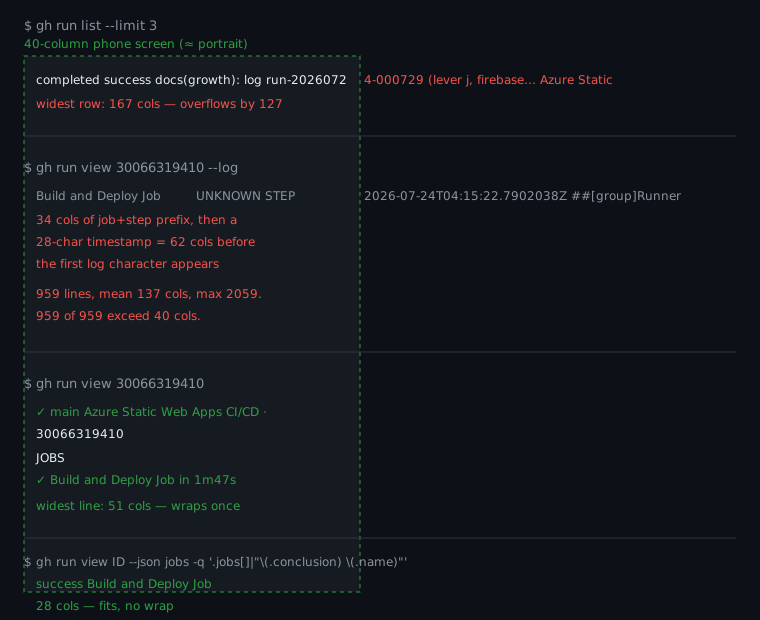
The default gh run list table came out at 165 to 167 columns per
row. On a 40-column screen every run wraps into five ragged lines and the columns
stop lining up, which is the specific failure mode that makes people give up and
open the browser.
gh run view <id> --log is worse, and the numbers are stark.
For one successful run it emitted 959 lines. Mean width was 137 columns,
the widest single line was 2,059, and every one of the 959 lines exceeded 40 columns.
The reason is structural rather than incidental: each log line is prefixed with
a 20-character job name, a 12-character step column, and then a 28-character ISO
timestamp. That is 62 columns of scaffolding before the first character of the
actual message. On a 40-column phone the first wrapped row of every log line contains
no log content at all.
The good news is the other two views are fine. Plain
gh run view <id> topped out at 51 columns, so it wraps once
and stays readable. And a JSON query narrowed to the fields you want —
gh run view <id> --json jobs -q '.jobs[] | "\(.conclusion)
      \(.name)"'
— produced 28 and 30 column lines. Those fit with room to spare.
The narrow-output recipe
The fix is to stop accepting the default table. Every gh command
that prints a table also accepts --json plus a
-q jq expression, and that is where the phone-friendly version lives.
Replace the run list with this:
gh run list -L 5 --json conclusion,databaseId \
  -q '.[] | [.conclusion, .databaseId] | @tsv'
That gives you one short line per run: the outcome and the ID you need for
every following command. We measured its output at 19 columns —
success 30066319410 — which is half a phone screen.
Set it as an alias once and the container keeps it, because the container's filesystem persists between sessions:
gh alias set runs 'run list -L 5 --json conclusion,databaseId \
  -q ".[] | [.conclusion, .databaseId] | @tsv"'
Then gh runs is the whole command. Two words, one thumb, output that
fits. Use the @tsv form rather than jq string interpolation, and
this is worth the warning: we first wrote that alias with
"\(.conclusion)" inside it, and the backslashes were consumed on
the way through gh alias set, so gh runs printed the
literal text (.conclusion) (.databaseId) for every run instead of
values. @tsv has no backslashes to lose, so it survives the round-trip.
We checked both on 2026-07-24.
Watching a run to completion
gh run watch refreshes every 3 seconds by default and redraws a checklist
of jobs and steps, each gaining a check or a cross as it resolves.
--compact drops the passing steps so the redraw stays short, which
matters on a screen where a long checklist scrolls the interesting line off the
top.
Set expectations correctly on one point: gh run watch shows status,
not the runner's log output. Someone asked for the log-streaming version in
cli/cli discussion #11893 on 2025-10-10, and a maintainer replied on 2025-10-23 that it has been on the
backlog a long time because there is no API support for streaming workflow run
logs. So the honest workflow is: watch for status, and once it goes red, pull
the failure with --log-failed.
If you authenticate with a fine-grained personal access token, expect
gh run watch to fall over with
failed to get annotations: HTTP 403: Resource not accessible by personal
      access token
. There is no checks:read scope to grant on a fine-grained PAT,
which is
cli/cli issue #8842 from
2024-03-19, and the caveat is still printed in the
official gh run watch manual. On a phone the answer is gh auth login with the device-code flow:
you type an eight-character code, not a token, which is the difference between
five seconds and a minute of thumb work.
Where a terminal beats the app: fixing it
We think the "watch CI from your phone" framing undersells the problem, and this is where we disagree with how the mobile-CI category is usually described. Watching is the easy half; the app already does it well. The half that decides whether the phone was worth taking out is what happens after the cross appears. A red build on a Friday evening is not a monitoring problem, it is an editing problem, and the app cannot edit.
In a container the loop closes. You are already in the repository, so the
sequence is: read the failure, open the file, change the line, commit, push,
and the push triggers the next run. That is the same loop as a laptop with a
smaller screen. Rerunning without changing anything is also a legitimate
move when the failure is flaky — gh run rerun <id> --failed retries only the failed jobs and their dependencies, and the app can do that
one too.
We ship gh in the container alongside git, so there is nothing to
install before the first gh auth login. The credential persists
across sessions, which means the second time you do this from a platform
bench it is one tap and one command.
Doing it on the phone's own CPU
You do not strictly need a cloud container for the read-only half. On
Android
gh is a Go binary and pkg install gh in Termux gets
you a working CLI. For a quick gh run view that is completely reasonable,
and we would not talk anyone out of it.
Two things limit it. A long gh run watch holds a process open for
minutes while you naturally lock the screen, and that is the workload Android
12+ reaps with its phantom-process killer, producing the
signal 9 kill our
Termux signal 9 fix covers in detail.
And the fixing half still needs the repository checked out with a toolchain that
can run the build locally, which is the same wall described in
running tests from your phone. On iPhone the question does not arise, because there is no native shell
to install gh into.
The broader mechanics — device-code auth, cloning, branching, pushing — are in git from your phone, and the full edit-to-deploy path is the shipping code from your phone pillar. If you are still choosing a terminal at all, start at the mobile coding terminal guide.
FAQ
Can the GitHub Mobile app show GitHub Actions runs?
Yes. GitHub shipped Actions in the mobile app on 2022-10-04: you can open a workflow run, see its jobs, and read the logs of completed steps, plus rerun a single job, rerun the failed jobs, rerun the whole workflow, or cancel a run in progress (GitHub changelog, Introducing Actions on GitHub Mobile). Anyone telling you the app has no CI at all is working from a pre-2022 memory. What the app does not give you is a shell, so the moment the fix is a one-line code change you are stuck reading rather than doing.
Can I approve a pending workflow run from the GitHub mobile app?
Not from the workflow-run view. Environment protection rules that require a manual approval can only be approved from a push notification or the web UI, which is what the open feature request "Ability to approve workflow runs from the mobile app" asks for. It was filed 2024-03-02, has 33 upvotes, and as of mid-2026 a commenter is counting the days. If your deploy gates on an approval, budget for a browser detour.
Does gh run watch stream the log output like the website does?
No, and it is not an oversight. gh run watch shows a live checklist of jobs and steps with their status, not the runner's stdout. The request to change that is cli/cli discussion #11893 (opened 2025-10-10), where a maintainer answered on 2025-10-23 that the blocker is upstream: there is no API support for streaming workflow run logs. So the pattern is watch for status, then gh run view --log-failed once it goes red.
Why does gh run watch fail with a 403 on my token?
Because you are using a fine-grained personal access token. The command needs annotation access and there is no checks:read scope to grant on a fine-grained PAT, which produces failed to get annotations: HTTP 403: Resource not accessible by personal access token. That is cli/cli issue #8842, filed 2024-03-19, and the caveat is still printed in the official gh run watch manual. The fix on a phone is to authenticate with gh auth login and the device-code flow instead of pasting a token.
Is there a GitHub Actions app for Android?
The official GitHub app is the answer, and the question has been asked directly: "Are there plans to support Actions or Workflows in the GitHub android app?" (opened 2022-10-08). It was answered the next day pointing at the then-new Actions support. There is no separate first-party Actions app, and third-party ones cannot do more than the API allows. For anything beyond viewing, a terminal with gh is the more capable client on both Android and iOS.
Can I run gh on my phone directly instead of in the cloud?
On Android, yes: gh is a Go binary and pkg install gh works in Termux. The catch is that a long gh run watch is exactly the kind of foreground-adjacent process Android 12+ reaps when you lock the screen, which is the same signal-9 problem covered in our Termux signal 9 fix. On iPhone there is no native shell to install into, so gh runs in a cloud container or not at all. Our git from your phone guide covers the auth setup either way.
Recap
The GitHub Mobile app has handled the watching half since 2022: runs,
jobs, completed-step logs, rerun, cancel. Reach for a terminal when you
need the failing step and the fix. Use gh run view --log-failed instead of --log (959 lines at a mean 137 columns for one green
run), narrow gh run list through --json and
-q to get 35-column rows, and follow reruns with
gh run watch --compact.
We built Cosyra so that terminal is a tap away from
the notification: an Ubuntu container with git and gh
already installed, reachable from iPhone, Android, or the web. Core is $20/month
and Pro is $30/month, with 120 hours of compute and 30 GB of persistent storage.
Eligible new users can start a 7-day free trial in the App Store app.