You cannot run Docker on Termux on Android without root, because the Docker
daemon has to create kernel namespaces, write cgroups and mount overlay
filesystems, and Android grants none of that to an ordinary app. Rooting
helps less than people expect: Termux's own Docker package sits in its
root-repo, pinned to version 20.10.12 since 2021, and container start still
fails on kernels that lack the cgroup layout runc wants. Three paths
do work, and one of them is realising you wanted a clean Linux box rather than
a daemon.
Quick decision: pick the path you came for:
- You need real
docker build/composeand have a server somewhere: drive it with the client. Remote daemon setup ↓ - You want it entirely on-device, no root: a virtual machine carries its own kernel. The QEMU path, and its real cost ↓
- Your phone is already rooted: know the kernel lottery before you start. Why root is not enough ↓
- You actually just want an isolated, reproducible Linux: skip Docker entirely. The reframe ↓
This guide was written by the Cosyra team. We build a mobile cloud development environment, so we have a stake in the last section, and we have tried to be blunt about where our own answer does not apply. Every claim below is checked against a primary source on 2026-07-18: the Termux package recipes on GitHub, the Termux issue tracker, and Docker's own security docs. Rather than repeat the folklore about why this does not work, we ran the privilege checks ourselves.
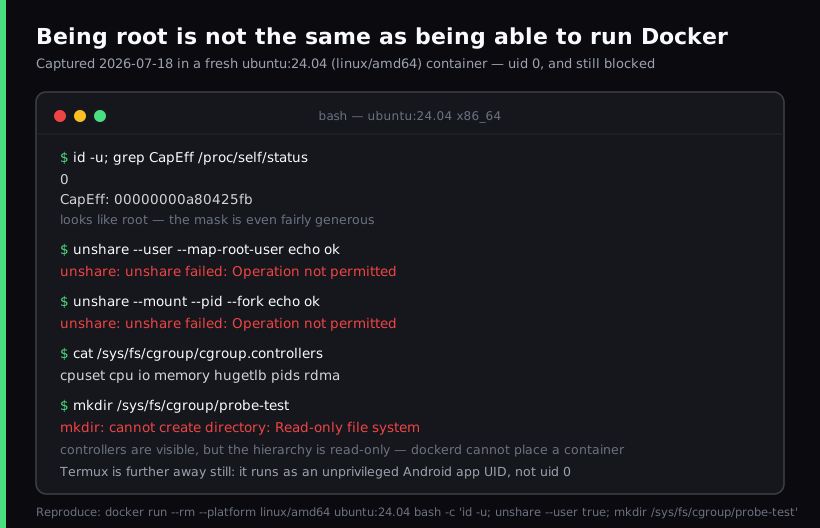
ubuntu:24.04 (linux/amd64)
container. The session is uid 0 with a generous capability mask
and it still cannot unshare a namespace or write a cgroup. Those are
the exact three things dockerd needs at startup. Termux sits further
from those privileges than this, because it never gets uid 0 at
all. The reproduce command is printed at the bottom of the capture.
Why the Docker daemon cannot start inside Termux
Docker splits into two halves, and conflating them is what makes this
question confusing. The client (docker) is an
ordinary program that speaks HTTP to a socket. The
daemon (dockerd) is the privileged half that
actually creates containers. Only the daemon is a problem on a phone.
To start a container, the daemon needs to:
- Create namespaces: separate PID, mount, network and user
views for the container, via the
unshare/clonesyscalls. - Write cgroups:
runcplaces the container into a control group to bound its CPU and memory. - Mount overlay filesystems: layered images are assembled with an overlay mount, which requires mount privileges.
Termux is an Android app. It runs under its own application UID inside the
Android sandbox, with no CAP_SYS_ADMIN and no route to any of the
three. This is not a gap Termux is neglecting to fill; it is the security model
of the platform working correctly. The same sandbox shapes every long-running
server process on Android, not just dockerd. We traced the same
pattern through
running a PostgreSQL server on a phone, where the package installs and then Android's process limits decide how
long it survives.
One correction worth making, because it circulates widely: the claim that
"Android has no namespaces or cgroups" is false. Android is Linux, and
it leans on cgroups constantly to manage app CPU and memory. The barrier is access,
not absence. Our capture above makes the distinction concrete: the cgroup v2 controllers
(cpuset cpu io memory hugetlb pids rdma) were plainly visible, and the hierarchy was still read-only. Seeing the machinery is not the
same as being allowed to drive it.
Rooting helps less than you expect
Termux does package Docker, but in root-repo, its repository
for rooted devices. Two things are worth knowing before you count on it.
First, it is old. The build recipe at
termux/termux-root-packages pins TERMUX_PKG_VERSION=20.10.12, and the last commit
touching that file is dated 2021-12-05 ("docker: update to 20.10.12").
Upstream Docker was at 29.3.1 when we checked on 2026-07-18. That is a
four-and-a-half-year gap carrying every CVE fixed in between.
Second, root does not guarantee a working kernel. Even with the
daemon running as real root, runc still has to place the container
into a cgroup, and stock Android kernels frequently do not expose the hierarchy
it looks for. A Termux user hit precisely this on a Droidlogic u202 (Android 9,
kernel 4.9.113, armv7l):
$ docker run hello-world
docker: Error response from daemon: failed to create shim task:
OCI runtime create failed: runc create failed: unable to start
container process: unable to apply cgroup configuration:
mkdir /cpuset/docker: no such file or directory
# reported in termux-packages#15662, root was not the missing piece
That error is a property of the device's kernel build, not of Termux or Docker, which means there is no package that fixes it. You would need a custom kernel with the right options compiled in. Reported in termux-packages issue #15662, still open.
Path 1: run the Docker CLI on your phone, the daemon somewhere else
This is the path we would actually recommend if you need real Docker, and it sidesteps the privilege problem completely rather than fighting it. The client requires no privileges at all when the daemon lives elsewhere. Termux maintainers made the same point when splitting the client into its own package in 2026: the CLI "does not need a Docker daemon running on the same host, and does not require any privileges if the connected daemon allows the client."
Two ways to connect, both standard:
# Option A: over SSH (simplest to secure)
$ export DOCKER_HOST=ssh://you@your-server
$ docker ps
# Option B: over TLS with client certificates
$ export DOCKER_HOST=tcp://your-server:2376
$ export DOCKER_TLS_VERIFY=1
$ docker compose up -d
Use the SSH form unless you have a reason not to; it reuses keys you already manage. If you expose the daemon over TCP, it must be the TLS-protected port 2376 with client certificate verification, never plain 2375. An unauthenticated Docker socket on the open internet is root on that host for anyone who finds it. Docker's protect the Docker daemon socket page covers certificate generation.
The obvious catch: you need a server. If you were hoping to avoid running one, this path trades the privilege problem for a hosting problem.
Path 2: QEMU, where the VM brings its own kernel
The reason a virtual machine solves what proot cannot is simple:
proot translates syscalls against the host kernel you are not allowed
to command, while a VM boots its own kernel and therefore has genuine
namespaces and cgroups. Root on the phone is not required, because the privileges
are being exercised inside the guest.
This is an established approach and it is being packaged: a request for
termux-qemu-docker, described by its author as "a VM manager
like Lima/Colima but focused on running Docker in QEMU in Termux without
root," was opened on 2026-06-13 as
termux-packages issue #30165. It boots an Alpine guest and exposes the daemon socket back to the host.
Here is our opinion, and plenty of people on the Termux forums would argue
with it: the QEMU path is a demonstration, not a workflow. You
are emulating a machine on phone silicon, holding a gigabyte of RAM that Android
would rather reclaim, while the device warms in your hand. Booting Alpine and
running hello-world is a genuinely satisfying trick. Building a real
image on a train, with the VM competing against the browser you switch to and
Android killing background processes under memory pressure, is a different experience.
If it works for you, we are glad, but be honest with yourself about which of the
two you are actually planning to do.
Path 3: the reframe, you probably wanted a clean Linux, not a daemon
Worth pausing on why you searched this. In our experience the answer is usually one of: you want an isolated environment you cannot break, a reproducible one you can recreate, or simply a real Linux userland where normal packages install. Docker is how you get those on a laptop, so it is the thing you went looking for on the phone.
But if that is the actual goal, a cloud Linux container delivers it directly. You are not running a container runtime on your phone; you are reaching a container that already exists, on hardware built to run it. The phone becomes the terminal, which is the job it is good at.
That is what we build. Cosyra is a mobile coding terminal backed by a persistent Ubuntu 24.04 x86_64 container on Azure AKS, reached from native iOS and Android apps. It provisions on first launch in about 15 seconds in our testing, keeps 30 GB of persistent storage, and hibernates after 10 minutes idle then resumes right where you left it. Node.js, Python, Git, tmux and vim are already there, along with Claude Code, Codex CLI, OpenCode and Antigravity CLI if you want an agent doing the typing.
Where our own answer does not apply
We should be precise here, because it would be easy to imply more than is
true. We do not guarantee that you can run the Docker daemon inside a Cosyra
container. Docker-in-Docker needs privileges from the host kernel, and that is a case-by-case
question we have not made a blanket promise about. If your requirement is literally
docker build, treat the remote-daemon path above as the answer
and point it at a host provisioned for it.
The other honest limits, since they matter for this topic:
- No offline mode. The container is in the cloud. On a plane or in a tunnel you have nothing, whereas Termux keeps working. If offline is a hard requirement, Termux is the better tool and we would tell you so.
- Docker is the hard case, not the typical one. Plenty of toolchains
do compile on-device once you stop fighting the packaging. Rust is the clearest
example: rustup fails, but
pkg install rustgives you a working 1.97.1 toolchain (verified 2026-07-21), covered in Rust on Termux. Read this page as "the daemon is the blocker," not "nothing builds locally." - No on-prem option. You have to accept Azure as the host.
- It is not free. Termux and QEMU cost nothing but your time; we start at $20/month.
Side by side
| Approach | Root needed | Runs daemon on phone | Needs a server | Practical for daily use |
|---|---|---|---|---|
| Docker CLI + remote daemon | No | No | Yes | Yes |
| QEMU VM in Termux | No | Yes (inside the guest) | No | No, emulation cost |
| Termux root-repo Docker | Yes | Yes, if the kernel cooperates | No | Rarely, pinned to 20.10.12 |
| Cloud Linux container (Cosyra) | No | No, no daemon involved | Hosted for you | Yes, if online |
If you are weighing on-device Linux against a hosted one more broadly, we worked through that trade-off in Cosyra vs Termux, and the wider landscape of options in mobile cloud terminal solutions.
Frequently asked questions
Can you install Docker on Termux without root?
Not the Docker daemon. Termux runs as an ordinary Android application UID,
and dockerd needs to create namespaces, write cgroups and mount
overlay filesystems, which Android does not grant to apps. Termux itself packages
Docker only in its root-repo, the repository reserved for
rooted devices. What you can install without root is the Docker CLI,
which needs no privileges when it talks to a daemon running somewhere else.
[source: termux/termux-root-packages, Docker is packaged only in the root repository]
Why does docker run fail with a cgroup error even after rooting?
Because root is necessary but not sufficient. runc has to place
each container into a cgroup, and it fails if the device kernel does not expose
the hierarchy it expects. A Termux user on an armv7l device running Android
9 and kernel 4.9.113 reported exactly this: "unable to apply cgroup configuration:
mkdir /cpuset/docker: no such file or directory". That is a kernel configuration
problem on the device, not something Termux or Docker can patch around.
[source: termux-packages issue #15662, "root-repo docker run failed"]
Does the Android kernel support namespaces and cgroups at all?
Yes, and it is worth correcting the common claim that it does not. Android is Linux, and it uses cgroups heavily to manage app resources. The blocker is access, not absence: an unprivileged app UID cannot create new namespaces or write to the cgroup hierarchy, and many device kernels ship without the specific options Docker needs, such as the full cgroup controller set and overlayfs. Those are two separate problems and both have to be solved.
[source: Docker Engine install requirements, supported kernel and storage-driver prerequisites]
Is running Docker in QEMU on Termux actually usable?
It genuinely works, because the virtual machine supplies its own kernel, and a Termux package request for a Lima-style QEMU Docker manager was opened on 2026-06-13 describing exactly this design. Usable is a different question. You are emulating a machine on phone silicon while the VM holds RAM your launcher would like back, so builds are slow and the battery drains. We would call it a good weekend experiment and a poor commute workflow.
[source: termux-packages issue #30165, "[Package]: termux-qemu-docker"]
Can you run Docker on an iPhone?
No, and less ambiguously than on Android. iOS has no Termux equivalent, forbids the just-in-time compilation and process spawning a container runtime needs, and gives apps no route to kernel namespaces. There is no rooted-device escape hatch comparable to Android's. The two options from an iPhone are the same as the two good options from Android: drive a remote Docker daemon with a client, or use a cloud Linux environment reached from the phone. We covered the second in Termux for iPhone.
[source: Docker Engine install, supported platforms list contains no mobile OS]
tl;dr
Use the Docker CLI with DOCKER_HOST pointed at
a remote daemon if you need real docker build. The client
needs no privileges, so Termux is fine for it. Use QEMU if
you want it fully on-device and accept emulation speed. Use Cosyra if what you actually wanted was an isolated, reproducible Linux you can reach
from your phone, and you do not need the daemon itself. Do not expect
root-repo Docker to work: it is pinned to 20.10.12 from 2021 and
still loses to the kernel lottery.
App Store / Google Play. Plans start at $20/month.
Want the clean Linux box, not the daemon? Install Cosyra and you are in a persistent Ubuntu container in about 15 seconds.