You can run PostgreSQL on a phone, and on Android you can run it on-device.
pkg install postgresql in Termux installs
PostgreSQL 18.2 as of 2026-07-19, a newer major version than
Ubuntu 24.04 ships. The hard part is not installing Postgres on a phone. It is
keeping the daemon alive on an OS designed to kill background processes. If you
want a database that stays up, install
Cosyra for iOS or
Cosyra for Android, run
apt-get install postgresql, and start it with
pg_ctlcluster. Here is each path, honestly.
Quick decision: pick the path you came for:
- Cloud container (Cosyra) if you want a Postgres server that survives a locked phone, on stock Debian packaging. Setup in ~4 minutes ↓
- Termux (Android) if you want Postgres on-device and offline, and accept Android shims plus the process killer. What actually breaks ↓
- iPhone / iPad if you searched for Postgres on iOS and need the hard answer. Why iOS can't host a database ↓
This guide was written by the Cosyra team. We ran the container install
first-hand on 2026-07-19 in a clean
ubuntu:24.04 image on linux/amd64, which matches
the architecture our containers run, and we read the Termux
postgresql build recipe rather than repeating what other blogs say
about it. Every version number below carries the date we confirmed it.
Why running a database on a phone is different
Installing a compiler or a language runtime on a phone is a one-shot problem: the binary either runs or it doesn't. A database is a daemon. It has to be running when your app connects, three hours from now, after you have locked the screen and answered four messages. That single difference is what makes Postgres harder on mobile than Node or Python, and it is why the interesting question is not "does it install" but "does it survive."
There is a second difference. Postgres leans on operating-system primitives
that Android deliberately does not provide, System V shared memory, System V
semaphores, backtrace() from glibc. Termux's maintainers work around
each one. That work is real engineering and it mostly succeeds, but it is worth
knowing that the Postgres on your phone is not the Postgres in the upstream tarball.
Run PostgreSQL from your phone in about four minutes
This is the path we use ourselves. The database runs in a Linux container in the cloud; your phone is the terminal in front of it.
1. Install Cosyra and sign in
Download Cosyra for iOS or Cosyra for Android and sign in with Apple, Google, or email. It provisions a fresh Ubuntu container on first launch, about 15 seconds in our testing. Plans start at $20/month.
2. Install the postgresql package
sudo apt-get update
sudo apt-get install -y postgresql postgresql-contrib
Setting up postgresql-16 (16.14-0ubuntu0.24.04.1) ...
psql --version
psql (PostgreSQL) 16.14
Ubuntu 24.04 ships PostgreSQL 16, at 16.14 as of 2026-07-19. The Debian
packaging creates a cluster called 16/main during install, so unlike
the Termux path you do not run initdb yourself.
3. Start the cluster (not with systemctl)
Here is the step every desktop tutorial gets wrong for containers.
Containers do not run systemd as PID 1, so
systemctl start postgresql has no init system to talk to. Debian
ships a tool for exactly this:
sudo pg_ctlcluster 16 main start
pg_lsclusters
Ver Cluster Port Status Owner Data directory
16 main 5432 online postgres /var/lib/postgresql/16/main
We measured this on 2026-07-19: the cluster read online about three
seconds after the start command. pg_ctlcluster 16 main stop
shuts it down cleanly.
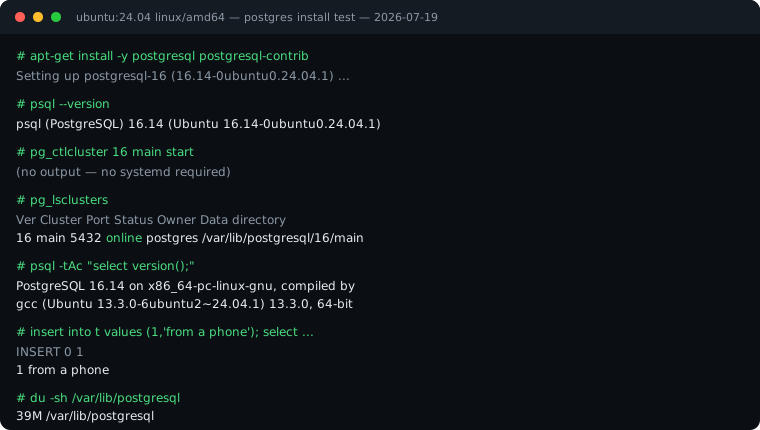
ubuntu:24.04 /
linux/amd64 container, captured 2026-07-19. No systemd, no
initdb, 39 MB on disk before any user data.
4. Connect and create something
sudo -u postgres psql
create table t(id int, s text); insert into t values (1,'from a phone');
INSERT 0 1
select id || ' ' || s from t;
1 from a phone
That is a real Postgres server, on a real x86_64 Linux kernel, reachable from a phone on a train. The data directory measured 39 MB before any user tables, which sits comfortably inside the 30 GB of persistent storage your plan includes. Files survive hibernation: close the app mid-query and the cluster picks up where you left it.
5. Point an app at it
Your application code and the database share one container, so connect over
localhost:5432. There is no tunnel to set up and no port to
forward. Set a password on the postgres role before you expose the
port beyond the container.
 scan to install
 PostgreSQL in Termux: what actually happens
Termux genuinely runs Postgres, and it runs a newer one than we do. We
read the package recipe on 2026-07-19: Termux's
postgresql build script pins TERMUX_PKG_VERSION="18.2". Ubuntu 24.04 ships 16.14. If
you need a Postgres 18 feature on-device, Termux is the only mobile option
that has it today.
We think that fact gets buried, and the blogs that recommend Termux for Postgres bury the cost of it too. The same recipe shows what Android forces the build to change:
- Shim libraries. The package depends on
libandroid-shmemandlibandroid-execinfo, because Bionic libc has neither System V shared memory norbacktrace(). - Different semaphores. The build sets
USE_UNNAMED_POSIX_SEMAPHORES=1, with a comment stating System V semaphores "are disabled on Android." - A patched timezone compiler. Termux builds its own
zicpatched to use symlinks instead of hard links, because Android 6.0+ does not support hard links. - Eight patch files in the package directory, including one against
src/backend/storage/ipc/dsm_impl.c, the dynamic shared-memory implementation, and one againstinitdb.c.
Those patches are why the two most common Termux Postgres failures look the
way they do. In
Termux issue #3086, an Android 12 aarch64 user hit
CANNOT LINK EXECUTABLE ... library "libexecinfo.so" not found,
a shim out of step with the Postgres package. In
termux-packages issue #5956, a user got
FATAL: could not create lock file "/tmp/.s.PGSQL.5432.lock",
because Termux has no root-level /tmp; everything lives under
$PREFIX. Neither is a Postgres bug. Both are Android.
The problem that actually matters
Shim errors are fixable. The process killer is structural. Android 12
introduced a limit on "phantom" processes, background processes forked by an
app, and kills them once the system-wide count passes 32, or when one uses
sustained CPU. Users see
[Process completed (signal 9) - press Enter]. It is tracked in
Termux issue #2366
and
discussion #3387.
Postgres is a poor fit for that ceiling by design. It runs a supervisor
process, a background writer, a WAL writer, a checkpointer, an autovacuum
launcher, and one backend process per connection. A database with a
handful of open connections is a meaningful share of a 32-process budget
that every other app on the phone is also drawing from. You can disable the
killer, Developer Options has "Disable child process restrictions" on
Android 14+, and Android 12L/13 need an adb settings put global command,
but you are turning off a battery protection to keep a database alive on a battery-powered
device. We have a
full walkthrough of the signal 9 fix if you want to go that route.
Where Termux wins
Two things, and they are not small. It works offline. On a plane, in a basement, on a rural train line, Termux still has a database and we do not. Our container lives in the cloud, so no network means no terminal. And it is free and open source, with a newer Postgres than Ubuntu 24.04 packages. If you are learning SQL on a commute through tunnels, install Termux and stop reading here.
Why iPhone and iPad can't host a Postgres server
There is no Termux equivalent on iOS, and the reason is not a missing port. iOS does not let a third-party app run arbitrary background daemons: when your app leaves the foreground the system suspends it within seconds unless it is using a small set of declared background modes, none of which cover "run a database." iSH gives you an Alpine userland through x86 emulation, but an emulated userland inside a suspendable app is not somewhere a database survives.
So on iPhone and iPad the question answers itself: the Postgres server runs somewhere else and your phone connects to it. That is the same shape as the cloud-container path above, which is why the setup section works identically on both platforms. Our coding on iPhone guide covers the wider set of trade-offs.
Side by side
| Cosyra | Termux | |
|---|---|---|
| Postgres version | 16.14 (Ubuntu 24.04, 2026-07-19) | 18.2 (2026-07-19), newer |
| Build | Stock Debian package | Patched: 8 patches, 2 shim libs |
| Platforms | iOS, Android, web | Android only |
| Cluster setup | Created by the package | Manual initdb |
| Start command | pg_ctlcluster 16 main start | pg_ctl / termux-services |
| Survives locked phone | Yes, runs server-side | Not reliably (signal 9) |
| Works offline | No, needs a connection | Yes |
| Architecture | x86_64 | arm64 (Bionic libc) |
| Persistent storage | 30 GB (Pro) | Device storage |
| Price | $20/mo Core or $30/mo Pro | Free, open source |
Which one should you pick
Pick Termux if you need the database on-device, you work offline often, you want Postgres 18 specifically, or you are learning SQL and do not want a subscription. Accept that you will meet the process killer and may need to disable it.
Pick a cloud container if the database backs an application you are actually building, needs to be up when you come back to it, or has to be reachable from an iPhone. Stock packaging also means every Debian Postgres answer on Stack Overflow applies to you unchanged, which is worth more than it sounds when you are debugging from a phone keyboard on a train.
tl;dr
Use Termux if you want Postgres 18.2 on-device and offline, and can live with Android killing the daemon. Use Cosyra if you want a stock Postgres 16.14 that stays up while the phone is locked, and works on iPhone too.
Cosyra for iOS · Cosyra for Android · See pricing. Sign up and pick a plan. Eligible new users can start a 7-day free trial in the App Store app.
If you are setting up more than a database, the mobile coding terminal guide covers the full environment, and running Node.js on your phone pairs naturally with this one if Postgres is backing a JavaScript app.