You can run Rust on Termux, but not the way the official docs tell you to.
rustup refuses to install, because
aarch64-linux-android is not a supported host triple and the stable
channel has no binaries for it. The route that works is Termux's own package:
pkg install rust. That package is not the outdated thing the
forums claim, either. It tracked upstream at 1.97.1 when we checked on
2026-07-21. The thing that actually defeats people is not the toolchain
version. It is the compile.
Quick decision: pick the path you came for:
- You just want
rustcon your phone now: skip the installer you were told to use. Install the Termux package ↓ - Your build dies partway through: that is Android, not Rust. The signal 9 fix ↓
- A crate will not compile against Bionic: a Linux userland restores glibc, at a price. What proot-distro costs ↓
- You only need the finished binary: build it elsewhere. Cross-compiling, and its catch ↓
This guide was written by the Cosyra team. We build a mobile cloud development environment, so we have a stake in the last section, and we have tried to be direct about where our answer does not apply. Every claim below is checked against a primary source on 2026-07-21: the Termux package recipes on GitHub, the rustup issue tracker, and the proot-distro README. Where we give a number, we measured it ourselves rather than repeating it.
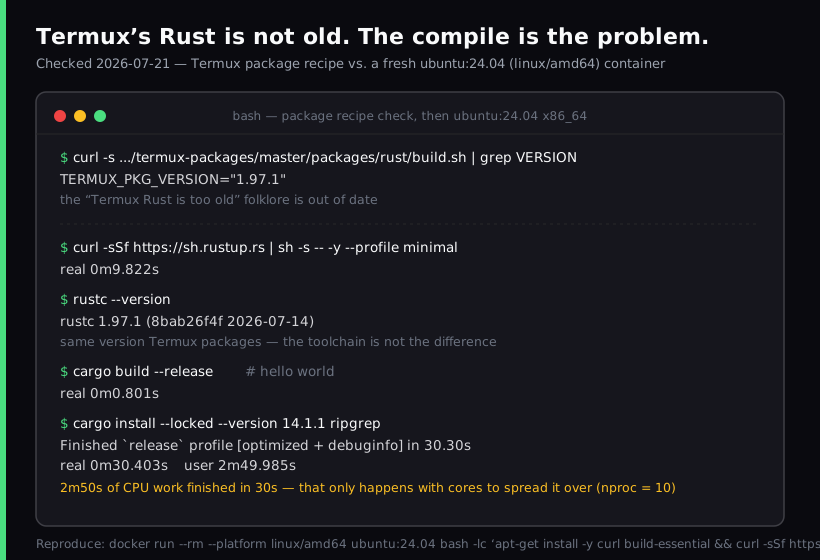
ubuntu:24.04 (linux/amd64) container,
the same OS and architecture we ship, where rustup installs the
same version in under ten seconds. The toolchain is not the difference
between these two environments. The 30.4s versus 2m50s split at the bottom is.
We do not publish per-container CPU allocations, so read those numbers as what
an x86_64 Rust toolchain does with a real crate, not as a promise about any
particular Cosyra session.
Why rustup does not work on Termux
Rust distinguishes between a target (the platform you are building for) and a host (the platform the compiler itself runs on). Android is a well supported target. Android is not a supported host.
So when you pipe sh.rustup.rs into a shell inside Termux, the installer
detects your triple as aarch64-linux-android, queries the
stable channel for a matching toolchain, and finds nothing:
$ curl --proto '=https' --tlsv1.2 -sSf https://sh.rustup.rs | sh
info: downloading installer
error: target 'aarch64-linux-android' not found in channel
On a 32-bit device the triple changes and the message reads
armv7-linux-androideabi instead, but the cause is identical. Both
reports are on the rustup tracker and both are closed. The 64-bit one was closed
as not planned and tagged not-rustup, a label whose description
reads: "Whatever is described in this issue isn't Rustup's fault." That is
the maintainers saying this is a distribution question rather than a bug
they intend to fix. Read them at
rustup issue #2872 and issue #3420.
This trips people up because every Rust tutorial on the internet opens with the rustup one-liner. On Termux it is the one command guaranteed not to work, and the error text does not explain why.
What does work: pkg install rust
Two commands, no root, no workaround:
$ pkg update
$ pkg install rust
$ rustc --version
rustc 1.97.1
Termux maintains its own build of the compiler, linked against Android's
Bionic libc rather than glibc, which is exactly why it works where the
upstream binaries do not. The package pulls in clang,
lld, openssl and LLVM as dependencies, so a fair amount
arrives with it.
Now the correction. The single most repeated claim about Rust on Termux is
that the packaged version is too old to be useful. The Rust user forum
thread that surfaces first for this question opens with exactly that
complaint: "Install from pkg install rust can works, but the version
is too low." That thread is old, and the advice outlived the condition it described.
We read the package recipe on 2026-07-21. It pins
TERMUX_PKG_VERSION="1.97.1", and it sets
TERMUX_PKG_AUTO_UPDATE=true, so it follows upstream releases
automatically rather than waiting for a maintainer to notice. In the same
session, rustup in an ordinary x86_64 Linux container gave us
rustc 1.97.1. Identical. You can check the recipe yourself at
termux-packages/packages/rust.
If you skipped Termux's Rust because a 2020 forum post said it was stale, that reason is gone. Test the real constraint instead of the remembered one.
The real ceiling is the build, not the version
Here is where people actually get stuck, and it has nothing to do with Rust. You start a release build, put the phone in your pocket, walk to the platform, pull it out again, and find this:
$ cargo build --release
Compiling regex-automata v0.4.9
Compiling grep-searcher v0.1.14
[Process completed (signal 9) - press Enter]
That is Android's phantom process killer. The Termux README carries a
standing notice about it: Android will kill any phantom processes beyond 32,
and will kill processes using excessive CPU. A Rust release build is close
to the worst possible case for that policy, because cargo
spawns a separate rustc per crate in parallel and then holds the
CPU pinned for minutes at a stretch. A Node install or a Python script slips under
the threshold. A dependency graph of 200 crates does not.
On Android 14 and later there is a real fix: Developer Options, then Disable child process restrictions. On earlier versions it takes an ADB command or root. We wrote the full procedure up separately in fixing the Termux signal 9 error, because it affects far more than Rust.
The second constraint is thermal, and no setting fixes it. Sustained all-core compilation is the workload phones are least equipped to hold. A laptop fan spins up; a phone has nowhere to move the heat, so the governor reduces clocks and the build stretches. Our ripgrep build consumed 2 minutes 50 seconds of CPU time. On a machine that can hold ten cores at full clock that landed in 30 seconds of wall time. On silicon that throttles after 90 seconds, the same work takes far longer than the core count would suggest.
The proot-distro route, and what it costs
Some crates will still refuse to build. Anything whose build script assumes
glibc, or that links a precompiled native library, can fail against Bionic.
The standard answer, and the one the Rust forum thread converges on, is to
run a real Linux userland inside Termux with
proot-distro. Install
Ubuntu or Debian, and inside it rustup works normally, because the
host triple is now ordinary Linux.
This genuinely solves the compatibility problem. It is worth being clear about the bill, and the project states it plainly in its own README:
"proot intercepts every system call via ptrace. Filesystem-heavy workloads (compilation, package managers) are noticeably slower than native execution."
Compilation is named in that sentence, and Rust compilation is filesystem
heavy in the specific way that hurts most: thousands of small reads and
writes across the crate graph and the incremental cache, each one now routed
through ptrace. You are trading speed for correctness on a
workload where speed was already the binding constraint.
Use it when a specific crate refuses to build natively. It is a poor default for everyday work.
Cross-compiling from a desktop
If what you need is a finished binary running in Termux, rather than a development loop on the phone, cross-compilation is the mature path. On a desktop:
$ rustup target add aarch64-linux-android
$ cargo build --target aarch64-linux-android --release
$ scp target/aarch64-linux-android/release/mytool phone:~/
You also need .cargo/config.toml pointing the linker for that target
at the matching Android NDK toolchain, which is the step most write-ups spend
their length on. A worked example covering arm64, arm and x86 is at
How to compile Rust command line tools for Termux.
The catch is structural rather than technical. Cross-compiling means the desktop has to be present for every code change. If your reason for being on the phone was that the desktop was at home, you have solved a different problem than the one you have.
Skip the phone's CPU entirely
Here is the opinion we hold that the Termux community would push back on. We think compiling Rust on the phone's own silicon is the wrong goal. The culture around on-device Linux treats native compilation as the win condition, and there is real craft in it. But the thing you wanted was the binary, and the tests passing, and the commit pushed. Which CPU did the work is an implementation detail, and choosing the most thermally constrained processor you own to do the most sustained-load task in your workflow is a strange place to plant a flag.
That is the reasoning behind what we build. Cosyra gives you a persistent
Ubuntu 24.04 x86_64 container on Azure AKS, reached from a native iOS or
Android app. We do not pre-install Rust, so you run the same
rustup one-liner that fails on Termux. There it works, for the ordinary
reason: the host triple is x86_64-unknown-linux-gnu, so you are
not asking an unsupported platform to host a compiler. That is the
environment our measurements above came from, and the install took under ten
seconds.
The practical difference is what happens when you lock the phone. A cargo build in Termux is subject to Android's process policy the moment your screen goes dark. A build running in a container keeps going, because nothing about it depends on your handset staying awake. We do most of our own long builds this way from a train seat, where the phone is a terminal and the compile is happening several hundred miles away.
Where this does not apply: if you are writing something that has to run on Android and touch device hardware, a cloud x86_64 container is the wrong tool and Termux is the right one. Same if you are offline regularly, since a container needs a connection. Termux is genuinely excellent software and we have said so at length in Cosyra vs Termux.
Want rustup to just work?
Cosyra provisions a fresh Ubuntu container on first launch, about 15 seconds
in our testing, with the toolchain a normal Linux host expects. Plans start
at $20/month.
The four paths compared
| Approach | rustup works | Needs a 2nd machine | Compile speed | Survives screen lock | Cost |
|---|---|---|---|---|---|
Termux pkg install rust | No (use the package) | No | Phone CPU, throttles | No, without the Android 14 setting | Free |
| proot-distro Ubuntu | Yes | No | Slowest, ptrace on every syscall | No, same Android policy | Free |
| Cross-compile from desktop | Yes, on the desktop | Yes | Desktop speed | Not applicable | Free |
| Cosyra | Yes | No | x86_64 Linux | Yes | From $20/mo |
Which one should you pick
- Pick Termux's
rustpackage if you are writing small tools, learning the language, or building something that has to run on the Android device itself. Turn off child process restrictions first. - Pick proot-distro if one specific crate will not compile against Bionic and you need it. Do not adopt it as your everyday environment; the syscall overhead lands hardest on exactly the workload you are running.
- Pick cross-compilation if you want a binary to ship into Termux and you already have a desktop in the loop.
- Pick a cloud container if the build is long, the crate graph is large, or you want the compile to survive your screen turning off. Compare the options in the mobile coding terminal guide, and see pricing for what a paid tier includes.
Rust is a harder case than most languages here, which is why the advice differs from what we say about lighter toolchains. If you came to this from another direction, we covered Node.js on a phone and Docker on Termux separately, and the constraints are not the same in either case.
Frequently asked questions
Why does rustup fail to install on Termux?
Because rustup does not support aarch64-linux-android as a host
platform. The installer resolves your host triple, looks for matching binaries
in the stable channel, finds none, and stops with "target 'aarch64-linux-android'
not found in channel". The maintainers closed the report as not planned and
labelled it not-rustup, meaning they consider it outside the
project's scope rather than a bug to fix. Rust can still target Android;
it just cannot bootstrap itself while running on Android.
Is the Rust version in Termux too old to use?
No, and this is the most out-of-date piece of advice circulating on the
topic. The claim comes from forum threads written years ago, when the
package genuinely lagged. We read the Termux package recipe on 2026-07-21
and it pins TERMUX_PKG_VERSION="1.97.1", the same version
rustup installed in our container test the same day. The recipe
also sets TERMUX_PKG_AUTO_UPDATE=true, so it tracks upstream
releases automatically.
[source: termux-packages, packages/rust build recipe]
Why does my cargo build die with "signal 9" partway through?
That is Android's phantom process killer, not a Rust problem. Android 12
and later terminate background processes beyond a limit of 32, and kill
processes using sustained CPU. A Rust release build is close to a worst
case for that policy, because cargo spawns one rustc per crate
in parallel and holds high CPU for minutes. On Android 14 and later you can
disable it under Developer Options with "Disable child process restrictions".
On earlier versions it needs an ADB or root workaround.
[source: termux-app issue #2366, phantom process killing on Android 12+]
Does installing Ubuntu in Termux with proot-distro fix everything?
It fixes the compatibility half and costs you the performance half. Inside
a proot-distro Ubuntu you get glibc and a working rustup, so
crates that assume a normal Linux userland build correctly. The trade-off
is documented in the project's own README: proot intercepts every system
call via ptrace, and it names compilation specifically as a workload that
is noticeably slower than native execution. You are choosing correctness
over speed, on a workload where speed was already the problem.
[source: termux/proot-distro README, performance caveats]
Can I cross-compile Rust for Termux from my laptop instead?
Yes, and it is the standard answer when you only need to ship a finished
binary. You add the aarch64-linux-android target with rustup on
the desktop, point cargo's linker configuration at the matching Android NDK
toolchain, build with
--target aarch64-linux-android --release, and copy the result
across. The cost is that the laptop now has to be present for every code
change, which defeats the point if the reason you were on the phone was
that the laptop was not with you.
[source: "How to compile Rust command line tools for Termux", DEV Community]
How long does a real Rust build actually take?
It depends almost entirely on how many cores you can sustain, which is
what a phone is worst at. We built ripgrep 14.1.1 from source in a fresh
ubuntu:24.04 x86_64 container on 2026-07-21. It finished in 30.4
seconds of wall time but consumed 2 minutes 50 seconds of CPU time, so the work
only compressed into 30 seconds because ten cores shared it. A phone can match
that core count on paper and still take much longer, because it throttles under
sustained load in a way a server does not.
tl;dr
Use Termux's pkg install rust if you want Rust
on the phone itself. Skip rustup, it cannot host on Android,
and ignore the folklore about the package being old: it was 1.97.1 on
2026-07-21, the same as upstream. Turn off child process restrictions or
your build will take a signal 9. Use proot-distro only for
crates that will not build against Bionic. Use Cosyra if the
build is long enough that you would rather it ran on x86_64 Linux and kept going
after your screen locks.
App Store / Google Play. Sign up and pick a plan, from $20/month.
Long builds, small phone? Run them on a persistent Ubuntu container instead and keep the phone as the terminal.