Yes, you can run tmux on your phone in 2026. The only question that matters is whether the session survives the app closing. On Android, Termux installs real local tmux 3.6b with one command and runs offline, but on Android 12+ the OS can kill the tmux server with signal 9. On iPhone there is no local tmux at all, so you SSH into a box that runs it. When you want a tmux session that just stays alive on either phone, we run the server in a cloud Ubuntu container reached from a native app, because the phone OS can't reap a process that isn't on the phone. This guide tells you which path wins when, with the exact commands.
tl;dr
Android, local + offline: Termux +
pkg install tmux (3.6b), plus the signal-9 fix so it survives backgrounding.
iPhone: no local tmux, so SSH over mosh into a box that runs
it. A tmux session that survives the app closing, on either phone, with no
server to babysit: a cloud Ubuntu container reached from a native app. We ship Cosyra with tmux pre-installed; plans start at $20/month, and eligible new users
can start a 7-day free trial in the App Store app.
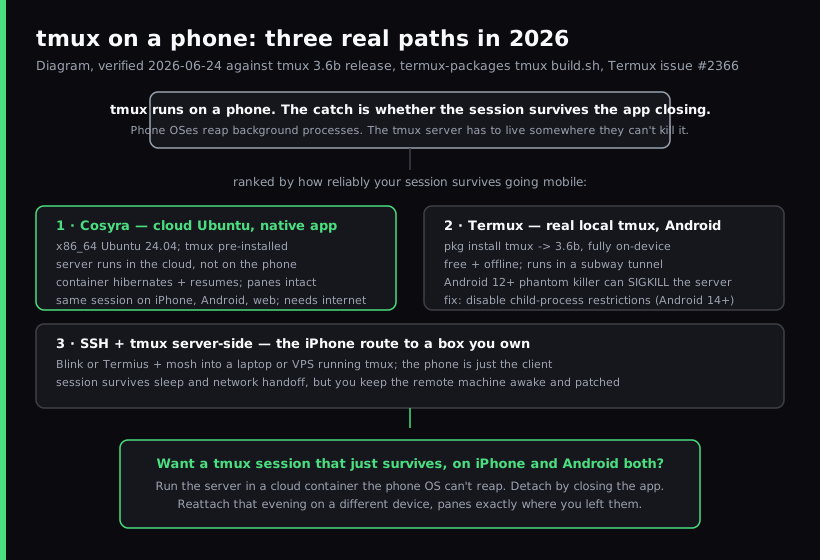
The three realistic paths to run tmux on a phone
Every "tmux on my phone" question is really a question about where the tmux server runs, because that decides whether your session is still there when you reopen the app. tmux runs in all three paths below. What separates them is survival: which host can the phone's operating system not kill, and can you use it offline.
| Path | Platform | tmux version | Survives app close? | Offline | Cost |
|---|---|---|---|---|---|
| Termux | Android | 3.6b (local) | Only with the signal-9 fix | Yes | Free |
| SSH + tmux server-side | iOS, Android | whatever the remote runs | Yes (server-side) | No | Free client; you run the server |
| Cosyra cloud container | iOS, Android, web | pre-installed (Ubuntu 24.04, x86_64) | Yes (hibernate + resume) | No | From $20/mo |
Our opinion, which a "just SSH into your laptop" blog probably wouldn't lead with: the interesting part of tmux on a phone is not getting the binary to run, which it has done on Termux for years; it is keeping the session alive when the phone backgrounds the terminal, sleeps, or drops signal. Two of these three paths need a fix or a machine you maintain to do that. One does it by default. That is the decision.
Path 1: a cloud Ubuntu container
For a tmux session that survives with no maintenance, the practical answer is a cloud Linux container reached from a native phone app. We built Cosyra for this: every signup gets an isolated Ubuntu 24.04 workspace on Azure, x86_64, with tmux, Git, Node.js, Python, and vim pre-installed.
# Inside a Cosyra workspace, reached from the iOS/Android app
tmux new -s work            # tmux is already installed
# ...split panes, run a build, start an agent...
# Ctrl-b d  (or just close the app) to detach

# Reopen the app later, anywhere:
tmux attach -t work         # same panes, same processes
Because the tmux server runs in the cloud container rather than on the
phone, no phone-OS process policy can reap it: closing the app is just a
detach. The container hibernates after inactivity and resumes exactly where
it left off, so the tmux server and your panes are intact when you come
back. And because the same container is reachable from iPhone, Android, and
web, you attach to one session from whichever device is in your hand. The
Ctrl-b friction is handled by a terminal toolbar pinned above the
keyboard with dedicated CTRL, ESC, TAB, ALT, and arrow keys.
Here is the first-hand version, because it is the whole pitch: we started a
tmux session on the train with a build running in one pane and Claude Code
in another, closed the app at our stop, and reopened it on the couch that
evening from a different phone, and tmux attach dropped us back into
both panes, the build long since finished, nothing re-cloned or re-authed. That
is the experience the other two paths are trying to approximate.
The honest trade-off: no offline mode. The container lives in the cloud, so a flight with no Wi-Fi is dead air, and Termux wins on that one dimension. For everything else (survival, the same session on every device, agents already installed next to your panes), the cloud container is the path that needs no apologies. The mobile coding terminal pillar covers how this category sits next to local terminals, and TUI apps on phone goes wider on running vim, htop, and other full-screen terminal apps from glass.
Try a persistent tmux session from your phone in a few minutes.
Plans start at $20/month, and eligible new users can start a 7-day free trial
in the App Store app. tmux is pre-installed; start a session, close the app,
reopen it later and
tmux attach right back in.
Path 2: Termux on Android
Termux is the honest local answer on Android. It is a free, open-source
terminal emulator with its own apt-style package manager, and it ships a
current tmux. The
termux-packages tmux build script we re-read on 2026-06-24 pins TERMUX_PKG_VERSION=3.6b,
matching the latest upstream release, so a clean install gives you real
local tmux 3.6b on-device and offline.
# From a fresh Termux install (F-Droid build recommended)
pkg update && pkg upgrade
pkg install tmux
tmux -V                     # tmux 3.6b

tmux new -s work           # start a named session
# Ctrl-b d to detach, tmux attach -t work to come back
The wall you hit is not tmux. It is Android. On Android 12 and later the
phantom-process killer reaps background processes, and a backgrounded tmux
server is a prime target. You come back to
[Process completed (signal 9) - press Enter] and your session is
gone. The behavior is documented in the Termux README and tracked in
Termux issue #2366. The mitigation:
# Hold a wakelock so Termux is less likely to be reaped
termux-wake-lock

# Android 14+: Developer Options -> Disable child process restrictions
# Earlier Android: ADB or root workaround (see the signal-9 guide)
Our full signal 9 fix guide walks the version-by-version steps. It works, but it is a fight you are re-fighting every Android release, and it does nothing for iPhone. If you want a full Ubuntu or Debian environment on Android instead of Termux's Bionic-libc world, the Linux container on Android guide covers proot-distro, UserLAnd, and a cloud x86_64 container.
Path 3: SSH into a box running tmux (the iPhone route)
On an iPhone there is no native tmux, and there is not going to be one, because iOS doesn't give apps the process model tmux needs. So the iPhone path runs tmux somewhere else and uses the phone as a client. The stack practitioners actually run is a terminal app plus mosh plus server-side tmux.
# On the remote machine (laptop or VPS), once:
tmux new -s work

# From Blink Shell or Termius on the iPhone:
mosh you@your-host
tmux attach -t work        # back into the same session
mosh fixes the connection: it is UDP-based, keeps state server-side, and reconnects automatically when your phone sleeps or hands Wi-Fi off to cellular, which plain TCP-based SSH cannot do. tmux fixes the workspace, keeping your panes and processes alive on the host. Our SSH from phone guide covers the full Tailscale + mosh + tmux setup, and the best terminal apps for iPhone compares the clients. This path is solid, and its cost is that you own the server: you keep the laptop awake or pay for a VPS, patch it, and keep it online. That maintenance is exactly what a managed container removes.
When each path actually wins
Decision framework, deliberately blunt:
- "I'm on Android and want tmux in a subway tunnel with no signal."
Termux.
pkg install tmux. Real local 3.6b, offline, free. Apply the signal-9 fix so it survives backgrounding. - "I'm on iPhone and already run a laptop or VPS I can SSH into." Blink or Termius + mosh + server-side tmux. It's the right call when you already own and maintain the remote machine.
- "I want a tmux session that survives the app closing, with no server to babysit." A cloud Ubuntu container. The server runs in the cloud, hibernates, and resumes and closing the app is just a detach. This is the only path that does survival by default on both phones.
- "I want the same tmux session on my iPhone and my Android phone." A cloud container. It's the only path that reaches both, attaching to one session from either device.
- "I'm running an AI coding agent in a tmux pane from my phone." A cloud container, where Claude Code, Codex CLI, OpenCode, and Antigravity CLI are pre-installed next to your panes. Our Claude Code on phone guide walks through the agent side.
Worked example: a session that outlives the app
The test that separates these three paths is one workflow: start a long-lived tmux session, fully close the terminal app, reopen it later, and check whether you re-attach to the same panes. Same steps, three different outcomes.
- Termux:
tmux new -s workstarts fine. Whether it is still alive when you reopen depends entirely on whether you applied the Android signal-9 fix. Without it, a long background gap can leave you with a dead session. With it, it usually holds. - SSH + tmux server-side: the session survives, because it lives on a machine the phone's OS can't touch. You re-attach over mosh. The cost is keeping that machine awake and online: if your laptop sleeps, the attach fails.
- Cosyra cloud container: close the app, reopen hours later on
any device,
tmux attach -t work, and you are back in the same panes. The container hibernated and resumed; nothing on your side kept a machine alive. This is the persistent-session experience reached from a phone.
That workflow is the whole guide condensed. If your phone tmux is for offline Android sessions, Termux plus the signal-9 fix is enough. If you already run a server, SSH plus mosh plus tmux is solid. If you want the session to simply be there when you come back, on either phone, with nothing to babysit, a cloud Ubuntu container is the path that doesn't require apologizing for itself.
FAQ
Does tmux keep running when I close the app or disconnect?
That is the entire reason to use tmux on a phone, but where the tmux server runs decides whether it actually holds. tmux detaches a session from your terminal and keeps the processes running, so you re-attach later with tmux attach. The tmux Getting Started wiki covers the detach/attach model. The catch on mobile is the server's host. If tmux runs locally in Termux, Android can still kill it when the app is backgrounded (see signal 9 below). If it runs on a remote box or a cloud container, the phone closing is just a detach. The server keeps going and your panes are waiting when you come back.
Can I run tmux on an iPhone?
Not locally. iOS has no native tmux build because tmux needs a POSIX process model iOS doesn't expose to apps. The two real iPhone paths both run tmux somewhere else: SSH (ideally over mosh) from a terminal app like Blink or Termius into a machine you own that runs tmux, or a cloud Ubuntu container reached from a native app where tmux is already installed server-side. In both cases the iPhone is the client and the session lives on a host that doesn't get reaped when you lock the screen.
Why does my tmux session die on Termux / Android (signal 9)?
On Android 12 and later the OS phantom-process killer reaps background processes, and you see [Process completed (signal 9) - press Enter] when it takes the tmux server. The Termux README documents this and the tracking issue is Termux issue #2366. On Android 14+ you disable it under Developer Options -> Disable child process restrictions; termux-wake-lock also helps for shorter sessions. Our full signal 9 fix guide walks through it version by version. The cleaner fix is to move the tmux server off the phone entirely so no phone-OS policy can touch it.
What version of tmux does Termux install?
As of 2026-06-24, the Termux tmux build script pins TERMUX_PKG_VERSION=3.6b, so a clean pkg install tmux gives you tmux 3.6b on Android arm64, the same version as the latest upstream release (3.6b, published 2026-05-20). The version is not the problem on Android; the phantom-process killer is.
tmux or mosh: which one do I actually need for mobile?
Different jobs, and on a phone you usually want both. mosh fixes the connection: plain SSH is TCP, so when your phone sleeps or hands Wi-Fi off to cellular the connection breaks and the session dies. mosh uses UDP, keeps state server-side, and reconnects automatically. tmux fixes the workspace: it keeps your shells, splits, and running programs alive on the server so you re-attach to the same layout. Our SSH from phone guide covers the mosh + tmux stack in detail. On a cloud container you skip mosh, the native app reconnects to the same container, and tmux still gives you the persistent panes.
Is a phone keyboard usable with tmux's Ctrl-b prefix?
The honest objection to tmux on glass is the prefix key. Ctrl-b is awkward when the system keyboard hides Ctrl. Local iOS terminals solve it with extended key rows; we solve it in Cosyra with a terminal toolbar pinned above the keyboard that has dedicated CTRL, ESC, TAB, ALT, and arrow keys. Our opinion, which an SSH-from-a-laptop purist would push back on: once CTRL is one tap away, driving tmux from a phone is genuinely fine for the real mobile loop, re-attach on the train, check a long-running build, split a pane to tail logs, fire off an agent. It is not where you reflow a 500-line file, and we don't pretend it is.
Recap
tmux on Android, local and offline → Termux +
pkg install tmux (3.6b), plus the
signal-9 fix so it survives backgrounding.
tmux from an iPhone → SSH over mosh into a box you own that runs tmux. A tmux
session that survives the app closing, on either phone, with no server to babysit
→ a cloud Ubuntu container reached from a native app.
We built Cosyra for the last case. Core is $20/month and Pro is $30/month, with 120 hours of compute and 30 GB of persistent storage. Eligible new users can start a 7-day free trial in the App Store app.