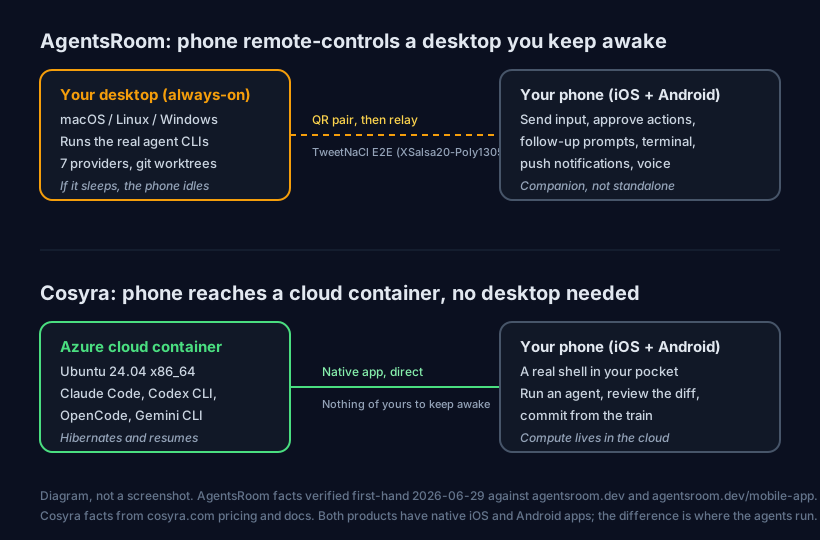
AgentsRoom does run on your phone: it ships native iOS and Android apps with feature parity. But those apps are a remote control for AI agents that run on a desktop you own and keep awake, not a place the agents themselves run. If you want the agents in your pocket without a personal machine in the loop, the other option is to run them in the cloud: open a container from Cosyra for iOS or Cosyra for Android and run Claude Code, Codex CLI, OpenCode, or Antigravity CLI, pre-installed. Plans start at $20/month.
This guide was written by the Cosyra team. We cross-checked every claim about AgentsRoom against the official AgentsRoom site and its mobile-app page, both verified first-hand on 2026-06-29 (the landing footer read "v1.96.1, Last updated: Jun 29, 2026" when we checked). Where AgentsRoom is genuinely ahead of us, we say so.
The distinction that matters: "AgentsRoom on a phone" is real, the app exists and it is good, but it answers a narrower question than most people mean. The phone app steers agents; the desktop still has to be on for there to be anything to steer. So the honest framing is not "does AgentsRoom work on mobile" (it does) but "do I want a desktop to be the engine, or the cloud." We built the cloud answer.
What is AgentsRoom?
AgentsRoom is a desktop app that the site calls "the native desktop app to run multiple AI coding agents in parallel." It runs on macOS, Linux, and Windows, and it spawns real CLI processes in your local project folders, one agent per git worktree, so several agents can work at once without stepping on each other. You get a kanban backlog, split-view terminal monitoring, per-agent diff review, and role presets like Architect, Frontend, Backend, and DevOps. As of 2026-06-29 it supports seven providers, Claude, Codex, Antigravity CLI, OpenCode, Aider, Grok Build, and Mistral Vibe, with mid-conversation provider switching.
The mobile apps are the second half of the product. They give you, in the site's words, the ability to "send input to a stuck agent, approve a pending action, or send a follow-up prompt, right from your phone," plus log streaming, the agent terminal, push notifications, and a voice mode. iOS and Android have feature parity. The connection is set up by scanning a QR code while both devices are on the same network; after pairing it works from anywhere over a relay that is end-to-end encrypted with TweetNaCl (XSalsa20-Poly1305).
The opinion we hold that an AgentsRoom user will push back on: for coding away from your desk, the always-on desktop is a liability, not a feature. AgentsRoom's pitch is that your code never leaves your machine and execution is local, which is a real privacy win. But it means the engine is a computer you have to leave running, unlocked enough to do work, and on a reachable network. We think that is the wrong trade for phone-first coding, because the whole reason you reach for your phone is that the desk machine is exactly what you do not have with you. People who care most about local-only execution will disagree, and for them AgentsRoom is the right call.
What the AgentsRoom phone app needs from you
Before the phone app does anything useful, three things have to be true, and they are worth saying plainly because the App Store listing itself states the dependency: the app "requires the AgentsRoom desktop app on macOS to function."
- A desktop that is installed and running. The desktop app is the command center. It holds your projects, your CLAUDE.md, and the agent processes. No desktop, no agents.
- That desktop has to stay awake and reachable. The agents run there, so a closed laptop, a sleeping Mac, or a machine that dropped off the network is a stalled session. The relay reaches the desktop; it does not replace it.
- The CLIs and keys set up on that machine. AgentsRoom drives whatever agents you have installed and authed on the desktop. That setup is yours to do and maintain.
None of this is a knock on the app. It is a clear, deliberate architecture: keep the code and the compute on your own hardware, use the phone as a secure window into it. It just answers a different question than "I have no machine with me and I want to run an agent right now."
How do you run agents on a phone without keeping a desktop awake?
You put the shell in the cloud and reach it from a native app. With Cosyra that takes about four minutes: install the app, open the container, pick an agent CLI, add your API key, and start a session. The container runs on Azure, so nothing you own has to stay on.
Step 1: Install Cosyra and open a container
Download from the App Store or Google Play and sign in with Apple, Google, or email. On first launch we provision a fresh Ubuntu 24.04 x86_64 container with Node.js, Python, Git, and tmux already on it.
Welcome to Cosyra.
Ubuntu 24.04.1 LTS (x86_64)
Pre-installed: claude, codex, opencode, agy
The engine is here in the cloud, not on a desktop you keep awake.
Step 2: Pick the agent CLI you want to drive
AgentsRoom relays seven providers from your desktop. We pre-install four of those same agents in the container, so you do not have to install or auth them yourself. Run whichever matches the model you pay for.
$ claude --version # Anthropic Claude Code
$ codex --version # OpenAI Codex CLI
$ opencode --version # open-source agent
$ agy --version # Google Antigravity CLI
Step 3: Add your provider API key (BYOK)
The agents are bring-your-own-key, the same model AgentsRoom uses. Export the key for whichever model you use and write it into your shell config once. It persists in the container's home volume across sessions and across your phone, tablet, and the web. We do not proxy or meter model billing; you pay your provider.
$ echo 'export ANTHROPIC_API_KEY="your-key-here"' >> ~/.bashrc
$ source ~/.bashrc
# OpenAI, Gemini, or other providers work the same way
Step 4: Clone a repo and start a session
Clone your repository, cd into it, and start the agent. You describe
the change, it edits files and runs commands in the same shell. This is the same
agent loop AgentsRoom relays to your phone, except the work runs in the cloud.
$ git clone https://github.com/your-org/your-project.git && cd your-project
$ claude
> Add a --dry-run flag to the deploy script and update the README
Edited scripts/deploy.sh and README.md. Run the script to confirm.
Step 5: Keep it running with tmux
Wrap long sessions in tmux so a dropped signal or a locked phone
does not kill the agent mid-task. The session keeps running on the container;
you re-attach when you come back.
$ tmux new -s work
# ...phone locks on the train, signal drops...
$ tmux attach -t work
# right back in the session, agent still working
Try Cosyra. Eligible new users can start a 7-day free trial in the App Store app. Claude Code, Codex CLI, OpenCode, and Antigravity CLI come pre-installed, so the agent part is ready the moment the container boots, no desktop required. App Store / Google Play / Pricing details
What does this actually feel like on a phone?
The honest pitch is an agent session you can start anywhere, with nothing of yours that has to be awake back home. Three places we run it.
A fix on the train, committed before your stop
You noticed a bug on the way out. On the train, open Cosyra, cd
into the repo, run claude, and describe the fix. It edits the
file and you commit it. With AgentsRoom this same moment depends on your Mac
at home being on and reachable; here the container was already awake in the
cloud, so there was nothing to wonder about.
A refactor from the couch with the agent doing the typing
Saturday morning, phone in hand. Point an agent at a module: "split this file into a parser and a formatter, keep the public API the same." The agent runs the edits and the tests in the same shell, and you review the diff on the phone before keeping it. The small on-screen keyboard barely matters because you are describing intent, not typing every line.
Checking a long task from the waiting room
You kicked off a build or a long agent run before leaving. From a waiting room, attach to the tmux session and watch it finish, or steer it if it went sideways. The container kept running while your phone was in your pocket and while your laptop stayed shut. For the cross-agent picture, see the AI coding agents on mobile pillar.
Where AgentsRoom is the better tool
AgentsRoom is not a weaker version of what we do; it is a different shape, and for several people it is the right one. We would point you to it in these cases.
- Code that must never leave your machine. Execution is local and the phone link is end-to-end encrypted, so your source never sits in a hosted container. For strict privacy or air-gapped-ish setups, that is a real advantage we cannot match, because our container is the whole point.
- You already keep a machine on. If you have an always-on Mac or a home server, AgentsRoom is cheaper: free for up to 3 projects, $9.99/month Pro for unlimited (verified 2026-06-29), versus our $20/mo that includes the cloud machine you would otherwise be providing yourself.
- Genuine multi-agent orchestration. Parallel agents each on their own git worktree, a kanban backlog, role presets, and per-agent diff review in one window. We run one agent session per tab; we do not ship an orchestration UI like that.
- A wider provider set. Seven providers with mid-conversation switching versus the four CLIs we pre-install. If you want Grok Build or Mistral Vibe in the same surface, AgentsRoom has them today.
Who should pick which?
Choose AgentsRoom if you keep a desktop running anyway, you want your code to stay on your own hardware, you want real multi-agent orchestration with worktrees and diff review, or you want a wider set of providers in one place. The phone app is a polished remote control on top of that, and at $0 to $9.99/mo it is inexpensive for someone who already owns the machine doing the work.
Choose Cosyra if you do not want a personal machine to be the engine, you want Claude Code, Codex CLI, OpenCode, and Antigravity CLI sitting in one container with no install step, or you want a persistent Linux box that follows you across iPhone, Android, and web at a flat $20 or $30/mo. The compute lives in the cloud, so a dead laptop battery or a sleeping desktop never strands you.
Try AgentsRoom first if your work centers on a machine that is always on and you want local execution with a phone window into it. Several tools sit in this same "drive your own machine from your phone" spot and resolve the same way. For the full head-to-head on pricing, orchestration, and where the agents run, see Cosyra vs AgentsRoom. We compare the closest relay neighbour in Cosyra vs Happy Coder, and the broader category, including relay apps and desktop agents, is laid out in remote-control coding from your phone. For a desktop agent with no mobile app at all, see Devin Desktop on a phone. If you are weighing what coding agents on a phone even look like, start with the AI coding agents on mobile pillar.
Frequently asked questions
Does AgentsRoom have a phone app?
Yes. AgentsRoom ships native iOS and Android apps with feature parity, real-time agent status, log streaming, the agent terminal, and push notifications on both. But they are companions to the desktop app, not standalone clients. The App Store listing says the app "requires the AgentsRoom desktop app on macOS to function." The phone drives agents; the desktop runs them.
Can AgentsRoom run AI agents in the cloud so my desktop can be off?
No. AgentsRoom's own site says it "spawns a real CLI process in your project folder, no API proxy, no cloud relay, everything runs locally." Agent execution happens on your desktop. The phone link uses an encrypted relay, but if the desktop is off, asleep, or off-network, there is nothing for the phone to drive. Running the agents on a cloud machine instead is what a hosted container does.
[source: agentsroom.dev, "everything runs locally," no cloud relay for execution]
How does the AgentsRoom phone app connect to my computer?
You scan a QR code shown in AgentsRoom Desktop while both devices are on the same network, which generates a shared encryption key pair. After that, log streaming and the terminal view work from any network over a secure relay. The link is end-to-end encrypted with TweetNaCl (XSalsa20-Poly1305), so the relay never sees your unencrypted data, per the AgentsRoom mobile-app page.
How much does AgentsRoom cost?
As of 2026-06-29, AgentsRoom is free for up to 3 projects with unlimited agents, and Pro is $9.99/month for unlimited projects. It is bring-your-own-key on every tier: you pay the AI provider directly and AgentsRoom adds no token markup. For users who already own an always-on machine, that is cheaper than a hosted container.
Is AgentsRoom open source?
The AgentsRoom site does not present the app under an open-source license, so we do not claim it is one. It supports open-source agent providers such as OpenCode and Aider, but that is a separate fact from the app's own license. If open-source, self-hostable infrastructure is a hard requirement, verify the license first-hand before relying on it.
[source: agentsroom.dev, no OSI license stated for the app itself as of 2026-06-29]
What can I do from the AgentsRoom mobile app, just watch?
More than watch. The mobile-app page says you can "send input to a stuck agent, approve a pending action, or send a follow-up prompt, right from your phone," and type into the agent terminal with the mobile keyboard. It is genuine remote control with push notifications and a voice mode, not a read-only monitor. The limit is that it still needs the desktop doing the work.
[source: agentsroom.dev/mobile-app, send input, approve, follow-up, terminal typing from the phone]
tl;dr
AgentsRoom does work on your phone: native iOS and Android apps with feature parity, send-input and approve and follow-up, push notifications, and a voice mode, all over a TweetNaCl end-to-end-encrypted relay. The catch is that the agents run on a desktop you own and keep awake; the phone is a remote control, not the engine. Use AgentsRoom if you already keep a machine on and want local execution with a phone window into it (free up to 3 projects, $9.99/mo Pro, verified 2026-06-29). Use Cosyra if you want the agents to run in the cloud with no desktop in the loop: install the app, open the container, run Claude Code, Codex CLI, OpenCode, or Antigravity CLI, and bring your own provider key.
App Store / Google Play. Sign up and pick a plan. Eligible new users can start a 7-day free trial in the App Store app.
Run an agent CLI from your phone, no desktop required. Install Cosyra, open the container, run an agent CLI, start coding.