Short answer. Cosyra vs AgentsRoom comes down to where the agents run. AgentsRoom is a local multi-agent orchestrator: a desktop app that spawns real agent CLIs in parallel on a Mac, Linux, or Windows box you keep awake, with iOS and Android apps that remote-control it. Cosyra is the machine: a per-user Ubuntu 24.04 container we run in the cloud, with Claude Code, Codex CLI, OpenCode, and Antigravity CLI already installed, reached from standalone native apps. Pick AgentsRoom for parallel multi-agent work on a machine you own. Pick Cosyra to code from a phone with no desktop in the loop.
We build the cloud answer, so we pushed hard to represent the local one honestly. AgentsRoom is a well-made orchestrator, it is BYOK, and it drives the same terminal-native agents we ship. We read agentsroom.dev, its mobile-app page, and the App Store listing first-hand on 2026-07-04 (the landing footer read "v1.102.0, Last updated: Jul 4, 2026" when we checked), and the difference never moves off one line: AgentsRoom runs the agents on a machine you own; we are the machine. Everything below follows from that.
This post was written by the Cosyra team. We compared Cosyra against AgentsRoom based on hands-on testing of both, reading agentsroom.dev, its /mobile-app page, and the App Store listing (id6761265182) first-hand, running the same agents in our own container, and our internal AgentsRoom factsheet. Platform, version, providers, and pricing verified 2026-07-04.
tl;dr
Use AgentsRoom if you already keep a desktop running and want genuine multi-agent orchestration: parallel agents each on their own git worktree, a kanban backlog, role presets, and per-agent diff review, steered from a phone over an encrypted relay, at $0 to $9.99/mo. Use Cosyra if you want to code from a phone with no machine to supply: a managed Ubuntu container with four agents pre-installed, on iOS or Android, at a flat $20 or $30/mo. Both are BYOK. The fork is who owns the box that runs the agents.
App Store · Google Play. Sign up and pick a plan. Eligible new users can start a 7-day free trial in the App Store app.
Want the agents running with no desktop to keep awake? Our container is the always-on Linux box AgentsRoom expects you to bring. Claude Code, Codex CLI, OpenCode, and Antigravity CLI are already on the PATH, reached from a native iOS or Android app.
App Store · Google Play · Pricing. Sign up and pick a plan, from $20/month.
Cosyra vs AgentsRoom: how do they compare feature by feature?
Cosyra is a managed cloud container reached from standalone native apps with agents pre-installed; AgentsRoom is a desktop orchestrator that runs agents on your own machine and relays a companion phone app to it. Both are BYOK, both run the same terminal-native agents, and both put a phone in the loop. The table lines them up on fourteen attributes, verified 2026-07-04.
| Feature | Cosyra | AgentsRoom |
|---|---|---|
| Pricing | $20 / month Core or $30 / month Pro | Free (up to 3 projects); Pro $9.99 / month unlimited projects |
| Free tier | None. 7-day free trial for eligible new users in the App Store app | Free up to 3 projects (you still supply the desktop + compute) |
| OS support | iOS, Android, web (standalone) | Desktop macOS / Linux / Windows + companion iOS / Android |
| Who owns the compute | We do (managed Ubuntu container on Azure AKS) | You do (a desktop you run and keep awake) |
| AI agents pre-installed | Claude Code, Codex CLI, OpenCode, Antigravity CLI | None hosted; drives 8 providers you install and auth on your desktop |
| Multi-agent orchestration | One agent session per shell tab; no orchestration UI | Parallel agents, git-worktree isolation, kanban, diff review |
| Persistent storage | 30 GB cloud, survives device loss | On your own desktop; you size and back it up |
| Offline capability | No (cloud-only) | No (phone needs a network path to the desktop) |
| Container sandboxing | Per-user isolated container on Azure AKS | Runs on your desktop; per-agent git-worktree isolation |
| Port forwarding | Inside your container | Live localhost preview tunnel from the desktop |
| File sync across devices | Same container from iPhone, Android, and web | Files live on the one desktop; phone views over the relay |
| Max session length | Hibernates on idle, resumes on reopen | No per-hour meter (you own the compute) |
| API key model | BYOK (you pay Anthropic / OpenAI / Google) | BYOK across 8 providers, no token markup |
| Open-source status | Client app closed, orchestration proprietary | License not stated as open source; do not assume OSS |
No desktop you want to keep running? That's the row that decides it. We ship a persistent Ubuntu container with four agents pre-installed, so there's no machine to leave on and nothing to QR-pair, reached from iOS and Android in about two minutes.
App Store · Google Play · Pricing. Sign up and pick a plan. Eligible new users can start a 7-day free trial in the App Store app.
The whole comparison in one diagram: where the agents run
Here is the piece you cannot copy-paste from another blog, because drawing it meant reading both products' actual execution models. From App Store screenshots the two look similar: a phone, a terminal, AI agents, BYOK. The difference is one box in an architecture diagram, and it decides cost, setup, and what happens when the machine you own is asleep.
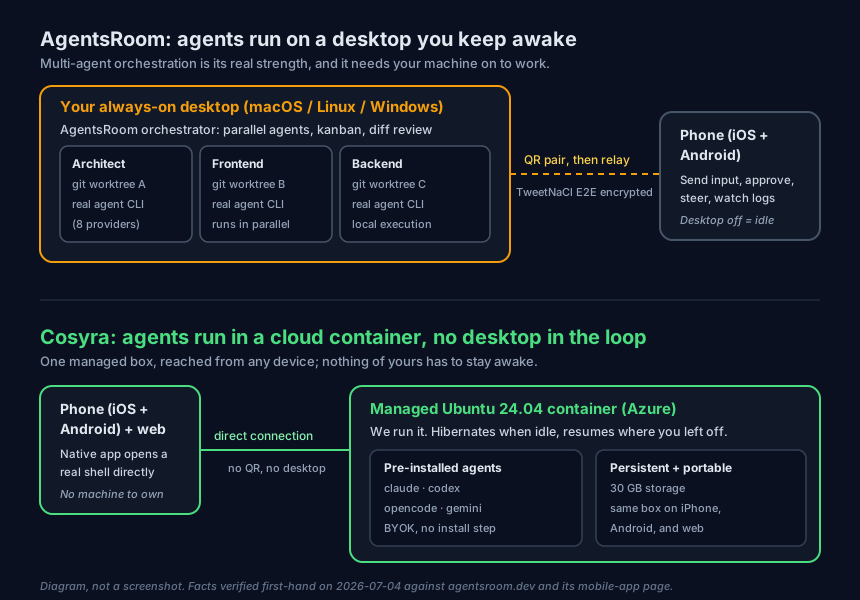
AgentsRoom solves the orchestration half of running agents well: it keeps several of them working at once, each in its own git worktree, and lets you review each one's diff before you merge. It does not solve the machine half. That box is yours to own, keep awake, and keep reachable. Cosyra ships the machine half: the container is the always-on box, it hibernates when idle and resumes where you left off, and the four agents are already there. We ran the same agents in our own container on the couch while writing this, with nothing at home switched on.
$ cat /etc/os-release | head -1
PRETTY_NAME="Ubuntu 24.04 LTS"
$ which claude codex opencode agy
/usr/local/bin/claude
/usr/local/bin/codex
/usr/local/bin/opencode
/usr/local/bin/agy
$ # no desktop to keep awake, no QR pair, no os to patch
$ claude "summarise the diff on this branch"
With AgentsRoom the equivalent first session starts one step earlier: you install the desktop app, install and auth your agent CLIs on that machine, QR-pair the phone on the same network, and then you are steering it. If you already run that machine, it is a clean flow with a much richer control surface than a single shell. If you do not, the machine is the project before the project.
Where does AgentsRoom beat Cosyra?
AgentsRoom beats Cosyra on multi-agent orchestration, local execution and privacy, provider breadth, and cost if you already own the compute. We ship a managed product and we still think AgentsRoom is the better tool for a real set of people. Here is where, with the receipts.
- Genuine multi-agent orchestration. Parallel agents, each isolated on its own git worktree, plus a kanban backlog, role presets (Architect, Frontend, Backend, DevOps, QA, and more), split-view terminal monitoring, and per-agent diff review in one window (agentsroom.dev, 2026-07-04). We run one agent session per shell tab and ship no orchestration UI like that. If you want to fan work out across several agents at once, AgentsRoom is built for exactly that and we are not.
- Local execution, code never leaves your machine. AgentsRoom's site says agents run locally with "no cloud relay" for execution, and the phone link is end-to-end encrypted with TweetNaCl. Your source never sits in a hosted container. For strict privacy, compliance, or air-gapped habits, that is a real advantage we cannot match, because our container is the whole point.
- Wider provider set. As of 2026-07-04 AgentsRoom drives eight providers with mid-conversation switching: Claude Code, Codex CLI, Antigravity CLI, OpenCode, Aider, Grok Build, Mistral Vibe, and Ollama. We pre-install four. If you want Grok Build or a local Ollama model in the same surface, AgentsRoom has them today.
- Cheaper software if you already own a box. Free for up to 3 projects, $9.99/month Pro for unlimited (verified 2026-07-04), versus our $20/month. The desktop cost lives on your side of the ledger, so if that machine already exists and is already paid for, the math favours AgentsRoom.
- No per-hour compute meter. Because you own the machine, AgentsRoom imposes no session-hour cap. Cosyra meters compute hours (120/month). For very long sessions on hardware you already run, that uncapped model can work out cheaper.
Where does Cosyra beat AgentsRoom?
Cosyra beats AgentsRoom on zero-machine onboarding, a phone app that stands on its own, agents that are genuinely pre-installed, and managed persistence you do not keep alive. The trade for "orchestrate on your own hardware" is that you have to own, wake, and reach that hardware. We would rather be it for you.
No desktop to own, wake, or keep reachable
This is the load-bearing difference. AgentsRoom gives the phone nothing to drive unless a desktop is on, unlocked enough to work, and on a reachable network. Standing that up and keeping it that way is the actual work, and it is work AgentsRoom leaves to you. Our container is the machine, and it lives in the cloud awake. Sign in and you are in a shell in seconds, with no box to keep running back home.
A phone app that works on its own
The AgentsRoom App Store listing says the app "requires the AgentsRoom desktop app on macOS to function." It is a remote control, not a standalone client. Our iOS and Android apps are the whole product: open one and you land in a live container, no desktop paired, no second device involved. If you carry a Pixel or a Galaxy and no laptop, that is the difference between coding and waiting until you get home.
The agents are already installed, on managed infrastructure
On first boot our container already has Claude Code, Codex CLI, OpenCode, and Antigravity CLI on the PATH: no install step, no auth wizard, no machine to install them on. AgentsRoom drives whatever agents you have set up on your own desktop across eight providers, which is more choice, but the setup and upkeep of those CLIs is yours. We did the supplying already.
Managed persistence you don't keep alive
A Cosyra container persists in the cloud and is the same container whether you reach it from an iPhone, an Android tablet, or a laptop browser. Drop your phone, buy a new one, log in, and your repo, your shell history, and your half-finished agent session are still there. With AgentsRoom, persistence lives on the desktop you run; if that machine reboots, sleeps, or drops off the network, the state and the ops are your problem, not the app's.
An opinion AgentsRoom's crowd will push back on
We think the always-on desktop is the wrong default for coding from a phone, and the local-execution crowd will disagree loudly. Their case is real: keeping the code and the compute on your own hardware means owning the trust boundary, and for some workloads that is non-negotiable. But most people who want to fan out a couple of agents from a train platform do not also want to be the sysadmin for a desktop that has to stay awake, unlocked, and reachable while they are away from it. The reason we run the container instead of relaying to your machine is that the machine is exactly the part that turns "code from my phone" back into "carry a laptop, or babysit a box." AgentsRoom made the orchestrate-your-own-machine bet; we made the be-the-machine bet.
Who should pick AgentsRoom instead of Cosyra?
Pick AgentsRoom instead of Cosyra if you already keep a desktop running, you want parallel multi-agent orchestration, or you need code to execute only on hardware you control. For those profiles AgentsRoom is the better tool, and we would tell you so.
Try AgentsRoom first if you are one of these profiles
- You already keep a machine on. If you have an always-on Mac, a home server, or a workstation that never sleeps, the compute is a sunk cost you maintain anyway. AgentsRoom turns it into a pocket-reachable multi-agent command center without changing where anything runs. That is the right answer for you, and it is cheaper.
- You want real parallel orchestration. If your work is fanning several agents across a codebase at once, each on its own worktree, with a kanban board and diff review in one place, AgentsRoom built exactly that. We run one session per tab and do not pretend to match it.
- Local-only execution is non-negotiable. If your code cannot run on third-party managed infrastructure, whether for compliance, air-gap habits, or plain preference, AgentsRoom's local-execution model keeps the trust boundary on your side. We are an Azure-hosted managed product; if that is a dealbreaker, we are honestly not your tool, and the relay-vs-cloud category guide lays out the other local options too, including leaner single-app relays like RemoteCode for a Mac-plus-iPhone setup (we line it up in Cosyra vs RemoteCode).
We run managed infrastructure and we are not neutral about it, but if you already own the compute and want to orchestrate it from your pocket, AgentsRoom is a clean answer to a real problem, and it is one of the closest neighbours to what we build.
How do you try Cosyra if you're coming from AgentsRoom?
You try Cosyra from an AgentsRoom background in about two minutes, and you skip the desktop entirely: install from the App Store or Google Play, sign in, and you land in a fresh Ubuntu 24.04 x86_64 container instead of QR-pairing a phone to a machine you had to set up. Your four agents are already on the PATH, the provider keys stay yours (BYOK), and there is no desktop underneath any of it. The session below is what we run on a fresh install.
$ # No desktop to pair. This container is the machine.
$ whoami && uname -s -m
coder
Linux x86_64
$ which claude codex opencode agy
/usr/local/bin/claude
/usr/local/bin/codex
/usr/local/bin/opencode
/usr/local/bin/agy
$ # bring your key, start coding, nothing to provision
The big unlock for most people coming from AgentsRoom: there is no machine to keep awake anymore. The container is the always-on box, it hibernates when idle and resumes where you left off, and you reach it the same way from any device. If the orchestration UI was the reason you liked AgentsRoom, keep it on your desktop; if keeping that desktop awake was the chore you tolerated to use it, this removes the chore. For the broader map of options, the best way to run AI agents on a phone walks through local, relay, and cloud side by side.
Frequently asked questions
Does AgentsRoom run my agents in the cloud like Cosyra does?
No. AgentsRoom's site says it "spawns a real CLI process in your project folder … no API proxy, no cloud relay, everything runs locally." The agents run on your own desktop; the phone reaches that desktop over an encrypted relay. If the desktop is off, asleep, or off-network, the phone has nothing to drive. Cosyra runs the agents in a managed Ubuntu container on Azure, so the compute is already awake and you reach it directly from the app.
[source: agentsroom.dev, "everything runs locally," no cloud relay for execution, 2026-07-04]
Is AgentsRoom or Cosyra cheaper?
It depends on whether you already own an always-on machine. AgentsRoom is free for up to 3 projects and $9.99/month Pro for unlimited projects (verified 2026-07-04), but that price assumes you already run and pay for the desktop that does the work. Cosyra starts at $20/month, and that price includes the always-on Ubuntu container, 30 GB of storage, and the native apps. If you already keep a machine on, AgentsRoom is cheaper; if you do not, Cosyra bundles the compute you would otherwise buy and maintain yourself.
[see: Cosyra pricing, Core $20/mo, Pro $30/mo]
Can I use the AgentsRoom phone app without a desktop?
No. The App Store listing (id6761265182) states the app "requires the AgentsRoom desktop app on macOS to function." The iOS and Android apps are companions that remote-control the desktop, not standalone clients. There is no AgentsRoom compute without a machine you supply. Cosyra's app is standalone: sign in and you are in a container we run, with no desktop to install or QR-pair.
[source: App Store id6761265182, "requires the AgentsRoom desktop app … to function", 2026-07-04]
Does AgentsRoom run more agents at once than Cosyra?
Yes, and this is where it is genuinely stronger. AgentsRoom is a multi-agent orchestrator: it launches several agents in parallel, each isolated on its own git worktree, with a kanban backlog, role presets, and per-agent diff review in one window. As of 2026-07-04 it drives eight providers with mid-conversation switching. Cosyra runs one agent session per shell tab and ships no orchestration UI, so for parallel multi-agent work on one machine AgentsRoom is the better fit.
[source: agentsroom.dev, parallel agents, git-worktree isolation, kanban, diff review, 2026-07-04]
Which is better for coding from an Android phone?
Both ship a native Android app, but they mean different things by it. AgentsRoom's Android app is a remote control that still needs your desktop running the agents. Cosyra's Android app opens a real Ubuntu shell in the cloud with four agents pre-installed, so nothing of yours has to stay awake at home. If you want to start an agent from an Android phone with no machine in the loop, Cosyra is self-contained; if you already keep a desktop on and want to steer it from Android, AgentsRoom fits.
[source: Google Play com.agentsroom.dev.ia, native Android companion app]
Is AgentsRoom open source?
The AgentsRoom site does not present the app under an open-source license, so we do not claim it is one. It supports open-source agent providers such as OpenCode, Aider, and Ollama, but that is a separate fact from the app's own license. If open-source or self-hostable infrastructure is a hard requirement for you, verify the license first-hand before relying on it. Cosyra's client and orchestration are closed too, so neither of us wins this row.
[source: agentsroom.dev, no OSI license stated for the app itself as of 2026-07-04]
Same agents, same phone: no desktop to keep awake. We run Claude Code, Codex CLI, OpenCode, and Antigravity CLI in a real x86_64 Ubuntu container, reached from a standalone iOS or Android app, with no machine to own or QR-pair. Two-minute setup.
AgentsRoom on a phone · AI coding agents on mobile · Remote-control coding from your phone · See pricing. Sign up and pick a plan. Eligible new users can start a 7-day free trial in the App Store app.