The best way to run AI coding agents on your phone is one of three setups, and which one fits you depends on what hardware you already own. You can run the agent locally on the device (Termux on Android), point your phone at a machine you keep awake as a remote control, or open a hosted cloud container where the agent lives in the cloud. We build the third option, so we will be upfront about when the other two beat it. Install Cosyra for iOS or Cosyra for Android to skip the setup entirely. Plans start at $20/month.
We kept hitting this decision ourselves. We wanted to approve a Claude Code permission request from the train, kick off a Codex run while waiting for coffee, and read a diff on the couch without opening a laptop. Each of the three approaches answers that differently, and the wrong one for your situation wastes a weekend. This guide lays out all three honestly, names the tools in each, and gives you a decision framework at the end. Once you have picked, the AI agents on mobile setup guide walks the install step by step. If you are still deciding which agent to run, our AI coding agent CLIs compared breaks down Claude Code, Codex, OpenCode, Gemini, and four more on license, cost, and mobile reach.
Quick decision. Pick the row that describes you:
- I have an always-on desktop or VPS and want my code to stay on it → relay (Happy Coder, Copilot CLI mobile, or SSH).
- I have no machine to keep awake and want a real terminal that just opens → hosted cloud container (Cosyra native app, or Codespaces in a browser).
- I mostly script offline and accept the limits → local on-device (Termux on Android).
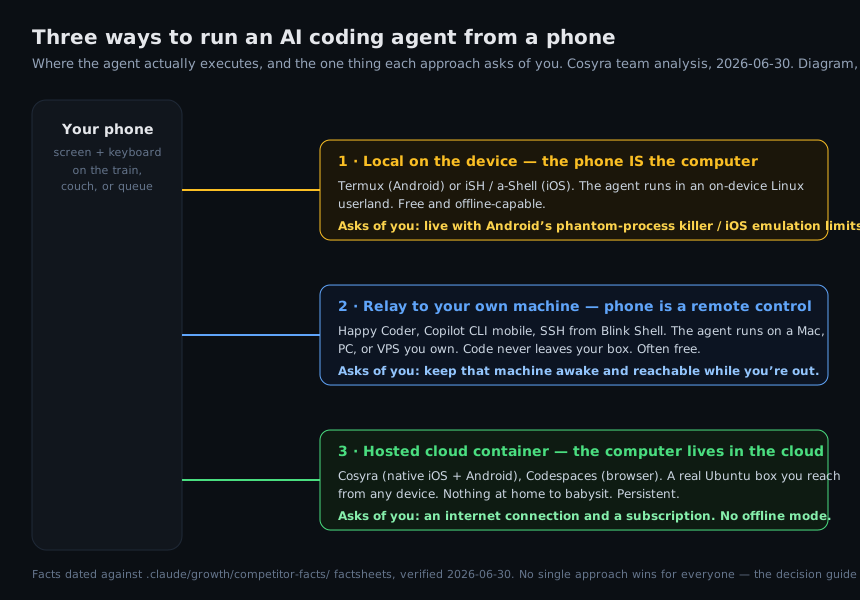
The three approaches at a glance
Strip away the brand names and there are exactly three places the agent can run: on the phone, on a computer you own, or on a computer someone else runs. Everything else is a variation on one of those. Here is how they compare on the things that decide which one you can live with.
| What matters | Local on-device | Relay to your machine | Hosted cloud container |
|---|---|---|---|
| Where the agent runs | On the phone | On your Mac, PC, or VPS | In a cloud Ubuntu container |
| Representative tools | Termux, iSH, a-Shell | Happy Coder, Copilot CLI mobile, SSH | Cosyra, GitHub Codespaces |
| Cost | Free | Client often free; you supply the machine | Subscription (Cosyra: from $20/mo) |
| Works offline | Yes (Termux, iSH) | No (needs the host reachable) | No (container is in the cloud) |
| Needs a machine kept awake | No | Yes | No |
| Native iOS + Android apps | Termux: Android only. iOS: emulator apps | Happy Coder: both. Copilot: GitHub Mobile | Cosyra: both. Codespaces: browser only |
| Code location | On the phone | On your own machine | In the cloud container |
| Real horsepower | Phone CPU and battery | Your machine's CPU | Cloud CPU, phone stays cool |
| Setup effort | Medium (install, configure) | High (tunnel or SSH, keep host up) | Low (install app, add API key) |
The rest of this guide takes each row of that table seriously. None of these three is the right answer for everyone, and the loudest blog posts usually pretend their favorite is.
Approach 1: Local on the device
Here the phone is the computer. The agent's process runs in a Linux
environment that lives on the handset, with no network round-trip to
anywhere. On Android that means
Termux, which gives you a real
Linux userland where Node.js installs through pkg and npm-based agents
like Claude Code, or Charm's source-available Crush binary, which we weigh against
a hosted container in
Cosyra vs Crush, genuinely run.
On iOS the equivalents are iSH and a-Shell, which emulate Linux on top of
the iOS sandbox.
Termux on Android
Termux is the real thing on Android: bash, OpenSSH, Python, and Node.js, all installed from its package manager. The catch is the operating system around it. Since Android 12, the OS aggressively kills background processes, which surfaces as the [Process completed (signal 9)] message the moment you switch apps mid-run. It is fixable on Android 14+ by disabling child-process restrictions in Developer Options, and on earlier Android it needs an ADB or root workaround. The Termux F-Droid build sat at v0.118.3 (released 2025-05-22) through our last check on 2026-06-13, so this is a stable, known quantity rather than a moving target.
The deeper limit is physics. A long agent run pegs the phone's CPU, and we have watched a handset get uncomfortably warm and drain fast during an extended session. For a quick script on the bus, Termux is great. For a multi-file refactor that runs for twenty minutes, you feel the phone working.
iSH and a-Shell on iOS
iOS has no Termux, so the on-device options are iSH and a-Shell. iSH runs
Alpine Linux through a user-mode i386 emulator, fully on-device with no
network. It is a genuinely clever project, but modern Node.js crashes on it
with an Illegal instruction error, an issue
open since 2024-01-21, and the App Store build has been frozen at 1.3.2 since 2023. That rules
out every npm-based agent CLI. a-Shell ships curated WebAssembly binaries
with no global npm path, so it has the same blocker. Both are fine for shell
scripting on the go. Neither is a route to running an AI agent locally on an
iPhone.
Pick local on-device if: you are on Android, you value working with no signal (a flight, a basement, a campsite), you keep sessions short, and you would rather not pay anyone. It is the only approach that works offline, and that is a real advantage we are not going to wave away.
Approach 2: Relay to your own machine
Here the phone is a remote control. The agent runs on a computer you already own, a Mac, a Linux box, or a VPS, and an app on the phone drives it and shows you the output. The defining property is that your code, your git history, and your API keys never leave your own hardware. The defining cost is that the hardware has to be awake and reachable the whole time you are out.
Happy Coder and the relay apps
Happy Coder is the cleanest example.
It is MIT-licensed and free, with native iOS and Android apps. You run a small
wrapper on your own machine instead of claude or
codex, and the phone app drives that local session over an
end-to-end-encrypted relay that, by the project's own description, only ever
sees encrypted blobs. You can even self-host the relay so nothing touches a
third-party server. We rate it highly for what it is, and its 4.9-star App
Store rating (from 941 ratings as of 2026-06-12) suggests its users agree.
The same shape covers AgentsRoom and similar tools: real local execution,
privacy by design, a desktop you keep running. Onepilot fits here too, as an
iPhone SSH client that deploys Claude Code or Codex onto a server you run;
our Onepilot comparison weighs that
BYO-server control plane against a managed container.
GitHub Copilot CLI mobile remote
If you live in GitHub, Copilot CLI's mobile path is worth knowing. Mobile remote control for Copilot CLI went generally available on 2026-05-18, so you can steer a session from the GitHub Mobile app or github.com. Keep the distinction exact: the CLI runs on your desktop and the phone is the remote, not the host. There is no build of Copilot CLI that runs on the phone itself, and per the official Copilot CLI docs it needs Node.js 22+ on a desktop OS. Factory's droid CLI ships the same handoff-not-host shape: its mobile surface lets you finish a droid task on your phone, but the agent still runs on a desktop or Factory's cloud, not the phone. We put the two shapes side by side in our Cosyra vs Factory Droid comparison: a routed-subscription desktop agent against a BYOK Linux container you drive from the phone.
SSH from a terminal app
The oldest version of this is SSH. A native client like Blink Shell on iOS
holds a session better than a web terminal because Mosh survives the
cellular handoffs that drop plain SSH when you walk between towers. Start
tmux on the host so the session outlives an app switch, and you have
a durable remote into your own Linux box. It is powerful and it is yours, but
it is also the most setup: you provision the server, you keep it patched, and
you keep it awake. Moshi is a newer take on
the same idea, an iOS, iPadOS, and watchOS SSH and Mosh client that bills itself
as a mobile interface for AI coding agents, with Apple Watch approvals and on-device
voice input. The agent still runs on the machine you keep awake, so it sits squarely
in this relay column rather than the hosted one; we put the two shapes side by
side in
Cosyra vs Moshi.
Pick relay if: you already run an always-on machine, your employer requires code to stay on company hardware, or you have a tuned local environment you do not want to recreate. The privacy story is the best of the three, and for a lot of professionals that decides it.
Approach 3: Hosted cloud container
Here the computer lives in the cloud. The agent runs in a real Linux container on a server someone else operates, and you reach it from any device. Nothing at home has to stay on. The two names that matter for mobile are us and GitHub Codespaces, and they take opposite stances on the phone.
Cosyra: native apps, agents pre-installed
We run an Ubuntu 24.04 container per user on Azure, reachable from native
iOS and Android apps and the web. Claude Code, Codex CLI, OpenCode, and
Antigravity CLI are already on the PATH, so there is no host to provision
and no SSH tunnel to keep alive. You bring your own API keys (you pay
Anthropic, OpenAI, or Google directly), clone a repo, and type claude. Files sit on 30 GB of persistent storage, and the container hibernates
after 10 minutes idle and resumes exactly where it left off, so we can pause
a session on the train and pick it up on the couch with the same shell
state. That continuity across devices is the whole point: the box does not
care which screen you open it from. See the
Cosyra vs Codespaces comparison for the head-to-head.
The honest gaps: there is no offline mode, because the container is in the cloud, so no signal means no terminal. There is no on-prem or self-hosted option, so you accept Azure as the host. And it is a subscription: $20 a month for Core or $30 a month for Pro. If those three are dealbreakers, one of the other two approaches is your answer, and that is fine.
GitHub Codespaces: powerful, browser-only on mobile
GitHub Codespaces runs the same class of cloud Linux container and integrates deeply with GitHub repos and pull requests, with a generous individual free tier (120 core-hours and 15 GB on GitHub Free, verified 2026-06-05). On a phone, though, there is no native app: you reach it through vscode.dev in mobile Safari or Chrome, and the VS Code file tree and terminal are cramped on a phone-sized viewport. It is excellent from an iPad with a keyboard and serviceable from a phone in a pinch. If your work already lives in Codespaces, the browser path is real; if the phone is your main device, the lack of a touch-built native app shows.
Pick hosted cloud if: the phone is your primary device, you do not want to run or maintain a server, and you want a real terminal that opens in a tap. It trades offline capability and a monthly fee for never babysitting a machine.
How to choose: a three-question framework
You do not need to weigh nine table rows. Three questions settle it for almost everyone.
- Do you already keep a computer awake and online? If yes, and you care about code staying on your hardware, relay is built for you. If you would have to leave a laptop running at home just for this, keep reading.
- Do you need to work with no internet? If yes, only local on-device qualifies. Termux on Android is your path; iOS cannot do it today. If no, drop this approach.
- Is the phone your main coding device? If yes, and you said no to the first two, a hosted cloud container with native apps is the least friction. You open the app and the terminal is there.
Here is the opinion we will plant a flag on, and plenty of relay fans will disagree: leaving a desktop awake at home so your phone can borrow it is a worse default than it sounds. You have traded a tether to a laptop for a tether to a laptop that you now cannot see, that drops you when the home Wi-Fi blips, and that you are paying to keep powered. For people who genuinely own an always-on server, relay is great. For everyone keeping a machine awake only to reach it from a phone, a cloud box that is simply always there is the calmer setup. We think the phone keyboard is also fine for agent-driven work, because your job is approving and directing, not typing out functions by hand. Most people who disagree have not tried a full session where the agent does the typing.
Want the cloud-container path with zero setup? Cosyra runs Claude Code, Codex CLI, OpenCode, and Antigravity CLI in a managed Ubuntu 24.04 container, reachable from native iPhone and Android apps. Plans start at $20/month.
Where each approach genuinely wins
To make the trade-offs concrete, here is the single strongest case for each, stated plainly:
- Local on-device wins on offline and price. Termux costs nothing and runs on a plane. No cloud setup can match that, and we are not going to pretend otherwise. If your constraint is "no signal" or "no budget," it wins outright.
- Relay wins on privacy and using your own environment. Your code and keys never leave a machine you control, and the agent runs against the exact toolchain you already tuned. For regulated work or a beloved local setup, that is decisive. Happy Coder's end-to-end encryption and self-hostable relay make it the strongest privacy story here.
- Hosted cloud wins on zero maintenance and real horsepower. Nothing to keep awake, a real CPU doing the work while the phone stays cool, and the same session from any device. That is the case we built Cosyra around.
The one thing to do next
Answer the three questions above and you have your approach. If you landed on relay, install Happy Coder or set up Copilot CLI's mobile remote and point it at your machine. If you landed on local and you are on Android, install Termux and disable child-process restrictions first. If you landed on hosted cloud, install Cosyra for iOS or Cosyra for Android and run your first agent in the time it takes to add an API key. For the broader terminal context beyond AI agents, the mobile coding terminal pillar covers SSH, tmux, and editors on a phone.
tl;dr
Use local on-device (Termux) if you need offline and free, on Android. Use relay (Happy Coder, Copilot CLI mobile, SSH) if you keep a machine awake and want code to stay on it. Use a hosted cloud container (Cosyra native apps, or Codespaces in a browser) if the phone is your main device and you want a real terminal with nothing to babysit.
Native iPhone and Android apps, available now on the App Store and Google Play. Cosyra runs Claude Code, Codex CLI, OpenCode, and Antigravity CLI in a real Ubuntu 24.04 container with 30 GB of persistent storage and session hibernation. Eligible new users can start a 7-day free trial in the App Store app.