Short answer. Factory Droid is a desktop terminal agent (npm i -g @factory/cli, bin droid) that runs on macOS, Linux, and Windows. It is a
routed subscription: one Factory plan routes Claude, GPT, and Gemini for
you, with no free tier, and its only phone surface is a handoff that
monitors an agent running elsewhere. Cosyra is a native iOS and Android app
paired with a managed Ubuntu 24.04 container that already has Claude Code, Codex
CLI, OpenCode, and Antigravity CLI installed, all BYOK. Droid is an agent
you run on a machine you keep awake. Cosyra is where you run agents from a phone.
If the phone is your primary device, that is the whole comparison.
Quick decision. Pick the path that matches your constraint:
- You code on a desktop and want frontier models without key juggling. Factory Droid routes Claude, GPT, and Gemini through one subscription. Where Factory Droid wins ↓
- The phone is the primary device. Cosyra is a native iOS and Android app with the container managed for you, four agents pre-installed. Where Cosyra wins ↓
- You want the side-by-side. Twelve attributes, two columns, no marketing. Feature table ↓
- You just want the verdict. Who should pick which. Decision framework ↓
We rate Factory Droid highly as a terminal agent. It routes several frontier models through one plan, its terminal UX is well reviewed, and its cross-surface story across TUI, IDE via ACP, Slack, and web is genuinely useful for teams. What it is not is a way to code from a phone. We ran both for real: droid inside a cloud Ubuntu container we reached from an Android phone, and Cosyra from that same phone on a train with the laptop shut in a bag. The trade-offs below are the ones we hit, checked against Factory's own docs and our internal factsheet, not invented bullet points.
This post was written by the Cosyra team. We compared Cosyra against Factory Droid based on hands-on testing of both, and cross-checked every Factory fact against Factory's pricing page, the droid CLI docs, the factory-ai/factory repo, and the @factory/cli npm metadata. Source verification date 2026-07-07 (npm license and version last checked 2026-07-06). Where Factory has not published a specification, we say so rather than guess.
tl;dr
Use Factory Droid if you code on a desktop and want Claude, GPT, and Gemini routed through one $20/mo subscription with deep IDE, Slack, and Linear/Jira integration. Use Cosyra if your main device is a phone: native iOS and Android apps, a managed Ubuntu container, and four BYOK agents pre-installed, in about two minutes.
App Store · Google Play. Eligible new users can start a 7-day free trial in the App Store app.
How do Cosyra and Factory Droid compare feature by feature?
The core difference is shape. Cosyra is a hosted mobile cloud terminal with its own managed Ubuntu container and native phone apps. Factory Droid is a desktop terminal agent you install on a machine you already run, billed against a Factory subscription. The table below maps them on twelve attributes as of 2026-07-07. We cite the date rather than pin a droid version in the body, because the CLI ships fast; it was 0.164.1 when we last checked npm on 2026-07-06.
| Feature | Cosyra | Factory Droid |
|---|---|---|
| Pricing | $20/month Core or $30/month Pro (USD) | Pro $20 / Plus $100 / Max $200 per month, usage-metered |
| Free tier | None. 7-day free trial for eligible new users in the App Store app | None; no free plan or documented free trial |
| OS support | Native iOS + Android apps, plus web | macOS, Linux, Windows (desktop only) |
| AI agents pre-installed | Claude Code, Codex CLI, OpenCode, Antigravity CLI | Droid is the one agent; you install it yourself |
| Persistent storage | 30 GB per user | None of its own; state lives on the machine you ran it on |
| Offline capability | No; the container lives in the cloud | Binary runs offline, but inference calls the network |
| Container sandboxing | Per-user Ubuntu 24.04 x86_64 container on Azure AKS | Runs in your shell; Droid Computers offer a managed cloud target |
| Port forwarding | Yes; container ports reachable from the app | Uses your local machine's network; no managed forwarding layer |
| File sync / cross-device | Same container from iPhone, Android, and web | Files live where you ran it; sessions sync across Factory surfaces |
| Max session length | Hibernation + resume; 120 hours/month compute | Bounded by 5-hour, weekly, and monthly rolling rate limits |
| API key model | BYOK; pay Anthropic / OpenAI / Google directly | Routed subscription + BYOK allowance on individual plans |
| Open source | Proprietary, hosted only | Proprietary; npm UNLICENSED, GitHub repo is docs/issues |
Want the phone-native side of this comparison? Cosyra ships on the App Store and Google Play today with Claude Code, Codex CLI, OpenCode, and Antigravity CLI pre-installed. Two-minute setup. Eligible new users can start a 7-day free trial in the App Store app.
Routed subscription vs BYOK: what actually differs?
This is the billing distinction that separates the two, and it is easy to get wrong. Factory Droid is a routed subscription: your one Factory plan routes Claude, GPT, and Gemini per task, so you never paste a provider key for the routed path, and individual plans add a complimentary BYOK allowance on top. Cosyra is pure BYOK: you bring your own Anthropic, OpenAI, or Google key and pay that provider directly, with no per-request metering on our side. The capture below shows droid running inside a Cosyra container with no provider key entered, next to the BYOK path our four agents use.
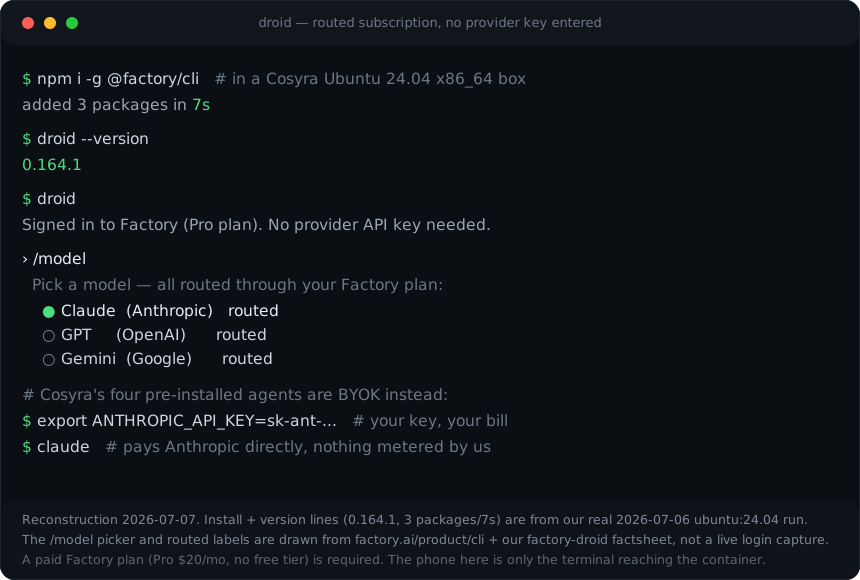
0.164.1, three packages in seven seconds) are from a real
ubuntu:24.04 run we captured on 2026-07-06; the
/model picker and routed labels are drawn from
factory.ai/product/cli and our
factsheet, not a live login capture. A paid Factory plan is required to use
droid.
Which model is cheaper depends entirely on how much you run. For light, bursty use the routed subscription is calmer: no keys, no surprise provider invoice, and the rate limits reset. For heavy, long agent sessions we think a flat BYOK pass-through is the more honest deal, because you see exactly what a session costs at your provider instead of drawing down metered credits against rolling 5-hour, weekly, and monthly windows. Factory would argue the routed plan removes friction and the bundled models are worth the metering, and for a lot of people they are right. It is a real trade, not a winner.
Where does Factory Droid beat Cosyra?
Factory Droid beats Cosyra on model breadth in one bill, deep tool integration, being the agent itself, and a managed cloud exec target. We respect the tool. It is well-built and its cross-surface continuity is a genuine workflow win.
- Frontier models in one subscription. Droid routes Claude, GPT, and Gemini per task from a single Factory plan, with per-task model choice. That is genuinely less friction than juggling separate Anthropic, OpenAI, and Google keys, which is exactly what Cosyra's BYOK model asks of you.
- Deep IDE, Slack, and issue-tracker integration. Droid reaches into VS Code and, via ACP, Zed and JetBrains, plus Slack and Linear/Jira, with sessions syncing across those surfaces. If your day lives in those tools, that integration saves real time. Cosyra doesn't have it.
- It is the agent. Cosyra is the place you run agents; Droid is the agent. A solo developer who only wants a great terminal agent on a laptop, and never codes from a phone, has no reason to pay for a container. Droid alone is the right buy.
- Droid Computers. On Plus and above, Factory gives you managed remote cloud execution environments without provisioning one yourself, a real convenience if you're already in the Factory ecosystem.
Where does Cosyra beat Factory Droid?
Cosyra beats Factory Droid on being a real phone tool: native iOS and Android apps, a managed container with four agents already installed, a persistent cross-device workspace, and BYOK billing with no metering in the middle. The trade-off for "routed models in one plan" is that there is no plan that puts droid in your pocket.
The agent actually runs from the phone
Cosyra is a native App Store and Google Play app. Droid has no phone client at all. Its Mobile surface, per Factory's own product page, lets you start a task in your terminal and finish it on your phone: a handoff and monitor for an agent executing on a desktop or on Droid Computers, not a terminal running droid on the phone. Cosyra runs the agent in a cloud box you drive from a touch-tuned terminal with a key toolbar. We think the phone keyboard is fine for agent-driven coding, where you write prompts and read diffs more than you type raw code. Most people who disagree haven't tried it on a real commute.
Four agents already installed, none of them metered by us
Cosyra's container ships with Claude Code, Codex CLI, OpenCode, and Antigravity CLI, all BYOK. Droid is one agent you install yourself, billed against a Factory plan rather than a raw provider key. If you want droid too, add it. It's not either/or. See how to run Factory Droid from your phone for the full walkthrough. The same routed-subscription-plus-handoff shape shows up in GitHub Copilot CLI, so if you're weighing that one too, the phone trade-offs mirror these.
A persistent workspace that follows you across devices
Cosyra's per-user Ubuntu 24.04 container has 30 GB persistent storage and survives device loss. Open it on the train from Android, keep going on the couch from an iPhone, finish at a desk in the browser. Droid's state lives on whatever machine you ran it on; if that machine is asleep, so is your session. Cosyra containers hibernate after ten minutes idle and resume on reopen, documented on the pricing page, so you don't re-clone or re-auth.
No home machine to keep awake
The honest phone path for droid is a remote Linux box, which means a machine you maintain and keep online. Cosyra is the box. There is nothing in your apartment to leave running, and nothing to SSH into from a cramped mobile browser. For the wider pattern, see our guide to running AI coding agents on your phone and our breakdown of the best way to run agents on a phone.
Who should pick Factory Droid and who should pick Cosyra?
Pick Factory Droid if you live on a desktop, want routed frontier models in one plan, and lean on IDE and Slack integration. Pick Cosyra if the phone is your primary device and you want agents that work the moment the app opens. We mean this honestly: the answer is not always "use our product."
Try Factory Droid first if…
- You code at a desktop most of the day and the phone is an occasional glance, not the main screen.
- You want Claude, GPT, and Gemini available per task without managing three provider keys, and $20/mo for that routing is worth it to you.
- Your workflow is tied to VS Code, JetBrains, Slack, or Linear/Jira, and first-party integration across those tools saves you real time.
Choose Cosyra if…
- Your main interface is the phone, iPhone, Android, or both, and you want native apps rather than a browser SSH session.
- You want four agents (Claude Code, Codex CLI, OpenCode, Antigravity CLI) pre-installed in a managed container, not one tool you set up yourself.
- You want BYOK billing straight to your provider with no per-request credit metering in the middle.
- You want a persistent workspace that follows you across devices with documented resources (30 GB storage, 120 hours/month, Ubuntu 24.04).
We are biased, obviously. But if you sit at a desktop and want a routed multi-model agent that plugs into your IDE and Slack, Droid is a legitimate, well-built choice, and droid installs cleanly inside Cosyra if you later want it on a phone-reachable box. Phone-native, with four BYOK agents in a managed container, is where Cosyra earns the difference. If you're weighing the Android on-device route specifically, our Cosyra vs Termux comparison covers why that path stays painful.
How do you add Factory Droid on Cosyra if you want both?
This is not either-or. Cosyra's container is a full Ubuntu 24.04 x86_64 box, so if you want droid alongside the four pre-installed agents, you add it yourself. We don't pre-install it because it runs against your Factory plan rather than the BYOK model the other four use. The session below is the one we ran in a clean container on 2026-07-06, three packages in seven seconds, then the version check.
$ uname -m
x86_64
$ node --version
v22.23.1
$ which claude codex opencode agy
/usr/local/bin/claude
/usr/local/bin/codex
/usr/local/bin/opencode
/usr/local/bin/agy
$ npm i -g @factory/cli
added 3 packages in 7s
$ droid --version
0.164.1
$ # Sign in to your Factory plan, then:
$ droid
On x86_64 the glibc-vs-Bionic problem that makes on-device Android risky does not apply: the container is the same architecture and libc droid targets on desktop Linux. Sign in to your Factory plan (droid needs one; there is no free tier), and you have five agents in one phone-reachable box, four BYOK and one routed.
Frequently asked questions
Is Factory Droid free?
No. Factory has no free plan and no documented free trial as of 2026-07-07. The cheapest tier is Pro at $20/mo, then Plus $100/mo and Max $200/mo, with Teams and Enterprise on custom pricing. Plus is roughly 5x Pro's usage and Max roughly 10x. Droid Core is an overflow model pool that kicks in after your plan's standard usage is spent, not a free tier.
Can I run Factory Droid on my phone?
Not as a runtime. Factory's CLI docs list macOS, Linux, and Windows only, with no Android or iOS build. Its Mobile surface is a handoff and monitor. Start a task in your terminal and finish it on your phone, watching an agent that runs on a desktop or on Droid Computers. To actually run droid with a phone as your only device, install it inside a cloud Linux container reached from a native app.
[source: droid CLI docs, platform support]
Does Factory Droid work in Termux on Android?
We haven't run it, so we won't claim it works or fails. The risk is concrete: droid's installer pulls a prebuilt binary, and Termux uses Bionic libc rather than glibc, the case where npm resolves a package but the binary won't load at runtime. Until someone captures a first-hand Termux run, treat on-device Android as unverified and use a cloud glibc container, where we did confirm the install works.
[source: droid install methods]
Is Factory Droid BYOK like Cosyra?
Partly. Factory Droid is a routed subscription: one plan routes Claude, GPT, and Gemini per task so you don't juggle keys, and individual plans include a complimentary BYOK allowance on top. Cosyra is pure BYOK. You paste your own Anthropic, OpenAI, or Google key and pay that provider directly, with nothing metered on our side.
Is Factory Droid open source?
No. The npm license field for @factory/cli is
UNLICENSED and the factory-ai/factory GitHub repo
returns a license of None (checked 2026-07-06). That repo is a docs and issue
tracker, not the CLI source. Droid is proprietary, closed source.
[source: @factory/cli npm metadata] · [factory-ai/factory repo]
Can I run Factory Droid inside Cosyra?
Yes, in one command. Cosyra's container is a full Ubuntu 24.04 x86_64 box,
so droid installs the same way it does on desktop Linux:
npm i -g @factory/cli. We don't pre-install it (we ship
Claude Code, Codex CLI, OpenCode, and Antigravity CLI, all BYOK), because
droid bills against a Factory plan. On 2026-07-06 we ran the install in a
clean container: three packages in seven seconds, droid --version
printed 0.164.1.
tl;dr
Use Factory Droid if you code on a desktop and want Claude, GPT, and Gemini routed through one $20/mo subscription with deep IDE, Slack, and Linear/Jira integration. Use Cosyra if your main device is a phone: native iOS and Android apps, a managed Ubuntu container, and four BYOK agents pre-installed, and droid installs on top in one command if you want both.
App Store · Google Play · Factory Droid on your phone · AI agents on mobile
Native iPhone and Android apps, available now on the App Store and Google Play. Cosyra runs Claude Code, Codex CLI, OpenCode, and Antigravity CLI in a real Ubuntu 24.04 container with 30 GB of persistent storage and documented session hibernation.