Short answer. GitHub Copilot CLI is a desktop terminal agent (npm install -g @github/copilot, Node.js 22+) that runs on Linux, macOS, and Windows. It has no mobile
app, and it does not run in Termux on Android because two of its native
modules have no Android build. Cosyra is a native iOS and Android app
paired with a managed Ubuntu 24.04 container that already has Claude Code, Codex
CLI, OpenCode, and Antigravity CLI installed. Copilot CLI is one agent you run
on a machine you keep awake. Cosyra is a phone app and a container we run. If
the phone is your primary device, that difference is the whole comparison.
Quick decision. Pick the path that matches your constraint:
- You already pay for Copilot and code on a desktop. The Copilot CLI is included on your plan and runs natively in your terminal. Where Copilot CLI wins ↓
- The phone is the primary device. Cosyra is a native iOS and Android app with the container managed for you, four agents pre-installed. Where Cosyra wins ↓
- You want the side-by-side, twelve attributes, two columns, no marketing. Feature table ↓
- You just want the verdict, who should pick which. Decision framework ↓
We rate GitHub Copilot CLI highly. It is a clean terminal agent with a preview-before-execute model, deep GitHub integration, and a Free tier that includes the CLI. If you sit at a desktop and already pay for Copilot, it is a strong default. What it is not is a way to code from a phone. We ran both for real: Copilot CLI in a Codespace from a laptop, and Cosyra from an Android phone on the train with the laptop shut in a bag. The trade-offs below are the ones we hit, not invented bullet points.
This post was written by the Cosyra team. We compared Cosyra against GitHub Copilot CLI based on hands-on testing of both, and cross-checked every Copilot fact against GitHub's own docs, the github/copilot-cli repo and its public issue tracker, and our internal competitor factsheet. Source verification date 2026-07-25. Where GitHub has not published a specification, we say so rather than guess.
tl;dr
Use GitHub Copilot CLI if you code on a desktop, want the deepest GitHub integration, and like that the CLI is included on the Free plan. Use Cosyra if your main device is a phone: native iOS and Android apps, a managed Ubuntu container, and four agents pre-installed, in about two minutes.
App Store · Google Play. Eligible new users can start a 7-day free trial in the App Store app.
How do Cosyra and GitHub Copilot CLI compare feature by feature?
The core difference is shape. Cosyra is a hosted mobile cloud terminal with its own managed Ubuntu container and native phone apps. Copilot CLI is a desktop terminal agent you install on a machine you already run. The table below maps them on twelve attributes as of 2026-07-25. Copilot CLI version is v1.0.75, published 2026-07-24.
| Feature | Cosyra | GitHub Copilot CLI |
|---|---|---|
| Pricing | $20/month Core or $30/month Pro (USD) | Free $0 / Pro $10 / Pro+ $39 / Max $100 per month, plus AI-credit metering |
| Free tier | None. 7-day free trial for eligible new users in the App Store app | CLI included on the Copilot Free plan (limited agent usage) |
| OS support | Native iOS + Android apps, plus web | Linux, macOS, Windows (PowerShell 6+ / WSL), desktop only |
| AI agents pre-installed | Claude Code, Codex CLI, OpenCode, Antigravity CLI | Copilot CLI is the one agent; you install it yourself |
| Persistent storage | 30 GB per user | None of its own; state lives on the machine you ran it on |
| Offline capability | No, the container lives in the cloud | Binary runs offline, but inference calls GitHub-hosted models, so it needs a network |
| Container sandboxing | Per-user Ubuntu 24.04 x86_64 container on Azure AKS | Runs in your shell; no sandbox of its own (preview-before-execute approval model) |
| Port forwarding | Yes, container ports reachable from the app | Uses your local machine's network; no managed forwarding layer |
| File sync / cross-device | Same container from iPhone, Android, and web | Files live wherever you ran it; no cross-device workspace |
| Max session length | Hibernation + resume; 120 hours/month compute | Bounded by your machine uptime and your plan's credit allowance |
| API key model | BYOK: pay Anthropic / OpenAI / Google directly | Copilot subscription or PAT (GH_TOKEN); credit-metered, not raw BYOK |
| Open source | Proprietary, hosted only | Not open source, public issues, compiled npm package |
Want the phone-native side of this comparison? Cosyra ships on the App Store and Google Play today with Claude Code, Codex CLI, OpenCode, and Antigravity CLI pre-installed. Two-minute setup. Eligible new users can start a 7-day free trial in the App Store app.
Why won't GitHub Copilot CLI install on an Android phone?
The short version: it is a Node CLI, but it bundles two native modules that have no Android build, so the "just npm install it in Termux" path that works for some tools fails here. We could not run the install live (the CLI needs a Copilot login), so the capture below is a reconstruction that quotes the exact errors from GitHub's public issue tracker, dated 2026-06-28.
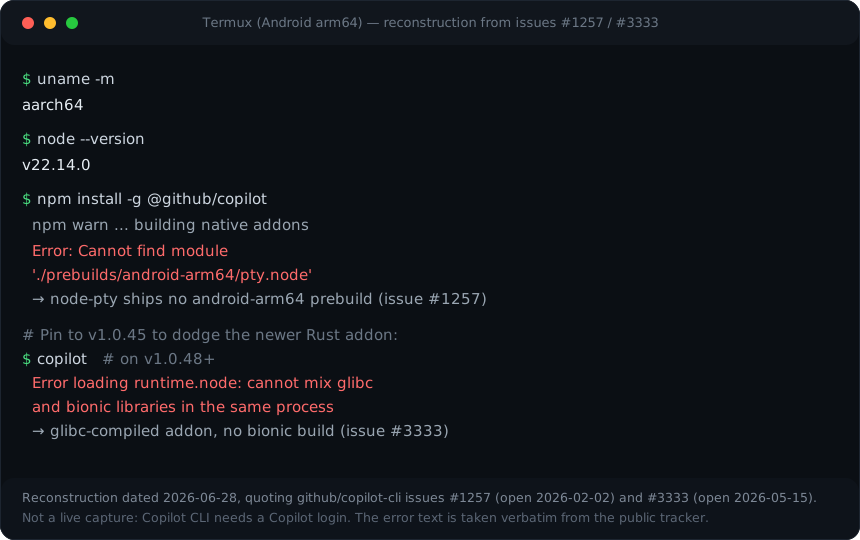
android-arm64 prebuild for pty.node) and
issue #3333 (the v1.0.48+ glibc runtime.node addon cannot load on Termux's
bionic libc). This is not a live capture, Copilot CLI needs a Copilot login,
but the error text is taken verbatim from the public tracker.
This is the crux of why "Copilot CLI on a phone" is misleading on Android. The fix is not a flag or a workaround you can paste in. It is to run the CLI on a Linux box that is not your phone, then reach that box from the phone. A cloud container like Cosyra is one way to do that; Codespaces or your own SSH server are others. We wrote a fuller walkthrough in how to run GitHub Copilot CLI from your phone, which covers the remote-box path step by step.
Where does GitHub Copilot CLI beat Cosyra?
Copilot CLI beats Cosyra on cost of entry, GitHub integration, running on your own hardware, and the breadth of GitHub/Microsoft behind it. We respect the tool. It is well-built and the preview-before-execute model is a sane default for an agent that runs shell commands.
- Free entry point. The CLI is included on the Copilot Free plan at $0. Cosyra is a paid cloud service. If your budget is zero and you have a desktop, Copilot CLI starts cheaper.
- Deepest GitHub integration. Issues, pull requests, and repo context are first-party. Copilot CLI can work against repositories, issues, and PRs directly per GitHub's docs. If your day is GitHub-shaped, that integration is hard to beat.
- Runs locally on your own machine. No cloud-container dependency and no per-user hosting cost. Your code never leaves the machine you run it on, which some teams require.
- An async phone path through GitHub Mobile. Since April 2026 the GitHub Mobile app can assign a task to a Copilot cloud agent that opens a pull request for you. That is not the interactive CLI, but if "fire off a task from my phone, review the PR later" is your need, it does that with zero setup.
Where does Cosyra beat GitHub Copilot CLI?
Cosyra beats Copilot CLI on being a real phone tool: native iOS and Android apps, a managed container with four agents already installed, a persistent cross-device workspace, and a BYOK billing model with no credit metering. The trade-off for "runs on your own machine for free" is that there is no machine in your pocket that runs it.
Native iOS and Android apps
Cosyra is a native App Store and Google Play app. Copilot CLI has no mobile client at all. On a phone you would otherwise be SSH-ing from a browser or fighting a native-module install that does not finish. We ship a touch-tuned terminal with a key toolbar so the phone keyboard stops being the bottleneck. We think the phone keyboard is fine for agent-driven coding, where you are writing prompts and reading diffs more than typing raw code. Most people who disagree have not tried it on a real commute.
Four agents already installed, none of them metered by us
Cosyra's container ships with Claude Code, Codex CLI, OpenCode, and Antigravity CLI. Copilot CLI is one agent you install yourself, and it bills against Copilot credits rather than a raw provider key. We think the credit-metered model is the wrong default for heavy agent use, because a flat BYOK pass-through is more honest about what a long session actually costs. GitHub would argue the bundled credits and the Free-tier CLI lower the barrier to entry, and for light use they have a point. With Cosyra you pay Anthropic, OpenAI, or Google directly and we do not sit in the billing path.
A persistent workspace that follows you across devices
Cosyra's per-user Ubuntu 24.04 container has 30 GB persistent storage and survives device loss. Open it on the train from Android, keep going on the couch from an iPhone, finish at a desk in the browser. Copilot CLI's state lives on whatever machine you ran it on. If that machine is asleep, your session is asleep. Containers hibernate after ten minutes idle and resume on reopen, documented on the pricing page, so you do not re-clone or re-auth.
No home machine to keep awake
The honest Android and iOS path for Copilot CLI is a remote Linux box, which means a machine you maintain and keep online. Cosyra is the box. There is nothing in your apartment to leave running, and nothing to SSH into from a cramped mobile browser. For a wider view of that pattern, see our guide to running AI coding agents on your phone. Copilot CLI is not the only agent that pairs a routed-subscription bill with a handoff-only mobile story. Factory's droid CLI lands in the same spot, so the phone tradeoffs there mirror the ones here, and we lay them out side by side in Cosyra vs Factory Droid.
Who should pick GitHub Copilot CLI and who should pick Cosyra?
Pick Copilot CLI if you live on a desktop, your work is GitHub-centric, and a $0 entry tier matters. Pick Cosyra if the phone is your primary device and you want agents that work the moment the app opens. We mean this honestly: the answer is not always "use our product."
Try GitHub Copilot CLI first if…
- You code at a desktop most of the day and the phone is an occasional glance, not the main screen.
- Your workflow is deeply tied to GitHub issues and pull requests, and first-party integration saves you real time.
- You want a free starting point and you already have a GitHub Copilot subscription that the CLI is included with.
Choose Cosyra if…
- Your main interface is the phone, iPhone, Android, or both, and you want native apps rather than a browser SSH session.
- You want four agents (Claude Code, Codex CLI, OpenCode, Antigravity CLI) pre-installed in a managed container, not one tool you set up yourself.
- You want BYOK billing straight to your provider with no per-request credit metering in the middle.
- You want a persistent workspace that follows you across devices with documented resources (30 GB storage, 120 hours/month, Ubuntu 24.04).
We are biased, obviously. But if you sit at a desktop and live in GitHub, Copilot CLI is a legitimate, well-built choice, and the Free-tier CLI is a genuinely low-friction way to start. Phone-native, with four agents in a managed container, is where Cosyra earns the difference. If you are still weighing the Android side specifically, our Cosyra vs Termux comparison covers why the on-device route stays painful.
How do you add Copilot CLI on Cosyra if you want both?
This is not either-or. Cosyra's container is a full Ubuntu 24.04, so if you want Copilot CLI alongside the four pre-installed agents, you add it yourself. We do not pre-install it, because it runs against your Copilot plan rather than the BYOK model the other four use. Confirm Node is 22 or newer first, then install. The session below shows the commands we run on a fresh container.
$ uname -m
x86_64
$ node --version
v22.14.0
$ which claude codex opencode agy
/usr/local/bin/claude
/usr/local/bin/codex
/usr/local/bin/opencode
/usr/local/bin/agy
$ npm install -g @github/copilot
+ @github/copilot@1.0.75
$ # Auth with your Copilot subscription or a PAT:
$ export GH_TOKEN=... # Copilot Requests permission
$ copilot
On x86_64 the native-module problem that blocks Termux does not apply: the container is the same architecture Copilot CLI targets on desktop Linux. Confirm your container's Node is 22+ before claiming a clean install, then point it at your GitHub token. Now you have five agents in one phone-reachable box, four BYOK and one on Copilot credits.
Frequently asked questions
Does GitHub Copilot CLI work in Termux on Android?
No. Even though it is a Node CLI, @github/copilot ships native
modules with no Android build. The pty.node pseudo-terminal has
no android-arm64 prebuild, so the install fails outright, and since
v1.0.48 a glibc-compiled Rust addon, runtime.node, cannot
load on Termux's bionic libc. The honest Android path is a remote or cloud
Linux box, not Termux.
[source: github/copilot-cli issue #1257] · [issue #3333]
Is the GitHub Copilot CLI free?
The CLI itself is included on the GitHub Copilot Free plan ($0) with limited agent usage, as of 2026-07-25. Heavier agent use needs a paid plan: Pro $10/mo, Pro+ $39/mo, or Max $100/mo, each carrying a monthly pool of AI credits valued at $0.01 each.
[source: GitHub Copilot plans]
Can I use GitHub Copilot from my phone at all?
Partly. The GitHub Mobile app added a Copilot cloud agent in April 2026 that you can assign a coding task to from your phone, and it opens a pull request asynchronously. That is not the interactive CLI, though. For an interactive terminal on a phone you need a remote Linux box reached over SSH, Codespaces, or a container like Cosyra.
[source: GitHub Changelog, 2026-04-08]
Is Copilot CLI BYOK like Cosyra?
No. Copilot CLI authenticates with an active GitHub Copilot subscription
or a fine-grained PAT with the Copilot Requests permission (via
GH_TOKEN/GITHUB_TOKEN), and bills against
GitHub-hosted models metered in Copilot credits. You can point it at a
custom model provider, but that is the exception. Cosyra is BYOK: you pay
Anthropic, OpenAI, or Google directly.
[source: github/copilot-cli README]
What Node version does GitHub Copilot CLI need?
Node.js 22 or later, installed via
npm install -g @github/copilot, as of 2026-07-25. If you have
ignore-scripts=true in ~/.npmrc you must run
npm_config_ignore_scripts=false npm install -g @github/copilot, because the package builds native addons during install.
[source: GitHub Docs, Install Copilot CLI]
Which agents does Cosyra pre-install, and is Copilot CLI one of them?
Cosyra pre-installs four agents: Claude Code, Codex CLI, OpenCode, and Antigravity CLI. Copilot CLI is not one of them. The container is a full Ubuntu 24.04, so you can add it yourself with one command once you have confirmed Node 22+, but it runs against your GitHub Copilot plan, not BYOK.
tl;dr
Use GitHub Copilot CLI if you code on a desktop, want the deepest GitHub integration, and like that the CLI is included on the Free plan. Use Cosyra if your main device is a phone: native iOS and Android apps, a managed Ubuntu container, and four agents pre-installed, with BYOK billing straight to your provider.
App Store · Google Play · Copilot CLI on your phone · AI agents on mobile
Native iPhone and Android apps, available now on the App Store and Google Play. Cosyra runs Claude Code, Codex CLI, OpenCode, and Antigravity CLI in a real Ubuntu 24.04 container with 30 GB of persistent storage and documented session hibernation.