Factory Droid runs on macOS, Linux, and Windows. There is no iPhone or
Android build. So to run droid from a phone you put it on a real
Linux machine and reach it. The fastest way: install
Cosyra for iOS or
Cosyra for Android, then npm i -g @factory/cli in the terminal (Node 22+ is already there), sign in to Factory, and run droid. Factory also has a mobile surface, but it only steers a droid running on
a machine elsewhere. We installed droid in a clean container to check the
path; here is each option.
Quick decision: pick the path you came for:
- Cloud container (Cosyra): you want droid actually running somewhere your phone reaches, with no desktop left awake. Setup in ~5 minutes ↓
- Factory Web and Mobile: you already keep a desktop or Droid Computer running and just want to watch and steer it. How that works ↓
- Termux (Android): you want it on-device and need the honest state of that. The glibc question ↓
Not sure which fits? The side-by-side comparison ↓ lines them up on what runs where, and what each costs.
This guide was written by the Cosyra team. We grounded every claim in primary sources checked 2026-07-06: Factory's Droid CLI overview, its pricing page, the Web and Mobile product page, and the Factory-AI/factory repo. We also installed droid ourselves; the capture is below.
What is Factory Droid?
Factory Droid is Factory AI's terminal-native coding agent. You install a
CLI, launch it with droid inside a repo, and it plans, edits files,
runs commands, and drives work with autonomy levels you set. It sits on the same
shelf as Claude Code, Codex CLI, and OpenCode: a full agent in a TUI, not a command-suggester.
- Packages: it ships on npm as
@factory/cliand the aliasdroid; both resolve to the same CLI with the bin namedroid(version 0.164.1 as of 2026-07-06, though it ships fast, so treat the number as a snapshot). - Platforms: macOS, Linux, and Windows. No native iOS or Android build exists, and Factory's own CLI overview lists no mobile platform.
- Billing: a routed subscription: one Factory plan routes Claude, GPT, and Gemini per task, and individual plans include a complimentary bring-your-own-key allowance on top. No free tier; Pro is $20/month.
- Source: proprietary and closed. The npm package is published UNLICENSED and the GitHub repo carries no license.
Because it is a binary that expects a real shell, it has the same mobile problem as every other coding CLI: the phone is the wrong place to run the process. The fix is putting the process somewhere real.
Factory's own "mobile" is control, not the CLI on your phone
This is the part that trips people up. Factory ships a Web and Mobile surface, and the pitch is genuinely useful: start a task in your terminal and finish it on your phone, watch progress, inspect tool calls, and approve diffs from a screen sized for a phone. With Bring Your Own Machine you can remotely steer a droid running on your laptop or workstation while you are out for a walk.
But read where the agent runs: the droid executes on a desktop, on a Bring-Your-Own-Machine box you keep awake, or on Factory's managed Droid Computers (a cloud exec target on the Plus plan and up). The phone is a control-and-monitor window onto a session running somewhere else. If you have a machine you can keep powered on, that fits well. If you do not, if the phone is your only device, there is nothing for the mobile surface to steer. That is exactly the gap a cloud container fills, and it is the same control-versus-run split we map across every agent in the best way to run AI agents on a phone.
How can you run droid from a phone?
Three ways, in order of how well they work without a desktop: a cloud Ubuntu container where droid actually runs (Cosyra), Factory's mobile control of a session running elsewhere, and Termux on Android (untested and likely rough).
1. Cosyra: install droid in a cloud container
Cosyra is a native iOS and Android terminal connected to a persistent Ubuntu
24.04 container. It ships Node 22+, so npm i -g @factory/cli
installs and droid runs in the container, so nothing of yours has
to stay awake. We pre-install Claude Code, Codex CLI, OpenCode, and Antigravity
CLI; droid goes on top in one command.
- Works when: you want droid running on demand from either platform with no home machine to maintain.
- Breaks when: you have no internet, or you specifically need droid reaching resources only on your desktop's local network.
- Cost: Core is $20/month and Pro is $30/month. Eligible new users can start a 7-day free trial in the App Store app. See pricing. You pay Factory for the plan separately.
2. Factory Web and Mobile control of a session elsewhere
The surface above. Best when you already run droid on a desktop or a Droid Computer and just want to keep an eye on it or approve diffs from the couch. Needs that machine awake (or a Droid Computer running), so it is a monitor, not a runtime.
3. Termux on Android: the honest state
We are not going to pretend we tested this. Factory lists no Android platform, and the droid installer pulls a prebuilt glibc binary. Termux runs on Android's Bionic libc, and glibc-linked binaries routinely fail to load there. It is the same class of problem that bites other agents on Termux. But we have not run droid on a physical Termux device, so we will not write "it works" or "it fails." If it matters to you, test it yourself and expect friction. The same Android caveat (the OS killing long-running background processes) applies regardless, and we cover it in Cosyra vs Termux. A cloud x86_64 container sidesteps the whole question.
How do you run droid on iPhone or Android with Cosyra?
Four steps: install the app, install @factory/cli, sign in to
Factory, and run droid in a repo.
Step 1: Install Cosyra and sign in
Download from the App Store or Google Play. The container is Ubuntu 24.04 x86_64 and ships a current Node LTS (Node 22+), which is the runtime droid installs through. If you want the background on why a Linux container beats an on-device terminal for this, see running a Linux container on Android.
Step 2: Install the droid CLI
Droid is not one of the four agents we bake into the image, but it is one command away because Node is already set up. We ran exactly this in a clean Ubuntu 24.04 x86_64 container to confirm the path before publishing:
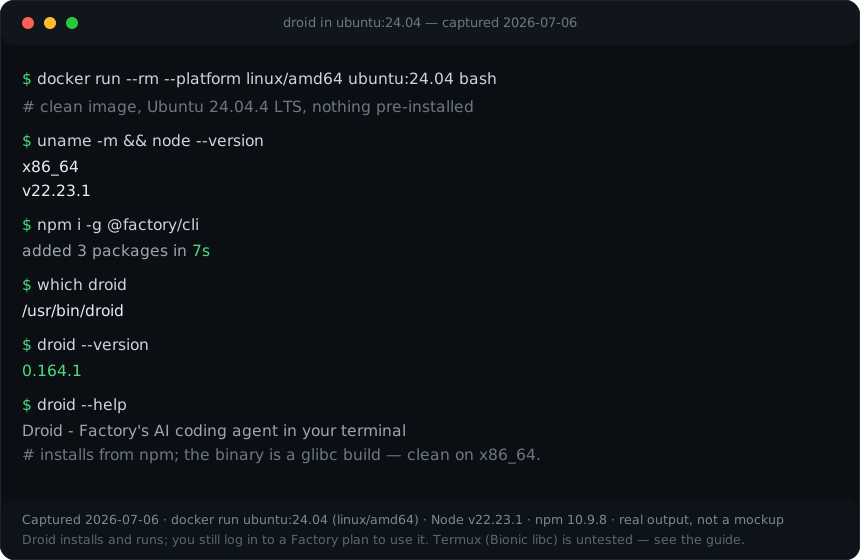
ubuntu:24.04 (linux/amd64) container on 2026-07-06. The npm package
added 3 packages in 7 seconds, droid --version printed
0.164.1, and droid --help ran. That Ubuntu 24.04 x86_64
glibc path is the same one a Cosyra container gives you.
$ node --version
v22.23.1
$ npm i -g @factory/cli
added 3 packages in 7s
$ droid --version
0.164.1
Step 3: Sign in to Factory
Run droid and it prompts you to sign in via your browser to connect
to your Factory account. A paid plan is required (there is no free tier), so have
Pro ($20/month) or higher before you expect real work. The browser sign-in behaves
the same in the container as on a laptop.
$ droid
Sign in to Factory to continue.
Opening https://app.factory.ai/auth?code=… then approve in your browser
✓ Signed in. Select a model to begin.
Step 4: Open a repo and run droid
$ git clone https://github.com/your-org/your-app.git
$ cd your-app && droid
> Add input validation to the /signup handler
and a test for the empty-email case.
[droid] planning… editing signup.ts… running tests
You set the autonomy level (--auto low|medium|high), pick a
model, and drive the session with the phone as your terminal. The persistent
container means you can pick the same session back up on an iPad later.
Try Cosyra. Plans start at $20/month. Node 22+ is ready, so
npm i -g @factory/cli just works.
App Store /
Google Play /
Pricing details
What are the real limits of running droid on a phone?
- No offline mode. The container is in the cloud; no internet, no terminal. A local on-device terminal wins if you need offline.
- A paid Factory plan is required. No free tier; the cheapest is Pro $20/month. That bill is separate from the environment you run droid in.
- Phone keyboards slow long prompts. Voice dictation and a Bluetooth keyboard help; we think the phone keyboard is fine for agent-driven work, where you write intent, not line-by-line code. Most people who disagree have not tried driving an agent this way from a train seat.
- High autonomy plus a small screen is risky. With
--auto high, droid runs without per-step approval; on a phone, where one mis-tap approves a lot, keep it lower unless you are watching closely.
Cosyra vs Factory mobile vs Termux for droid
Cosyra runs droid for real with nothing left awake; Factory's mobile surface is great if a machine is already running the session; Termux is untested and likely rough. The table lines them up, checked 2026-07-06.
| Feature | Cosyra | Factory Web and Mobile | Termux |
|---|---|---|---|
| droid actually runs | In the cloud container | On your desktop / Droid Computer | Untested (glibc vs Bionic) |
| Needs a machine awake | No | Yes | n/a |
| Platforms | iOS + Android | iOS + Android + web (as monitor) | Android only |
| Full shell on the phone | Yes | No (steer only) | Yes, but droid unverified |
| Setup time | ~5 min | Running session + sign-in | Unknown |
| Cost (excl. Factory plan) | From $20/mo | Free + your machine | Free |
Prefer one of the agents that is pre-installed, so there is nothing to add? See Claude Code on phone, Codex CLI on phone, and OpenCode on phone. If you like the install-it-yourself route, the same one-command pattern covers GitHub Copilot CLI, Crush, Sourcegraph's Amp, and Trae's Agent CLI. And the last two make the point: Amp's and Trae's own phone apps, like Droid's mobile, only dispatch work rather than running it, which is exactly why installing the CLI in a container is the path that actually runs the agent on a phone. Weighing droid against a phone-native container head to head? See Cosyra vs Factory Droid. The AI coding agents on mobile pillar ties the whole cluster together.
Frequently asked questions
Can you run Factory Droid on a phone?
Not as a native app. The droid CLI supports macOS, Linux, and Windows only, with no iOS or Android build. The two ways to involve it from a phone are installing it in a cloud Linux container (Cosyra), where it genuinely runs and your phone is the terminal, or using Factory's Web and Mobile surface to watch and steer a droid running on a desktop or on Factory's cloud. Only the container path runs droid without a machine left awake.
[source: Factory Docs, Droid CLI overview, platforms]
Is Factory Droid free?
No. There is no free tier and no documented free trial. Pro is $20/month, Plus is $100/month (it adds Droid Computers), and Max is $200/month; Teams and Enterprise are custom. "Droid Core" is an overflow pool of cheaper models that kicks in after your plan's usage, not a free plan. The Factory bill is separate from the machine you run droid on.
[source: Factory pricing page]
Does Factory's mobile feature run droid on my phone?
No. It is control and monitor, not the CLI on the phone. Factory's Web and Mobile product lets you start a task in your terminal and finish it on your phone: watch progress, inspect tool calls, and approve diffs on a small screen. But the droid executes on a desktop, a Bring-Your-Own-Machine box you keep awake, or Factory's managed Droid Computers. With no machine to keep running, the mobile surface has nothing to steer, which is the gap a cloud container fills.
[source: Factory, Web and Mobile product page]
Does Factory Droid work in Termux on Android?
Untested, and we will not pretend otherwise. Factory lists no Android platform, and the droid installer pulls a prebuilt glibc binary. Termux runs on Android's Bionic libc, where glibc-linked binaries commonly fail to load, but we have not run droid on a physical Termux install, so we do not claim it works or fails. Test it on your own device if it matters. A cloud x86_64 glibc container avoids the question, which is the path we verified on 2026-07-06.
[source: Factory Docs, Droid CLI overview, no Android platform]
Do you need a Factory account to use droid?
Yes. The first time you run droid it prompts you to sign in via your browser to connect to your Factory account, and a paid plan is required for real use. In a cloud container the browser sign-in works the same as on a laptop: open the printed link, authenticate, and the session binds to the container.
[source: Factory Docs, Droid CLI quickstart, sign in]
Is Factory Droid open source?
No. The npm package is published UNLICENSED and the Factory-AI/factory GitHub repository carries no license, so it is a docs and issue tracker, not the CLI source. Droid is proprietary and closed. If open source matters to you, that is a real reason to prefer an editor-embedded or self-hostable agent instead.
tl;dr
Factory Droid is desktop-only (macOS, Linux, Windows) with no phone
runtime, and Factory's mobile surface only steers a droid running on a
machine you keep awake. To actually run droid from a phone with
nothing left on at home, install it in a cloud Ubuntu container (Cosyra): npm i -g @factory/cli, sign in to Factory, and run droid. We confirmed that
install path in a clean Ubuntu 24.04 x86_64 container on 2026-07-06.
Termux is untested and likely rough (glibc binary vs Bionic libc).
App Store / Google Play. Plans start at $20/month.
Run Factory Droid from your phone.
Install Cosyra, npm i -g @factory/cli, sign in, and go.