Sourcegraph Amp is a terminal CLI that runs on macOS, Linux, and Windows via
WSL, with no iPhone or Android app. So to run Amp CLI on your phone you put
it on a real Linux machine and reach it. The fastest way: install
Cosyra for iOS or
Cosyra for Android, then
npm install -g @ampcode/cli in the terminal (Node is already there),
run amp login, and launch amp. Amp also has a
mobile surface, but it only remote-controls a thread whose CLI runs on your
own desktop. Here is each path, and what we actually tested.
Quick decision: pick the path you came for:
- Cloud container (Cosyra): you want Amp actually running somewhere your phone reaches, with no desktop left awake. Setup in ~4 minutes ↓
- Amp web remote control: you already keep a desktop awake running an Amp thread and just want to steer it from your phone. How that works ↓
- Termux (Android): you want it on-device and need the honest state of whether it runs. The glibc-vs-Bionic question ↓
Not sure which fits? The side-by-side comparison ↓ lines them up on what runs where, and what each costs.
This guide was written by the Cosyra team. We checked every moving part
against primary sources on 2026-07-16: Amp's own
manual for supported OSes, install commands,
and billing; its
changelog for the free-tier and package-rename
dates; the npm registry metadata for the package layout; and
gh api repos/sourcegraph/amp, which returns 404, so Amp is
proprietary, with no public repo. And rather than assume the install works,
we ran it.
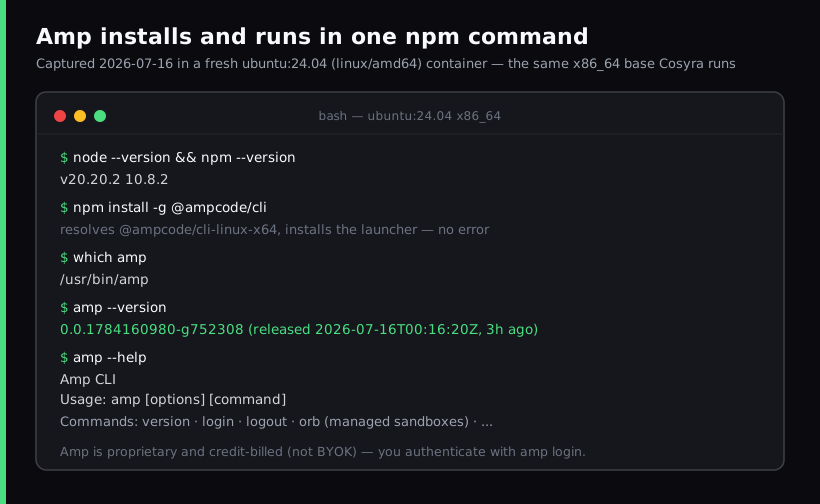
ubuntu:24.04 (linux/amd64) container
, the same x86_64 base Cosyra runs, on 2026-07-16. One command, and amp --version reported
0.0.1784160980-g752308, a build Amp had published about three
hours earlier. This is the install path the setup section below walks
through.
What is Sourcegraph Amp?
Amp is Sourcegraph's frontier coding agent for the terminal. You describe a
task, and it plans, edits files across a repo, runs commands and tests, and
iterates. That is the same shape as Claude Code or Copilot CLI, from the
company whose day job is code search over large codebases. It ships as the
npm package
@ampcode/cli (renamed from
@sourcegraph/amp on 2026-05-14) and launches with the
amp command.
- Platforms: macOS, Linux, and Windows via WSL. Android and iOS are absent from the manual's supported-OS list, so there is no mobile runtime.
- Not BYOK: you buy Amp credits and Amp picks and routes the model per request across three modes (deep, smart, rush). You do not paste your own provider key.
- Versioning: Amp uses epoch build strings, not semver. The latest
we saw was
0.0.1784160980-g752308, published the same day we tested. It ships daily, so we cite the date instead of pinning a number. - Free tier: $10/day across any mode, ad-free since 2026-03-30; usage-based beyond that, $5 minimum credit.
Because amp is a binary that expects a real shell, it has the same
mobile problem as every other coding CLI: the phone is the wrong place to run
the process. The trick is putting the process somewhere real, then driving it
from the phone.
The official "Amp on mobile" is remote control, not the CLI on your phone
This is the part that trips people up. Amp's manual describes a remote-control feature: you start a thread in the CLI, open that same thread on ampcode.com from a phone browser or desktop, and send messages to keep working from anywhere. It is genuinely useful, and you can nudge a run from the couch. But the manual is explicit about the architecture: the thread's CLI runs on the machine that started it. The phone is a window onto a session executing elsewhere.
So remote control needs a desktop you left awake and online. If it sleeps or drops its connection, the thread is unreachable until the machine is back. If you have a Mac or PC sitting powered-on at home, that fits fine. If you do not, and the phone is the only device you have on the train, it does not help, and that is exactly the gap a cloud container fills. We map this remote-control-versus-cloud-container split across every agent in AI coding agents on mobile.
How can you run Amp CLI from a phone?
Three ways, in order of how well they work without a desktop: a cloud Ubuntu container where Amp actually runs (Cosyra), Amp's web remote control of a desktop session, and Termux on Android (where on-device execution is unverified today).
1. Cosyra: install Amp in a cloud container
Cosyra is a native iOS and Android terminal connected to a persistent Ubuntu
24.04 x86_64 container. Node is already installed, so
npm install -g @ampcode/cli resolves the linux-x64 build and
amp runs in the container, and nothing of yours has to stay awake.
This is the path we captured above.
- Works when: you want Amp running on demand from either platform with no home machine to maintain.
- Breaks when: you have no internet, or you specifically need it reaching resources only on your desktop's local network.
- Cost: Core is $20/month and Pro is $30/month. Eligible new users can start a 7-day free trial in the App Store app. See pricing. Amp credits are billed separately by Amp.
2. Amp web remote control of a desktop session
The manual feature above. Best when you already run Amp on a desktop and just want to keep an eye on a thread or nudge it from your phone browser. Needs that desktop awake and online; the phone never runs the CLI itself.
3. Termux on Android: the honest state
We will not tell you Amp "runs on Termux" or "fails on Termux," because we have not run it on-device and the honest answer is: it is unverified. Here is the mechanism, so you can reason about it. Amp's npm package is a tiny launcher that pulls a platform-specific binary through optional dependencies:
$ npm install -g @ampcode/cli
resolves @ampcode/cli-linux-arm64 (aarch64)
# but the prebuilt binary is glibc-linked; Termux is Bionic libc
# on-device execution: UNVERIFIED (2026-07-16)
There is a linux-arm64 build, so npm can resolve it on Termux's
aarch64 userland. The catch is the same one that blocks other agent CLIs: prebuilt
binaries are typically compiled against glibc, and Termux's
userland uses Android's Bionic libc, which are not interchangeable
in one process. npm resolving a package is not the same as the binary running.
Until someone runs amp on-device in Termux and reports back, we are
leaving it at unverified. These are the same process-lifetime and libc problems
we cover in
Cosyra vs Termux. A cloud x86_64
glibc container, where we did verify it, avoids the whole question.
How do you run Amp on iPhone or Android with Cosyra?
Four steps: install the app, install @ampcode/cli, authenticate
with amp login, and run amp in a repo.
Step 1: Install Cosyra and sign in
Download from the App Store or Google Play. The container is Ubuntu 24.04 x86_64 with Node already installed, which is Amp's prerequisite.
Step 2: Install Amp CLI
Amp is not one of the four agents we pre-install (we ship Claude Code, Codex CLI, OpenCode, and Antigravity CLI), but it is one command away because Node is already set up. This is the exact sequence from our capture.
$ node --version
v20.20.2
$ npm install -g @ampcode/cli
$ which amp
/usr/bin/amp
$ amp --version
0.0.1784160980-g752308
Step 3: Authenticate with amp login
Run amp login and follow the prompt to sign in to your Amp account.
Amp's own --help lists logout as "remove stored API
key," so the credential persists in the container once you log in, so you do it
once, not every session. Remember the billing model: this signs you into Amp's
routed-model, credit-billed service, not a BYOK setup.
$ amp login
→ open the printed URL and authorize the device
✓ Signed in, credential stored stored in the container
Step 4: Clone a repo and run Amp
$ git clone https://github.com/your-org/your-app.git
$ cd your-app && amp
> Add input validation to the /signup handler
and a test for the empty-email case.
Amp plans the change, shows the edits, and asks before running anything destructive. You review the diff on the phone before it lands. Reading an agent's proposed patch on a train is exactly the kind of small, bounded task the phone is good at. The persistent container means you can reopen the same workspace on an iPad later without re-cloning.
Try Cosyra. Plans start at $20/month. Node is ready, so npm install -g @ampcode/cli just works; we tested it 2026-07-16.
App Store /
Google Play /
Pricing details
What are the real limits of running Amp on a phone?
- No offline mode. The container is in the cloud; no internet, no terminal.
- You are on Amp's credit meter. The container has its own cost, and Amp bills its routed-model credits separately: two meters, not one. The $10/day free tier covers light use.
- You cannot pin your own model. Amp routes deep/smart/rush for you. If you specifically want to force a model or use your own key, a BYOK CLI like OpenCode or Crush fits better.
- Phone keyboards slow long prompts. Voice dictation and a Bluetooth keyboard help a lot on longer instructions.
Here is the opinion Amp's team would push back on: for developers who already hold an Anthropic or OpenAI key, we think letting a tool pick your model and charging a second meter is friction, not convenience. You trade away the ability to pin a model for the convenience of not managing a key. Amp would call that a feature; we ship BYOK CLIs pre-installed because we would rather keep the control. If you do not want to manage keys at all, Amp's default is genuinely the lower-friction one, and that trade is the whole decision.
Amp is not the only agent that skips BYOK, and the two get compared for the
wrong reason. Auggie, Augment
Code's CLI, also authenticates to an account rather than a provider key,
auggie login, not a pasted ANTHROPIC_API_KEY. The
difference is who pays and how much: Amp meters $10/day free then
usage-based credits, while Augment's pricing page as of 2026-07-16 lists
only Business at $100/month and Enterprise, with no free or individual tier
at all. If account-auth is the part you want and cost is the part you are
weighing, those two numbers are the comparison that matters.
Cosyra vs Amp remote control vs Termux for Amp
Cosyra runs the CLI for real with nothing left awake; Amp's remote control is great if a desktop is already running the thread; Termux is unverified today. The table lines them up, verified 2026-07-16. For the deeper head-to-head, Amp's credit billing versus a BYOK container, model routing, and the two things Amp does better than us, read Cosyra vs Amp.
| Feature | Cosyra | Amp remote control | Termux |
|---|---|---|---|
| Amp CLI actually runs | In the cloud container | On your desktop | Unverified (glibc vs Bionic) |
| Needs a desktop awake | No | Yes | No |
| Platforms | iOS + Android | iOS + Android (browser) | Android only |
| Full shell on the phone | Yes | No (steer only) | Yes |
| Setup time | ~4 min | Desktop thread + browser | Unknown |
| Cost (excl. Amp credits) | From $20/mo | Free + your desktop | Free |
Prefer one of the agents that is pre-installed, or a BYOK setup where you pick the model? See Claude Code on phone, OpenCode on phone, and Antigravity on a phone, or the pillar on AI coding agents on mobile. Another hosted tool whose "mobile" is a remote-control handoff rather than the CLI on the phone is GitHub Copilot CLI: same architecture, different vendor. Amp also publishes its own CLI examples and guides if you want to go deeper on what it can do once it is running.
Frequently asked questions
Can you run Sourcegraph Amp on a phone?
Not as a native app. Amp's CLI supports macOS, Linux, and Windows via WSL,
with no iOS or Android build. The two working paths from a phone are
installing @ampcode/cli in a cloud Linux container (Cosyra), where
it genuinely runs and your phone is the terminal, or using Amp's web remote
control to continue a thread whose CLI runs on your own desktop. Only the container
path avoids needing a machine left awake.
[source: Amp manual: supported OSes and remote control]
Does Amp CLI work in Termux on Android?
It is unverified, and we will not claim it either way without a hands-on
test. The npm package resolves the @ampcode/cli-linux-arm64
build on Termux's aarch64 userland, so npm may install it, but Amp's prebuilt
binary is almost certainly glibc-linked, and Termux uses Android's Bionic libc,
which do not mix in one process. What we did test: on an x86_64 glibc Ubuntu
24.04 container, npm install -g @ampcode/cli installs and amp --version runs, first-hand on 2026-07-16.
[source: Amp manual: macOS/Linux/WSL only, no Android]
Is Amp free, and how does its billing work?
Amp has a real free tier of $10/day across any mode, ad-free since 2026-03-30. Beyond that it is usage-based with no subscription: a $5 minimum credit purchase, zero markup on provider API pricing for individuals, and unused credits expire after a year of account inactivity. You buy Amp credits and Amp routes the model; you do not bring your own provider key.
[source: Amp changelog: "The Frontier Is Now Free" and "Amp Free Is Ad-Free"]
Is Amp open source or bring-your-own-key?
Neither. Amp is proprietary, with no public source repository (the
sourcegraph/amp GitHub API returns 404 as of 2026-07-16) and the
npm license field reads "SEE LICENSE IN LICENSE.md." It is also not BYOK: you
buy Amp credits and Amp picks and routes the model per request rather than accepting
your own Anthropic or OpenAI key. That is the opposite axis from a BYOK setup,
where you supply the key and run whatever CLI you like.
[source: Amp manual: credit billing, zero markup, $5 minimum]
What does "Amp on mobile" actually mean?
It means remote control from a browser, not the CLI on your phone. Amp's
manual describes it plainly: start Amp in the CLI, open the thread on
ampcode.com from mobile or desktop, and send messages to keep working. The
thread's CLI runs on the machine that started it, so that machine has to
stay awake. To actually run amp with a phone as your only device,
install it in a cloud Linux container the phone connects to.
tl;dr
Sourcegraph Amp is desktop-only (macOS, Linux, Windows via WSL) with no
phone app, and its mobile feature only remote-controls a thread whose CLI
runs on a desktop you leave awake. To actually run Amp from a phone with
nothing left on at home, install it in a cloud Ubuntu container (Cosyra):
npm install -g @ampcode/cli, amp login, and run
amp. We verified that path on an x86_64 Ubuntu 24.04
container on 2026-07-16. On Termux, on-device execution is unverified.
App Store / Google Play. Plans start at $20/month.
Run Sourcegraph Amp from your phone.
Install Cosyra, npm install -g @ampcode/cli, and go.