You can run Crush on your phone today. Crush is Charm's terminal AI coding
agent, and it has no mobile app, so "Crush on a phone" means running its CLI
inside a terminal. The fastest path: install
Cosyra for iOS or
Cosyra for Android, then add Crush to your
Ubuntu 24.04 container with one command, npm install -g @charmland/crush. On Android you can also run it locally in Termux. Plans start at
$20/month, and eligible new users can start a 7-day free trial in the App
Store app.
This guide was written by the Cosyra team. We do not pre-install Crush, so
we tested the install path the way you would run it: on 2026-06-12 we ran
npm install -g @charmland/crush in a clean Ubuntu 24.04 x86_64 container
with Node v20.20.2, and it placed the crush binary at
/usr/bin/crush reporting v0.76.0. We verified the
license, provider list, and supported-OS facts the same day against the
charmbracelet/crush repo
and charm.land.
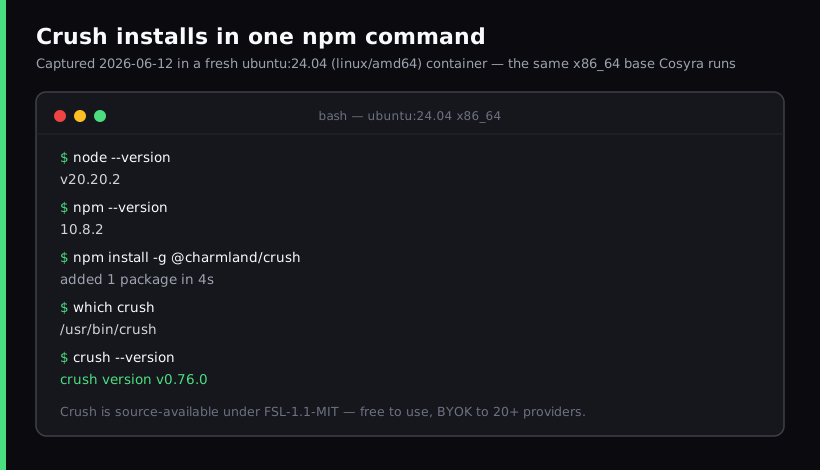
npm install -g @charmland/crush in a clean
Ubuntu 24.04 x86_64 container on 2026-06-12 produced
crush v0.76.0 at /usr/bin/crush. Reproduce with
docker run --rm --platform linux/amd64 ubuntu:24.04 after installing
Node 20.
What is Crush?
Crush is the terminal coding agent from Charm (Charmbracelet), the team behind Bubble Tea, Glow, and the rest of the glamourous terminal-UI ecosystem. It is a single Go binary, source-available under FSL-1.1-MIT, with 25,661 stars on GitHub and a current release of v0.79.1 dated 2026-06-20 (both verified 2026-06-24). One nuance worth pinning down: source-available is not the same as OSI open source. FSL-1.1-MIT lets you use the code freely and converts each release to MIT after two years, but until then it restricts using Crush to build a competing product. If you have seen it called "open source" elsewhere, that phrasing is imprecise.
What makes Crush a good fit for a phone is exactly what it is: a clean terminal binary with no GUI dependency. It talks to 20+ model providers through BYOK, reads your code through the Language Server Protocol for real structural context, connects to MCP servers, and keeps per-project session history. There is no Crush iOS or Android app, and there is no hosted Crush environment. You supply the machine the binary runs on. That is the whole reason this guide exists: the gap between "Crush supports Android" (it lists Android because the Go binary runs in a Linux userland) and "there is a Crush phone app" (there is not) is where people get stuck.
How can you run Crush on a phone?
You can run Crush on a phone three ways: a cloud Ubuntu container reached
from a native mobile app where you add Crush in one command (Cosyra), Termux
on Android where you install it locally, or Blink Shell on iOS into a VPS
you run it on yourself. Crush needs a terminal that can execute a Linux
binary, so every path puts the crush process on a real Linux shell
and gives your phone a way to drive it. All three are current as of 2026-06-12.
1. Cosyra: cloud Ubuntu container, add Crush in one command
This is what we built, and it is the path we recommend for most people. A
native iOS and Android terminal connects to a persistent Ubuntu 24.04 x86_64
container. We ship Claude Code, Codex CLI, OpenCode, and Antigravity CLI on
the image; Crush is not on that list, so you add it with
npm install -g @charmland/crush and it sticks on your home volume.
We think a one-command add is the right trade-off rather than bloating the base
image with every agent that exists. Some people want their favourite agent baked
in; we would rather keep the image lean and let you pick.
- Works when: you want both iOS and Android from the same container, a session that survives the app closing, and no home machine to keep awake.
- Breaks when: you have no internet, since the container lives in the cloud and we have no offline mode. Honest trade-off list in Cosyra vs Termux.
- Cost: Core is $20/month and Pro is $30/month. Eligible new users can start a 7-day free trial in the App Store app. Crush itself is free; you pay your provider for tokens. See pricing.
2. Termux on Android, fully local
Install Termux from F-Droid, run
pkg install nodejs, then
npm install -g @charmland/crush, and Crush runs on the phone
with no cloud bill. Crush is a Go binary, so unlike some Node and Python
agents it does not fight Termux's aarch64 userland over native build steps.
If you want the broader picture of running a real Linux environment on
Android, including the proot-distro route, see
Linux Container on Android: 3 Real Options in 2026.
- Works when: you are on Android, you want a fully local setup, and you accept provisioning and maintaining Termux yourself.
- Breaks when: Android 12+'s phantom process killer terminates a long agent run, or your default Termux storage gets wiped. Long sessions are the weak spot.
- Cost: free Crush binary, free Termux. The cost is your time maintaining the environment between updates.
3. SSH from Blink Shell into your own VPS (iOS only)
On iPhone or iPad there is no terminal that runs arbitrary Linux binaries,
so the local route does not exist. The classic path is Blink Shell into a VPS: spin up a box (Hetzner, Scaleway, DigitalOcean), install Node,
npm install -g @charmland/crush, SSH in inside a tmux session,
and run crush.
- Works when: you want a box that is yours and an iOS-native keyboard.
- Breaks when: you do not want to be a sysadmin. Patching, firewall rules, and backups are on you for a box that holds your source and your provider keys.
- Cost: Blink Shell is $19.99/year, the VPS is $5 to $40/month. No Android equivalent; Blink is iOS-only.
How do you set up Crush on iPhone or Android?
You set up Crush on iPhone or Android in about four minutes with Cosyra:
install the app, sign in, add the crush binary with one command,
export a provider key, clone a repo, run crush. No Node install
of your own, no arch mismatches.
Step 1: Install Cosyra and sign in
Download from the App Store or Google Play. Sign in with Apple, Google, or email. On first launch we provision a fresh Ubuntu 24.04 x86_64 container with Node 20+ already on the PATH.
Welcome to Cosyra.
Ubuntu 24.04.1 LTS (x86_64)
Pre-installed: claude, codex, opencode, agy
$ node --version
v20.20.2
Step 2: Add Crush with one command
Crush is not one of our four pre-installed agents, so add it yourself. This is the exact command we ran in a clean container on 2026-06-12.
$ npm install -g @charmland/crush
added 1 package in 4s
$ which crush
/usr/bin/crush
$ crush --version
crush version v0.76.0
Step 3: Connect a provider key (BYOK)
Crush is model-agnostic. Export the key for whichever provider you use and
append it to ~/.bashrc so every session can reach it. Anthropic,
OpenAI, Google, and 20+ others are supported, and you can switch model mid-session.
$ echo 'export ANTHROPIC_API_KEY="sk-ant-..."' >> ~/.bashrc
$ source ~/.bashrc
$ echo ${ANTHROPIC_API_KEY:0:8}...
sk-ant-a...
Step 4: Run your first Crush session
$ git clone https://github.com/your-org/your-project.git && cd your-project
$ crush
Crush v0.76.0 · anthropic/claude-sonnet-4-6
workspace: /home/cosyra/your-project (LSP: go, ts)
> Read the README and propose three small
refactors. Show diffs before applying.
Crush reads the repo through LSP, proposes diffs, and waits for your approval before writing. Because it keeps per-project session history, switching repos and coming back later picks up where you left off.
Try Cosyra. Plans start at $20/month. Four agents pre-installed, and Crush is one command away. App Store / Google Play / Pricing details
What does a Crush session on a phone look like?
The thing Crush unlocks on a phone is the mid-session provider switch plus the Charm TUI, which is genuinely pleasant to drive with a thumb. Two sessions we actually run from a phone.
Switch providers on the same bug, on the train
You have a flaky test and twenty minutes on the train. Open Cosyra,
cd into the repo, run crush, paste the failing
test and the suspect file, and ask for a root cause with the Anthropic
model. Not convinced? Switch the model inside the same session to an OpenAI
or Gemini endpoint and ask again, keeping the context. The single TUI is
what makes that comparison quick on a small screen.
Read-only repo audit from the couch
Saturday, a coworker shipped something Friday and you are curious from the
couch. Run crush in the repo and ask it to summarize the structure,
flag the riskiest files, and propose what you would change before touching anything.
The LSP context means it is reading real symbols, not just grepping text. For
other agents that fit this same couch-coding slot, the
AI coding agents on mobile
pillar walks through each one, including
Factory's droid CLI,
another
npm i -g agent whose own "mobile" is a phone handoff rather than
a runtime, so the couch-coding tradeoffs there mirror the ones you get with Crush.
Sourcegraph's Amp installs the same npm i -g way, but it sits on
the opposite axis from Crush, proprietary and credit-billed rather than open-source
and BYOK, so
running Amp's CLI from your phone
means the container does the work while Amp still picks and routes the model for
you.
For a sharper version of the same contrast, compare Crush's single Go binary against running Plandex from a phone. Plandex is MIT licensed and BYOK where Crush is source-available, but it is client-server: the CLI is inert without a Docker plus PostgreSQL server you host somewhere. That one architectural choice is why Crush takes a command to start on the couch and Plandex takes an afternoon.
What are the real limits of running Crush on a phone?
The honest limits: no offline mode on the cloud path, you maintain the box on the local and VPS paths, and Crush is BYOK so your provider's rate limits and bill are yours.
- No offline mode on Cosyra. The container and your provider both live in the cloud. No internet, no Crush. If you code on planes with no wifi, the Termux-local path fits that slot better for the editing parts.
- Termux long sessions are fragile. Android 12+'s phantom process killer can terminate a running agent, and default storage is ephemeral. Provisioning is on you.
- BYOK means your bill. Crush is free software, but the model tokens are billed by Anthropic, OpenAI, or Google directly. We do not proxy or meter that.
- Source-available, not open source. FSL-1.1-MIT restricts competing commercial use for two years before converting to MIT. If a strict OSI license matters to you, that is a real distinction.
How does Cosyra compare to Termux and Blink+VPS for Crush?
Cosyra wins for dual-platform and a session that survives the app closing; Termux wins if you want a fully local Android setup with no cloud bill; Blink-plus-VPS wins on iOS if you want a box you own. None is strictly best. Comparison as of 2026-06-12. For the full head-to-head of a hosted container against running the Crush binary on your own machine, read Cosyra vs Crush.
| Feature | Cosyra | Termux | Blink + VPS |
|---|---|---|---|
| Crush install | One command on top of 4 agents | You install (local) | You install (on VPS) |
| Platforms | iOS + Android | Android only | iOS only |
| Session survives app close | Yes (hibernation) | No (phantom killer) | Yes (tmux on VPS) |
| Offline editing | No (cloud) | Yes (local) | No (remote box) |
| Crush license | FSL-1.1-MIT (same binary) | FSL-1.1-MIT | FSL-1.1-MIT |
| Setup time (cold) | ~4 min | 20-40 min | 30-60 min |
| Price (not counting tokens) | From $20/mo | Free | $19.99/yr + VPS (~$5-40/mo) |
Crush joins a crowded shelf of terminal agents you can run this way. The same one-command-on-a-container pattern works for the agent we do pre-install by default in OpenCode on phone, for Anthropic's Claude Code on phone, and for the broader set of terminal UIs covered in TUI apps on your phone.
Frequently asked questions
Can you run Crush on a phone?
Yes, by running the Crush CLI in a terminal that can execute a Linux binary. Crush is a Go program with no iOS or Android app; its README lists Android among supported systems because the binary runs in an Android Linux userland (Termux), not because there is a phone app. The two working paths are Termux on Android, or a cloud Ubuntu container reached from a native app on either iOS or Android.
[source: GitHub, charmbracelet/crush README supported-OS list]
Is Crush open source?
Not in the OSI sense. Crush is source-available under FSL-1.1-MIT (the Functional Source License). The code is public and free to use, and each release converts to MIT two years after publication, but until then the license restricts using it to build a competing product. GitHub's license metadata shows NOASSERTION because FSL is not an OSI-approved license. Say source-available, not a flat open source.
[source: GitHub, charmbracelet/crush README license + repo metadata]
Is there a Crush mobile app?
No. As of 2026-06-12 there is no Crush app on the App Store or Google Play. Crush is a terminal program. Running it on a phone means running the CLI inside a terminal environment: Termux on Android, or a cloud Linux container you reach from a native terminal app on iOS or Android.
[source: charm.land, Crush product page]
How much does Crush cost?
The Crush software is free to download and use. You pay your own LLM provider via your API key (BYOK). Charm surfaces a few optional first-class provider subscriptions (Synthetic, GLM, Kimi Code, MiniMax), but those are the model vendors' plans, not a Crush license fee. There is no charge for the binary itself.
[source: GitHub, charmbracelet/crush README]
Which AI providers does Crush support?
More than 20, including Anthropic, OpenAI, Google Gemini, Groq, Hugging Face, Cerebras, Azure OpenAI, Amazon Bedrock, and Google Cloud VertexAI. It also accepts custom OpenAI-compatible and Anthropic-compatible endpoints, and you can switch model mid-session while keeping the conversation context. All of it is BYOK, verified 2026-06-12 against the Crush README.
[source: GitHub, charmbracelet/crush README provider list]
How do I install Crush on Android?
Install Termux from F-Droid, install Node with
pkg install nodejs, then
npm install -g @charmland/crush, or pull a packaged binary.
Crush then runs in the Termux terminal. You inherit Termux's trade-offs:
Android can kill long background sessions, default storage is ephemeral,
and you provision the environment yourself. A cloud x86_64 container
avoids those by keeping the session alive server-side.
[source: termux.dev] · [source: GitHub, charmbracelet/crush install commands]
tl;dr
Crush has no mobile app, so "Crush on a phone" means running the CLI in a
terminal. Two bridges that work: a cloud Ubuntu container where you add it
with npm install -g @charmland/crush (Cosyra, iOS + Android), or
Termux on Android where you install it locally. We recommend the cloud container
for a session that survives the app closing and works on iOS too, where no local
terminal can run the binary.
App Store / Google Play. Plans start at $20/month.
Run Crush from your phone in four minutes.
Install Cosyra, sign in, run npm install -g @charmland/crush,
type crush.