To run Plandex on your phone in 2026, ignore the install command in its
README. The plandex.ai hostname stopped resolving, so
curl -sL https://plandex.ai/install.sh | bash fails before it downloads
anything. What still works: install the pinned
GitHub release tarball in a cloud Linux container you reach from
Cosyra for iOS or
Cosyra for Android, then point it at a Plandex
server you host. We tested every step of this on 2026-07-18. Here is what
passed and what did not.
Quick decision: pick the path you came for:
- Your install just failed: you ran the README command and got nothing useful. What actually broke ↓
- You want the working install: skip the diagnosis and get the binary on disk. The install that works ↓
- You want it running from a phone: the CLI is only half of Plandex. The server problem ↓
Not sure Plandex is still the right pick? The honest verdict ↓ covers who should choose something else.
This guide was written by the Cosyra team. We checked every claim against
primary sources on 2026-07-18 rather than repeating what other pages say:
dig against three independent public resolvers for the DNS state,
the
GitHub repository and its
API for the maintenance state and release assets,
Docker Hub for
the server image, and a clean container for the install itself. Rather than assume
the install works, we ran it.
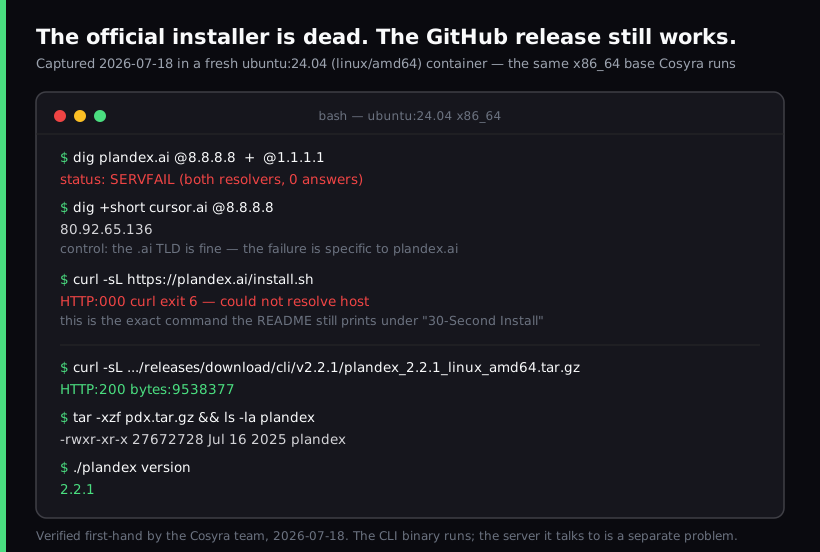
ubuntu:24.04 (linux/amd64) container,
the same x86_64 base we run. The install command in the README fails at DNS
resolution. The pinned GitHub release downloads at 9,538,377 bytes and the extracted
binary reports 2.2.1. This is the path the setup section
below walks through.
Why your Plandex install failed
Plandex's README still opens with a "30-Second Install" heading and this command:
curl -sL https://plandex.ai/install.sh | bash
curl: (6) Could not resolve host: plandex.ai
That is not a network problem on your end. We queried the hostname against
three unrelated public resolvers and all three returned SERVFAIL with zero answer records:
- Google Public DNS (8.8.8.8):
SERVFAILforplandex.ai,www.plandex.ai, anddocs.plandex.ai - Cloudflare (1.1.1.1):
SERVFAIL, same three names - Quad9 (9.9.9.9): no answer
We ran a control lookup in the same session to rule out a broader outage.
Another .ai domain resolved to an address immediately, and the
.ai nameservers themselves answered normally. So the TLD is healthy
and the failure is specific to this zone. A SERVFAIL across every
major resolver, rather than NXDOMAIN, usually means the zone's
authoritative nameservers are no longer answering, which is what a lapsed
domain configuration looks like from the outside.
The documentation site went with it. Every link to docs.plandex.ai in the README and in older blog posts is dead, including the wind-down announcement
the final commit points at. That is the part worth knowing before you spend an
evening on this: the written record for Plandex now lives entirely in the GitHub
repository.
The state of the project, in numbers
Before you invest setup time, here is what the GitHub API returned on 2026-07-18:
| Signal | Value (2026-07-18) |
|---|---|
| Stars | 15,533 |
| Forks | 1,164 |
| License | MIT |
| Archived | No |
| Open issues | 59 |
| Last push | 2025-10-03 (about 9 months ago) |
| Last commit message | "link to cloud wind down post" |
| Latest CLI release | cli/v2.2.1 (2025-07-16) |
| Plandex Cloud | Wound down 2025-10-03, no new users |
Dormant, not abandoned, and not archived. The code is MIT licensed and the artifacts are still hosted, so nothing stops you running it. But a project whose last commit was a link to its own wind-down notice is a different proposition from one shipping weekly, and you should price that in.
The install that works
Skip the script. Download the release asset directly. Inside a Cosyra
container, which is Ubuntu 24.04 on x86_64, the linux_amd64 build
is the right one:
curl -sL -o pdx.tar.gz https://github.com/plandex-ai/plandex/releases/download/cli/v2.2.1/plandex_2.2.1_linux_amd64.tar.gz
tar -xzf pdx.tar.gz
sudo mv plandex /usr/local/bin/ && plandex version
2.2.1
That is the sequence we ran, and the numbers behind it: the download
returned HTTP 200 at 9,538,377 bytes, the extracted binary is 27,672,728
bytes dated 2025-07-16, and plandex version printed
2.2.1. The release also ships linux_arm64,
darwin_amd64, darwin_arm64, and two FreeBSD
builds, so pick to match your target.
One trap worth naming. The install script itself is still in the repository
at app/cli/install.sh, and it is tempting to fetch it from
GitHub and run it, since its release URL points at GitHub and looks fine. It
will still fail. Line 66 resolves the version number with
curl -sL https://plandex.ai/v2/cli-version.txt, which hits the
same dead hostname and hands you an empty version string that poisons the
download URL. Pin the version yourself.
The server problem, which is the real one
Here is the part that separates Plandex from
OpenCode and every other agent CLI
we have written up. Plandex is client-server. The
plandex binary you just installed is a client. It does nothing on
its own. It needs a Plandex server, which runs as a Docker Compose stack: the
plandexai/plandex-server image plus PostgreSQL, listening on ports
8099 and 4000, with plan files on a volume and metadata in the database.
The server image is still there. Docker Hub lists 21 tags for
plandexai/plandex-server, with latest and
server-v2.2.1 both dated 2025-07-16 at about 656 MB, and the compose
file is in the repository at app/docker-compose.yml. So both
halves of Plandex survive the website going dark.
What we will not tell you is that the whole stack runs inside our container. We did not verify that, so we are not going to claim it. Our containers are per-user Ubuntu environments on Azure AKS, and we make no Docker-in-Docker guarantee. Plenty of container workloads need the host kernel, and the honest answer is that it depends on the workload. Anyone telling you a nested Docker plus PostgreSQL stack "just works" inside a managed container, without having run it, is guessing.
The arrangement we would actually recommend:
- Server: on a machine that already runs Docker and stays up. A small VPS or a box at home is fine. It is a database and a Go server, not a demanding workload.
- Client: the
plandexbinary in your Cosyra container, pointed at that server. - You: on the train, holding a phone, with the terminal in front of you and nothing left awake on your desk.
That split is a real cost compared to the agents we pre-install, where the binary is the whole product and there is no second machine in the picture. We think that cost is the single biggest reason Plandex never took hold as a mobile agent, and we would rather say so than pretend the architecture is incidental.
Want the container half without the setup? Cosyra gives you a persistent Ubuntu 24.04 container reachable from an iPhone or Android phone, with Claude Code, Codex CLI, OpenCode, and Gemini CLI already installed. It provisions on first launch in about 15 seconds in our testing.
Sign up and get 1 hour free, no credit card. See pricing.
Plandex on Termux, honestly
Plandex publishes a linux_arm64 binary, and Termux runs on aarch64,
so the client will probably land on disk. That is not the blocker. The blocker
is that a Plandex client with no server is an inert 27 MB binary, and the server
wants Docker and PostgreSQL. We went through what
running PostgreSQL on a phone actually involves separately. Termux ships Postgres 18.2, but the Android shims around it are
exactly why hosting the server half on-device stops being worth it.
Docker on Termux is not a normal install. It means running an emulated Alpine VM, which is slow, storage-hungry, and dies whenever Android decides to reclaim the background session. We took that apart properly in running Docker on Termux, and what actually works, including a first-hand probe of the privileges the daemon needs. The broader userland version of the problem is in our Android Linux container guide. For Plandex specifically, the honest summary: you can put the client on your phone, but hosting its server there is impractical, and the sensible answer is a server somewhere else.
The three paths side by side
| Cosyra container | Self-hosted server | Termux | |
|---|---|---|---|
| CLI runs | Yes (verified 2026-07-18) | Yes | Likely, untested |
| Server runs here | Not verified, no DinD guarantee | Yes | Impractical |
| Needs a machine left awake | No | Yes | No |
| Works from a phone | Yes, native iOS and Android apps | Via SSH | On-device |
| Persistent storage | 30 GB | Your disk | Phone storage |
| Offline | No | On local network | Yes |
| Cost | $29.99/mo Pro | Free plus hosting | Free |
The honest verdict: who should skip Plandex
We are not going to talk you into Plandex to sell you a container. Plandex does real things well. Its cumulative diff review, where changes accumulate in a sandbox you inspect before applying, is a genuinely good design that several better-funded agents still do worse. It handles large multi-file tasks deliberately. It is MIT licensed and BYOK across seven providers including local Ollama, so your keys stay yours.
Choose Plandex if:
- You want the diff-review sandbox specifically and have used it before.
- You already run a Docker host that stays up, so the server is nearly free to add.
- You want MIT-licensed tooling you can fork, and dormancy does not worry you.
Choose something else if:
- You want an agent that edits code from your phone with the least moving parts. A single-binary CLI like Crush or the four agents we pre-install have no server tier at all.
- You need active maintenance. Nine months without a commit means bugs you hit are bugs you fix.
- You do not want to run and back up a PostgreSQL database for a CLI.
Our own opinion, which the Plandex faithful will disagree with: the client-server design was the wrong bet for this category. Coding agents got adopted because you could install one binary and start. Every agent that asked for infrastructure first has lost ground to ones that did not, and no amount of context-window advantage compensates for a setup step that ends in a Postgres container. We would rather ship four agents that start instantly than one that starts well.
Frequently asked questions
Why does the Plandex install command fail?
Because the hostname it points at no longer resolves. The README still
prints curl -sL https://plandex.ai/install.sh | bash under a "30-Second
Install" heading, but on 2026-07-18 we measured
SERVFAIL for plandex.ai,
www.plandex.ai, and docs.plandex.ai against Google
Public DNS, Cloudflare, and Quad9. A control lookup of another
.ai domain answered normally, so the TLD is healthy and the failure
is specific to plandex.ai. curl reports exit code 6.
[source: Plandex README, "Install" section, still printing the plandex.ai command]
Is Plandex dead or still maintained?
Dormant but not archived. As of 2026-07-18 the repository has 15,533
stars, 1,164 forks, an MIT license, and 59 open issues, and it is not
marked archived. The last push was 2025-10-03 and the final commit message
reads "link to cloud wind down post." The newest tagged release is
cli/v2.2.1 from 2025-07-16. Plandex Cloud stopped accepting new
users on 2025-10-03.
[source: plandex-ai/plandex commit history, last push 2025-10-03]
Can you run Plandex entirely on a phone?
Not practically, because Plandex is client-server rather than a single binary. The CLI talks to a Plandex server that runs as a Docker Compose stack with PostgreSQL on port 8099. The CLI half runs fine in a cloud Ubuntu container reached from a phone, which we verified on 2026-07-18. The server half needs a Docker host, and running Docker on the phone itself means an emulated Linux VM.
[source: app/docker-compose.yml, plandex-server plus postgres on ports 8099 and 4000]
Does the recovered install.sh work if I run it from GitHub?
Not without editing it. The script is still at
app/cli/install.sh even though the site that served it is gone.
Its release URL points at GitHub and is fine, but line 66 resolves the version
with curl -sL https://plandex.ai/v2/cli-version.txt, hitting
the same dead hostname and returning an empty version string that poisons
the download URL. Pin the version and fetch the release asset directly.
[source: app/cli/install.sh, RELEASES_URL on line 10 and the version lookup on line 66]
Is the Plandex server Docker image still available?
Yes. plandexai/plandex-server is still published with 21 tags.
The latest tag and server-v2.2.1 both date to 2025-07-16
at about 656 MB. So both halves of Plandex remain installable even with the
website unreachable: the CLI from GitHub releases, the server from Docker Hub.
[source: Docker Hub, plandexai/plandex-server tag list]
Should I still pick Plandex in 2026?
Only if you want its cumulative diff review workflow specifically and you are comfortable maintaining a database-backed server for an agent that has not shipped a commit since 2025-10-03. If you mostly want an agent that edits code from your phone, an actively maintained CLI is safer. We pre-install Claude Code, Codex CLI, OpenCode, and Gemini CLI for that reason, and none of them ask you to run PostgreSQL.
[source: Plandex releases, newest tag cli/v2.2.1 dated 2025-07-16]
tl;dr
The Plandex install command in its README is broken because
plandex.ai stopped resolving, measured against three public resolvers
on 2026-07-18. Install the pinned cli/v2.2.1 release tarball from
GitHub instead; we confirmed it downloads and reports version 2.2.1 in a clean Ubuntu 24.04 x86_64 container. Because Plandex is client-server,
the phone side only works if you also run its Docker plus PostgreSQL server
somewhere. Use Plandex if you want its diff-review sandbox and already run a
Docker host. Use an agent with no server tier if you want to start coding from
your phone in one command.
App Store / Google Play. 1 hour free, no credit card.
Code from your phone without the server tier. Install Cosyra and get a persistent Ubuntu container with four agent CLIs already on it.