Short answer. Cosyra vs Amp is not agent-vs-agent; it's two different shapes. Amp is Sourcegraph's proprietary, credit-billed coding agent that runs as a terminal CLI on macOS, Linux, and Windows-via-WSL, with no phone runtime (its mobile surface only remote-controls a desktop-run thread). Cosyra is a BYOK mobile cloud terminal: a per-user Ubuntu 24.04 container with Claude Code, Codex CLI, OpenCode, and Antigravity CLI pre-installed, reached from native iOS and Android apps. Pick Amp if you want routed frontier models with nothing to configure and you code at a desk. Pick Cosyra if you want an agent that runs on an actual phone, with no machine to keep awake.
There's a detail that makes this closer than it looks: Amp installs and runs
inside a Cosyra-shaped container. We pulled the @ampcode/cli package
and ran it ourselves in a clean Ubuntu 24.04 x86_64 box on 2026-07-16,
npm install -g @ampcode/cli, and amp was at
/usr/bin/amp. So the runtime isn't the wall between these two.
The wall is the billing and control model, and where the process actually
lives. We wrote this on the couch, phone in hand, no laptop open, which is
the exact case Amp's mobile surface can't cover on its own.
This post was written by the Cosyra team. We compared Cosyra against Amp
based on hands-on testing of both, reading ampcode.com/manual and
ampcode.com/chronicle first-hand, pulling the @ampcode/cli metadata
from the npm registry, checking gh api repos/sourcegraph/amp (404,
no public repo), and installing and running the Amp CLI in our own container.
Pricing, platform support, and versions verified 2026-07-16.
tl;dr
Use Amp if you want routed frontier models with zero key or account setup, a real $10/day free tier, and you're at a desk where a terminal staying open is no problem. Use Cosyra if you want to actually code from a phone: a real Ubuntu terminal and agent CLIs on iOS or Android, BYOK, with no machine to keep awake. They solve different problems, and Amp installs inside a Cosyra container with one command if you want both.
App Store · Google Play. Sign up and pick a plan. Eligible new users can start a 7-day free trial in the App Store app.
Want Amp CLI running from your phone?
Our container is the always-on Linux machine Amp's package installs onto. Run
npm install -g @ampcode/cli, then amp login, or
use the four agents we pre-install, all reached from a native iOS or
Android app with no laptop kept open.
App Store · Google Play · Pricing. Sign up and pick a plan, from $20/month.
How do Cosyra and Amp compare feature by feature?
Cosyra is a cloud Ubuntu container reached from native iOS and Android apps with AI agents pre-installed; Amp is a proprietary CLI that runs on a desktop-class machine you supply, with a phone surface that only watches a running thread. Cosyra is BYOK on a flat plan; Amp is credit-billed and routes the model for you. The table below lines them up on thirteen attributes, verified 2026-07-16.
| Feature | Cosyra | Amp (Sourcegraph) |
|---|---|---|
| Pricing | $20 / month Core or $30 / month Pro | Usage-based credits, $5 minimum, no subscription |
| Free tier | None. 7-day free trial for eligible new users in the App Store app | $10/day across any mode, ad-free since 2026-03-30 |
| OS support | iOS, Android, web | macOS, Linux, Windows-via-WSL; no mobile runtime |
| AI agents pre-installed | Claude Code, Codex CLI, OpenCode, Antigravity CLI | Amp is the agent; routes GPT-5.5, Opus 4.8, Fable 5 |
| Where the agent runs | In the cloud container; phone is a terminal | On a desktop you keep awake; phone only watches |
| Native phone app | Native iOS and Android apps | None: web remote control of a desktop thread |
| Model choice | BYOK: you pick the provider and model | Amp routes deep / smart / rush for you |
| Persistent storage | 30 GB cloud, survives device loss | On your machine; tied to the workspace |
| Offline capability | No (cloud-only) | No: runs locally but routes to hosted models |
| File sync across devices | Same container from any device | Tied to the machine you installed on |
| Max session length | Hibernates on idle, resumes on reopen | As long as your machine stays awake |
| API key model | BYOK (you pay Anthropic / OpenAI / Google) | Buy Amp credits; Amp routes the model (not BYOK) |
| Open-source status | Client app closed, orchestration proprietary | Proprietary; no public repo (gh api returns 404) |
Want the phone side of this comparison?
We ship a persistent Ubuntu container with four agents pre-installed, and Amp
installs on top with npm install -g @ampcode/cli, on iOS and
Android, in about two minutes.
App Store · Google Play · Pricing. Sign up and pick a plan. Eligible new users can start a 7-day free trial in the App Store app.
What actually separates these two?
Two axes do all the work here, and they're independent of each other. The first is billing and control: Amp is credit-billed and picks the model for you, while Cosyra is BYOK and hands you a shell to run whatever you like. The second is where the process runs: Amp's CLI executes on a desktop-class machine, while a Cosyra container is the machine, reached from a phone. Amp is strong on the first axis for people who don't want to touch keys. Cosyra owns the second axis for people who don't want a laptop in the loop. Neither axis is "better" in the abstract; they're different jobs.
We installed Amp: where does it actually run?
Here's the piece you can't copy-paste from another blog. Amp's manual lists
macOS, Linux, and Windows-via-WSL, with no phone build, so "Amp on a phone"
means one of two things: watch a desktop thread from a browser, or put the
CLI on a Linux machine your phone reaches. We tested the second path on
2026-07-16 in a clean ubuntu:24.04 (linux/amd64) container, the same
x86_64 base Cosyra runs.
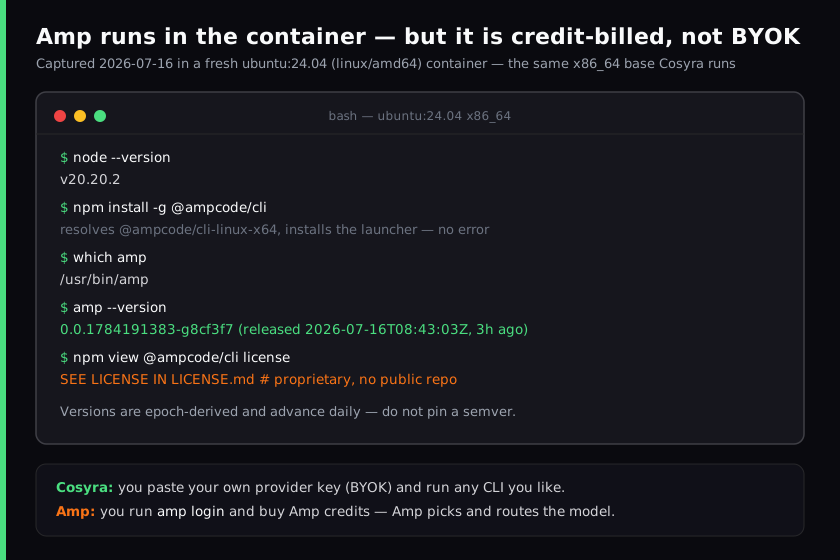
ubuntu:24.04 (linux/amd64)
container on 2026-07-16. The install works in one command; the license field
and the
amp login flow confirm the honest catch. Amp runs, but it's proprietary
and credit-billed, not BYOK. Cross-checked against
ampcode.com/manual.
The install resolves the @ampcode/cli-linux-x64 build against a standard
glibc userland and drops the binary at /usr/bin/amp. The
version string, 0.0.1784191383-g8cf3f7, is epoch-derived and
had been published three hours before we ran it, which is why we don't pin a
semver for Amp anywhere on this page: it rebuilds daily. This is the same
clean-container path we documented in Run Amp CLI on your phone, and it behaves like any other npm-published agent CLI once the platform gate passes.
$ node --version
v20.20.2
$ npm install -g @ampcode/cli
$ which amp
/usr/bin/amp
$ amp --version
0.0.1784191383-g8cf3f7
$ npm view @ampcode/cli license
SEE LICENSE IN LICENSE.md
$ # runs clean, but amp login + Amp credits are still required
So the container isn't the differentiator. Amp runs in it. What you're choosing between is Amp's routed-credit model on a machine you keep open, versus a BYOK box that is the machine and lives in your pocket. On a train with no laptop, that second shape is the only one that answers.
Where does Amp beat Cosyra?
Amp beats Cosyra on zero-setup routed models, a genuinely free daily allowance, model-quality routing, and Sourcegraph's large-codebase pedigree. We ship a managed cloud terminal and we still think Amp is an excellent agent for the right person. Here's where it's the better pick, with the receipts.
- Zero key or account juggling. Amp routes frontier models out of the box; there's no provider account to create and no key to paste. For someone who doesn't want to manage API keys at all, that is genuinely less friction than BYOK, and it's a real advantage Cosyra doesn't match. We hand you a key prompt, Amp hands you a working agent.
- A real free daily allowance. Per ampcode.com/chronicle, Amp offers $10/day across any mode, ad-free since 2026-03-30. That's a lower barrier to first use than a trial-then-subscription, and it renews every day. If you want to try an agent for free indefinitely at low volume, Amp's model fits better than ours.
- Model-quality routing. Amp actively selects deep, smart, and rush models per task, per its manual. Cosyra hands you a shell and you run whatever CLI and model you like, which is more control and more setup. If you'd rather the tool decide, Amp decides well.
- Sourcegraph's code-search DNA. Large-codebase context and navigation is Sourcegraph's historical strength, and Amp inherits it. On a sprawling monorepo that pedigree shows.
- Cross-surface continuity for desk users. Start on the desktop CLI, glance at or steer progress from a phone browser. If you already keep a machine awake, that hand-off is a legitimately useful mobile story, just a different one from ours.
Where does Cosyra beat Amp?
Cosyra beats Amp on running on an actual phone, BYOK and provider choice, a persistent cloud workspace that follows you across devices, and not needing you to keep a machine awake. The trade-off for "routed models with no setup" is that the CLI runs on a desktop, and the phone only watches it. We'd rather be the machine for you.
It runs on a phone, and Amp has no client that does
This is the load-bearing difference. Amp's CLI runtime is macOS, Linux, and Windows-via-WSL only; its mobile surface remote-controls a thread whose CLI executes on a desktop you left awake. Our native Google Play and App Store apps put a real Ubuntu terminal in your hand, and that terminal can run Amp's own CLI. If you want to code from a phone with nothing else on, that's the gap.
BYOK and provider choice, not credits Amp routes
Cosyra is bring-your-own-key: you paste your Anthropic, OpenAI, or Google key and pay the provider directly, with no per-token credit purchase and no model routing you can't override. Amp is the opposite axis. You buy Amp credits and Amp picks the model. Both are valid, and if you want to run a specific model at provider cost with your own key, that's a thing Amp doesn't offer and we do.
No desktop to keep awake
An Amp thread you steer from your phone still runs on a machine that has to stay powered and online. That machine is your responsibility. Our container is the always-on Linux machine, in the cloud, reached from a native app with nothing running at home. The agent keeps working whether your laptop is shut or in another city.
Persistent workspace across devices, no machine to supply
A Cosyra container persists in the cloud and is the same container whether you reach it from an iPhone, an Android tablet, or a laptop browser. Drop your phone, buy a new one, log in, and your repo, your shell history, and your half-finished session are still there. Amp's state lives on the desktop you installed it on; move machines and you're setting it up again.
An opinion Amp's crowd will push back on
We think "the agent should run on a real desktop and you can peek from your phone" has the mobile story backwards. Most agent work now is the agent doing multi-file edits and running commands while you approve steps, and that job doesn't need a desktop-class keyboard in front of you; it needs the box to be reachable and awake. A lot of excellent engineers will disagree and keep their CLI on a workstation, and for a heavy interactive refactor at a desk they're right. But for kicking off and steering an agent from a phone in a waiting room, "the CLI runs on the desktop you left at home" isn't mobile, it's a leash. That's the exact reason we built Cosyra as a container with a native app instead of a remote-control panel.
Who should pick Amp instead of Cosyra?
Pick Amp instead of Cosyra if you're at a capable desktop, you want routed frontier models with no key setup, you want a genuinely free daily allowance, or you're working a large codebase where Sourcegraph's context pedigree pays off. For those profiles Amp is the better tool, and we'd tell you so.
Try Amp first if you are one of these profiles
- Desk-bound and key-averse. You code at a desk and you don't want to create provider accounts or manage keys. Amp's routed-credit model with a $10/day free tier is the lowest-friction way to a working agent, and a phone isn't your primary surface. That's the right answer for you.
- Large-codebase navigator. You work a big monorepo where finding the right context is half the battle. Sourcegraph built its company on exactly that, and Amp inherits it. If code search and context are your bottleneck, start with Amp.
- Low-volume free-tier user. You want to use an agent for free, indefinitely, at modest daily volume. Amp's daily allowance renews; ours is a subscription, with a 7-day free trial for eligible new users in the App Store app. For steady light use, Amp's shape costs you less.
We use terminal-based agents at our desks too, and we use Cosyra when we want an agent on a phone with no laptop to keep open. They aren't mutually exclusive, and since Amp installs inside a Cosyra container, the line between them is thinner than it looks.
How do you try Cosyra if you're coming from Amp?
You try Cosyra from an Amp background in about two minutes: install from the
App Store or Google Play, sign in, and you land in a fresh Ubuntu 24.04
x86_64 container instead of a CLI on a laptop you keep open. Four agents are
already on the PATH, and if you want Amp specifically, it's one
npm install -g @ampcode/cli away, now in the cloud and reached from
the phone. The session below is what we run on a fresh install.
$ # Install Cosyra, open the app, drop into the container.
$ cat /etc/os-release | head -1
PRETTY_NAME="Ubuntu 24.04 LTS"
$ which claude codex opencode agy
/usr/local/bin/claude
/usr/local/bin/codex
/usr/local/bin/opencode
/usr/local/bin/agy
$ # Want Amp too? One command, runs in this container.
$ npm install -g @ampcode/cli && amp login
The big unlock for most people coming from Amp: there's no desktop to keep awake anymore. The container is the always-on machine, it hibernates when idle and resumes where you left off, and you reach it the same way from any device, and Amp runs inside it just like the four agents we pre-install. If you want the pillar view of the category, see the mobile coding terminal guide.
Frequently asked questions
Is there an Amp mobile app that runs the agent on your phone?
No. Amp's CLI supports macOS, Linux, and Windows via WSL only, with no iOS or Android build. Amp's mobile story, from its "Agents, Everywhere" launch on 2026-06-04, is a web remote-control surface: you start a thread in the desktop CLI, then open it from a phone browser to keep steering it. The CLI still executes on the desktop that started it, so a machine has to stay awake. Cosyra takes the other route: the agent runs in a cloud Ubuntu container and your phone is the terminal.
[source: ampcode.com/manual lists macOS/Linux/WSL and the web remote surface, no phone runtime]
Is Amp free, or does it cost money?
Amp has a real free tier of $10/day across any mode, ad-free since 2026-03-30. Beyond that it is usage-based with no subscription: a $5 minimum credit purchase, zero markup on provider API pricing for individuals, and +50% for enterprise. Cosyra is a flat plan instead: Core at $20/month or Pro at $30/month, and you bring your own model key.
[source: ampcode.com/chronicle, free-tier and ad-free dates + credit billing]
Is Amp open source or bring-your-own-key?
Neither. Amp is proprietary: gh api repos/sourcegraph/amp returns
404 (no public repo) and the npm license field reads "SEE LICENSE IN LICENSE.md",
both checked first-hand on 2026-07-16. It is also not BYOK. You buy Amp credits
and Amp picks and routes each request across models like GPT-5.5, Claude Opus
4.8, and Fable 5, rather than accepting your own key. Cosyra is BYOK: you paste
your provider key and run whatever CLI you like.
[source: @ampcode/cli npm registry metadata, license field]
Can I run Amp CLI inside Cosyra?
Yes. We ran it first-hand on 2026-07-16. In a clean Ubuntu 24.04 x86_64
container, the same base Cosyra runs, npm install -g @ampcode/cli
resolves the @ampcode/cli-linux-x64 build, puts the binary at
/usr/bin/amp, and amp --version returns
0.0.1784191383-g8cf3f7. We don't pre-install Amp (we ship
Claude Code, Codex CLI, OpenCode, and Antigravity CLI); Amp installs on
top. Running it still means an amp login and buying Amp credits.
[see: Run Amp CLI on your phone, the container setup we tested]
Does Amp CLI run on Termux on Android?
It's unverified, and we won't claim it either way without a hands-on test.
The npm package resolves @ampcode/cli-linux-arm64 on Termux's aarch64
userland, so npm may install it. But Amp ships a prebuilt binary that is almost
certainly glibc-linked, and Termux uses Android's Bionic libc, the same mismatch
that trips up other agent CLIs on Termux. A cloud x86_64 glibc container sidesteps
the question, which is why the container path is the one we tested and can stand
behind.
[source: ampcode.com/manual platform list; @ampcode/cli platform binaries via npm]
Four agents pre-installed, and Amp is one npm install away. We run them in a real x86_64 Ubuntu container, reached from a native iOS or Android app, with no desktop to keep awake. Two-minute setup.
Run Amp CLI on your phone · OpenCode on your phone · All eight agent CLIs compared · AI coding agents on mobile · See pricing. Sign up and pick a plan. Eligible new users can start a 7-day free trial in the App Store app.