The best AI coding agent CLI for your phone is the one whose model you trust and whose license you can live with. The agents themselves have converged on the same terminal shape. Claude Code, Codex CLI, OpenCode, and Gemini CLI all run as a terminal program you drive with plain English; Cursor CLI, Amp, Crush, and Aider round out the field. This guide compares all eight on the four things that actually decide it from a phone: license, cost model, install path, and how each one reaches a small screen. We pre-install the first three, plus Antigravity CLI in place of Gemini CLI, because switching between them is a one-word command.
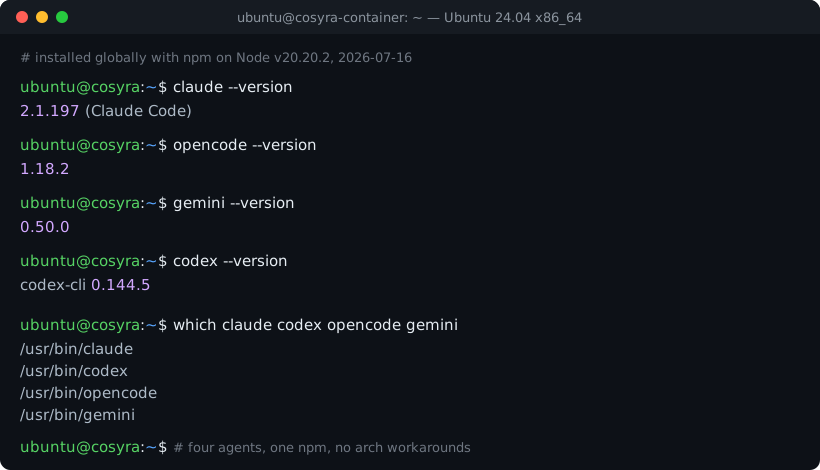
We build Cosyra, so we have a side here, but the useful version of this comparison is the one that tells you which agent to run, not which company to like. We installed Claude Code, Codex CLI, OpenCode and Gemini CLI into a clean Ubuntu 24.04 container on 2026-07-16 and read their versions back off the shell, so the numbers below are first-hand, not copied from a release page. If you want the setup mechanics for any single agent, the AI coding agents on mobile pillar has the step-by-step; this page is the choosing part underneath it.
Quick decision.
- Loyal to one model provider → pick that vendor's agent: Anthropic → Claude Code, OpenAI → Codex CLI, Google → Gemini CLI.
- Want maximum openness and model choice → OpenCode (MIT) or Crush (source-available). See the eight agents ↓.
- Want the full framework → which should you pick ↓.
The eight AI coding agent CLIs, compared
These eight cover the agents developers actually reach for in a terminal in 2026. They split cleanly on two axes: how open the code is, and how you pay for the model. Everything else (approval defaults, install path, mobile reach) falls out of those two. Every "as of" date is when we last verified that row first-hand against the tool's own docs, repo, or npm metadata.
| Agent | Maker / License | Cost model | Install | Reaches a phone by |
|---|---|---|---|---|
| Claude Code | Anthropic / proprietary | BYOK or paid Claude plan | npm @anthropic-ai/claude-code | A Linux shell you reach remotely |
| Codex CLI | OpenAI / Apache 2.0 | ChatGPT sign-in or API key | npm @openai/codex | A Linux shell you reach remotely |
| OpenCode | Anomaly / MIT | BYOK, many providers | npm opencode-ai | A Linux shell (Termux misdetected) |
| Gemini CLI | Google / Apache 2.0 | Paid Gemini key (free tier ended) | npm @google/gemini-cli | A Linux shell you reach remotely |
| Cursor CLI | Anysphere / proprietary | Paid Cursor plan | curl native binary (no npm) | iOS app launches cloud agents; no phone shell |
| Amp | Sourcegraph / proprietary | Amp credits (not BYOK) | npm @ampcode/cli | Mobile surface monitors a desktop agent |
| Crush | Charmbracelet / FSL-1.1-MIT | BYOK, many providers | Go binary (android-arm64 prebuilt) | Termux binary or a remote shell |
| Aider | Aider-AI / Apache 2.0 | BYOK, many providers | PyPI aider-chat | A Linux shell you reach remotely |
The two Anthropic-and-OpenAI defaults: Claude Code and Codex CLI
Claude Code is the agent most
people mean when they say "coding agent in the terminal." It is proprietary, from
Anthropic, and ships on a fast cadence. We installed
2.1.197 on 2026-07-16, and it moves several point releases a week.
You bring your own Anthropic key or drive it from a paid Claude plan. Its default
is conservative: it asks before running commands that change your machine, which
on a phone, where you cannot glance at a second monitor, is the behavior you want.
Codex CLI is OpenAI's answer, and
it is the opposite trade in two ways. It is open source (Apache 2.0, the code
is at openai/codex), and it
defaults to looser approvals. It will run shell commands, write files,
and run npm or pip inside the workspace without asking
each time. That is faster and more dangerous. On a phone we run it with
codex --ask-for-approval always when we are on a network we do not
fully trust. We installed codex-cli 0.144.5 first-hand on 2026-07-16.
The open pair: OpenCode and Aider
OpenCode is the most open agent on this list: MIT-licensed, model-agnostic, and, at 186,323 GitHub stars on 2026-07-16, the one with the most momentum. It does not tie you to a single provider. Point it at Anthropic, OpenAI, Google, or a local model. The one honest wrinkle for phone users: it still misdetects Termux as plain Linux (issue #21043, opened 2026-04-04, auto-closed by a staleness bot on 2026-07-03 without a fix), so on raw Android you fall back to a proot chroot. In a cloud container that problem never comes up because the container is plain Linux.
Aider is the elder statesman, an Apache-2.0
Python agent (aider-chat on PyPI, 0.86.2) that pioneered a lot of
the git-native, edit-in-place workflow the newer agents copied. It is model-agnostic
and works well with Gemini 2.5 Pro, DeepSeek, Claude, and o3-class models. The
caveat is momentum: as of 2026-06-11 its
main branch had gone ~20 days without a commit, so the release cadence
has clearly slowed relative to Claude Code or OpenCode. If you value stability
over the newest features, that is a feature, not a bug.
Gemini CLI and the free-tier that ended
Gemini CLI is Google's Apache-2.0
agent (@google/gemini-cli, installed first-hand at
0.50.0 on 2026-07-16). The thing to know before you pick it: the
free first-party endpoint ended on 2026-06-18. The free
OAuth login now returns 410 Gone, with no grace period. The
binary still works, but you have to feed it a paid Gemini API key from
Google AI Studio or Vertex AI. Google's official successor is
Antigravity CLI (the agy command), which did not ship at feature parity. Do not
conflate "the free tier ended" with "the tool is dead." The toolchain is under
active daily development. In a Cosyra container the pre-installed Google agent
is Antigravity CLI, and Gemini CLI is one
npm install -g @google/gemini-cli away.
The other three: Cursor CLI, Amp, Crush
Cursor CLI (the
agent command) is Anysphere's headless runtime, still labelled beta.
Two things make it different: it installs as a native binary via a curl
script rather than from npm, so glibc and CPU arch matter the way they do for
any compiled binary; and Cursor's mobile story is a desktop story: the iOS app
launches and monitors cloud agents but gives you
no terminal on the phone. If you live in the Cursor editor,
the CLI is a natural extension. If your phone is the point, it is the wrong
tool. A Cosyra workspace does ship it, so it needs no install there. Our Cosyra vs Cursor CLI
comparison walks through why a cloud container beats the desktop-plus-remote setup
for phone-first work.
Amp, from Sourcegraph, is the
one that breaks the BYOK pattern. You do not paste your own key. You buy Amp
credits ($5 minimum) and Amp routes each request to a model it picks. Its
@ampcode/cli package publishes daily and runs on macOS, Linux, and
Windows via WSL. Its "Agents, Everywhere" mobile surface lets you watch and steer
a running thread from a phone, but the agent is executing on a desktop-class machine,
not on the phone. That is the honest framing: Amp on a phone means monitoring,
not running. We break down the credit-billing trade-off, model routing, and where
Amp beats a BYOK container in
Cosyra vs Amp.
Crush, from Charmbracelet, is the most phone-friendly of the install-it-yourself three for one structural reason: it is a single Go binary with a prebuilt android-arm64 archive. A self-contained Go binary does not fight Termux's aarch64 userland the way a Node or Python agent does, so Crush is the one agent here you can genuinely run on raw Android without a chroot. Its license is source-available FSL-1.1-MIT (free to use, converts to MIT after two years), which is more permissive than proprietary but not OSI open source, worth naming so you do not call it "open source" and get corrected.
Three we left out of the eight, and why they still matter
Pi is the one we expect to force its way
into this list. It is MIT-licensed TypeScript with four tools, read, write, edit,
bash, and a system prompt under 1,000 tokens, which is the shortest of anything
here. The reason it belongs in a mobile conversation is structural: the npm package
declares no os and no cpu
constraint (checked against the registry 2026-07-20), so it sidesteps both the
arch-misdetection that trips OpenCode's launcher on Termux and the glibc gap that
breaks native installers. At 72,991 GitHub stars on 2026-07-20, against 54k in
January, it is moving faster than anything else in this category.
Auggie, from Augment Code, is
the opposite case: it is here because people keep asking, not because it
fits phone-first work. It is proprietary, installs via
npm i -g @augmentcode/auggie on Node 20+, and authenticates with
auggie login against an Augment account rather than a provider key,
so it is not BYOK, the same way Amp is not. Its docs name no operating systems at all and never mention Android,
iOS, or Termux, and as of 2026-07-16 its pricing page shows only Business at $100/month
and Enterprise, with no free or individual tier. Running it from a phone means
running it in a cloud Linux container you drive from the phone.
The two unrelated agents both named Grok are left out for a third reason: a single row called "Grok" would tell you less
than it hides. xAI's Grok Build and a community project called Grok CLI both install
a binary named grok into
~/.grok/bin, neither installer checks for the other, and the
second one you install replaces the first. Both are BYOK against a Grok API
key, both have an MIT-or-Apache harness with a closed model, and their Linux
ARM64 support is exactly inverted: xAI publishes a first-class
linux-aarch64 binary, the community CLI publishes none, so the Termux
answer flips depending on which grok someone means. Release assets
probed first-hand 2026-07-20.
Run four agents without installing anything. Claude Code, Codex CLI, OpenCode, and Antigravity CLI are pre-installed in every container. Eligible new users can start a 7-day free trial in the App Store app. App Store / Google Play / Pricing details
Where each agent genuinely wins
No hedging. Here is the one-line case for each, including the ones we do not ship:
- Claude Code wins on judgment and safe defaults. If you want the agent to ask before it runs something destructive, this is the one.
- Codex CLI wins on open source plus speed. It is Apache 2.0 and it does not stop to ask, which suits a trusted sandbox.
- OpenCode wins on openness and model choice. MIT, the biggest community, and no provider lock-in.
- Gemini CLI wins if you are already paying for Gemini and want Google's models in the terminal, if you accept the paid-key requirement first.
- Cursor CLI wins if you live in the Cursor IDE and want its agent in a terminal on your desktop. Not a phone tool.
- Amp wins if you would rather buy credits than manage keys and you want Sourcegraph's model routing to make the choice for you.
- Crush wins on raw Android (a single Go binary that runs in Termux without a chroot) and on a clean TUI.
- Aider wins on stability and a mature git-native workflow, if you do not need the newest features.
Here is the opinion a lot of these vendors would push back on: the agent you
pick matters less than the model behind it and the box you run it in. They
are all BYOK-ish terminal programs converging on the same edit-in-place,
run-tests, approve-diffs loop. We ship four rather than betting on one
because switching between claude, codex, opencode, and
agy is a single word at the prompt, and the differences between them
shrink every month. Cursor and Amp, whose whole pitch is a differentiated managed
experience, would tell you the opposite. We think they are selling the wrapper
when the model is the product.
How each one actually reaches a phone
This is where the field splits hardest, and it is the axis desktop-centric blogs skip. Reviewing an agent's diff on the 7:52 train is a different problem from running it at a desk, and the agents were not all built for it:
- Terminal agents you reach remotely: Claude Code, Codex, OpenCode, Gemini, Aider, Crush. These have no phone app; "on a phone" means running them in a Linux environment you connect to. That is either Termux on Android (where the Node and Python ones fight the userland; see the Android container wall) or a cloud container that gives your phone a full shell.
- Desktop agents with a mobile remote: Cursor CLI and Amp. The agent runs on a desktop-class machine; the phone launches or monitors it. Useful if you already keep a machine awake, useless if the phone is your only always-on device.
We built Cosyra for the first group. Each user gets a private Ubuntu 24.04
container on Azure AKS with Claude Code, Codex CLI, OpenCode, and
Antigravity CLI already on PATH, 30 GB of storage that survives
between sessions, and native iOS and Android apps. Because the container is
x86_64 plain Linux, the same environment where Claude Code, Codex CLI,
OpenCode, and Gemini CLI installed cleanly in our 2026-07-16 test, so there
is no ABI gap to fight. The honest trade-off: the container lives in the
cloud, so no network means no terminal, the way
a local tool like Termux keeps working
on a plane. If offline is your hard requirement, run Crush in Termux and skip
us.
Which should you pick?
Here is the framework we actually give people who ask:
- Pick by model loyalty first. If you trust one provider's models (Anthropic, OpenAI, or Google), start with that vendor's agent (Claude Code, Codex CLI, or Gemini CLI). The model does most of the work; the CLI is the harness.
- Pick OpenCode if you want to stay provider-neutral and auditable: MIT, model-agnostic, the largest community, and the safest bet against any one vendor changing terms.
- Pick Crush if you need raw Android with no cloud and no chroot. The Go binary is the only one here that runs cleanly in Termux.
- Pick Amp or Cursor CLI only if you want credits-over-keys (Amp) or you already live in the Cursor IDE, and accept that neither gives you a real terminal on the phone.
- Skip Plandex unless you want to run a server. It is the one
agent on the wider shelf that is client-server rather than a single binary:
the MIT-licensed Go CLI needs a Plandex server with Docker, Docker Compose,
and PostgreSQL v14 listening on port 8099. Its 2M-token effective context and
cumulative diff sandbox are real, but
plandex.aistopped resolving (SERVFAIL on Google, Cloudflare, and Quad9, checked 2026-07-18), which kills both the documented installer and the docs site. The working install path is in Run Plandex from your phone.
Try one you do not have to install first if the phone is your
point. The four we pre-install are on PATH the second the container
boots, so you can compare Claude Code against Codex against OpenCode against Antigravity
on the same repo, from the same phone, without four separate setups. If one of
them wins for your work, you will know inside an afternoon. And if none of them
do, the honest answer might be Crush in Termux or Cursor on your desktop, and
we will have told you so.
Frequently asked questions
Which AI coding agent CLI is the best?
There is no single winner, because they optimize for different things. Claude Code is the strongest default if you are loyal to Anthropic's models and want tight command-approval control. Codex CLI is open source and defaults to looser approvals, so it moves fast. OpenCode is the most open and the most model-agnostic. Gemini CLI ties you to a paid Gemini key since the free endpoint was sunset. Pick by the model you trust and the license you can live with. The agents themselves are converging on the same terminal shape.
[source: anomalyco/opencode on GitHub]
Is Codex CLI open source?
Yes. OpenAI's Codex CLI is licensed Apache 2.0 and its source is on GitHub at openai/codex. That is different from Codex Web and the Codex controls in the ChatGPT mobile app, which are hosted OpenAI surfaces, not the open-source CLI. We verified the license first-hand against the repository's LICENSE file.
[source: openai/codex LICENSE]
Does Gemini CLI still have a free tier?
No, not the way it used to. On 2026-06-18 Google sunset the free first-party endpoint for Gemini CLI; the free OAuth login path now returns HTTP 410 Gone with no grace period. The Apache-2.0 binary still runs, but you have to supply a paid Gemini API key from Google AI Studio or Vertex AI. Google's official replacement is Antigravity CLI (invoked as agy).
[source: Google Developers Blog on the Gemini CLI transition]
Can I run these AI coding agents on Android or Termux?
It depends on how each one is packaged. Crush is a single Go binary with a prebuilt android-arm64 archive, so it runs in Termux without fighting the userland. The Node CLIs (Claude Code, Codex, OpenCode, Gemini) and the Python one (Aider) can hit ABI and arch issues in Termux's aarch64 environment; OpenCode still misdetects Termux as plain Linux. Cursor CLI is a curl-installed native binary, so glibc and arch matter there too. Running them in a cloud Linux container sidesteps all of that.
[source: charmbracelet/crush on GitHub]
Is Amp bring-your-own-key?
No. Amp is not BYOK. Instead of pasting your own Anthropic or OpenAI key, you buy Amp credits (a $5 minimum) and Amp routes each request to a model it chooses. That is the opposite of the BYOK model that Claude Code, OpenCode, Gemini CLI, Crush, and Aider use, where you bring your own provider key and pay that provider directly.
Which AI coding agents come pre-installed on Cosyra?
Four: Claude Code, Codex CLI, OpenCode, and Antigravity CLI. They are already on PATH in every Ubuntu 24.04 container, so there is nothing to install before you start. The Cursor CLI ships in the workspace too. If you want Gemini CLI, Amp, Crush, or Aider, you install them yourself in the same container the way you would on any Linux box.
tl;dr
Pick by the model you trust: Claude Code (Anthropic, safe defaults), Codex CLI (OpenAI, open source, fast), OpenCode (MIT, model-agnostic), or Gemini CLI (Google, paid key only now). Use Crush for raw Android, and skip Cursor CLI or Amp if you want a real terminal on the phone rather than a remote for a desktop agent.
App Store / Google Play. Claude Code, Codex CLI, OpenCode, and Antigravity CLI are pre-installed. Eligible new users can start a 7-day free trial in the App Store app.
Compare all four on the same repo. Claude Code, Codex, OpenCode, and Antigravity are on PATH the moment the container boots: no install, no arch fight, from your phone.
 scan to install
 See pricing · AI agents on mobile pillar · Mobile terminal pillar