Short answer. Cosyra vs RemoteCode comes down to one line: RemoteCode relays your iPhone to Claude Code, Codex, or OpenCode running on an Apple-Silicon Mac you own; Cosyra runs the agent in a cloud container so there is no Mac to keep awake. RemoteCode is free on your own network, $4.99/month for the internet relay, and keeps your code on the Mac (verified 2026-07-06). Cosyra starts at $20/month for a persistent Ubuntu 24.04 x86_64 box with Claude Code, Codex CLI, OpenCode, and Antigravity CLI pre-installed, reached from native iOS and Android apps. Pick RemoteCode if you already own an always-on Mac; pick Cosyra if you don't, or if you're on Android at all.
We wrote this from a phone on the train with every laptop at home shut, which is the whole test. RemoteCode is the leanest relay we have covered: a tidy single-session remote control that drives the exact agent already running on your Mac. But the moment you leave that Mac behind, RemoteCode's iPhone app has nothing to talk to unless you pay for the relay and the Mac is still awake at home. On Cosyra the Mac never mattered, and there is no Mac to matter. That contrast is the spine of this page.
This post was written by the Cosyra team. We compared Cosyra against RemoteCode based on hands-on testing of both: reading remotecode.io first-hand, installing the iPhone app and pairing it to a local session, and confirming the version, pricing, platform, and rating count against the App Store listing and the public iTunes lookup API. RemoteCode was version 2.0.38 (released 2026-06-22, first released 2026-03-31, minimum iOS 18.0, Free with a Pro in-app purchase, 0 ratings, iOS/iPadOS only), verified 2026-07-06 against our internal RemoteCode factsheet.
tl;dr
Use RemoteCode if you own an always-on Apple-Silicon Mac and an iPhone, and you want near-$0 (free on your own network, $4.99/month for the internet relay), code that never leaves your Mac, and a simple remote control for the exact session already running there. Use Cosyra if you want the compute itself in the cloud with nothing to keep awake: a real Ubuntu container on a phone where the agent runs whether or not any Mac is on, and where Android is a first-class client, which RemoteCode has no answer for. RemoteCode relays to your Mac; Cosyra is the machine.
App Store · Google Play. Sign up and pick a plan. Eligible new users can start a 7-day free trial in the App Store app.
Want a phone that doesn't depend on a Mac being awake? Our container is an always-on x86_64 Linux machine in the cloud, with Claude Code, Codex CLI, OpenCode, and Antigravity CLI ready to drive from iOS or Android. No home Mac to keep running, and no Apple-Silicon requirement.
App Store · Google Play · Pricing. Sign up and pick a plan, from $20/month.
How do Cosyra and RemoteCode compare feature by feature?
Both put Claude Code on your phone, but from opposite ends. RemoteCode is a lean relay to an agent running on your own Mac; Cosyra is a paid cloud container that runs the agent for you. RemoteCode's near-$0 assumes you already own a modern Mac and keep it awake; Cosyra's $20/month is that machine, and it needs no Mac at all. The table below lines them up on twelve attributes, verified 2026-07-06.
| Feature | Cosyra | RemoteCode |
|---|---|---|
| Pricing | $20 / month Core or $30 / month Pro | Free on your network; Pro $4.99 / month (internet relay) |
| Free tier | None. 7-day free trial for eligible new users in the App Store app | Free on your own Wi-Fi/VPN, no account; Pro has a 1-week trial |
| OS support | iOS, Android, web | iPhone/iPad client; macOS 15+ Apple-Silicon host. No Android |
| AI agents pre-installed | Claude Code, Codex CLI, OpenCode, Antigravity CLI (BYOK) | None bundled; drives your local Claude Code, Codex, or OpenCode |
| Where the agent runs | Cloud Ubuntu container; no home machine needed | Your own Apple-Silicon Mac; relay only passes encrypted data |
| Persistent storage | 30 GB cloud, survives device loss | Local disk on your own Mac |
| Offline capability | No (cloud-only) | No to start work; needs your Mac awake + reachable |
| Container sandboxing | Per-user Ubuntu container on Azure AKS | None; runs on whatever Mac you pair |
| Privacy model | Hosted container (code runs on Azure) | Code stays on your Mac; encrypted device-to-device relay |
| Off-network access | Built in. The container is already in the cloud | Paid: Pro relay $4.99/month, and the Mac must be awake |
| API key model | BYOK (you pay Anthropic / OpenAI / Google) | Uses your existing local CLIs and keys (BYO) |
| Open-source status | Client app closed, orchestration proprietary | Unverified. Referenced repo 404s, no license asserted |
Want the agent to run without your Mac? We ship a persistent x86_64 Ubuntu container with four agents pre-installed, reached from native iOS and Android apps. The agent runs in the cloud, so a sleeping Mac never stops you mid-task, and there's no Mac to buy in the first place.
App Store · Google Play · Pricing. Sign up and pick a plan. Eligible new users can start a 7-day free trial in the App Store app.
Relay vs hosted compute: the one distinction that matters
RemoteCode has two parts: a desktop client on your Mac that surfaces the active AI coding session, and an iPhone or iPad app that drives it. You keep running Claude Code, Codex, or OpenCode in your Mac's terminal exactly as you always did; RemoteCode attaches to that session and passes it to the phone, encrypted, and it states the code never leaves your Mac (remotecode.io, verified 2026-07-06). On your own Wi-Fi it auto-discovers the session with no account, so it can genuinely cost $0. It is a clean, single-session design. The catch is structural: RemoteCode provides zero compute. The agent lives on a Mac you have to own, power, keep awake, and, to reach it from the train, pay $4.99/month to relay.
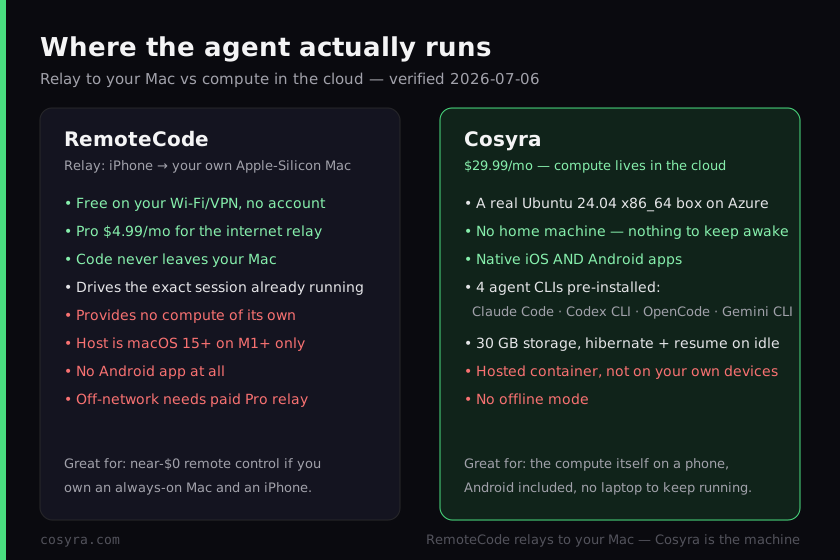
Cosyra inverts that. The agent runs in a per-user Ubuntu 24.04 x86_64 container on Azure, reached from native iOS and Android apps, and the four CLIs are already on the PATH. There is no Mac in the loop. We think that difference is the entire decision, and most "Claude Code on phone" posts skip it: RemoteCode makes your iPhone a great window into a Mac you must keep running, and Cosyra makes your phone a window into a computer that is always running for you. Be precise about it in both directions, because the easy mistakes are real.
Two of those mistakes to avoid. "RemoteCode runs your agents in the cloud" is wrong: they run on your own Mac and the relay only passes encrypted session data. And "RemoteCode is just a cheap clone of Cosyra" is also wrong and unfair: it is a fundamentally different architecture with a real privacy edge, and it is nearly free if you already have the Mac. The honest framing is relay versus hosted compute, and once you see it that way the right pick falls out of your own situation, starting with whether you own that Mac and whether you ever touch Android.
What happened when we paired RemoteCode with a local session?
It worked as advertised, and then it stopped exactly where the design says it would. We ran the desktop client on an Apple-Silicon Mac, started a Claude Code session in a repo, opened the iPhone app on the same Wi-Fi, and it auto-discovered the session with no account and no pairing friction. We reviewed output and sent input from the phone. Smooth. Then we walked out the door, the thing you actually do when you leave the house, and on cellular the app could not reach the Mac until we enabled the Pro relay, and even then only because the Mac was still awake at home. Nothing broke; that is simply what a relay is. Here is the Mac side.
$ # RemoteCode desktop client running on your Apple-Silicon Mac
$ claude # a normal local Claude Code session in your repo
> Claude Code · /Users/you/project · running on THIS Mac
> RemoteCode: session shared · iPhone discovered on local Wi-Fi
> source code stays on this Mac · relay passes encrypted data only
$ # close the lid and, off-network, the phone needs Pro to reach it
Now the Cosyra side of the same walk. There is no Mac in it at all. We open the app, land in the container, and the agent is already there in the cloud. The point isn't that one session is faster; it's that one of them depends on a Mac being awake somewhere and the other doesn't. On a train with no laptop in your bag and an Android phone in your hand, that is the whole ballgame, and RemoteCode can't even board that train, because it has no Android client.
$ cat /etc/os-release | head -1
PRETTY_NAME="Ubuntu 24.04 LTS"
$ which claude codex opencode agy
/usr/local/bin/claude
/usr/local/bin/codex
/usr/local/bin/opencode
/usr/local/bin/agy
$ claude # runs in the cloud container, no home machine
> Claude Code · /home/you/project · ready
Where does RemoteCode beat Cosyra?
RemoteCode beats Cosyra on cost, privacy, and living where your work already is. We ship a paid hosted product and we still think RemoteCode is a well-built, honest little tool; it ships fast (v2.0.38 on 2026-06-22) and the local-network path is genuinely frictionless. Here is where it is the better pick, with the receipts from remotecode.io and the App Store listing, verified 2026-07-06.
- Cheapest relay in the family, often $0. On your own Wi-Fi or VPN it is free with no account, and the internet relay is $4.99/month with a 1-week trial (remotecode.io). If you already own a modern Mac and mostly code at home or the office, your added cost can be nothing. Cosyra's $20/month cannot beat $0 for someone who already has the hardware.
- Code never leaves your Mac. The agent runs locally and the relay "only passes encrypted session data between your own devices"; RemoteCode states it never uploads your source code (App Store listing, verified 2026-07-06). Cosyra runs your code in a hosted Azure container; for privacy-sensitive or air-gapped work that alone is disqualifying, and we'll say so plainly. RemoteCode wins that profile outright.
- Drives the exact session already running. There is no repo migration and no new environment: RemoteCode attaches to the Claude Code, Codex, or OpenCode session already on your Mac and follows whatever CLI you run. If your whole setup already lives on that Mac, that is less friction than recreating it anywhere else.
- Simple, polished, actively shipped. One clean single-session remote control, auto-discovery with no account on the local network, and frequent updates. It does one job and does it tidily, without asking you to learn a new environment.
Where does Cosyra beat RemoteCode?
Cosyra beats RemoteCode on not needing a Mac at all, shipping a real Android app, zero setup, a persistent workspace that follows you across devices, and being a real x86_64 box you can run builds and servers on. The trade-off for RemoteCode's cheapness and privacy is that it hands you no compute and a very narrow hardware assumption. We'd rather hand you the machine.
No Mac to keep awake, and no Mac to buy
This is the load-bearing difference. RemoteCode's agent runs on your own Apple-Silicon Mac, so that Mac has to exist, be on macOS 15 or newer, be on an M1-or-later chip, be awake, and be reachable. Cosyra's agent runs in the cloud, so a sleeping desktop, a dead laptop battery, or simply not owning a Mac never strands you. The same thing that makes RemoteCode nearly free if you have the hardware makes it unusable if you don't. Cosyra removes the dependency entirely.
Native Android: RemoteCode has none
RemoteCode is iPhone and iPad only, with no Google Play listing and no Android build as of 2026-07-06. If your phone is a Pixel or a Galaxy, RemoteCode is a non-starter before the conversation begins. Cosyra ships a native Android app that reaches the same container as the iOS app, so a full Linux container on Android is a first-class path, not an afterthought.
Zero setup, four agents already there
RemoteCode needs Claude Code, Codex, or OpenCode installed and running on your Mac first, plus the desktop client. A Cosyra container boots with Claude Code, Codex CLI, OpenCode, and Antigravity CLI already on the PATH, all BYOK, so you pick the right tool per task without installing anything. For a phone-first workflow, the difference between "set up an agent on a Mac, keep it awake, then relay it" and "open the app and type" is most of the experience.
A real machine, not just a window into one
Because Cosyra is an actual x86_64 Ubuntu box, you can run builds, start a dev server and preview it, run native binaries, and kick off long jobs that keep going while the container hibernates and resumes on reopen. RemoteCode is bounded by whatever your Mac can do and whether it stays on. If you want to spin up work from scratch on the go, you want the machine, not a remote control for one.
An opinion the RemoteCode crowd will push back on
We think, for most people coding from a phone, the home Mac is the weak link, not the feature. The RemoteCode crowd will disagree, and with conviction: they'll say the entire point is that your code stays on hardware you own, end to end, with nothing in a third-party cloud, for the price of an app you already had a Mac to run. For privacy-sensitive and air-gapped work they are right, and we'll say so without hedging. But "nearly free" quietly assumes a modern Apple-Silicon Mac that is always on, always awake, and always reachable, and it assumes you never pick up an Android phone. Most people on a train with a dead laptop in their bag don't have that. We'd rather put the machine in the cloud than ask you to babysit one at home. That is the exact reason we built Cosyra as hosted compute instead of a relay.
Who should pick RemoteCode instead of Cosyra?
Pick RemoteCode instead of Cosyra if you already own an always-on Apple-Silicon Mac and an iPhone, and you want near-$0 or you need your code to never leave hardware you control. For those profiles RemoteCode is the better pick, and we'd tell you so. The deciding question is simple: do you have a modern Mac you're happy to leave running, is your phone an iPhone, and do you need your code to stay on the Mac?
Try RemoteCode first if you are one of these profiles
- You own a modern Mac and an iPhone and want near-$0. An Apple-Silicon Mac that stays awake, plus the CLIs and keys you already run, and RemoteCode adds no compute bill on your own network, or $4.99/month for the internet relay. If the hardware is a sunk cost, that beats $20/month and we won't pretend otherwise.
- Privacy is non-negotiable. You need code to stay on devices you control, end to end, with only encrypted session data crossing an encrypted relay. A hosted container is a non-starter for you on policy or principle. RemoteCode is built for exactly that, and Cosyra is not.
- You just want a lean remote control for one session. You're not trying to move your environment anywhere; you want to check progress and approve steps for the agent already running on your Mac. RemoteCode does that one job tidily.
We reach for a relay like RemoteCode when we have a Mac we trust sitting at home and privacy is the priority, and for Cosyra when we want the agent to just be there on the phone with no Mac to keep alive. They're honestly different tools for different situations, and the home Mac is the variable that decides it. If you're weighing RemoteCode against other relay apps like Happy Coder (which we put head to head in Cosyra vs Happy Coder) and AgentsRoom (which we compare in Cosyra vs AgentsRoom), our remote-control vs cloud coding guide maps every relay option against the cloud-container shape in one place.
How do you try Cosyra if you're coming from RemoteCode?
You try Cosyra from a RemoteCode background in about two minutes, and there is no desktop client and no Mac in it. Install from the App Store or Google Play, sign in, and you land in a fresh Ubuntu 24.04 x86_64 container with the four agents already on the PATH. Where RemoteCode asks you to run a desktop client on a Mac and keep it awake, Cosyra just drops you into the machine. For the agent-by-agent tour, see running Claude Code on your phone.
The big unlock for most people coming from RemoteCode: nothing at home has to stay awake, and nothing at home has to be a Mac. The container is the always-on machine, it hibernates when idle and resumes where you left off, and you reach the same container from an iPhone, an Android tablet, or a laptop browser with state intact. You trade RemoteCode's near-$0-and-privacy for a hosted machine that is simply always there, on whatever phone you carry. Whether that trade is worth it is exactly the decision this page is about.
Frequently asked questions
Does RemoteCode run Claude Code in the cloud?
No. RemoteCode is a relay, not a computer. You run its desktop client on your own Apple-Silicon Mac next to your terminal, and the iPhone or iPad app drives the Claude Code, Codex, or OpenCode session running on that Mac. The compute, files, and tokens all stay on your machine, and RemoteCode states it never uploads your source code (verified 2026-07-06). Cosyra is the opposite shape: the agent runs in a hosted Ubuntu container, so there is no home machine in the loop.
[source: App Store, RemoteCode drives a session on your own Mac; code never uploaded]
Does RemoteCode work on Android?
No. As of 2026-07-06 the RemoteCode mobile client is iPhone and iPad only, and the desktop client it pairs with is macOS 15 or newer on an Apple-Silicon (M1 or later) chip only. There is no Google Play listing and no Android build, so an Android user cannot use RemoteCode at all (verified 2026-07-06). Cosyra ships a native Android app alongside iOS, and the container it reaches has no Mac dependency of any kind.
[source: iTunes lookup API, supported devices are iPhone/iPad only, no Android]
Is RemoteCode free?
It is free on your own Wi-Fi or VPN, where the app auto-discovers desktop sessions on the same network with no account needed. RemoteCode Pro is $4.99/month (with a 1-week free trial) and adds an encrypted private relay so you can reach your Mac from anywhere on the internet with no port forwarding (verified 2026-07-06). Cosyra Pro is $30/month, which buys the always-on x86_64 machine the agent runs on rather than a remote control for a machine you already own.
[source: remotecode.io, free on your network, Pro $4.99/mo for the internet relay]
Do I need a Mac to use RemoteCode?
Yes, and a specific one. The RemoteCode desktop client requires macOS 15 or newer on an Apple-Silicon chip (M1 or later). There is no Linux, Windows, or Intel-Mac build, and the phone app needs that desktop client running to have anything to drive (verified 2026-07-06). Cosyra needs no personal computer at all: the agent runs in a cloud container you reach straight from the phone.
[source: App Store, desktop client is macOS 15+ on Apple Silicon only]
Is RemoteCode open source?
Unverified, so we will not claim it either way. Older search results referenced a github.com/samuelfaj/remotecode.io repository, but that URL returns 404 as of 2026-07-06 and the App Store listing asserts no license (verified 2026-07-06). If open source is a hard requirement, a relay like Happy Coder (MIT) is the safer pick, and Cosyra's client app is closed too, so neither of us wins that line.
[source: iTunes lookup API, no license field; referenced GitHub repo 404s]
What is the difference between RemoteCode and Cosyra?
Architecture. RemoteCode relays your iPhone to Claude Code, Codex, or OpenCode running on your own Apple-Silicon Mac: free on your network, $4.99/month for the internet relay, code never leaves the Mac, and no Android. Cosyra runs Claude Code, Codex CLI, OpenCode, and Antigravity CLI in a hosted Ubuntu 24.04 x86_64 container you reach from native iOS and Android apps, with nothing at home to keep awake but a $20/month bill and no offline mode. Pick RemoteCode if you own an always-on Mac and want near-$0; pick Cosyra if you want the compute itself in the cloud, Android included.
[source: remotecode.io, "Continue AI Coding Sessions From Anywhere", relay to your Mac]
Four agents pre-installed, running in the cloud, with no Mac to keep awake. We run them in a real x86_64 Ubuntu container, reached from a native iOS or Android app. Two-minute setup, no desktop client, no machine at home to babysit.
Claude Code on your phone · AI coding agents on mobile · See pricing. Sign up and pick a plan. Eligible new users can start a 7-day free trial in the App Store app.