If Claude Code stopped working on Termux and you are staring at Error: claude native binary not installed, nothing is wrong with your install. Version 2.1.113
swapped the JavaScript entry point for a native binary compiled against
glibc, and Termux runs on Android's Bionic
libc. The binary cannot load. You have three fixes: pin
2.1.112, patch the native binary through Termux's glibc-runner,
or install inside a proot-distro Ubuntu rootfs. Each one works and
each one costs you something. Below is what breaks, how to confirm it, and how
to pick.
This guide was written by the Cosyra team. We verified every version number against the npm registry publish dates and every claim about Anthropic's position against the tracking issues on claude-code #50270, #20778, and #10644, checked 2026-07-22.
The one thing to understand first: this is an ABI mismatch, not a bug in your setup. Reinstalling, clearing the npm cache, or switching Node versions will not fix it, because there is no Android build of the native binary to install. Every working answer is a way to get glibc into the picture or to avoid the native binary entirely.
Jump to the fix that matches what you need:
- Just make it work again: pin 2.1.112, the last JavaScript build. One command.
- Need current features: load the binary through glibc-runner.
- Want the sturdiest on-device setup: install inside proot-distro Ubuntu.
- Sessions dying after they start? That is a different problem — the phantom process killer, not glibc.
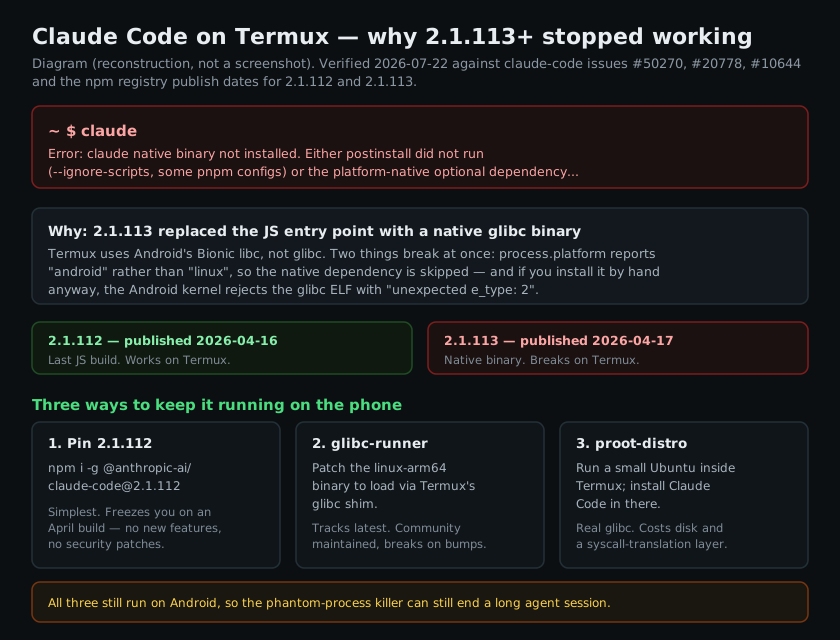
What actually broke in 2.1.113
Claude Code used to ship as a JavaScript CLI. You installed it with npm,
Node ran it, and Termux's Node was as good as any other. On
2026-04-17 the 2.1.113 release moved the CLI to a precompiled
native binary. The npm package became a thin wrapper that downloads a platform-specific
binary during postinstall. The previous release, 2.1.112, went
out one day earlier on
2026-04-16, and it is still the last version that runs on
Termux without help.
The binary is built for linux-arm64 and dynamically linked against
glibc — its interpreter is
/lib/ld-linux-aarch64.so.1. Termux does not have that
interpreter. Android uses Bionic, a different C library with a different
dynamic linker, so the file on disk is not loadable even when it is sitting
in the right place with the right permissions.
Two distinct failures come out of that one mismatch, which is why the symptoms people report do not match each other:
- The install path never gets there. When we pulled the tarball,
package.jsondeclaredbin claude -> bin/claude.exe, a 500-byte shim, with a postinstall script that fetches the real binary for your platform. Node on Termux reportsprocess.platformasandroid, notlinux, so postinstall looks for@anthropic-ai/claude-code-linux-arm64-android. That package has never been published, the registry 404s it, and you are left holding the shim with no binary behind it. That is what printsError: claude native binary not installed. We bisected v2.1.108 through v2.1.116 to find the exact cut. - Installing it by hand does not help. If you download the
linux-arm64binary yourself and put it where the wrapper expects, the Android kernel refuses to execute it and reportsunexpected e_type: 2. The ELF is valid; it is just built for a userland this kernel does not serve.
Confirm it is the glibc break
Before you change anything, make sure you are looking at this problem and not a genuinely broken install. Run Claude Code and read the failure.
$ claude
Error: claude native binary not installed. Either postinstall did not run
(--ignore-scripts, some pnpm configs) or the platform-native optional
dependency was not downloaded.
$ npm ls -g @anthropic-ai/claude-code
└── @anthropic-ai/claude-code@2.1.217
$ node -p process.platform
android
Two signals confirm it. The installed version is 2.1.113 or newer,
and node -p process.platform prints
android. That second line is the whole story: every packaging
decision downstream keys off it, and on Termux it will never say
linux. If your version is 2.1.112 or older and Claude Code
still fails, you have a different problem and this guide will not fix it.
Fix 1: pin the last JavaScript build
The shortest path back to a working claude command is to install
the last release that did not need a native binary.
$ npm install -g @anthropic-ai/claude-code@2.1.112
changed 1 package in 8s
$ claude --version
2.1.112 (Claude Code)
That is the entire fix. Node runs the JavaScript directly and Bionic never enters the picture. It is the right answer if you want to stop debugging and start working.
The cost is real, though, and worth stating plainly: you are pinned to a
build from April 2026. As of 2026-07-22 the current release
is 2.1.217, so pinning puts you roughly a hundred releases
behind. You will not get new features, and you will not get later fixes. If
you take this path, put a calendar reminder on it rather than discovering in
six months that your agent is running on a build nobody upstream remembers.
Fix 2: load the native binary through glibc-runner
Termux packages a glibc compatibility layer, and the community installers
use it to patch the official linux-arm64 binary so it loads through
that layer instead of Android's linker. The binary itself is unmodified Anthropic
output; what changes is which dynamic linker resolves it.
This keeps you on current releases, which is the main thing pinning cannot do. The trade is maintenance: it is a community-maintained patch against a binary Anthropic does not intend to support on this platform, so a packaging change upstream can break it without warning. The most active collection of these approaches is claude-code-android, which documents both the glibc-runner path and the newer Android Virtualization Framework route. Read its README before running anything — that project moves faster than this page does, and it is the honest place to get current commands.
We would not put a production workflow on this path. We would absolutely use it on a spare phone to stay on current Claude Code while the upstream issue is open.
Fix 3: install inside proot-distro Ubuntu
The sturdiest on-device answer is to stop fighting Bionic and put real glibc
on the phone. proot-distro installs a Linux rootfs inside Termux
and gives you a shell in it.
$ pkg install proot-distro -y
$ proot-distro install ubuntu
[*] Installing Ubuntu...
$ proot-distro login ubuntu
$ apt install -y nodejs npm
$ npm install -g @anthropic-ai/claude-code
$ claude --version
2.1.217 (Claude Code)
Inside that rootfs the official installer works unmodified, because the interpreter it wants is actually there. You get current releases and no patching.
What you pay is throughput. proot intercepts syscalls and rewrites
them in userspace, without root and without a kernel module, and every file operation
goes through that translation. An agent session is unusually file-heavy — it greps
a repository, opens dozens of files, and rewrites several — so this is the workload
that feels proot the most. It also costs a rootfs worth of storage on a device
that probably has less to spare than a laptop.
The catch that applies to all three
All three fixes get claude to start. None of them changes the fact
that you are running a long-lived, CPU-active process on Android.
Android 12 and newer run a phantom process killer that terminates background
child processes once the system-wide count passes 32, or when one uses heavy
CPU. That is a fair description of an agent working through a task. The
symptom is [Process completed (signal 9) - press Enter], and it
is a
separate problem with a separate fix. Solving glibc and then losing sessions to signal 9 is the normal sequence
here, not bad luck.
So the honest summary of on-device Claude Code in mid-2026: it is possible, it takes a workaround the vendor has declined to remove, and the OS is still entitled to kill it. People do run it this way and get real work done. It is a maintained setup, not a solved one.
Where Termux is still the right answer
We build a cloud alternative, so take this in that light — but Termux genuinely wins in places we do not:
- It works with no connection. Termux is local. On a plane, in a tunnel, or on a dead cell, it keeps working. We need a network, because the container is not on your phone. That is a real trade-off, not a footnote.
- It is free and open source. No account, no subscription, no vendor. For a lot of people that settles it.
- It reaches Android itself. Termux talks to the device — storage, sensors, the Android API through termux-api. A container in a datacenter cannot.
If any of those three describe your situation, pin 2.1.112 and stop reading. That is the correct answer for you, and we would rather say so than pretend otherwise. Our longer comparison of the two setups is in Cosyra vs Termux, and the full survey of every route onto an Android phone, Termux, SSH, and container alike, is in Claude Code on Android.
When to stop working around it
The reason this error exists is that Claude Code targets desktop Linux, and a phone running Bionic is not that. Every fix above is a way to make a phone look more like desktop Linux. The other direction is to keep the phone as a terminal and put the Linux somewhere it already exists.
That is what we build. A Cosyra workspace is a per-user Ubuntu 24.04 container on Azure AKS with Claude Code, Codex CLI, OpenCode, and Antigravity CLI already installed. It provisions a fresh Ubuntu container on first launch, about 15 seconds in our testing. There is no glibc question because it is ordinary Linux, no phantom process killer because it is not Android, and nothing to pin — you get whatever the current release is.
We think the phone keyboard is fine for agent-driven coding, and most people who disagree have not tried it. You are not writing a thousand lines on a touchscreen. You are typing a paragraph of intent, reading a diff on the train, and saying yes or no. That is a phone-shaped task. The part that was never phone-shaped is the Linux underneath it, which is the part we moved.
The honest trade runs the other way too: no connection means no terminal. Termux does not have that problem. If you code mostly offline, the workaround path above is genuinely better for you than we are.
Skip the workaround. Claude Code, Codex CLI, OpenCode, and Antigravity CLI, already installed in an Ubuntu 24.04 container. Sign up and pick a plan, from $20/month.
Picking between the three
| Approach | Stays current | Setup effort | Main cost |
|---|---|---|---|
| Pin 2.1.112 | No | One command | Frozen on an April 2026 build |
| glibc-runner patch | Yes | Moderate | Breaks on upstream packaging changes |
| proot-distro Ubuntu | Yes | Moderate | Slower file I/O, extra storage |
| Cloud Ubuntu container | Yes | Sign in | Needs a connection |
If you want more context on running agents from a phone generally, the pillar page is AI coding agents on mobile, and the Claude-specific walkthrough is Claude Code on your phone. Plans and limits are on pricing.
tl;dr — Claude Code 2.1.113+ ships a glibc binary that Termux's
Bionic libc cannot load. Pin 2.1.112 if you want it working in
one command. Use glibc-runner or proot-distro Ubuntu if you need current releases.
Use Cosyra if you would rather not maintain a workaround at all — though Termux
is still the right call if you code offline.
Run Claude Code without the workaround. Sign up and pick a plan, from $20/month.