You can run OpenAI's Codex CLI on Android, but not the way the marketing
screenshots imply. There is no native Android build. As of 2026-07-18 the
Codex CLI (latest stable 0.144.6, published 2026-07-18) ships
for macOS, Linux, and Windows only. So "Codex on Android" means one of four
real paths: a cloud Ubuntu container with the official CLI pre-installed (Cosyra on Google Play, where you type codex), a Termux community fork on-device,
Codex Web in a mobile browser, or the ChatGPT app's Codex feature
remote-controlling a Mac or Windows PC. This guide walks each one with the
honest trade-offs.
This is the Android-specific companion to our Codex CLI on your phone walkthrough (which covers iPhone and Android generically), with a tablet sibling in our Codex CLI on iPad guide. What changes on Android is that Termux is a real on-device option, unlike on iOS, but the Codex story there runs through community forks rather than the official binary, which is the part most blog posts get wrong. For the broader picture across all four mobile AI agents, see AI coding agents on mobile. If you are weighing Codex against Anthropic's agent from a phone, our Claude Code vs Codex CLI on phone head-to-head covers the permission-prompt and sandbox differences, and the Claude Code on Android guide and the Gemini CLI on Android guide are the siblings to this one, and all three feed into our Coding on Android pillar, which maps out everything the OS can run as a dev environment. GitHub's own agent is desktop-only in the same way Codex is, so if you are comparing CLI agents our GitHub Copilot CLI on your phone guide covers the install path and what its mobile remote-control feature really does, and the Cosyra vs GitHub Copilot CLI comparison weighs the two approaches side by side.
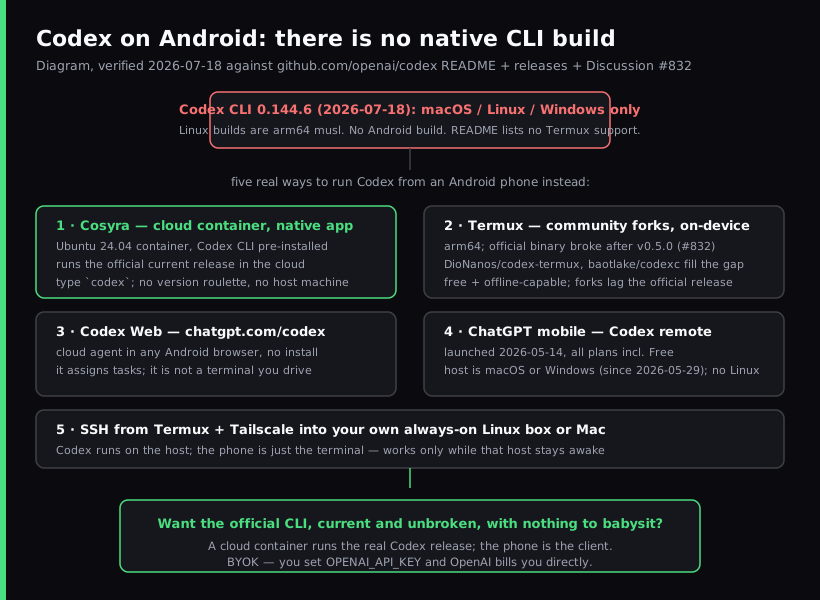
Quick decision. Jump to the part that matches you:
- You want the real CLI, current and unbroken. A cloud container
runs the official release and you type
codexfrom the Android app. Cosyra setup ↓ - You want free, local, and offline. Termux runs Codex on Android arm64 through community forks. Know the version caveat first. Termux reality ↓
- You just want to assign a task from a browser. Codex Web
at
chatgpt.com/codexneeds no install. Codex Web ↓ - You own a Mac or Windows PC and want to steer it from your phone. The ChatGPT app's Codex feature remote-controls that host. ChatGPT remote ↓
Why is there no native Codex CLI on Android?
There is no native Codex CLI on Android because OpenAI does not ship one.
The
openai/codex README documents install
paths for macOS (Apple Silicon and x86_64), Linux (x86_64 and arm64, built against
musl), and Windows. Android is not on the list. The CLI is an Apache-2.0 Rust
binary you install with
npm install -g @openai/codex, brew install --cask codex, or the chatgpt.com/codex/install.sh script, all of which target
those desktop platforms.
Android phones run an arm64 Linux kernel, so on paper a Linux arm64 build is
close. In practice Termux uses Android's Bionic C library and its own
userland, and the official Codex binary stopped loading cleanly there after
a certain version (more on that below). The dependable way to get the actual
CLI on your phone is to put a real Linux userland behind it, which is what a
cloud container does, and what a proot-distro Ubuntu inside Termux
attempts locally (we cover that route in
Linux container on Android).
We have an opinion the desktop-first crowd would push back on: for Codex specifically, Android is a better phone target than iPhone, because Android at least gives you Termux as a local fallback while iOS gives you nothing on-device. The catch is that the Termux Codex path is community-maintained and lags the official release, so "better than nothing" is not the same as "good enough for daily work." On a Pixel on the couch, we reach for the cloud container every time precisely so we are not debugging a fork at 9pm.
What are the four real ways to run Codex on Android in 2026?
There are four real ways to run Codex from an Android phone as of 2026-07-18: Cosyra (cloud container with the official CLI pre-installed), Termux community forks (on-device, free), Codex Web (cloud agent in a browser), and the ChatGPT mobile app's Codex feature (remote control of a Mac). A fifth path, SSH from Termux into your own machine, is the classic remote route. We walk each below.
1. Cosyra (cloud container, native Android app)
This is what we build. The Cosyra Android app opens a persistent Ubuntu
24.04 x86_64 container reached from any Pixel, Galaxy, OnePlus, or foldable.
The official Codex CLI is pre-installed alongside Claude Code, OpenCode, and
Antigravity CLI, and we track the upstream release so you are not pinning an
old version to keep it working. You get 30 GB of persistent storage, session
hibernation that resumes exactly where you left off, and the same container
is reachable from iPhone, iPad, and a browser. BYOK applies: you set
OPENAI_API_KEY and OpenAI bills you directly. We do not proxy or
meter your model calls.
- Works when: you want the current official Codex with zero setup, full x86_64 Ubuntu compatibility, and the same environment across every device you pick up.
- Breaks when: you have no internet. The container lives in the cloud, so there is no offline mode. That is a genuine trade-off versus a local Termux install.
- Cost: Core is $20/month and Pro is $30/month. See pricing.
2. Termux community forks (on-device, free)
Termux is an open-source (GPLv3) Android
terminal emulator with a real Linux package manager. Codex does run on Android
arm64 inside it, but through community forks, not OpenAI's binary. In openai/codex Discussion #832, a user reports the official build worked up to v0.1.25x (May 2025)
and then broke after v0.5.0 with connection errors and an
"unexpected e_type: 2" load failure. The community filled the gap
with Termux-specific builds: DioNanos/codex-termux (October 2025) and baotlake's codexc (December 2025).
- Works when: you want free, local, offline-capable Codex on Android, you are comfortable installing from a community repo, and you accept that the fork trails the official release.
- Breaks when: the fork falls behind a Codex feature you want,
the official binary's loader rejects the build, or you hit the Android 12+ phantom-process
killer on a long session (the same
signal 9issue we document in the Claude Code on Android guide). - Cost: free.
3. Codex Web (browser, no install)
Codex Web is the cloud agent at
chatgpt.com/codex. It opens in any Android browser with no
install, you connect a repository, and it works on tasks asynchronously. It
is genuinely useful for fire-and-forget changes from a phone: kick off a
refactor on the train, check the diff at the office. What it is not is an
interactive terminal: you cannot cd around, run arbitrary shell commands,
or pair it with other CLIs in one session. For that you need a real shell, which
is the line between Codex Web and a container.
4. ChatGPT mobile app: Codex remote control
On 2026-05-14 OpenAI added a Codex feature to the ChatGPT mobile app, rolling out to all plans including Free. It is a remote-control surface: from the phone you "work across all of your threads, review outputs, approve commands, change models, or start something new," in OpenAI's words, while Codex keeps running on your computer. The host side supports macOS and Windows as of 2026-07-18 (Windows shipped 2026-05-29), but not Linux; you pair by scanning a QR code that the desktop app shows. Screenshots, terminal output, diffs, and approval prompts flow to the phone; files and credentials stay on the host machine.
This is the right tool if you already keep a Mac or a Windows PC awake at home and want to glance at a run from a waiting room. It is the wrong tool if you own neither, or if you want the work to actually happen on a machine you do not have to leave running, which is the case a cloud container is built for.
How do you set up Codex on Android with Cosyra?
You set up Codex on Android in about two minutes: install Cosyra from Google
Play, set your OpenAI API key in the Ubuntu container where Codex CLI is
already installed, and type codex. The steps below are exactly
what we run on a fresh Pixel.
Step 1: Install Cosyra from Google Play
Open the Google Play Store and install Cosyra. The Android app runs on Pixel, Samsung Galaxy S and Z foldables, OnePlus, Nothing, and any device on Android 9 or later. Sign in with Google, Apple, or email and the app provisions a fresh Ubuntu 24.04 container with Codex CLI, Claude Code, OpenCode, and Antigravity CLI already installed.
Step 2: Set your OpenAI API key
Get a key from platform.openai.com, or plan to use Sign in with ChatGPT if you are on a paid plan. In the Cosyra terminal:
$ # Set the key (persists across sessions)
$ echo 'export OPENAI_API_KEY="sk-your-key-here"' >> ~/.bashrc
$ source ~/.bashrc
$ codex --version
codex-cli 0.144.6
Step 3: Clone a repo and run codex
$ git clone https://github.com/your-org/your-project.git
Cloning into 'your-project'...
$ cd your-project
$ codex
OpenAI Codex (v0.144.6)
Signed in. Working directory: your-project
> Add a --json flag to the export command and update the tests.
Codex reads the repo and starts working. By default it runs shell commands
and writes files inside the workspace without per-command approval, which is
looser than Claude Code. For a higher-trust session, start it with
codex --ask-for-approval always. When the screen locks the
container keeps running; reopen the app and the session is exactly where you
left it. The phone keyboard is fine for the natural-language turns, because
you are writing one sentence of intent at a time, not 40-line functions.
Most people who disagree have not actually tried it on a commute.
Try Cosyra. Plans start at $20/month. Google Play / App Store / Pricing details
How do the Android options compare?
The four paths line up cleanly against what matters for running an agent from a phone: whether it is the real CLI, whether it stays on the current version, whether it needs another machine, and whether it works offline. The table covers the state as of 2026-07-18.
| Feature | Cosyra (Android app) | Termux forks | Codex Web | ChatGPT remote |
|---|---|---|---|---|
| Runs the official Codex CLI | Yes (pre-installed) | Community fork | No (cloud agent) | On your Mac or PC |
| Interactive terminal | Yes | Yes | No | On your Mac or PC |
| Tracks current release | Yes | Lags upstream | Yes (hosted) | Yes (on the host) |
| Needs another machine | No | No | No | Yes (a Mac or PC) |
| Works offline | No | Yes | No | No |
| Phantom-killer risk | None | Yes (mitigated) | None | None |
| Setup time | ~2 min | ~15 min | ~1 min | ~5 min |
| Cost | From $20/mo | Free | ChatGPT plan | Free + a Mac or PC |
Choose Cosyra if you want the official CLI, current and unbroken, the same container across Android, iPhone, iPad, and web, and nothing to babysit. Choose Termux if free and offline matter more than running the latest version. Choose Codex Web for fire-and-forget tasks from a browser. Choose the ChatGPT remote if you already keep a Mac or PC awake. For tmux and TUI ergonomics once you are in a shell, see TUI apps on phone, part of the broader mobile coding terminal pillar.
Frequently asked questions
Can you run the Codex CLI natively on Android?
Not the official build. As of 2026-07-18, OpenAI ships Codex CLI for macOS, Linux (x86_64 and arm64, musl), and Windows. Its README lists no Android target. On Android you run it inside a cloud Linux container (Cosyra), through a Termux community fork, in a mobile browser via Codex Web, or by remote-controlling a Mac or Windows PC from the ChatGPT app.
[source: GitHub, openai/codex README, supported platforms]
How do people run Codex in Termux on Android?
On Android arm64 via community forks. OpenAI's official binary worked up to v0.1.25x but stopped working after v0.5.0 with connection errors, so the community maintains Termux-specific builds such as DioNanos/codex-termux and baotlake's codexc. They work, but they trail the official release, which is the reason we pre-install the real CLI in a cloud container instead.
[source: GitHub, openai/codex Discussion #832, "Codex runs in Termux on Android"]
What is the difference between Codex in the ChatGPT mobile app and the Codex CLI?
They are different surfaces. The Codex feature in the ChatGPT mobile app, launched 2026-05-14, is a remote control for Codex running on your computer. From the phone you review outputs, approve commands, change models, or start something new. The Codex CLI is the actual command-line agent that does the work on a host machine.
[source: 9to5Mac, "OpenAI brings Codex control to ChatGPT for iPhone, iPad, and Android"]
Does the ChatGPT mobile Codex feature need a Mac?
No longer Mac-only. As of 2026-07-18 the ChatGPT mobile Codex feature controls the ChatGPT desktop app running on a Mac or a Windows PC. OpenAI shipped Windows host support on 2026-05-29. The desktop app shows a QR code you scan from the ChatGPT app on iPhone, iPad, or Android to pair the two. There is still no Linux mobile-host path, so if you own neither a Mac nor a Windows machine, a cloud Linux container is the path that runs Codex itself.
[source: MacRumors, "OpenAI Brings Codex Remote Access to ChatGPT Mobile App"]
Is Codex on mobile only for ChatGPT Pro or Plus subscribers?
No. When OpenAI brought Codex to the ChatGPT mobile app on 2026-05-14 it was available to all plans, including Free and Go. The Codex CLI itself supports Sign in with ChatGPT for paid plans, and an OPENAI_API_KEY path that the README notes requires additional setup.
[source: TechCrunch, "OpenAI says Codex is coming to your phone"]
Can I open Codex Web from an Android browser?
Yes. Codex Web lives at chatgpt.com/codex and runs in any mobile browser with no install. It is the cloud-agent experience: you point it at a repository and assign tasks, and it works asynchronously. It is a good fit for fire-and-forget changes, but it is not an interactive terminal, so it does not replace a shell where you run codex and other tools side by side.
[source: GitHub, openai/codex README, Codex Web at chatgpt.com/codex]
tl;dr
Four real ways to run Codex from an Android phone as of 2026-07-18. Cosyra
(native Android app, official Codex CLI pre-installed in a persistent
Ubuntu container, tracks the current release, nothing to babysit). Termux
community forks (free, local, on-device on arm64, DioNanos/codex-termux
and codexc, because OpenAI's binary broke after v0.5.0 per Discussion
#832). Codex Web at chatgpt.com/codex (cloud agent in a browser,
no terminal). ChatGPT mobile Codex (remote-controls Codex on a Mac or Windows
PC; no Linux host path).
Google Play / App Store. Sign up and pick a plan, from $20/month.
Run the official Codex CLI on your Android phone in 2 minutes.
Install Cosyra, set OPENAI_API_KEY, type codex.