You can run Gemini CLI on Android, but not as an app you install from the
Play Store. Google's Gemini CLI is the @google/gemini-cli Node.js
binary, and as of 2026-06-25 it ships for macOS, Linux, and Windows only. Two
things also changed in mid-2026 that most blog posts miss: the free personal-account
login ended on 2026-06-18, so you now need a paid API key wherever you run it,
and recent versions fail to build on Termux because of Android NDK dependencies.
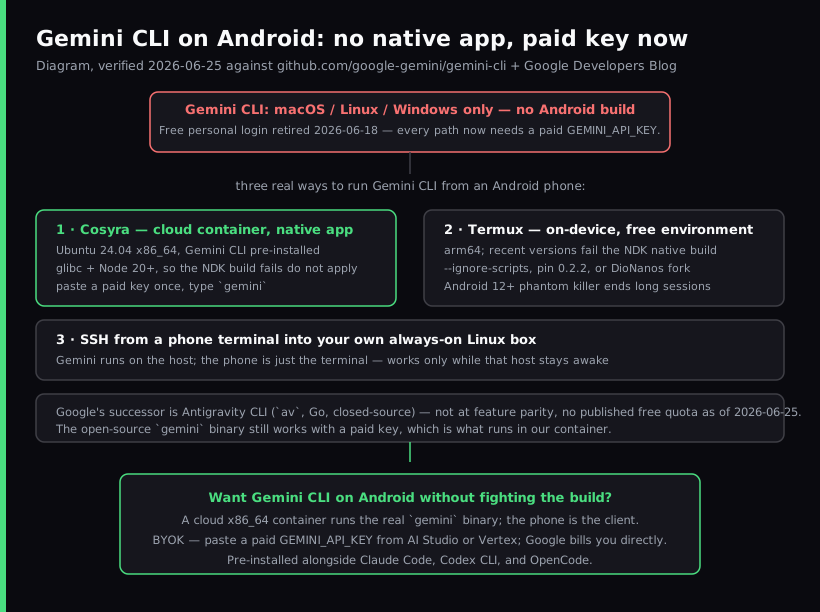
So "Gemini CLI on Android" means one of three real paths: a cloud Ubuntu container
where the CLI installs with one npm command (Cosyra on Google Play, then you type gemini), Termux on-device with workarounds, or
SSH into your own Linux box. This guide walks each one honestly.
This is the Android-specific companion to our Gemini CLI on your phone walkthrough, which covers iPhone and Android generically; the iOS-only install paths live in the Gemini CLI on iPhone guide, and if you reach for a tablet with an external keyboard, the Gemini CLI on iPad guide is the device-specific companion. What changes on Android is that Termux is a real on-device option, unlike on iOS, but the Gemini CLI story there runs through build workarounds and community forks rather than a clean install, which is the part most guides get wrong. The sibling agents have the same shape: see Claude Code on Android and Codex CLI on Android, and for the full map of what the OS can run as a dev environment, our Coding on Android pillar. If you want to understand the Termux-and-proot route in depth, the Linux container on Android guide covers it. On a Chromebook the story flips the other way. Crostini is a real glibc Debian VM, so the npm install runs clean; see Gemini CLI on Chromebook. For the broader picture across all four mobile AI agents, see AI coding agents on mobile.
Quick decision. Jump to the part that matches you:
- You want it to just work, current and unbroken. A cloud container
runs the real
geminibinary on x86_64 after one npm install; you type it from the Android app. Cosyra setup ↓ - You want free, local, and offline for the shell. Termux runs Gemini CLI on arm64 with workarounds. Know the build caveats first. Termux reality ↓
- You already own an always-on Linux box. SSH into it and run Gemini there. SSH route ↓
Why is there no native Gemini CLI on Android?
There is no native Gemini CLI on Android because Google does not ship one. The google-gemini/gemini-cli README describes "an open-source AI agent that brings the power of Gemini directly into your terminal," distributed through npm, Homebrew, and MacPorts for macOS, Linux, and Windows. It is an Apache-2.0 Node.js binary that needs Node 20 or newer. Android is not a target.
Android phones run an arm64 Linux kernel, so on paper Termux should be able
to run a Node CLI. In practice the install breaks on recent versions. Native
dependencies such as tree-sitter-bash expect an Android NDK toolchain
Termux does not fully provide, which shows up as build failures on arm64 (issue #11254, 0.11.0-nightly on Node v24) and earlier install failures (issue #7895, 0.3.3 on Node v22.19.0). There is also a clipboardy bug that mis-detects
Termux and refuses to run with a false "You need to install Termux" error, which
Google closed as "not planned" (issue #13784). On x86_64 Ubuntu with glibc, these native modules build normally, which
is the whole reason a cloud container is the least brittle option.
What changed on 2026-06-18 (the free login is gone)
The headline reason people ran Gemini CLI used to be the free
personal-account login: sign in with a Google account and get 60 requests
per minute and 1,000 per day at no charge. That path stopped serving
requests on 2026-06-18 as part of Google's transition to Antigravity CLI;
the free OAuth endpoint now returns HTTP 410 Gone (Google Developers Blog). The open-source gemini binary still works, but only with a paid
GEMINI_API_KEY from Google AI Studio or Vertex AI. Google's successor
is Antigravity CLI (binary name agy, a Go rewrite with no published license),
which did not ship at feature parity and has no published free-request
quota.
We have an opinion the local-tooling crowd will push back on: running Gemini CLI on-device on Android is a trap in mid-2026. You fight an NDK build, pin an old version or run a fork, accept that Android can SIGKILL your session, and at the end of all that you still need a paid key, because the local-and-free pitch quietly stopped being true on 2026-06-18. If you are paying for the key anyway, paying for a Linux box that actually builds the CLI is the smaller hassle. On a Pixel on the couch, that is the difference between coding and debugging a toolchain.
What are the three real ways to run Gemini CLI on Android?
There are three real ways to run Gemini CLI from an Android phone as of 2026-06-25: Cosyra (x86_64 cloud container where the CLI installs with one npm command), Termux with build workarounds (on-device, free shell), and SSH into your own always-on Linux box. We walk each below.
1. Cosyra (cloud container, native Android app)
This is what we build. The Cosyra Android app opens a persistent Ubuntu
24.04 x86_64 container reached from any Pixel, Galaxy, OnePlus, or foldable.
Claude Code, Codex CLI, OpenCode, and Antigravity CLI are pre-installed.
Antigravity CLI is Google's replacement for Gemini CLI, and it starts with
agy. Gemini CLI itself is not on the image, so you install it
with one command: npm install -g @google/gemini-cli. Node 20+
and npm are already there, and because the image is glibc x86_64, the
tree-sitter-bash and clipboardy failures that plague
Termux simply never appear. You get 30 GB of persistent storage, session hibernation
that resumes exactly where you left off, and the same container reachable from
iPhone, iPad, and a browser. BYOK applies: you paste a paid GEMINI_API_KEY
and Google bills you directly. We do not proxy or meter your model calls.
- Works when: you want a current Gemini CLI that installs with one npm command, full x86_64 Ubuntu compatibility, and the same environment across every device you pick up.
- Breaks when: you have no internet. The container lives in the cloud, so there is no offline mode. That is a genuine trade-off versus a local Termux install.
- Cost: Core is $20/month and Pro is $30/month. See pricing.
2. Termux (on-device, free shell)
Termux is an open-source (GPLv3) Android
terminal emulator with a real package manager. The Linux shell is genuinely free
and offline-capable, which is its honest advantage. Getting Gemini CLI running
inside it is the hard part. A bare npm install -g @google/gemini-cli trips the native-build and clipboardy failures above, so the working recipes
are: install with
--ignore-scripts to skip the failing native step, pin an older release
with @google/gemini-cli@0.2.2, or use the community
DioNanos/gemini-cli-termux fork that is maintained for Termux. All three trail the upstream release.
- Works when: you want a free, local shell on Android, you are comfortable maintaining a workaround or a fork, and you accept that it lags the official release.
- Breaks when: an upstream change outpaces the fork, the pinned
version misses a feature you want, or you hit the Android 12+ phantom-process
killer on a long session (the same
signal 9issue we document in the Claude Code on Android guide). You also still need a paid API key. - Cost: free shell, paid API key.
3. SSH into your own always-on Linux box
The classic remote route still works. Run Gemini CLI on a Linux machine you own, a home server, a VPS, or a desktop you leave on, where its native dependencies build cleanly, and reach it from a phone SSH client. Termux doubles as a capable SSH client, or you can use a dedicated app. The phone is just the terminal; the agent runs on the host. The catch is that the host must stay awake and reachable, and you maintain it yourself, which is the chore a managed container removes. If you go this way, pairing it with a mesh VPN keeps the box reachable without exposing a public SSH port.
How do you run Gemini CLI on Android with Cosyra?
You set up Gemini CLI on Android in about three minutes: install Cosyra from
Google Play, install Gemini CLI in the Ubuntu container with one npm
command, paste a paid API key, and type gemini. The steps below
are exactly what we run on a fresh Pixel.
Step 1: Install Cosyra from Google Play
Open the Google Play Store and install Cosyra. The Android app runs on Pixel, Samsung Galaxy S and Z foldables, OnePlus, Nothing, and any device on Android 9 or later. Sign in with Google, Apple, or email and the app provisions a fresh Ubuntu 24.04 container with Claude Code, Codex CLI, OpenCode, and Antigravity CLI already installed. Gemini CLI is not on the image, so you add it in the next step.
Step 2: Install Gemini CLI and paste a paid API key
Install Gemini CLI first. Node 20+ and npm are already in the container, so
it is one npm command. The binary lands in
~/.local/bin/gemini, which is on the PATH and survives
hibernation. The Gemini CLI shortcut on the Terminals screen (app 2.8.5 and
earlier) starts Antigravity CLI (agy), so type gemini in a terminal to run Gemini CLI itself. Then create a key at
Google AI Studio
(or use a Vertex AI key). Since the free personal-account login ended 2026-06-18,
a paid key is required. In the Cosyra terminal:
$ # Install Gemini CLI (to ~/.local/bin/gemini)
$ npm install -g @google/gemini-cli
$ # Set the key (persists across sessions)
$ echo 'export GEMINI_API_KEY="your-key-here"' >> ~/.bashrc
$ source ~/.bashrc
$ gemini --version
0.x.x
Step 3: Clone a repo and run gemini
$ git clone https://github.com/your-org/your-project.git
Cloning into 'your-project'...
$ cd your-project
$ gemini
Gemini CLI — connected (GEMINI_API_KEY)
Working directory: your-project
> Summarize the auth module and add a test for the expired-token path.
Gemini reads the repo and starts working. When the screen locks the container keeps running; reopen the app and the session is exactly where you left it. The phone keyboard is fine for the natural-language turns, because you are writing one sentence of intent at a time, not 40-line functions. Most people who say mobile coding is impossible have not actually tried it on a commute.
Try Cosyra. Plans start at $20/month. Google Play / App Store / Pricing details
How do the Android options compare?
The three paths line up against what matters for running an agent from a phone: whether it installs cleanly, whether it stays on the current version, whether it needs another machine, and whether the shell works offline. The table covers the state as of 2026-06-25.
| Feature | Cosyra (Android app) | Termux | SSH to your box |
|---|---|---|---|
| Installs cleanly | Yes (one npm command) | Needs workarounds | On the host |
| Tracks current release | Yes (latest from npm) | Lags (fork/pin) | You update it |
| Needs another machine | No | No | Yes (a Linux box) |
| Shell works offline | No | Yes | No |
| Phantom-killer risk | None | Yes (mitigated) | None |
| Needs a paid API key | Yes | Yes | Yes |
| Setup time | ~3 min | ~20 min | ~30 min |
| Cost | From $20/mo | Free shell | Box + upkeep |
Choose Cosyra if you want a current Gemini CLI with nothing to babysit and the same container across Android, iPhone, iPad, and web. Choose Termux if a free, local, offline shell matters more than running the latest version and you do not mind maintaining a workaround. Choose SSH if you already keep a Linux box awake. For tmux and TUI ergonomics once you are in a shell, see TUI apps on phone, part of the broader mobile coding terminal pillar.
Frequently asked questions
Can you run Gemini CLI natively on Android?
Not as a native app. Gemini CLI is the @google/gemini-cli
Node.js binary, and its README lists macOS, Linux, and Windows only. On Android
you run it inside a cloud Linux container (Cosyra), on-device in Termux with
workarounds, or by SSHing from your phone into your own Linux box. There is
no first-party Android build.
[source: GitHub, google-gemini/gemini-cli README, supported platforms]
Why does Gemini CLI fail to install on Termux?
Because native dependencies like tree-sitter-bash expect an Android
NDK toolchain Termux does not fully provide, recent versions fail to build on
arm64. A separate clipboardy bug also mis-detects Termux and prints
a false "You need to install Termux" error, which Google closed as "not planned."
On x86_64 Ubuntu these native modules build normally.
[source: GitHub, google-gemini/gemini-cli issue #13784, Termux false error, closed "not planned"]
Is the Gemini CLI free tier still available on Android?
No. The personal-Google-account login that gave 60 requests per minute and
1,000 per day ended 2026-06-18; the free OAuth endpoint now returns HTTP
410 Gone. The open-source gemini binary still runs with a paid
GEMINI_API_KEY from Google AI Studio or Vertex AI, wherever you
run it.
[source: Google Developers Blog, transitioning Gemini CLI to Antigravity CLI]
How do I get Gemini CLI working in Termux anyway?
Three known workarounds as of 2026-06-25: install with npm install --ignore-scripts @google/gemini-cli to skip the failing native build, pin an older release with @google/gemini-cli@0.2.2, or use the community DioNanos/gemini-cli-termux fork maintained for
Termux. All three trail the upstream release and still need a paid API
key.
[source: GitHub, DioNanos/gemini-cli-termux, Termux-optimized fork]
What is Antigravity CLI and does it replace Gemini CLI on Android?
Antigravity CLI (binary name agy) is Google's official
successor, a Go rewrite announced alongside the 2026-06-18 sunset
(open-source status unconfirmed as of 2026-07-12, the repo still ships no
LICENSE). It carries over Agent Skills, Hooks, Subagents, and Extensions
but did not ship at feature parity, and Google has not published a
free-request quota for it. Cosyra pre-installs Antigravity CLI: type
agy and sign in with a Google account. The open-source
gemini binary still works on Cosyra with a paid key, after one
npm install.
[source: GitHub, google-gemini/gemini-cli Discussion #27274, Antigravity transition]
Does the Android phantom-process killer affect Gemini CLI sessions?
On a local Termux install, yes. Android 12 and later kills background and high-CPU processes, which surfaces as "[Process completed (signal 9)]" and can end a long agent run. Android 14+ lets you disable it under Developer Options. A cloud container is not subject to it, because the agent runs on the server and the phone is only the client.
[source: GitHub, termux/termux-app issue #2366, Android 12+ phantom process killer]
tl;dr
Three real ways to run Gemini CLI from an Android phone as of 2026-06-25.
Cosyra (native Android app, Gemini CLI installs with one npm command on
x86_64 Ubuntu, no NDK build failures, runs the current release). Termux
(free local shell on arm64, but Gemini CLI needs
--ignore-scripts, a pinned version, or the DioNanos fork,
plus the phantom-killer caveat). SSH into your own always-on Linux box.
The free login ended 2026-06-18, so every path now needs a paid
GEMINI_API_KEY.
Google Play / App Store. Sign up and pick a plan, from $20/month.
Run Gemini CLI on your Android phone in 3 minutes.
Install Cosyra, run npm install -g @google/gemini-cli, paste
GEMINI_API_KEY, type gemini.