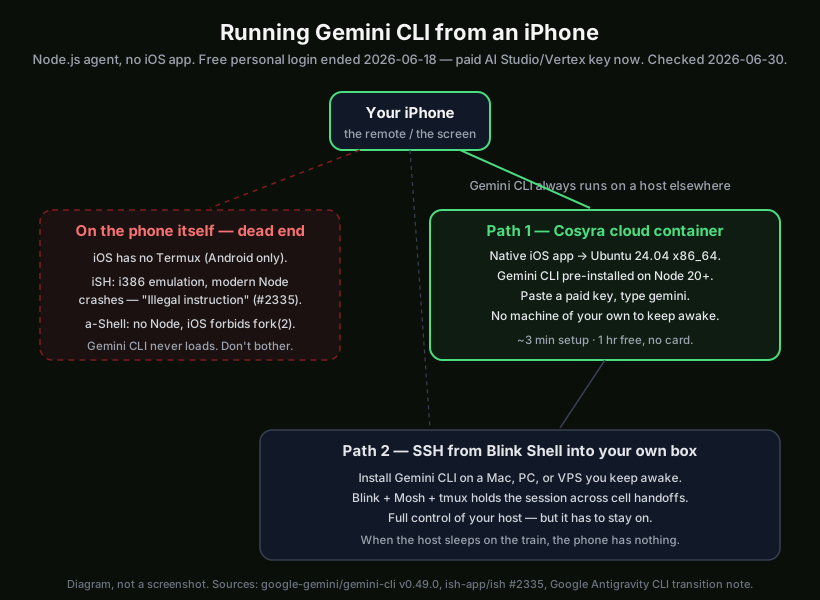
You can run Gemini CLI on an iPhone, but not on the phone itself. Gemini CLI
is Google's open-source Node.js agent, and iOS gives you nowhere to install
it. There is no Termux for iPhone, and the on-device terminals that do exist
cannot run a modern Node. So on an iPhone the agent always runs on a host
elsewhere and your phone drives it. The fastest path is
Cosyra on the App Store: a cloud Ubuntu 24.04
container that you reach from a native iOS app. Install Gemini CLI with one
npm command, paste a paid Gemini key, type gemini, and the
agent is up. Plans start at $20/month, and eligible new users can start a
7-day free trial in the App Store app. The only other path that works is SSH
from a terminal app into your own always-on machine, and the reason the
obvious on-device options fail is worth understanding before you waste an
afternoon on them.
This is the iPhone-specific companion to our Gemini CLI on your phone walkthrough, which covers iPhone and Android together. The iPhone earns its own page because iOS changes the answer in one big way: Android has Termux, so on a Pixel or Galaxy you can fight Node onto the device itself (we cover the Termux-plus-NDK path in Gemini CLI on Android). iOS has no equivalent, so the iPhone story is entirely about reaching a host. If you want the bigger tablet form factor with a Magic Keyboard, see Gemini CLI on iPad; on a Chromebook, Crostini gives you a real Linux VM but the setup has its own gotchas, which we cover in Gemini CLI on Chromebook. For the full picture of every agent on mobile, start at our AI coding agents on mobile pillar, and Claude Code vs Gemini CLI lines the two agents up if you're still choosing.
Quick decision. Jump to what matches your situation:
- I want Gemini CLI running, no machine of my own. Cloud container, native iOS app, three-minute setup. Cosyra iPhone setup ↓
- I already keep a Linux box or Mac awake at home. SSH from a terminal app and drive Gemini there. The two ways compared ↓
- I tried iSH or a-Shell and it broke. It's not you. Here's why the on-device shells can't run it. Why local fails on iPhone ↓
- Wait, didn't Gemini CLI's free tier end? It did, on 2026-06-18. Here's what you need now. The free-tier change ↓
Why won't Gemini CLI run locally on an iPhone?
Gemini CLI won't run locally on an iPhone because iOS has no Linux userland
and the on-device terminals cannot run a modern Node.js. Gemini CLI is a
Node binary distributed as @google/gemini-cli, and its README
lists its targets as macOS, Linux, and Windows. iOS is not one of them, and
Apple does not allow a Termux-style app that ships a general-purpose Linux
environment with a package manager. So the two on-device iOS shells people
reach for each hit a wall, and the failures are documented, not vague
"compatibility issues":
- iSH crashes Node with "Illegal instruction." iSH runs Alpine
Linux through a 32-bit i386 user-mode emulator on ARM hardware. Modern Node.js
prebuilt binaries emit CPU instructions the emulator doesn't implement, so
node --versiondies withIllegal instruction, tracked in iSH issue #2335, open since January 2024. A second issue, #2604, is literally titled "Gemini cli", a user asking how to install it, with no resolution. No working Node means no Gemini CLI. - a-Shell ships no Node.js and forbids fork. a-Shell bundles
native iOS-compiled and WebAssembly utilities, which makes it fast, but it doesn't
include a Node.js runtime, and iOS sandboxing forbids
fork(2), the subprocess model the agent relies on to run shell commands. There's noaptorapkto add Node either. It's a genuinely useful Unix scratchpad on the go; it is not a host for an AI coding agent.
Here's the honest opinion the "just self-host everything" crowd pushes back on: if you bought an iPhone expecting it to double as a pocket Linux box for terminal work, the on-device story is worse than on a $200 Android phone, where Termux at least gives you a fighting chance. The fix isn't a cleverer install command: it's running the CLI somewhere that has a real Linux kernel. For the local-terminal limits in more depth see Termux for iPhone and Cosyra vs iSH.
What changed with Gemini CLI's free tier?
The price of entry to Gemini CLI changed on
2026-06-18. Until that day, you could sign in to Gemini CLI
with a personal Google account and get a generous free quota (60 requests
per minute, 1,000 per day) with no API key. Google retired that path. The
no-key login now returns HTTP 410 Gone, and the official successor is
Antigravity CLI. Per
Google's own transition announcement, the open-source gemini binary keeps working, but only with a paid
key from Google AI Studio or Vertex AI. Enterprise Code Assist licenses are unaffected.
So every iPhone path below assumes you'll paste a paid
GEMINI_API_KEY. That's not a Cosyra opinion or a Cosyra
limitation; it applies identically whether you run Gemini CLI in our
container, on your own SSH box, or on a laptop. The binary itself is alive
and shipping fast: the latest release was v0.49.0 on 2026-06-25, with about
106,000 GitHub stars as of 2026-06-30. Google took away the free first-party
endpoint, not the toolchain. With Gemini 2.5 Pro selected on a paid key you
still get the 1-million-token context window, which is the genuinely
distinctive thing about this agent versus the others. If you would rather
sign in with a Google account, Antigravity CLI is pre-installed in Cosyra as
agy.
What are the two real ways to run Gemini CLI on iPhone?
There are two real ways to run Gemini CLI from an iPhone as of 2026-06-30: a cloud container where Gemini CLI installs with one npm command (Cosyra, native iOS app), or SSH from a terminal app into your own always-on machine. They're not interchangeable. One needs a machine of your own, one doesn't. We walk through both.
1. Cosyra (cloud terminal, Gemini CLI installs with one command)
This is what we build. The Cosyra iOS app gives you a persistent Ubuntu
24.04 x86_64 container with Claude Code, Codex CLI, OpenCode, and
Antigravity CLI already installed, 30 GB of storage, and hibernation that
resumes exactly where you left off. Gemini CLI is one command away:
npm install -g @google/gemini-cli. It installs to the
persistent home volume, so it survives hibernation. We pre-install the four
agents because setup friction is the thing that actually kills agent-driven
mobile coding; nobody wants to debug a Node version or a crashing emulator
on a phone keyboard. Because the container is real glibc x86_64 with Node
20+, the emulation and NDK problems that kill the on-device shells simply
don't exist. There's no SSH tunnel to keep alive and no laptop that has to
stay awake, and the same container is reachable from iPhone, Android, and
web, so you can start on the train and pick it up in a waiting room.
- Works when: you want Gemini CLI running on a real Linux host without owning one, with a one-command install and the four pre-installed agents next to it.
- Breaks when: you have no internet. The container lives in the cloud, so there is no offline mode. That is a real trade-off against a local terminal.
- Cost: Core is $20/month and Pro is $30/month. Eligible new users can start a 7-day free trial in the App Store app. You bring your own paid Gemini key and Google bills you for tokens. See pricing.
2. SSH from Blink Shell into your own machine
The classic remote-into-your-own-box path.
Blink Shell is a paid iOS terminal built around
SSH and Mosh. Mosh matters on a phone: it keeps the session alive across the cellular
handoffs and IP changes that drop plain SSH the moment you walk between cell towers.
You SSH into a desktop, Mac, or VPS where you installed Gemini CLI with npm i -g @google/gemini-cli, paste your paid key on the host, start tmux so the session survives
app switching, and drive gemini from there.
- Works when: you already keep an always-on Linux box or Mac and are comfortable with SSH plus tmux.
- Breaks when: the host sleeps, the home connection drops, or you do not want to keep a second computer awake just to give the phone a target. Chaining the phone to a machine in the closet defeats the portability that made you reach for the phone on the train in the first place.
- Cost: the Blink+ subscription plus whatever the host costs. Tailscale's free tier covers the personal networking if your box isn't already reachable.
Which path is yours? If you don't keep a machine awake at home, path 1 is the one, a cloud container where Gemini CLI installs with one npm command, reached from the iOS app, no SSH tunnel to babysit on the train. Plans start at $20/month. App Store / Google Play / Pricing
How do you set up Gemini CLI on iPhone with Cosyra?
You set up Gemini CLI on iPhone in about three minutes: install Cosyra from
the App Store, install Gemini CLI inside the container with one npm command,
paste a paid Gemini API key, and type gemini. No emulator, no
SSH tunnel, no Mac. These are the exact steps we run on a fresh iPhone.
Step 1: Install Cosyra on iPhone
Open the App Store on your iPhone and search for Cosyra. Sign in with Apple, Google, or email and the app provisions a fresh Ubuntu 24.04 x86_64 container on first launch, about 15 seconds in our testing. Claude Code, Codex CLI, OpenCode, and Antigravity CLI are pre-installed, and so are Node 20+ and npm, so you skip the part that breaks most on-phone setups. Gemini CLI is not on the image. You install it in step 2.
Step 2: Install Gemini CLI and add a paid API key
In the Cosyra terminal, install Gemini CLI with
npm install -g @google/gemini-cli. The binary lands in
~/.local/bin on the container's home volume, so you install it once.
The Gemini CLI shortcut on the Terminals screen (app 2.8.5 and earlier) starts
Antigravity CLI (agy), so type gemini in a terminal
to run Gemini CLI itself. Since the free personal-account login retired on 2026-06-18,
Gemini CLI now needs a paid key. Generate one at
Google AI Studio (or use a Vertex
AI key), then set it once so it persists:
$ # Install Gemini CLI (lands in ~/.local/bin)
$ npm install -g @google/gemini-cli
$ # Set the paid key (persists across sessions)
$ echo 'export GEMINI_API_KEY="your-key-here"' >> ~/.bashrc
$ source ~/.bashrc
$ gemini --version
0.63.0
The key lives with the container's home volume, so you paste it once and it's there next time you open the app. Google bills you for tokens directly. This is the same BYOK model we use for every agent in the container.
Step 3: Clone a repo and run gemini
Clone a repo and start a session:
$ git clone https://github.com/your-org/your-project.git
Cloning into 'your-project'...
$ cd your-project
$ gemini
Gemini CLI. Type a task to begin.
> Add a /health endpoint, wire it into the router, write a test, run it.
Gemini reads the repo and starts working. When you close the app to catch your stop, the container hibernates; reopen it and the session is exactly where you left it, with no re-clone and no re-auth. On a phone that resume behavior is the whole game. You get pulled away constantly, and a setup that loses state every time you switch apps is unusable.
Try Cosyra. Eligible new users can start a 7-day free trial in the App Store app. App Store / Google Play / Pricing details
What does iPhone Gemini CLI look like in practice?
iPhone Gemini CLI in practice is short prompts, one hand, and dead time that used to be wasted. The phone is not where you do a four-hour refactor; it's where you keep a long task moving while you're away from the desk. Two patterns we run constantly:
The commute kickoff, dictated
Standing on the platform, you remember the failing CI job from last night. Open Cosyra, pull the branch, and hand Gemini the whole problem in one dictated sentence. Tap the mic key on the iOS keyboard, say it, done. No hunting for symbols on a phone keyboard:
$ git fetch origin && git checkout fix/ci-flake
$ gemini
> The auth integration test is flaky in CI. Reproduce it,
find the race, and propose a fix with a regression test.
By the time the train arrives you have a diff to skim. The 1-million-token context on Gemini 2.5 Pro earns its keep here: you can point it at a large repo and ask it to trace a value across many files without first hunting down which files matter. Dictation plus a big context window is a surprisingly good fit for the phone, because the slow part on a phone is typing, and you've removed it.
The waiting-room review
Fifteen minutes in a waiting room is enough to review a teammate's pull
request. Pull the branch, ask Gemini for a structured review of what you
care about, read it on the phone, and post it with
gh pr review --comment from the same terminal. The container holds
your gh auth, so there's no login dance. This is the kind of work
the phone is genuinely good at: bounded, reviewable, no deep window juggling.
The single honest limit is the screen. A sprawling multi-file diff is more scrolling
than on a laptop, so we keep phone tasks scoped to things you can actually read
on a 6-inch screen.
How do the iPhone Gemini CLI options compare?
The options compare cleanly when you line them up against what actually matters: does Gemini CLI run at all, does it need a machine of your own, and what happens when that machine sleeps. The table covers the two working paths plus the two on-device shells people try first and why they fail, as of 2026-06-30. For the wider field of editors and terminals beyond Gemini, our coding on iPhone guide lines every option up, and best terminal apps for iPhone covers the SSH-client side.
| Feature | Cosyra (iOS app) | SSH via Blink | iSH (local) | a-Shell (local) |
|---|---|---|---|---|
| Gemini CLI actually runs | Yes (in container) | On your host | No (Node crashes) | No (no Node) |
| Native iOS app | Yes | Yes (Blink) | Yes | Yes |
| Real Linux kernel / glibc | Yes (Ubuntu x86_64) | Depends on host | No (i386 emulated) | No (iOS-native) |
| Gemini CLI pre-installed | No (one npm command) | You install on host | N/A | N/A |
| Requires another machine | No | Yes (always-on) | No | No |
| Other CLIs alongside | Claude, Codex, OpenCode, Antigravity | Whatever is on the host | None work | None work |
| Survives app switch / signal loss | Yes (hibernation) | Yes (Mosh + tmux) | N/A | N/A |
| Setup time | ~3 min | 15–30 min | fails | fails |
| Cost on iPhone | From $20/mo | Blink sub + host | Free (but broken) | Free (but broken) |
Which path should you pick?
Choose Cosyra if you want Gemini CLI genuinely running with no machine of your own to maintain, the same container across iPhone, iPad, and web, and the four pre-installed agents next to it. Choose Blink plus SSH if your dev box is already always-on and Linux, and you want Gemini running on hardware you control. iSH and a-Shell are in the table only so you don't lose an evening discovering what their issue trackers already say. The one thing iOS cannot give you is Gemini CLI running on the phone itself; on Android the calculus shifts because Termux gets you closer to local, which is the whole point of our Gemini CLI on Android guide.
Frequently asked questions
Can you actually run Gemini CLI on an iPhone?
Not on the device itself, and not the way you can on Android. Gemini CLI is Google's open-source Node.js agent that installs on macOS, Linux, and Windows. iOS has no Termux (that's Android-only), and the two on-device iOS shells can't run it. The two paths that work are a cloud Linux container the iPhone connects to (in Cosyra, Gemini CLI installs with one npm command) or SSH from a terminal app into your own always-on machine.
[source: google-gemini/gemini-cli README: supported platforms]
Why won't Gemini CLI install in iSH or a-Shell on my iPhone?
Because both lack a working modern Node.js runtime. iSH runs Alpine via i386 emulation and modern Node crashes with "Illegal instruction". iSH issue #2335 has tracked this since January 2024, and issue #2604 is literally titled "Gemini cli" with no resolution. a-Shell ships no Node.js and iOS forbids fork(2), which the agent's subprocess model needs.
[source: iSH issue #2604, "Gemini cli"]
Did Gemini CLI's free tier really end?
Yes. As of 2026-06-18 the free personal-account login stopped serving requests. The no-key OAuth path now returns HTTP 410 Gone, with no grace period. Google's official replacement is Antigravity CLI. The open-source gemini binary itself still works, but only with a paid API key from Google AI Studio or Vertex AI. Enterprise Code Assist licenses are unaffected.
[source: Google Developers Blog: transitioning Gemini CLI to Antigravity CLI]
Do I need a Mac or PC to run Gemini CLI on iPhone?
No, if you use a cloud container. Cosyra runs the Ubuntu container on Azure and the iPhone is just the screen and keyboard, so there's no machine of your own to keep awake. The SSH path does need a Mac, PC, or VPS that stays on. When that host sleeps, the iPhone has nothing to talk to. We start a Gemini session on an iPhone on the train and resume the same container on a laptop later without re-cloning or re-authing.
[related: Gemini CLI on your phone: the cross-device container]
Is the Gemini app on iPhone the same as Gemini CLI?
No. The Gemini app on the App Store is a chat assistant. Gemini CLI is an agentic terminal tool that clones repos, edits files in place, runs shell commands, and executes tests. The app can't touch your codebase the way the CLI does. For the agent that actually changes files in a project, you need the CLI in a Linux environment, which on iPhone means a cloud container or SSH.
[source: google-gemini/gemini-cli README: what the CLI does]
Is the iPhone screen big enough to drive Gemini CLI?
For agent-driven work, yes. You're not hand-typing functions on the phone. You're handing Gemini a sentence and reviewing a diff, and dictation handles the sentence faster than a keyboard. The honest limit is the diff: a large multi-file change is more scrolling on a 6-inch screen than on a laptop. The phone is where you kick off and review bounded tasks on a commute. If you want the bigger screen, our Gemini CLI on iPad guide covers the tablet form factor.
[related: AI coding agents on mobile: the four agents compared]
tl;dr
Gemini CLI does not run on an iPhone directly. iOS has no Termux and the on-device shells iSH and a-Shell can't run it (Node crashes on iSH, a-Shell has no Node). Two real ways to use it from an iPhone as of 2026-06-30: Cosyra (cloud terminal, native iOS app, Gemini CLI one npm command away, no machine of your own) or SSH from Blink Shell into your own always-on box. The free personal login ended 2026-06-18, so both paths need a paid Gemini key. Want it just working with nothing of your own to babysit? Use Cosyra.
App Store / Google Play. Sign up and pick a plan. Eligible new users can start a 7-day free trial in the App Store app.
Run Gemini CLI on your iPhone in 3 minutes.
Install Cosyra, run npm install -g @google/gemini-cli, paste
a Gemini API key, type gemini.