You can run Codex CLI on iPhone today, but not on the phone itself. OpenAI
builds Codex CLI for macOS, Linux, and Windows, and iOS gives you none of
those. There is no Termux for iPhone, and the local terminals that do exist
cannot run a modern Node.js. So on an iPhone the agent always runs on a host
elsewhere and your phone drives it. The fastest path is
Cosyra on the App Store: a cloud Ubuntu 24.04
container with Codex CLI pre-installed that you reach from a native iOS app.
Paste your OpenAI API key, type codex, and you are in. Plans
start at $20/month, and eligible new users can start a 7-day free trial in
the App Store app. The three other real paths are OpenAI's own ChatGPT-app
remote into a Mac or PC, SSH from
Blink Shell into your own machine, and Codex Web
in Safari.
This is the iPhone-specific companion to our Codex CLI on your phone walkthrough, which covers iPhone and Android together. The iPhone earns its own page because iOS changes the answer in one big way: Android has Termux, so on a Pixel or Galaxy you can lean on a community fork to get closer to the metal (we cover that in Codex CLI on Android). iOS has no equivalent. That single difference is why the iPhone story is all about reaching a host, never about running Codex on the device. If you want the bigger tablet form factor, see Codex CLI on iPad; for the full picture of every agent on mobile, start at our AI coding agents on mobile pillar.
Quick decision. Jump to what matches your situation:
- Just give me the setup. Three-minute path: install Cosyra,
paste an
OPENAI_API_KEY, typecodex. Cosyra iPhone setup ↓ - I keep a Mac awake at home. Use OpenAI's own ChatGPT-app remote into the Codex App. Four options compared ↓
- My dev box is Linux. SSH in from Blink Shell, or skip the host with a cloud container. Four options compared ↓
- Why can't I just use iSH like on a Linux box? Because modern Node crashes under iSH's i386 emulation. Why nothing runs locally ↓
Why won't Codex CLI run locally on an iPhone?
Codex CLI will not run locally on an iPhone because iOS has no Linux userland and the on-device terminals cannot run a modern Node.js. OpenAI lists Codex CLI's supported hosts as macOS, Linux, and Windows; iOS is not on that list, and Apple does not allow a Termux-style app that ships a general-purpose Linux environment with a package manager. So the two well-known iOS terminals each hit a wall:
- iSH emulates 32-bit i386 Alpine Linux. Modern Node.js crashes
with
Illegal instructionunder that emulation, tracked in iSH issue #2335, open since 2024-01-21, and the i386-only target rules out current Node prebuilt binaries anyway. No Node means no Codex CLI, which is a Node package (@openai/codex). - a-Shell ships native iOS-compiled tools and a curated set of
WebAssembly binaries. It is genuinely useful, but it has no
apt, noapk, and no global npm install path, so you cannot install Codex into it.
Here is an opinion the "just use a laptop" crowd pushes back on: the iPhone is a fine Codex client precisely because you stop trying to make it the host. Once you accept that the phone's job is to drive a Linux box that lives elsewhere, every "you can't develop on a phone" complaint stops applying. The box runs the agent, and the phone is the window you open on the train. We ran Codex from an iPhone on the couch the same week we wrote this, pointed at a container, and the on-screen keyboard was a non-issue because the work is prompts and approvals, not hand-typing functions. For the local-terminal limits in more depth see Termux for iPhone and Cosyra vs iSH.
What are the four ways to run Codex on iPhone?
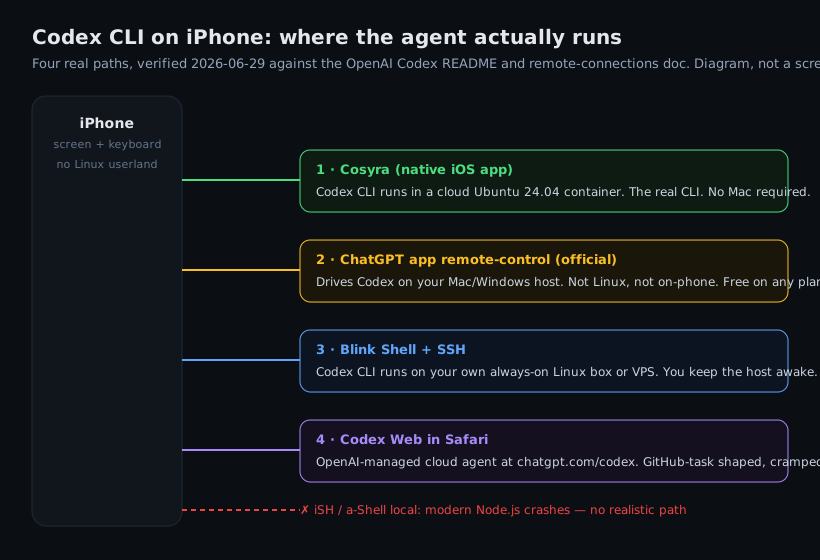
There are four real ways to run Codex from an iPhone as of 2026-06-29: a cloud terminal with Codex CLI pre-installed (Cosyra, native iOS app), OpenAI's own ChatGPT-app remote that drives the Codex App on your Mac or PC, SSH from a terminal app into your own always-on Linux box, or Codex Web in Safari. All four share the same shape: the agent runs on a host and the iPhone is the remote. They differ in who owns and babysits that host.
1. Cosyra (cloud terminal, native iOS app)
This is what we build. The Cosyra iOS app gives you a persistent Ubuntu
24.04 container with Codex CLI, Claude Code, OpenCode, and Antigravity CLI
already installed, 30 GB of storage, and hibernation that resumes exactly
where you left off. We pre-install the four agents because setup friction is
the thing that actually kills agent-driven mobile coding; nobody wants to
debug an npm install on a phone keyboard. There is no SSH tunnel to keep
alive and no laptop that has to stay awake. The same container is reachable
from iPhone, Android, and web, so you can start on the couch and pick it up
in a waiting room. Codex defaults to looser approvals than some agents. It
will run shell commands and write files inside the workspace without asking,
so we tend to start higher-trust sessions with codex --ask-for-approval always.
- Works when: you want zero setup and a host you do not have to maintain, and you want the real Codex CLI rather than a remote view of it.
- Breaks when: you have no internet. The container lives in the cloud, so there is no offline mode. That is a real trade-off against a local terminal.
- Cost: Core is $20/month and Pro is $30/month. Eligible new users can start a 7-day free trial in the App Store app. You bring your own OpenAI key and OpenAI bills you directly. See pricing.
2. ChatGPT-app remote-control into a Mac or PC (OpenAI's own option)
On 2026-05-14 OpenAI added Codex to the ChatGPT mobile app, and it is the most important thing to understand here because it is easy to mistake for "Codex on the phone." It is not. It is a remote-control surface: the Codex App keeps running on your Mac or Windows machine, and the ChatGPT iOS app drives it after you scan a QR code. Prompts and approvals go from phone to host; screenshots, diffs, and test results flow back. The repo, credentials, shell, and execution all stay on the desktop. Windows host support shipped 2026-05-29; there is no Linux mobile-host path. It is free on any ChatGPT plan, which makes it the honest winner for anyone who already keeps a Mac running.
- Works when: you have a Mac or Windows machine you keep awake, and you are happy steering rather than holding a real shell.
- Breaks when: your dev box is Linux, the host sleeps, or you do not want a second computer running just so the phone has a target.
- Cost: free on any ChatGPT plan, including Free, plus whatever the host machine costs to run.
3. SSH from Blink Shell into your own machine
The classic remote-into-your-own-box path.
Blink Shell is a paid iOS terminal built around
SSH and Mosh. Mosh matters on a phone: it keeps the session alive across the cellular
handoffs and IP changes that drop plain SSH the moment you walk between cell towers.
You SSH into a Linux box or VPS where you installed Codex CLI with npm install -g @openai/codex, start tmux so the session survives app switching, and drive Codex
from there.
- Works when: you already keep an always-on machine and are comfortable with SSH plus tmux.
- Breaks when: the machine sleeps, the home connection drops, or you do not want to keep a second computer awake just to give the phone a target.
- Cost: the Blink+ subscription plus whatever the host costs. Tailscale's free tier covers the personal networking.
4. Codex Web in Safari
OpenAI's cloud agent at chatgpt.com/codex runs in the browser with
no install. You connect a GitHub repo, kick off a task, and the managed agent
works on it server-side. On an iPhone it renders in Safari, but the layout is
built for bigger screens, so it is more comfortable for kicking off and reviewing
a task than for hands-on iteration. It is a different tool from the CLI: there
is no terminal, and you are working in OpenAI's task UI rather than a shell with
your own tools next to it.
- Works when: your workflow is GitHub-native and you want to fire off a task without any setup.
- Breaks when: you want a real terminal, the other three agents alongside Codex, or anything outside a single GitHub task.
- Cost: bundled with your ChatGPT plan.
How do you set up Codex CLI on iPhone with Cosyra?
You set up Codex CLI on iPhone in about three minutes: install Cosyra from
the App Store, paste an OpenAI API key into the container, and type
codex. No Node install, no SSH tunnel, no jailbreak. These are
the exact steps we run on a fresh iPhone.
Step 1: Install Cosyra on iPhone
Open the App Store on your iPhone and search for Cosyra. Sign in with Apple, Google, or email and the app provisions a fresh Ubuntu container on first launch, about 15 seconds in our testing. The four agent CLIs are already inside, so you skip the part that breaks most on-phone setups.
Step 2: Add your OpenAI API key
Get an API key from platform.openai.com/api-keys. In the Cosyra terminal:
$ # Set the key (persists across sessions)
$ echo 'export OPENAI_API_KEY="sk-your-key-here"' >> ~/.bashrc
$ source ~/.bashrc
$ codex --version
codex-cli 0.142.2
Prefer not to manage a key? Run codex and pick Sign in with ChatGPT
instead. It works inside the container by following the on-screen flow, and is
the path OpenAI recommends for Plus, Pro, and Business plans.
Step 3: Clone a repo and run codex
Clone a repo and start a session:
$ git clone https://github.com/your-org/your-project.git
Cloning into 'your-project'...
$ cd your-project
$ codex
OpenAI Codex (codex-cli 0.142.2)
Type your prompt to get started.
› Find the bug in the checkout flow and write a failing test first.
Codex reads the repo and starts working. Approve or reject changes inline with a tap. When you close the app to catch your stop, the container hibernates; reopen it and the session is exactly where you left it, no re-clone, no re-auth.
Try Cosyra. Eligible new users can start a 7-day free trial in the App Store app. App Store / Google Play / Pricing details
What does iPhone Codex look like in practice?
iPhone Codex in practice is short prompts, one hand, and dead time that used to be wasted. The phone is not where you do a four-hour refactor; it is where you keep a long task moving while you are away from the desk. Two patterns we run constantly:
The commute kickoff
Standing on the platform, you remember the failing CI job from last night. Open Cosyra, pull the branch, and hand Codex the whole problem in one dictated sentence. Press and hold the mic key, say it, release:
$ git fetch origin && git checkout fix/ci-flake
$ codex --ask-for-approval always
› The auth integration test is flaky in CI. Reproduce it,
find the race, and propose a fix with a regression test.
By the time the train arrives you have a diff to skim. Approve it, let it push, and the rest of the commute is reading the result instead of starting from a cold terminal at your desk.
The waiting-room review
Fifteen minutes in a waiting room is enough to review a teammate's pull
request. Pull the branch, ask Codex for a structured review focused on what
you care about, and post it with gh pr review --comment from the
same terminal. The container holds your gh auth, so there is no login dance. This
is the kind of work the phone is genuinely good at: bounded, reviewable, no deep
window juggling required.
How do the iPhone options compare?
The four paths line up cleanly against what matters for an agent client: whether you maintain the host, whether you get the real CLI, and what happens when you switch apps or lose signal. The table covers the real options as of 2026-06-29. For the wider field of editors and terminals beyond Codex, our coding on iPhone guide lines every option up the same way, and best terminal apps for iPhone covers the client side.
| Feature | Cosyra (iOS app) | ChatGPT-app remote | SSH via Blink Shell | Codex Web (Safari) |
|---|---|---|---|---|
| Gives you the real Codex CLI | Yes (cloud host) | Yes (on your Mac/PC) | Yes (your host) | No (managed agent) |
| Codex pre-installed | Yes | You install on host | You install on host | Yes (managed) |
| Requires another machine | No | Yes (Mac/Windows) | Yes (always-on) | No |
| Linux host path | Yes (the container) | No | Yes | N/A (cloud) |
| Persistent workspace | Yes (30 GB) | On your host | On your host | Per-task |
| Setup time | ~3 min | ~3 min (QR pair) | 15–30 min | ~3 min |
| Cost on iPhone | From $20/mo | Free on any plan + host | Blink+ sub + host | Bundled with plan |
Which path should you pick?
Choose Cosyra if you want the real Codex CLI with no host to maintain and the same container across iPhone, Android, and web. Choose the ChatGPT-app remote if you already keep a Mac or Windows machine awake and are happy steering it. It is free and it is OpenAI's own option, so we will not pretend otherwise. Choose Blink plus SSH if your dev box is Linux and you want Codex running on hardware you control. Choose Codex Web if you live in GitHub and want a zero-setup task runner rather than a terminal. The one combination iOS cannot give you is Codex running on the phone itself; on Android the calculus shifts because Termux gets you closer to local, which is the whole point of our Codex CLI on Android guide.
Frequently asked questions
Can you run Codex CLI directly on an iPhone?
Not on the device itself. OpenAI ships Codex CLI for macOS, Linux, and Windows only; there is no iOS build and no Termux for iPhone, so iOS gives you no Linux userland to install it into. The CLI always runs on a host elsewhere and the iPhone drives it: a cloud Ubuntu container with Codex pre-installed (Cosyra), SSH into your own Linux box, or OpenAI's ChatGPT-app remote into a Mac or PC.
[source: OpenAI Codex README, supported platforms macOS/Linux/Windows]
Isn't there a Codex feature in the ChatGPT iPhone app already?
Yes, added 2026-05-14, and it is worth knowing exactly what it is. It is a remote-control surface: it drives the Codex App running on your Mac or Windows machine, not Codex running on the phone, and there is no Linux host path. If you keep a Mac awake it is a genuinely good free option; if your dev box is Linux or you do not want to babysit a desktop, it does not reach you.
[source: 9to5Mac, "OpenAI brings Codex control to ChatGPT for iPhone and Android"]
Can I control Codex running on my Mac from my iPhone?
Yes. Open the Codex App on the Mac, scan its QR code from the ChatGPT iPhone app, and you can review output, approve commands, switch models, and start new threads from the phone. The work still executes on the Mac, and the repo, credentials, and shell never leave it. The trade-off is the always-on machine: if the Mac sleeps, the iPhone has nothing to talk to.
[source: OpenAI community, "Controlling Codex App remotely from my mobile device"]
Can I run Codex CLI remotely from my phone without a Mac?
Yes, by putting the CLI on a Linux host the phone reaches over the network: SSH from a terminal app into a VPS or always-on Linux box where you installed Codex, or a cloud container that already has it. We pre-install Codex CLI in the Cosyra container precisely so there is no host to provision and no SSH tunnel to keep alive; you open the app and the terminal is there.
[source: OpenAI community, "Using Codex CLI remotely using your mobile device"]
Why can't iSH or a-Shell run Codex CLI on iPhone?
Both are real on-device terminals, but neither runs a modern Node.js. iSH
emulates 32-bit i386 Alpine Linux, and current Node crashes there with
Illegal instruction, which blocks every Node-based agent CLI
including Codex. a-Shell ships curated WebAssembly binaries with no global
npm install path. They are fine for shell scripting on the go; they are
not a path to Codex.
[source: iSH GitHub issue #2335, Node "Illegal instruction"]
What terminal app is best for SSHing into a Codex host from iPhone?
A native SSH/Mosh client like Blink Shell holds a session better than a
web terminal, because Mosh survives the cellular handoffs that drop plain
SSH when you walk between cell towers. Start tmux on the host so
the session survives app switching. SSH still needs a machine on the other end,
and a cloud container removes both the SSH client and the host you would otherwise
maintain.
[source: Hacker News, "Show HN: Echo, an iOS SSH+mosh client"]
tl;dr
Codex CLI does not run locally on an iPhone. iOS has no Termux and the
on-device terminals cannot run modern Node. Four real ways to reach it as
of 2026-06-29: Cosyra (cloud terminal, native iOS app, Codex
pre-installed, persistent container, no other machine required), OpenAI's
free ChatGPT-app remote into a Mac or PC (not Linux), SSH from Blink Shell
into your own Linux box, or Codex Web at chatgpt.com/codex in Safari.
The phone is the remote; the host does the work.
App Store / Google Play. Sign up and pick a plan. Eligible new users can start a 7-day free trial in the App Store app.
Run Codex CLI from your iPhone in 3 minutes.
Install Cosyra, paste an OpenAI API key, type codex.