Short answer. Andronix installs a real Linux distro onto your Android phone through Termux, gives you a graphical desktop over VNC, and costs $4.99 to $6.99 once, forever. Cosyra rents you an x86_64 Ubuntu container in the cloud with Claude Code, Codex CLI, OpenCode, and Antigravity CLI pre-installed, works on iPhone as well as Android, and starts at $20/month. These are different products. If you want to learn Linux on a phone you already own, Andronix is cheaper and better at it.
This post was written by the Cosyra team. We compared Cosyra against
Andronix based on hands-on testing of both, first-hand reads of
andronix.app, its pricing page, the Play listing for
studio.com.techriz.andronix, the MIT-licensed AndronixOrigin
installer repo, and the Andronix docs. Prices, ratings, and repository
state below were verified 2026-07-21.
tl;dr
Use Andronix if you want Linux running on hardware you already own, offline, for a one-time $6.99, and a desktop with a browser matters to you. Use Cosyra if your actual job is running AI coding agents, you need x86_64 and glibc, you are on an iPhone, or you are tired of Android killing long jobs.
App Store · Google Play. Sign up and pick a plan, from $20/month.
What is Andronix, exactly?
The single most common mistake written about Andronix is calling it a Termux alternative. It is a Termux frontend. The install flow published on andronix.app has four steps, and step one is verbatim: "Copy and paste a command from Andronix into Termux." You install Termux first. Andronix hands you a shell command. Termux runs it.
What that command does is fetch a distro rootfs tarball, unpack it, and set up PRoot, which fakes a chroot in user space so that no root access is needed. From there you get a shell inside Ubuntu, Debian, Manjaro, Fedora, Void, Alpine, Kali, or Arch, and optionally a graphical desktop served over VNC to any display on the same network.
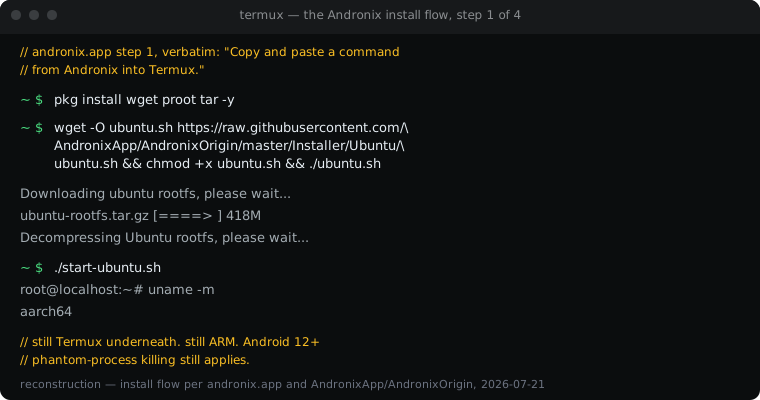
That architecture line matters more than anything else in this comparison. Andronix adds a distro and a desktop on top of Termux. It does not change what is underneath. Every Termux constraint survives the install: Android 12+ phantom-process killing, ARM binaries against Android's Bionic libc at the base layer, no x86_64 native installers. Andronix is not marketed as fixing those things, and it does not.
How do Cosyra and Andronix compare feature by feature?
Andronix is a one-time purchase that runs Linux on your own hardware and works with no network. Cosyra is a monthly subscription that runs Ubuntu on Azure and is useless without connectivity. The table covers twelve attributes as of 2026-07-21.
| Feature | Cosyra | Andronix |
|---|---|---|
| Price | $20/mo Core or $30/mo Pro | $4.99 Premium / $6.99 Modded OS, one-time, lifetime |
| Free tier | None. The 7-day free trial is for eligible new users on iPhone and iPad only | UnModded OS install is free |
| OS support | iOS, Android, web | Android only, and requires Termux |
| AI agents pre-installed | Claude Code, Codex CLI, OpenCode, Antigravity CLI | None; not a product goal |
| Persistent storage | 30 GB in the cloud, survives device loss | Your phone's storage, tied to the device |
| Offline capability | No, cloud-only | Yes, fully on-device once installed |
| Isolation model | Per-user Ubuntu container on Azure AKS | PRoot user-space chroot inside the Termux app sandbox |
| Graphical desktop | None, terminal only | Yes, XFCE and others over VNC |
| Distros offered | Ubuntu 24.04 | Eight, including Kali and Arch |
| Max session length | Hibernates on close, resumes where you left it | Subject to the Android 12+ phantom process killer |
| API key model | BYOK, you pay Anthropic/OpenAI/Google directly | Not applicable; no agent integration |
| CPU architecture | x86_64 with glibc | ARM (aarch64) via PRoot on Termux |
| Open-source status | Client app closed, orchestration proprietary | Install scripts MIT; app and Modded OS images closed |
Want the cloud side of this comparison? We give you a persistent Ubuntu 24.04 x86_64 container with Claude Code, Codex CLI, OpenCode, and Antigravity CLI already on PATH, on iPhone and Android, with nothing to install inside it.
App Store · Google Play · Pricing. Plans start at $20/month.
Where does Andronix beat Cosyra?
Andronix beats us on price, offline capability, data locality, graphical desktop, and distro choice. Four of those five are structural, meaning we cannot close them by shipping features. They come from the shape of the product.
$6.99 once versus $20 every month
A student who wants to learn Linux on the phone in their pocket should buy Andronix. Fifty months of Cosyra costs about $1,000. Andronix Modded OS costs $6.99 and never asks again. We are not going to pretend that gap is a detail. If the job is "learn what a package manager is" or "practice bash for a class," we are the wrong tool and Andronix is the right one.
It works with no signal
This is the one that comes up on trains. Cosyra is a thin client over a network connection: in a tunnel between stations, in a basement office, on a plane without Wi-Fi, our terminal stops responding and Andronix keeps compiling. We have written the same admission about Termux, and it is no less true here. If offline is your first requirement, stop reading and install Andronix.
Nothing leaves the phone
No cloud account, no container on infrastructure you do not control, no third party in the path of your source code. For anyone with an employer policy about where code may live, that is not a preference, it is a requirement.
A real graphical desktop
Andronix serves XFCE and other desktop environments over VNC, and the paid Modded OS image arrives with VS Code, Chromium, and Firefox already installed and themed. We have no desktop environment at all. If you want to plug a phone into a monitor and use it like a small Linux workstation, Andronix is built for that and we are not.
Eight distros, including Kali and Arch
We ship Ubuntu 24.04 and that is the whole menu. Andronix offers Ubuntu, Debian, Manjaro, Fedora, Void, Alpine, Kali, and Arch. Security work in particular tends to assume Kali, and that is a real reason to pick them.
Where does Cosyra beat Andronix?
We win on architecture, agent availability, process survival, iOS support, and not burning your battery. All five collapse into one sentence: the work does not happen on your phone.
x86_64 and glibc, not ARM under PRoot
A Cosyra container is Ubuntu 24.04 x86_64 with glibc and apt, the same ABI
as a Linux laptop or a CI runner. Andronix gives you a distro with glibc
inside it, which is genuinely better than bare Termux, but the CPU is still
aarch64 and the syscalls still route through PRoot. Anything distributed
only as a linux/amd64 binary does not run, and a bug report filed
against Gemini CLI under proot-distro on Android describes the performance cost as "syscall overhead from user-space emulation,
reduced filesystem access speed."
Four AI agents already installed
On first boot our container has claude, codex,
opencode, and agy on PATH. You export an API key and
run one. Andronix ships none of these, and this is not a knock on them, it is
simply a different product goal. Their tagline is "Learn Linux on your phone,"
and their paid tier's headline feature is a themed desktop with a browser. Nothing
on andronix.app or its Play listing mentions AI coding agents at all, checked
2026-07-21.
$ uname -m
x86_64
$ cat /etc/os-release | head -2
PRETTY_NAME="Ubuntu 24.04 LTS"
NAME="Ubuntu"
$ which claude codex opencode agy
/usr/local/bin/claude
/usr/local/bin/codex
/usr/local/bin/opencode
/usr/local/bin/agy
$ export ANTHROPIC_API_KEY=sk-ant-...
$ claude
The phantom process killer is not your problem
Android 12 kills apps that spawn more than 32 child processes or use what the OS decides is excessive CPU. An agent doing a multi-file refactor with a test runner attached trips that easily. Because Andronix runs inside Termux, it inherits the behaviour completely. There is an open PRoot issue titled "Can PRoot be used to help work around the Phantom Process Kill introduced in Android 12", which tells you both that the problem is real and that it is unsolved. If you want to fight it on-device rather than move off it, we wrote up the version-by-version signal 9 fix. A Cosyra container runs on Azure and Android has no opinion about it. A twelve-minute refactor takes twelve minutes.
iPhone
Andronix is Android-only, with no iOS build and no web client. If your phone is an iPhone, Andronix is not an option at any price.
No battery or thermal cost
Compiling on a phone heats the phone. We watched a Pixel 8 go from 34°C to 51°C in a seven-minute agent session running locally, with battery drain to match. With the container in the cloud, the phone is a keyboard and a screen.
The opinion we will actually defend
Here is where we disagree with most of the Linux-on-Android community: the VNC desktop is the wrong goal. The appeal of Andronix Modded OS is a themed XFCE session with Chromium and VS Code, and it is a genuinely impressive piece of engineering. But a desktop metaphor on a 6-inch screen is a bad fit even when it works, and the upstream issue tracker suggests it often does not: there is an open report of an XFCE desktop rendering as a black screen in the VNC viewer, and a Termux issue from a OnePlus 8T user whose VNC connection dropped every 15 to 20 seconds unless they tapped the Termux app to keep it awake.
We think the phone keyboard is fine for agent-driven coding, and that most people who disagree have not tried it. You are not typing a function body on a phone. You are typing a sentence describing what you want, reading a diff, and typing "yes." That is a text interface, and a terminal is the right shape for it. Chasing a desktop on a phone is trying to make the phone into a laptop; running an agent from a terminal is accepting that the phone is a phone and putting the compute somewhere else. Standing on a platform waiting for a delayed train, the second one works and the first one does not.
Andronix or Termux's own proot-distro?
Worth asking before you pay anyone. Termux ships
proot-distro, which installs the same class of PRoot Linux for
free. A Termux maintainer put the question bluntly in the project's own
discussions:
"we too have had our own proot distros. Why do you need a third party one
(unless you pay for there modded distro's)?" The fair answer is that proot-distro gives you a bare distro with
no desktop preinstalled, and setting up XFCE plus a VNC server yourself is an
afternoon. Andronix sells you that afternoon for $6.99. If your time is worth
more than that and the desktop is what you want, buy it. If you enjoy the setup,
you do not need Andronix at all. We walk through both paths in our guide to
running a Linux container on Android.
Who should pick Andronix and who should pick Cosyra?
Try Andronix first if…
- You want to learn Linux on a phone you already own and do not want a subscription. $6.99 once is the correct answer to that question.
- You need it to work with no signal. Commuter rail through tunnels, remote fieldwork, flights.
- You want a graphical desktop, especially plugged into an external display, or you specifically need Kali or Arch.
- Your code cannot leave the device for policy reasons. No cloud container will satisfy that constraint, ours included.
Choose Cosyra if…
- Your workload is AI coding agents rather than learning Linux, and you want them working in the first minute instead of the first afternoon.
- You are on an iPhone. Andronix does not exist for you.
-
You need real x86_64 with glibc, for
linux/amd64binaries or prebuilt wheels that do not have ARM builds. - Long agent runs getting SIGKILL'd by Android is the thing that made you search for an alternative.
- You move between an iPhone, an Android device, and a laptop and want the same container from all three.
These overlap less than the search query implies. If you are still unsure which category of tool you are shopping for, our complete guide to mobile coding terminals lays out all four approaches, local apps, SSH, cloud IDEs, and cloud terminals, with the tradeoffs of each.
Two things we want to be precise about
Andronix is not abandoned. The MIT-licensed AndronixOrigin installer repo has had no commit since January 2023, which looks alarming in isolation. But the Play Store app itself was updated 2025-10-16, and the repo is not archived. Those are two different signals pointing different directions, and quoting only the first would be unfair.
Andronix is neither open source nor proprietary. Their own docs split it: "The free distro (.tar) files and the shell scripts are available on our GitHub repository," while "all the paid things, like the actual Android app and all the files concerning Andronix Modded OS, are closed-source." Both simplifications are wrong. For the record, our client app is closed and our orchestration is proprietary, so we are not throwing stones from a glass house.
Frequently asked questions
Does Andronix require root?
No. Andronix installs Linux distributions inside Termux using PRoot, which fakes a chroot in user space rather than asking the kernel for one. That is why it works on a stock, unrooted phone. The trade-off is that PRoot intercepts system calls to do it, which costs performance compared to a real chroot or a real machine.
[source: alt.os.linux, "Has anyone here installed Andronix - Linux on Android without root"]
Does Andronix need Termux, or does it replace it?
It needs it. Step 1 of the install flow on andronix.app reads, verbatim, "Copy and paste a command from Andronix into Termux." Andronix supplies the distro tarballs, the install scripts, and a VNC desktop; Termux supplies the terminal and the userland underneath. Calling Andronix a Termux alternative gets the relationship backwards.
[source: termux/termux-packages Discussion #10258, "Wondering regarding Andronix"]
Why use Andronix when Termux already ships proot-distro?
A Termux maintainer asked exactly this in the project's own discussions:
"we too have had our own proot distros. Why do you need a third party one
(unless you pay for there modded distro's)?" The honest answer is
convenience and the desktop. proot-distro installs a bare distro
with no X11; the paid Modded OS image arrives pre-themed with VS Code, Chromium,
and Firefox already in it. If you are comfortable installing XFCE and a VNC
server yourself, proot-distro does the same job for free.
[source: termux/termux-packages Discussion #10258]
Is PRoot Linux slower than a real Linux machine?
Yes, and the reason is architectural rather than incidental. A bug report
filed against Gemini CLI running under proot-distro on Android
lists "Slower startup time compared to native environments" and "Noticeable
latency when executing tools," attributing both to "syscall overhead from user-space
emulation, reduced filesystem access speed." Every PRoot-based Linux on Android,
Andronix included, pays that tax, and so does
UserLAnd, the other one-tap
distro installer that wraps the same PRoot mechanism in a wizard.
[source: google-gemini/gemini-cli Issue #26038]
Why does my Andronix VNC desktop show a black screen or keep disconnecting?
Both are common and both are logged upstream. A black XFCE desktop in the VNC viewer is open on the Andronix installer repo. The repeating disconnect is logged against Termux itself, where a user on a OnePlus 8T reported the VNC connection dropping every 15 to 20 seconds unless they physically touched the Termux app to wake it. That second one is Android aggressively backgrounding the process, not a VNC bug.
[source: AndronixOrigin Issue #350, black XFCE desktop over VNC] · [source: termux-app Issue #1924, VNC drops every 15-20 seconds]
Why do long jobs die with "[Process completed (signal 9)]"?
Android 12 introduced the phantom process killer, which terminates apps that spawn more than 32 child processes or use what the OS judges to be excessive CPU. Andronix runs inside Termux, so it inherits this in full. There is an open PRoot issue proposing to work around it by "making child processes look like an extension of the parent as opposed to a separate process," which is a fair description of how hard the problem is.
[source: termux-app Issue #2366, signal 9 on Android 12] · [source: termux/proot Issue #260, PRoot vs phantom process kill]
Can I run Claude Code or other AI coding agents on Andronix?
Andronix does not ship any and does not target them. Neither andronix.app nor its Play listing mentions Claude Code, Codex CLI, Gemini CLI, or OpenCode anywhere, checked 2026-07-21. Its tagline is "Learn Linux on your phone." You can install an agent yourself inside the PRoot distro, and because the distro carries glibc, some agents that fail on bare Termux will start there. You still inherit ARM-only builds, PRoot syscall overhead, and the phantom process killer. Our guide to running Claude Code on a phone covers the current state of that on every path.
[source: andronix.app, checked 2026-07-21]
Is Andronix free, and is Modded OS worth paying for?
The base UnModded OS install is free. Premium is $4.99 and Modded OS is
$6.99, both one-time payments for lifetime access as of 2026-07-21, not
subscriptions. Whether Modded OS is worth it depends on your tolerance for
install failure: there are paid users on the installer repo reporting that
the Modded image failed with a tar: xz: Cannot exec: Permission denied error after purchase. At $6.99 the downside is small, but do not expect a
support contract.
[source: andronix.app/pricing, verified 2026-07-21] · [source: AndronixOrigin Issue #311, paid Modded OS install failure]
tl;dr
Use Andronix if you want Linux on hardware you already own, offline, for $6.99 once, and a graphical desktop matters. Use Cosyra if you want AI coding agents pre-installed, need x86_64 and glibc, are on an iPhone, or need long jobs to survive.
App Store · Google Play. Sign up and pick a plan, from $20/month.
Pre-installed Claude Code, Codex CLI, OpenCode, and Antigravity CLI. We run them in a real x86_64 Ubuntu container reached from a native iOS or Android app. Nothing to compile on the phone.
 scan to install