Short answer. Cosyra vs Omnara comes down to one line: Omnara is a free remote control for Claude Code or Codex running on a computer you own; Cosyra runs the agent in a cloud container so there is no computer to keep awake. Omnara is free with unlimited sessions, has two-way voice, and spans desktop, web, phone, and Apple Watch (verified 2026-07-10). Cosyra starts at $20/month for a persistent Ubuntu 24.04 x86_64 box with Claude Code, Codex CLI, OpenCode, and Antigravity CLI pre-installed, reached from native iOS and Android apps. Pick Omnara if you already own a machine to start on; pick Cosyra if you don't want one in the loop.
We wrote this from a phone on the couch with every laptop in the house shut, which is the whole test. Omnara is one of the most polished competitors we've covered for this query, with a real desktop app, native iOS and Android, an Apple Watch companion, voice, and 20,000+ builders on its own count, so this is a genuine head-to-head, not a strawman. But the phrase Omnara puts on its own homepage is the tell: the mobile app is "not a terminal on your phone." It's a remote control for an agent that runs somewhere else. On Cosyra, the somewhere else is the cloud, and there is no other machine. That contrast is the spine of this page.
This post was written by the Cosyra team. We compared Cosyra against Omnara based on hands-on use of Cosyra and a first-hand review of Omnara's live product surfaces on 2026-07-10: its remote-control site and FAQ at remote.omnara.com, the App Store listing, the omnara-ai/omnara GitHub repo, and its YC profile. Pricing, platform, the "not a terminal" positioning, the archived repo, and the supported-agent list were verified 2026-07-10 against our internal Omnara factsheet. We did not install Omnara's desktop app; every Omnara claim here is sourced to a page we could read directly.
tl;dr
Use Omnara if you already own a machine to start work on and
want $0, two-way voice on every screen (phone, web, desktop, even Apple Watch),
and opt-in cloud sync so a session survives your laptop going offline. Use
Cosyra if you want the compute itself in the cloud with nothing
to keep awake: a real Ubuntu container on a phone where the agent runs whether
or not any laptop is on, with a full shell you can git, apt, and build in. Omnara steers your machine; Cosyra is the machine.
App Store · Google Play. Sign up and pick a plan. Eligible new users can start a 7-day free trial in the App Store app.
Want a phone that doesn't depend on a machine being awake? Our container is an always-on x86_64 Linux machine in the cloud, with Claude Code, Codex CLI, OpenCode, and Antigravity CLI ready to drive from iOS or Android. Nothing at home to keep running, and no session to migrate because it never lived on your laptop.
App Store · Google Play · Pricing. Sign up and pick a plan, from $20/month.
How do Cosyra and Omnara compare feature by feature?
Both put Claude Code within reach of your phone, but from opposite ends. Omnara is a free control surface over an agent running on your own machine; Cosyra is a paid cloud container that runs the agent for you. Omnara's $0 assumes you have a machine to start on and, for the always-on part, that you opt a repo into cloud sync; Cosyra's $20/month is the always-on machine. The table below lines them up on twelve attributes, verified 2026-07-10.
| Feature | Cosyra | Omnara |
|---|---|---|
| Pricing | $20 / month Core or $30 / month Pro | Free; you pay only your existing AI plan |
| Free tier | None. 7-day free trial for eligible new users in the App Store app | "100% free, unlimited sessions" (its own wording) |
| OS support | iOS, Android, web | macOS, Windows, iOS, Android, web, Apple Watch |
| AI agents pre-installed | Claude Code, Codex CLI, OpenCode, Antigravity CLI (BYOK) | None bundled; drives your Claude Code or Codex |
| Persistent storage | 30 GB cloud, survives device loss | Local disk on your machine; opt-in cloud checkpoint |
| Offline capability | No (cloud-only) | No; needs a machine or the cloud continuation running |
| Container sandboxing | Per-user Ubuntu container on Azure AKS | None on device; runs on your machine or a cloud sandbox |
| Port forwarding | Yes. Run a dev server in the container and preview it | Views a localhost dev server on your machine (per marketing) |
| File sync | Container files persist; same box from any device | Opt-in per-repo cloud sync of the session checkpoint |
| Max session length | Hibernates on idle, resumes; 120 hrs/mo compute | "Unlimited sessions" (its own claim) |
| API key model | BYOK (you pay Anthropic / OpenAI / Google) | Uses the Claude / Codex auth already on your machine |
| Open-source status | Client app closed, orchestration proprietary | Apache-2.0 tree archived 2026-01-19; product closed |
Want the agent to run without your laptop, no migration required? We ship a persistent x86_64 Ubuntu container with four agents pre-installed, reached from native iOS and Android apps. The agent runs in the cloud from the first keystroke, so there's no session that started at home to sync back.
App Store · Google Play · Pricing. Sign up and pick a plan. Eligible new users can start a 7-day free trial in the App Store app.
Remote control vs hosted compute: the distinction that decides it
Omnara has a desktop app that bundles the CLI, native mobile apps, a web app, and an Apple Watch companion, all pointed at Claude Code or Codex running on a machine you own. You steer the agent by text, dictation, or a full two-way voice conversation, approve diffs, and watch it work from whichever screen is nearest (remote.omnara.com, verified 2026-07-10). It is a genuinely good design, and for someone with a machine humming away it is close to free. Omnara also does something most relay tools don't: for repos you opt in, it can migrate a live session to a cloud continuation when your laptop drops off, so the run doesn't die. That's a real answer to the weakest point of the remote-control shape.
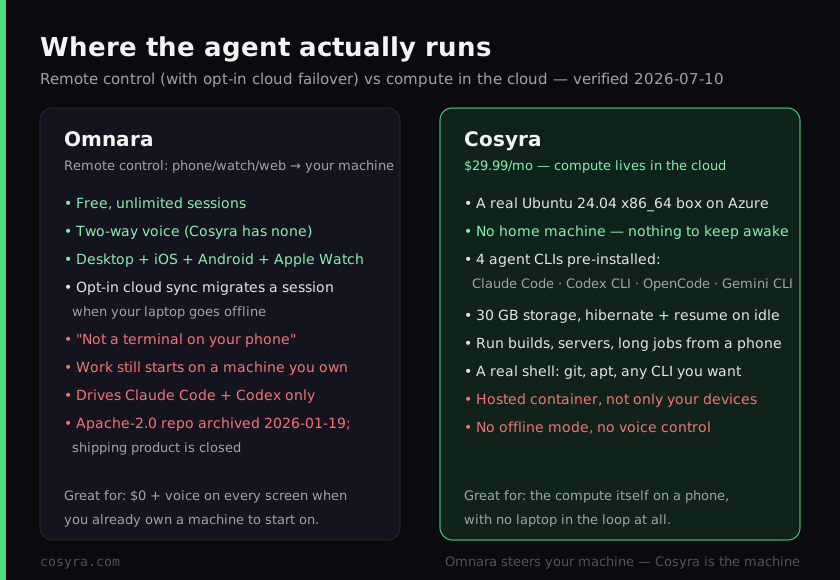
Cosyra inverts the whole picture. The agent runs in a per-user Ubuntu 24.04 x86_64 container on Azure, reached from native iOS and Android apps, and the four CLIs are already on the PATH. There is no first machine to start on and no session to migrate, because the session was never on a laptop. We think that difference is the entire decision, and most "control Claude Code from your phone" posts skip it. Omnara makes your phone an excellent window into a computer you supply; Cosyra makes your phone a window into a computer that is always running for you. Both are legitimate; they suit different people, and the honest question is whether you have a machine you're happy to start work on and keep reachable.
Two precision traps are worth naming, because they're the easy mistakes. "Omnara runs Claude Code in the cloud" is only half true: the default is that it runs on your machine, and the cloud part is an opt-in failover for sessions that already started there. And "Omnara is an open-source Claude Code client" is now stale. That repo is archived, and the shipping product is closed and built on the Claude Agent SDK. Omnara's own README explains why they left the wrapper behind, and it's the most interesting sentence in this comparison.
The wrapper lesson, in Omnara's own words
Omnara's archived README states the reason the open-source project stopped:
the tool "was built as a wrapper around the Claude Code CLI, which became
unfeasible to maintain with Claude Code's constant updates"
(github.com/omnara-ai/omnara, verified 2026-07-10). We're quoting a
competitor against their own past product on purpose, because it lands
exactly on a bet we made. We don't wrap the agent CLIs. We run the upstream claude, codex, opencode, and agy binaries in
the container, so when Anthropic or OpenAI ships an update it's an npm update inside a normal Linux box, not a rewrite of a wrapper. Omnara reached the same
conclusion the hard way and moved to the Claude Agent SDK. Different answer, same
diagnosis: wrapping a fast-moving CLI is a losing maintenance position.
$ cat /etc/os-release | head -1
PRETTY_NAME="Ubuntu 24.04 LTS"
$ which claude codex opencode agy
/usr/local/bin/claude
/usr/local/bin/codex
/usr/local/bin/opencode
/usr/local/bin/agy
$ claude # runs in the cloud container, no home machine
> Claude Code · /home/you/project · ready
Where does Omnara beat Cosyra?
Omnara beats Cosyra on cost, voice, device breadth, and keeping code on your own machine. We ship a paid hosted product and we still think Omnara is one of the better-built tools in this space; its free iOS app holds a 4.41/5 rating from its listing, and the desktop-plus-watch spread is more than most relay tools attempt. Here is where it's the better pick, with the receipts from remote.omnara.com and the GitHub repo, verified 2026-07-10.
- Free, unlimited sessions. Omnara's own site says the app is "100% free, with unlimited sessions" (remote.omnara.com). If you already own a machine to start on, your only spend is the Claude or Codex plan you already have. Cosyra's $20/month cannot beat $0 for someone who already has the hardware, and we won't argue otherwise.
- Two-way voice on every screen. Omnara Voice is a hands-free, two-way conversation with the agent (you talk, it responds and asks clarifying questions), plus one-way dictation, working across mobile, web, and desktop. Cosyra has nothing like it. If you want to think out loud on a walk instead of typing, Omnara is the one that does it today.
- Desktop, web, phone, and Apple Watch. Omnara is a control surface on more screens than we target, including a real desktop app that bundles the CLI and an Apple Watch companion for notifications and quick replies. If you want to approve a diff from your wrist, that's a genuine Omnara capability we don't match.
- Code can stay on your machine. By default the agent runs on hardware you own, and cloud sync is per-repo opt-in ("nothing leaves your machine unless you opt in"). For work that can't sit in a third-party container, a control surface is the right shape and a hosted box is the wrong one. Cosyra runs your code on Azure; for that profile Omnara wins outright.
Where does Cosyra beat Omnara?
Cosyra beats Omnara on not needing a starting machine at all, on being a real terminal instead of a control surface, on agent choice, and on running the upstream binaries directly. Omnara's cloud migration narrows the always-on gap, but it's a failover for a session that began on your laptop, not a machine that was there from the first keystroke. That's the difference we built around.
No starting machine, and no session to migrate
This is the load-bearing difference. Omnara's default agent runs on a computer you own, so to begin work that computer has to be on and reachable; the cloud continuation kicks in after a session already exists and you've opted the repo in. Cosyra's agent runs in the cloud from the first keystroke, so a dead laptop battery, a desktop asleep at home, or a laptop you simply left behind never strands you. There's nothing to hand off because nothing was ever local. On a train with no laptop in your bag, that's the whole game.
A real terminal, not a control surface
Omnara is, by its own description, "not a terminal on your phone". It's an
approve-and-steer layer over an agent session. Cosyra is an actual Ubuntu
shell. You can git clone, apt install, run a
build, start a dev server and preview it, run native binaries, and kick off
long jobs that keep going while the container hibernates and resumes on
reopen. When the agent isn't the only thing you need, when you want to poke
the repo yourself between prompts, the difference between a control surface
and a machine is most of the experience.
Four agents, and the upstream binaries
Omnara drives Claude Code and Codex. A Cosyra container boots with Claude Code, Codex CLI, OpenCode, and Antigravity CLI already on the PATH, all BYOK, and adding another is one command because it's a real box. And because we run the upstream CLIs rather than wrapping them, the exact trap Omnara's README describes, an agent release is a package update, not a product rebuild.
An opinion the Omnara crowd will push back on
We think, for most people coding from a phone, the starting machine is the weak link, not the feature, and cloud failover papers over it rather than removing it. The Omnara crowd will disagree with conviction: they'll say keeping code on hardware you own, with the cloud as an opt-in safety net, is exactly the right default, and for privacy-sensitive work they're right and we'll say so plainly. But "free" quietly assumes a machine that's on, patched, and reachable whenever inspiration hits away from your desk, and a lot of people on a couch with every laptop shut don't have that running. We'd rather put the machine in the cloud than ask you to keep one alive at home for the failover to fail over from. That's the exact reason we built Cosyra as hosted compute instead of a remote control.
Who should pick Omnara instead of Cosyra?
Pick Omnara instead of Cosyra if you already own a machine you're happy to start work on and you want $0, two-way voice, the widest device spread, or code that stays on your own hardware by default. For those profiles Omnara is the better pick, and we'd tell you so. The deciding question is simple: do you have a computer you're glad to keep reachable, and do you value voice and staying on your own hardware over having the machine itself in the cloud?
Try Omnara first if you are one of these profiles
- You already have a machine and want $0. A desktop or laptop you keep reachable, plus the Claude or Codex plan you already pay for, and Omnara adds no compute bill. If the hardware is a sunk cost, free beats $20/month and we won't pretend otherwise.
- Voice is how you want to work from a phone. Two-way voice on a walk or in the car is a real part of your workflow. Omnara has it today across mobile, web, and desktop; Cosyra doesn't.
- Code has to stay on your hardware. Policy or principle says your source can't sit in a third-party container by default. Omnara runs the agent on your machine with cloud sync opt-in; Cosyra is a hosted container, which for this profile is a non-starter and we'll say so.
We reach for a remote control like Omnara when we have a machine we trust to start on and voice or privacy is the priority, and for Cosyra when we want the agent to just be there on the phone with no laptop in the loop at all. They're honestly different tools for different situations, and the starting machine is the variable that decides it. If you're weighing Omnara against other remote-control apps like Happy Coder (the free, open-source relay we cover in Cosyra vs Happy Coder) or Claude's own remote control (Cosyra vs Claude Remote Control), or a tunnel that turns your own Mac into the remote box (Cosyra vs VibeTunnel), our remote-control vs cloud coding guide maps every relay option against the cloud-container shape in one place.
How do you try Cosyra if you're coming from Omnara?
You try Cosyra from an Omnara background in about two minutes, and there's no machine to pair and no repo to sync because there's no second computer. Install from the App Store or Google Play, sign in, and you land in a fresh Ubuntu 24.04 x86_64 container with the four agents already on the PATH. Where Omnara asks you to run the agent on your own machine and steer it, Cosyra just drops you into the machine. For the agent-by-agent tour, see running Claude Code on your phone.
The big unlock for most people coming from Omnara: nothing at home has to stay reachable, and there's no cloud sync to configure because the container is the cloud. It hibernates when idle and resumes where you left off, and you reach the same container from an iPhone, an Android tablet, or a laptop browser with state intact. You trade Omnara's $0, voice, and on-your-hardware default for a hosted machine that is simply always there. Whether that trade is worth it is exactly the decision this page is about.
Frequently asked questions
Is Omnara free?
Yes. Omnara's own site states the remote-control app is "100% free, with unlimited sessions". Download the desktop app or install the CLI, sign in, and start (verified 2026-07-10). Your only real spend is the Claude or Codex plan you already pay for. Cosyra Pro is $30/month, which buys the always-on x86_64 machine the agent runs on rather than the agent itself. If you already own a machine to start work on, Omnara's $0 is hard to beat and we won't pretend otherwise.
[source: remote.omnara.com, "100% FREE. UNLIMITED SESSIONS"]
Does Omnara run Claude Code on my phone?
No. Omnara describes its mobile app as "a purpose-built iOS and Android
app, not a terminal on your phone" (verified 2026-07-10). The agent runs
on your own computer, and the phone, web, or Apple Watch app is the remote
control that steers it. There is no Linux shell on the handset to apt install
into. Cosyra is the opposite shape: the agent runs in a cloud Ubuntu 24.04 container
you reach from the app, so there is no home machine in the loop.
[source: remote.omnara.com, "not a terminal on your phone"]
What happens with Omnara when I close my laptop?
For repos you opt in, Omnara can migrate a running session to a cloud-backed continuation so it doesn't die when your laptop goes offline; agent state and uncommitted changes sync back when you return (verified 2026-07-10). It's a real answer to the always-on-machine problem, but the session still starts on a machine you own and cloud sync is per-repo opt-in. Cosyra removes the machine entirely: the container is the always-on host, so nothing at home ever has to be awake.
[source: remote.omnara.com FAQ, "What happens when I close my laptop?"]
Is Omnara open source?
It was, and that repo is now frozen. The Apache-2.0 tree that earned Omnara's GitHub stars was a wrapper around the Claude Code CLI, and it is archived as of 2026-01-19 (verified 2026-07-10). The shipping product is a closed platform built on the Claude Agent SDK, with no public repo to audit or self-host. "Omnara is open source" was true and is now misleading. State the archive date, not a verdict.
[source: github.com/omnara-ai/omnara, Apache-2.0, archived 2026-01-19]
What coding agents does Omnara support?
Claude Code and Codex today, with more listed as in progress (verified
2026-07-10). It drives those two agents running on your machine. Cosyra
ships four agent CLIs pre-installed in the container, Claude Code, Codex
CLI, OpenCode, and Antigravity CLI, all BYOK, and anything else is one apt or
npm command away because it's a real Ubuntu box, not a fixed control
surface.
[source: remote.omnara.com FAQ, "What coding agents does Omnara support?"]
What is the difference between Omnara and Cosyra?
Where the agent runs. Omnara is a free remote control, desktop, web, phone, Apple Watch, for Claude Code or Codex running on your own machine, with two-way voice and opt-in cloud session migration. Cosyra runs Claude Code, Codex CLI, OpenCode, and Antigravity CLI in a hosted Ubuntu 24.04 x86_64 container reached from native iOS and Android apps, with nothing at home to keep awake but a $20/month bill and no offline mode. Pick Omnara for $0 and voice if you own a machine to start on; pick Cosyra for the compute itself in the cloud.
Four agents pre-installed, running in the cloud, with no machine to keep awake. We run them in a real x86_64 Ubuntu container, reached from a native iOS or Android app. Two-minute setup, no machine to pair, no repo to sync, nothing at home to babysit.
Claude Code on your phone · AI coding agents on mobile · See pricing. Sign up and pick a plan. Eligible new users can start a 7-day free trial in the App Store app.