Short answer. Cosyra vs VibeTunnel comes down to one line: VibeTunnel
tunnels the terminal on a Mac you own into a browser, so that Mac has to stay
awake; Cosyra runs the agent in a cloud container, so there's no machine to keep
awake. VibeTunnel is free and MIT-licensed, wraps any command with vt, and gives you your real local environment (verified 2026-07-11). Cosyra
starts at $20/month for a persistent Ubuntu 24.04 x86_64 box with
Claude Code, Codex CLI, OpenCode, and Antigravity CLI pre-installed, reached from native iOS and Android apps. Pick VibeTunnel if
you own a Mac that stays on; pick Cosyra if you don't want one in the loop.
We wrote this from a phone on the couch with every laptop in the house shut, which is the whole test. VibeTunnel is the most terminal-native competitor we've covered for this query and the highest-starred (4,581 stars, MIT, on GitHub, verified 2026-07-10), so this is a real head-to-head, not a strawman. But the shape of the tool is the tell: VibeTunnel is a relay that mirrors a terminal running on your Mac into a browser. The Mac is the compute. On Cosyra, the compute is the cloud container, and there is no Mac in the loop. That contrast is the spine of this page.
This post was written by the Cosyra team. We compared Cosyra against VibeTunnel based on hands-on use of Cosyra and a first-hand review of VibeTunnel's public surfaces on 2026-07-11: its README and Windows-support issue on the amantus-ai/vibetunnel GitHub repo, and the vibetunnel npm package. License, the localhost-plus-tunnel remote model, the Apple Silicon requirement, the work-in-progress iOS status, and the beta version were verified 2026-07-11 against our internal VibeTunnel factsheet. We did not install the native macOS app; every VibeTunnel claim here is sourced to a page we could read directly.
tl;dr
Use VibeTunnel if you own a Mac that stays on and want $0, MIT open source, your real local environment untouched, and a terminal-native relay that wraps any command, not just one agent. Use Cosyra if you want the compute itself in the cloud with nothing to keep awake: a real Ubuntu container on a phone where the agent runs whether or not any Mac is on, reached from a hosted URL with no tunnel to configure. VibeTunnel mirrors your machine; Cosyra is the machine.
App Store · Google Play. Sign up and pick a plan. Eligible new users can start a 7-day free trial in the App Store app.
Want a phone that doesn't depend on a Mac being awake? Our container is an always-on x86_64 Linux machine in the cloud, with Claude Code, Codex CLI, OpenCode, and Antigravity CLI ready to drive from iOS or Android. Nothing at home to keep running, and no tunnel to stand up because the machine already lives on the internet.
App Store · Google Play · Pricing. Sign up and pick a plan, from $20/month.
Cosyra vs VibeTunnel, feature by feature
Both put a terminal within reach of your phone, but from opposite ends. VibeTunnel is a free relay over a terminal running on your own Mac; Cosyra is a paid cloud container that runs the terminal for you. VibeTunnel's $0 assumes you have a Mac to start on and keep awake, plus a tunnel you set up; Cosyra's $20/month is the always-on machine. The table below lines them up on twelve attributes, verified 2026-07-11.
| Feature | Cosyra | VibeTunnel |
|---|---|---|
| Pricing | $20 / month Core or $30 / month Pro | Free; you pay only your existing AI plan |
| Free tier | None. 7-day free trial for eligible new users in the App Store app | Free and MIT open source, optional donations |
| OS support | iOS, Android, web | macOS (Apple Silicon app), Linux/Intel (server), web, iOS (WIP) |
| AI agents pre-installed | Claude Code, Codex CLI, OpenCode, Antigravity CLI (BYOK) | None; wraps whatever you run locally with vt |
| Persistent storage | 30 GB cloud, survives device loss | Your Mac's local disk |
| Offline capability | No (cloud-only) | Local terminal works offline; remote view needs the network |
| Container sandboxing | Per-user Ubuntu container on Azure AKS | None, runs on your real machine's shell |
| Port forwarding | Yes. Run a dev server in the container and preview it | Views a localhost dev server on your Mac through the tunnel |
| File sync | Container files persist; same box from any device | Files stay on your Mac; nothing to sync |
| Max session length | Hibernates on idle, resumes; 120 hrs/mo compute | As long as your Mac stays awake and online |
| API key model | BYOK (you pay Anthropic / OpenAI / Google) | Uses whatever auth is already on your Mac |
| Open-source status | Client app closed, orchestration proprietary | MIT open source; npm 1.0.0-beta.15.1 (still beta) |
Want the terminal to run without a Mac awake at home? We ship a persistent x86_64 Ubuntu container with four agents pre-installed, reached from native iOS and Android apps. The machine runs in the cloud from the first keystroke, so there's no Mac to keep on and no tunnel to configure.
App Store · Google Play · Pricing. Sign up and pick a plan. Eligible new users can start a 7-day free trial in the App Store app.
Tunnel to your Mac vs hosted compute: the distinction that decides it
VibeTunnel runs a small server on your Mac (default
http://localhost:4020) and a native menu-bar app, and the
vt wrapper makes any command's terminal visible in a browser,
vt claude, vt npm test, whatever you'd normally
type. It's a genuinely clever design, and for a terminal person it's the
most natural of all the phone-coding tools because it doesn't replace your
environment, it broadcasts it (github.com/amantus-ai/vibetunnel, verified
2026-07-11). The catch is baked into the model: the terminal exists on your
Mac, so the Mac has to be awake, online, and reachable. Out of the box the
server is localhost-only; to see it from a phone you add Tailscale or ngrok
yourself.
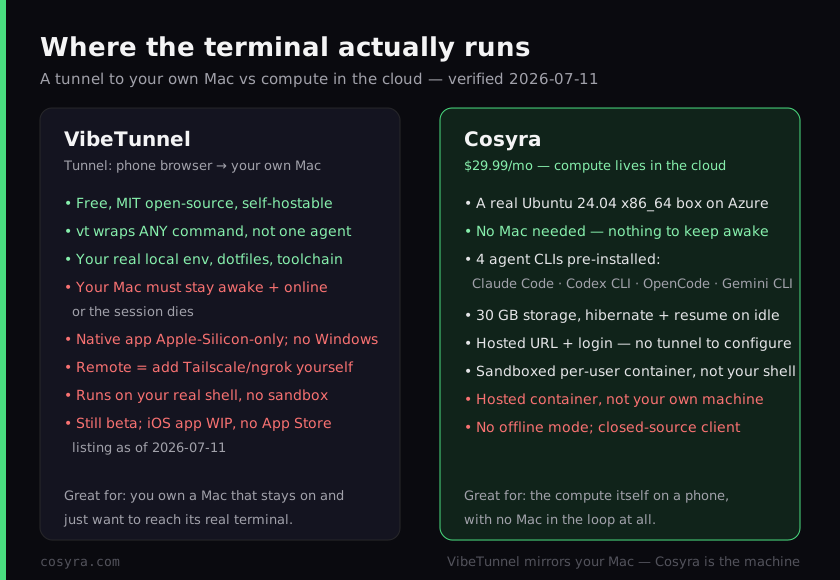
Cosyra inverts the whole picture. The terminal is a per-user Ubuntu 24.04 x86_64 container on Azure, reached from native iOS and Android apps, and the four CLIs are already on the PATH. There is no first machine to start on, no Mac to keep awake, and no tunnel to configure, because the machine already lives on the internet and we run it for you. We think that difference is the entire decision, and most "terminal on your phone" posts skip it. VibeTunnel makes your phone an excellent window into a computer you supply and keep running; Cosyra makes your phone a window into a computer that is always running for you. Both are legitimate; the honest question is whether you own a Mac you're happy to leave awake and reachable.
Two precision traps are worth naming, because they're the easy mistakes. "VibeTunnel is a cloud IDE" is wrong: there is no cloud compute. Your Mac runs the code and VibeTunnel just mirrors its terminal. And "VibeTunnel has an iOS app on the App Store" is wrong too: its own README calls the iOS app "work in progress and not recommended for production use yet," and there's no App Store listing as of 2026-07-11. The primary mobile path today is the responsive web interface through your tunnel.
$ cat /etc/os-release | head -1
PRETTY_NAME="Ubuntu 24.04 LTS"
$ hostname && uname -m
cosyra-user-container
x86_64
$ which claude codex opencode agy
/usr/local/bin/claude
/usr/local/bin/codex
/usr/local/bin/opencode
/usr/local/bin/agy
$ claude # no Mac awake at home, no tunnel to configure
> Claude Code · /home/you/project · ready
Where does VibeTunnel beat Cosyra?
VibeTunnel beats Cosyra on cost, openness, keeping your real environment, and being terminal-native rather than agent-specific. We ship a paid hosted product and we still think VibeTunnel is one of the best-built tools in this space. Here is where it's the better pick, with the receipts from the GitHub repo, verified 2026-07-11.
- Free and MIT open source. The README states VibeTunnel is "open source software licensed under the MIT License" (github.com/amantus-ai/vibetunnel). You can read every line, self-host it, and fork it. Cosyra's $20/month can't beat $0 for someone who already owns the Mac, and the client is closed. For auditability, VibeTunnel wins outright.
- Your real local environment, untouched. Same repos, same dotfiles, same installed toolchain, same auth. There's no "set up the container" step and nothing to re-clone. For a workflow that's already dialed in on your Mac, broadcasting it beats rebuilding it in a fresh box.
- Terminal-native:
vtwraps any command. VibeTunnel isn't tied to one agent.vt claude,vt npm test,vt python train.py. Any command's terminal becomes visible in the browser, and it resolves your shell aliases. If you want a general remote terminal rather than an agent host, that generality is real and Cosyra doesn't match its "wrap anything" ergonomics. - No hosting layer to pay for. You already own the Mac and pay for whatever agent you run; the tunnel adds no compute bill. If you have a beefy machine at home that stays on, VibeTunnel is the lighter, cheaper answer and we won't argue otherwise.
Where does Cosyra beat VibeTunnel?
Cosyra beats VibeTunnel on not needing a Mac at all, on nothing having to stay awake, on skipping the tunnel setup, and on running the agent in an isolated container instead of your real shell. VibeTunnel's model is elegant when the Mac is already humming; the gap opens the moment it isn't.
No Mac, and nothing to keep awake
This is the load-bearing difference. VibeTunnel's terminal runs on your Mac, so to work you need that Mac awake, online, and reachable; the session dies when it sleeps, closes, or drops off Wi-Fi. Cosyra's container runs on Azure from the first keystroke, so a dead laptop battery, a Mac asleep at home, or no Mac at all never strands you. On a train with nothing but a phone in your pocket, that's the whole game. There's no machine at home this depends on.
No tunnel to stand up
To reach VibeTunnel from a phone you install the app (Apple Silicon), install Tailscale on two devices, sign in, and find the hostname, or run ngrok. Cosyra is a hosted URL and an app login. We think fewer moving parts is the right default for coding away from your desk, because the failure mode of the tunnel approach is "I'm on the train and the VPN won't connect," and that's exactly when you can't fix it. Install from the store, sign in, and the machine is there.
An isolated container, not your real shell
VibeTunnel exposes your actual machine's shell, so a runaway agent runs on your real filesystem with your real credentials. Cosyra runs each agent in a per-user Ubuntu container on Azure AKS, isolated from anything else. For driving an autonomous coding agent from a phone where you can't watch every step, we'd rather the blast radius be a disposable container than the laptop with our whole life on it.
Four agents pre-installed, and no beta caveat
A Cosyra container boots with
Claude Code, Codex CLI, OpenCode, and Antigravity CLI already on the PATH, all BYOK, and adding another is one command because it's
a real box. VibeTunnel ships nothing pre-installed, you install and configure
whatever you run, and it's still beta (npm 1.0.0-beta.15.1, no
1.0 as of 2026-07-11), with the iOS app not yet production-ready.
An opinion the VibeTunnel crowd will push back on
We think, for most people coding from a phone, the Mac that has to stay awake is the weak link, not the feature. The VibeTunnel crowd will disagree with conviction: they'll say your real environment on hardware you own, with no third-party holding your code, is exactly the right default, and for privacy-sensitive work they're right and we'll say so plainly. But "free" quietly assumes a Mac that's on, patched, on Apple Silicon, and reachable through a working tunnel whenever inspiration hits away from your desk. A lot of people on a couch with every laptop shut don't have that running. We'd rather put the machine in the cloud than ask you to keep a Mac alive at home for the tunnel to reach. That's the exact reason we built Cosyra as hosted compute instead of a relay.
Who should pick VibeTunnel instead of Cosyra?
Pick VibeTunnel instead of Cosyra if you already own an Apple Silicon Mac you keep awake and you want $0, MIT open source, your real local environment, or a general terminal relay rather than an agent host. For those profiles VibeTunnel is the better pick, and we'd tell you so. The deciding question is simple: do you have a Mac you're glad to leave on and reachable, and do you value openness and your own environment over having the machine itself in the cloud?
Try VibeTunnel first if you are one of these profiles
- You have a Mac that stays on and want $0. An Apple Silicon desktop or laptop you keep awake and reachable, plus the AI plan you already pay for, and VibeTunnel adds no compute bill. If the hardware is sunk cost, free beats $20/month and we won't pretend otherwise.
- Open source and self-hosting matter to you. You want to read the code, fork it, and run it on your own terms. VibeTunnel is MIT; Cosyra's client is closed. For that requirement VibeTunnel wins.
- You want your exact local environment, not a fresh container. Your repos, dotfiles, and toolchain are already set up on your Mac and you just want to reach them. A relay is the right shape; a hosted box is the wrong one, and we'll say so.
We reach for a relay like VibeTunnel when we have a Mac we trust to stay on and openness or our own environment is the priority, and for Cosyra when we want the machine to just be there on the phone with no laptop in the loop at all. They're honestly different tools for different situations, and the always-awake Mac is the variable that decides it. If you're weighing VibeTunnel against other remote-control options like Happy Coder (the free, open-source relay we cover in Cosyra vs Happy Coder) or Omnara (Cosyra vs Omnara), our remote-control vs cloud coding guide maps every relay option against the cloud-container shape in one place.
How do you try Cosyra if you're coming from VibeTunnel?
You try Cosyra from a VibeTunnel background in about two minutes, and there's no Mac to keep awake and no tunnel to configure because there's no second computer. Install from the App Store or Google Play, sign in, and you land in a fresh Ubuntu 24.04 x86_64 container with the four agents already on the PATH. Where VibeTunnel asks you to run the terminal on your own Mac and tunnel into it, Cosyra just drops you into the machine. For the agent-by-agent tour, see running Claude Code on your phone.
The big unlock for most people coming from VibeTunnel: nothing at home has to stay awake, and there's no Tailscale or ngrok to stand up because the container is already on the internet. It hibernates when idle and resumes where you left off, and you reach the same container from an iPhone, an Android tablet, or a laptop browser with state intact. You trade VibeTunnel's $0, openness, and on-your-own-Mac environment for a hosted machine that is simply always there. Whether that trade is worth it is exactly the decision this page is about.
Frequently asked questions
Is VibeTunnel free?
Yes. VibeTunnel's own README states it is "open source software licensed under the MIT License" (verified 2026-07-11), free with optional donations. If you already own a Mac that stays on, your only spend is the AI plan you already pay for. Cosyra Pro is $30/month, which buys the always-on x86_64 machine the agent runs on rather than the agent itself. When the hardware is already sunk cost and awake, VibeTunnel's $0 is hard to beat and we won't pretend otherwise.
[source: github.com/amantus-ai/vibetunnel · MIT License]
Does my Mac have to stay on to use VibeTunnel from my phone?
Yes. VibeTunnel mirrors a terminal that runs on your own Mac, so the
session exists only while that Mac is awake and online. Out of the box it
binds to localhost:4020, and reaching it from a phone means
adding Tailscale ("a secure peer-to-peer VPN network between your
devices") or ngrok yourself (verified 2026-07-11). Cosyra's container runs
on Azure whether your laptop is open, asleep, or in a bag. There's no home
machine that has to stay reachable.
[source: github.com/amantus-ai/vibetunnel · Tailscale/ngrok remote access]
Does VibeTunnel work on Windows?
Not properly yet. Windows support is tracked as open issue #252, where the maintainer notes it "needs work, tests and ideally also an app" and is looking for someone to lead the port (verified 2026-07-11). The native menu-bar app is Apple-Silicon-only (M1+); Intel Macs and Linux run the npm server without the app. Cosyra needs no desktop at all. The compute is the cloud container, reached from an iOS or Android app.
[source: github.com/amantus-ai/vibetunnel/issues/252 · "Windows Support"]
Is there a VibeTunnel iOS app on the App Store?
No. VibeTunnel's README says "The iOS app is still work in progress and not recommended for production use yet" (verified 2026-07-11), and there is no App Store listing as of 2026-07-11. Mobile access is via the responsive web interface (or TestFlight). Cosyra ships native iOS and Android apps you install and sign into, and the agent is running in the container behind them from the first keystroke.
[source: github.com/amantus-ai/vibetunnel · "iOS app is still work in progress"]
How do I access VibeTunnel from my phone?
You run the VibeTunnel server on your Mac, then add a tunnel so the phone can reach it: Tailscale (their recommended path) puts both devices on one private network, or ngrok exposes a public URL (verified 2026-07-11). So "access from your phone" means your Mac plus Tailscale on two devices plus the VibeTunnel server all running at once. Cosyra is a hosted URL and an app login, nothing to tunnel, because the machine is already in the cloud.
[source: github.com/amantus-ai/vibetunnel · remote access via Tailscale/ngrok]
What is the difference between VibeTunnel and Cosyra?
Where the terminal runs. VibeTunnel is a free, MIT-licensed relay that mirrors the terminal on your own Mac into a browser, so the Mac is the compute and has to stay awake; remote access needs Tailscale or ngrok. Cosyra runs Claude Code, Codex CLI, OpenCode, and Antigravity CLI in a hosted Ubuntu 24.04 x86_64 container reached from native iOS and Android apps, with nothing at home to keep awake but a $20/month bill and no offline mode. Pick VibeTunnel if you own a Mac that stays on; pick Cosyra for the compute itself in the cloud.
Four agents pre-installed, running in the cloud, with no Mac to keep awake. We run them in a real x86_64 Ubuntu container, reached from a native iOS or Android app. Two-minute setup, no machine to pair, no tunnel to configure, nothing at home to babysit.
Claude Code on your phone · AI coding agents on mobile · See pricing. Sign up and pick a plan. Eligible new users can start a 7-day free trial in the App Store app.