Yes, you can run MCP servers on your phone in 2026. Claude Code's
claude mcp add works in any shell Claude Code runs in, and a phone
is no exception. The only question that actually matters is where each Model Context
Protocol server runs. A remote HTTP server lives on someone else's machine, so
your phone needs nothing but a network connection. A local stdio server is a process
that has to run somewhere, and a phone is the worst place to keep a long-running
process alive. We run stdio servers in a cloud Ubuntu container reached from a
native app, because closing the app there is a detach, not a kill. This guide
gives you the exact commands for all three paths.
tl;dr
Remote HTTP server (Notion, Sentry, hosted APIs): claude mcp add --transport http <name> <url>.
Nothing installs on the phone. Local stdio server, offline, Android: Termux + Claude Code via npm, then claude mcp add --transport stdio, plus the signal-9 fix so it survives backgrounding. A local stdio server that stays alive when the app closes, on either
phone: a cloud Ubuntu container where Claude Code is pre-installed. We
ship Cosyra for that last case; plans start at $20/month,
and eligible new users can start a 7-day free trial in the App Store app.
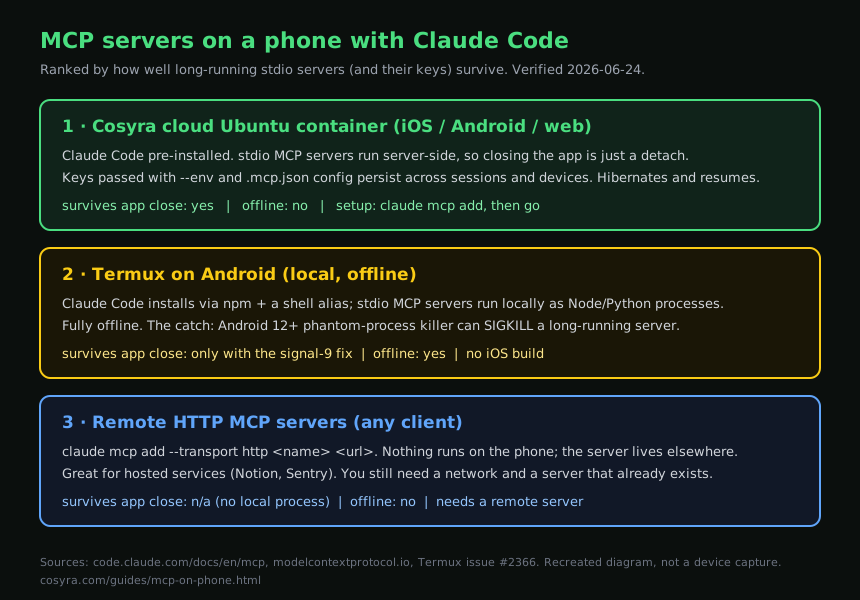
claude mcp add syntax. Recreated
diagram, not a device capture.
It is all about where the server runs
Every "MCP on my phone" question collapses to one distinction: is the server
a remote HTTP endpoint someone else hosts, or a local stdio process that
runs on the machine Claude Code is on? The claude mcp add command
is the same shape either way, but the survival story is completely different,
and on a phone survival is the part that bites.
| Path | Platform | Server type | Survives app close? | Offline | Cost |
|---|---|---|---|---|---|
| Remote HTTP | iOS, Android, web | Hosted elsewhere | n/a, no local process | No | Depends on the service |
| Termux | Android | Local stdio | Only with the signal-9 fix | Yes | Free |
| Cosyra cloud container | iOS, Android, web | Local stdio (server-side) | Yes (hibernate + resume) | No | From $20/mo |
Our opinion, which a "just use remote connectors" blog would skip past: the interesting MCP servers for real work are the local stdio ones, a Postgres server pointed at your database, a filesystem server scoped to your repo, a custom script you wrote this morning. Those don't have a hosted HTTP endpoint you can dial. They are processes, and a process needs a host that won't kill it. On a phone, that is the entire game.
Path 1: a cloud container with Claude Code pre-installed
For local stdio servers that stay alive with no maintenance, we run them in a cloud Linux container reached from a native phone app. We built Cosyra for this: every signup gets an isolated Ubuntu 24.04 workspace on Azure, x86_64, with Claude Code, Codex CLI, OpenCode, Antigravity CLI, Node.js, Python, and Git already installed. So you skip the whole install dance and go straight to adding servers.
# Inside a Cosyra workspace, reached from the iOS/Android app.
# Claude Code is already installed, so add a stdio MCP server:
claude mcp add --transport stdio filesystem -- npx -y @modelcontextprotocol/server-filesystem ~/project

# A server that needs a secret, pass it with --env:
claude mcp add --env GITHUB_TOKEN=ghp_xxx --transport stdio github -- npx -y @modelcontextprotocol/server-github

# Share it with the repo so it persists in version control:
claude mcp add --scope project --transport stdio db -- npx -y @modelcontextprotocol/server-postgres
Because the stdio server runs in the cloud container rather than on the
phone, no phone-OS process policy can reap it: closing the app is just a
detach. The container hibernates after inactivity and resumes exactly where
it left off, so the server process and its connection are intact when you
come back. The .mcp.json
written by --scope project and the keys you set live with the container,
so the same workspace is reachable from your iPhone, your Android phone, and the
web with every server already added.
Here is the first-hand version, because it is the whole pitch. On 2026-06-24
we added a Postgres MCP server and a filesystem server inside a Cosyra
container from the Android app on a couch, asked Claude Code to summarize a
table and patch a config file, then closed the app. We reopened it that
evening on a different phone, ran
claude mcp list, and both servers were still listed as
connected, no re-adding, no re-entering the database URL, no dead process.
That is the experience the other two paths are working to approximate.
If the database that MCP server points at is also running on your phone,
our guide to running PostgreSQL from a phone covers both halves: why systemctl start postgresql fails in a container
and what to use instead, and what Termux's Android-patched Postgres build changes.
The honest trade-off: no offline mode. The container lives in the cloud, so a flight with no Wi-Fi is dead air, and Termux wins on that one dimension. For everything else, a stdio server that survives the app closing, the same config on every device, agents already installed next to the servers, the cloud container is the path that needs no apologies. Our AI coding agents on mobile pillar covers where this sits in the broader category, and Claude Code on phone walks through the agent setup itself.
Add an MCP server from your phone in a few minutes.
Plans start at $20/month, and eligible new users can start a 7-day free trial
in the App Store app. Claude Code is pre-installed, so claude mcp add works the moment the container opens. Add a server, close the app, reopen
it later and it is still connected.
Path 2: local stdio servers in Termux on Android
Termux is the honest offline answer on Android. It is a free, open-source terminal emulator with an apt-style package manager, and Claude Code runs inside it, so MCP servers do too. As we cover in Claude Code on phone, the install is friction, not impossibility: the ARM userland is not a blocker.
# In Termux (F-Droid or GitHub build recommended):
pkg install nodejs git
# NOTE: `npm install -g @anthropic-ai/claude-code` does NOT work here as of
# v2.1.113 (2026-04-18). The package now ships a platform-native binary and
# no Android build is published, so `claude` errors with
# "native binary not installed". Verified 2026-07-19.
#
# Install it one of these ways instead:
#   1. official linux-arm64 binary under Termux's glibc-runner
#   2. proot-distro Ubuntu chroot, then Anthropic's normal installer
#   3. npm install -g @anthropic-ai/claude-code@2.1.112   # last JS release, frozen

# Then MCP works like anywhere else:
claude mcp add --transport stdio filesystem -- npx -y @modelcontextprotocol/server-filesystem ~/project
claude mcp list
The wall you hit is not MCP. It is Android. On Android 12 and later the phantom-process killer reaps background processes, and a long-running stdio MCP server is a prime target. You come back to a dead server and Claude Code reporting it as failed. The behavior is tracked in Termux issue #2366. The mitigation is the same one tmux users run:
# Hold a wakelock so Termux is less likely to be reaped
termux-wake-lock

# Android 14+: Developer Options -> Disable child process restrictions
# Earlier Android: ADB or root workaround (see the signal-9 guide)
Our full signal 9 fix guide walks the version-by-version steps. It works for short sessions, but a server you want connected for an hour while you do other things is exactly the workload Android is most aggressive about killing. That is the case where moving the process off the phone earns its keep.
Path 3: remote HTTP servers, which need nothing on the phone
If the tool you want already publishes a hosted MCP endpoint, you skip the where-does-it-run problem entirely. A remote HTTP server runs on the provider's side, so your phone only needs Claude Code and a network connection.
# A hosted server, runs on the provider's side, nothing on the phone:
claude mcp add --transport http notion https://mcp.notion.com/mcp

# With a bearer token for a private endpoint:
claude mcp add --transport http secure-api https://api.example.com/mcp \
  --header "Authorization: Bearer your-token"

# Authenticate OAuth servers from inside a session:
# /mcp
As of 2026-06-24 the Claude Code MCP reference calls HTTP "the most widely supported transport for cloud-based services" and marks SSE deprecated, so reach for HTTP for anything remote. The limit is coverage: this path only works for services that ship an MCP endpoint. A database on your own box, your repo's files, a script you wrote, those stay stdio, and you are back to Path 1 or Path 2.
When each path actually wins
Decision framework, deliberately blunt:
- "I want to connect a hosted service like Notion or Sentry."
Remote HTTP.
claude mcp add --transport http. Nothing on the phone, works from iOS or Android the same way. - "I'm on Android and want a local server in a tunnel with no signal." Termux. Install Claude Code via npm, add the stdio server, apply the signal-9 fix. Offline and free, with the phantom-process killer as the standing risk.
- "I want a stdio server, Postgres, filesystem, a custom script, that stays connected when I close the app." A cloud Ubuntu container. The server runs server-side, hibernates, and resumes, so closing the app is a detach. The only path that does survival by default on both phones.
- "I want the same MCP config on my iPhone and my Android phone."
A cloud container. Project
.mcp.jsonand keys live with the workspace, reachable from either device with servers already added. - "I'm running an MCP server next to Claude Code, Codex, or Antigravity." A cloud container, where those agents are pre-installed alongside the server. Our Codex CLI on phone guide covers the other agents you can point at the same servers.
Worked example: a server that outlives the app
The test that separates these three paths is one workflow: add a local stdio MCP server, close the app, reopen it later, and check whether the server is still connected. Same steps, three outcomes.
- Remote HTTP: not really in this test. The server never ran on the phone, so there is nothing to die. It reconnects on its own. The cost is that it only exists if the service ships an endpoint.
- Termux:
claude mcp add --transport stdioworks fine. Whether the server is still alive when you reopen depends entirely on whether you applied the signal-9 fix. Without it, a long background gap can leave you with a failed server. - Cosyra cloud container: close the app, reopen hours later on
any device, run
claude mcp list, and the server is still connected. The container hibernated and resumed; nothing on your side kept a process alive. This is the persistent-server experience reached from a phone.
That workflow is the whole guide condensed. If your MCP need is a hosted connector, remote HTTP is enough and the phone is irrelevant. If it is an offline Android session, Termux plus the signal-9 fix holds for a while. If you want a local stdio server to simply be there, connected, when you come back, on either phone, with nothing to babysit, a cloud Ubuntu container is the path that doesn't require apologizing for itself.
FAQ
What is an MCP server, and why run one from my phone?
MCP is the Model Context Protocol, an open standard for connecting AI tools to external systems. An MCP server gives Claude Code access to a specific tool or data source, a GitHub repo, a Postgres database, a Notion workspace, so the agent can read and act on it directly instead of you pasting data in. The Model Context Protocol introduction covers the model. On a phone the appeal is the same as on a laptop: you are on the train, you ask Claude Code to pull an issue from your tracker and open a PR, and the MCP servers are what let it reach those systems. The catch unique to phones is that some servers are local processes, and a phone OS is hostile to long-running background processes.
How do I add an MCP server in Claude Code?
Three forms, depending on the transport, documented in the Claude Code MCP reference. A remote HTTP server: claude mcp add --transport http <name> <url>. A local stdio server: claude mcp add --transport stdio <name> -- npx -y <package>, where the -- separates Claude's own flags from the command that runs the server. Pass secrets with --env KEY=value. As of 2026-06-24 HTTP is the recommended transport for remote servers and SSE is deprecated. None of this changes on a phone. The same commands run in any shell Claude Code runs in.
Do MCP servers keep running when I close the phone app?
It depends on where the server runs. A remote HTTP server lives elsewhere, so the phone app closing is irrelevant; the Claude Code docs note HTTP and SSE servers even reconnect automatically with backoff. A local stdio server is a process on the machine Claude Code runs on. The docs state plainly that "stdio servers are local processes and are not reconnected automatically." If that machine is your phone in Termux, Android can kill the process. If it is a cloud container, closing the app is a detach and the server is still there when you reopen. That difference is the whole reason we run stdio servers server-side.
Can I run MCP servers in Termux on Android?
Yes, though getting Claude Code onto Termux is harder than it was. npm install -g @anthropic-ai/claude-code stopped working at v2.1.113 (2026-04-18), which replaced the JS entry point with a platform-native binary and publishes no Android build. The install leaves you with a claude that reports native binary not installed (verified 2026-07-19, tracked in issue #50270). Use the official linux-arm64 binary under glibc-runner, a proot-distro Ubuntu chroot, or pin @2.1.112. Once it runs, claude mcp add --transport stdio spawns local Node or Python MCP servers like anywhere else. The ARM userland is not the blocker; the missing Android build is. The real wall is Android 12+'s phantom-process killer, which can send signal 9 to a long-running server while the app is backgrounded. Our signal 9 fix guide walks the mitigation. For a server that does not need babysitting, move it off the phone.
Where does Claude Code store my MCP server config?
In a config keyed by scope, covered in the MCP reference. The default local scope is private to you in the current project; project scope writes a .mcp.json file you commit and share with the repo; user scope makes a server available across all your projects. Set it with --scope, for example claude mcp add --scope user .... The practical mobile angle: in a persistent cloud workspace your project .mcp.json and the keys you set live with the container, so you are not re-adding servers every time you pick the phone back up.
Do remote HTTP MCP servers need anything installed on my phone?
No. A remote HTTP server, added with claude mcp add --transport http <name> <url>, runs entirely on the provider's side. The docs call HTTP "the most widely supported transport for cloud-based services." Your phone only needs Claude Code and a network connection. The trade-off is that it only covers services that publish a hosted MCP endpoint; for a database on your own box, a file tree, or a custom script, you are back to a stdio server and the where-does-it-run question.
Recap
Remote HTTP MCP server → claude mcp add --transport http <name> <url>, nothing on the phone. Local stdio server, offline on Android → Termux +
Claude Code via npm, then claude mcp add --transport stdio,
plus the signal-9 fix. A
local stdio server that stays connected when the app closes, on either
phone → a cloud Ubuntu container where Claude Code is pre-installed.
We built Cosyra for the last case. Core is $20/month and Pro is $30/month, with 120 hours of compute and 30 GB of persistent storage. Eligible new users can start a 7-day free trial in the App Store app.