There is no standalone Claude Code mobile app. Anthropic's own docs say it plainly: Claude Code lives in the Code tab of the regular Claude app for iPhone and Android, and that app is a client. The code runs either in Anthropic's cloud or on a computer of yours that has to stay on. Around that gap, about a dozen third-party iOS apps have appeared, and every one of them is also a window onto a machine somewhere else. This page sorts them by the one question that decides whether they work for you: where does the agent actually run? If you want Claude Code in a real terminal on your phone with nothing at home left switched on, that is what we build: Cosyra on the App Store or Google Play, from $20/month.
We checked everything below first-hand on 2026-10-30: Anthropic's Claude Code on mobile doc, its feature-availability table, the GitHub issues people file when the app does not do what they expected, and Apple's public lookup API for every Claude Code companion app we could find. For setup walkthroughs, see Claude Code on iPhone and Claude Code on Android; for the whole category, start at our AI coding agents on mobile pillar.
Quick answer by situation:
- You pay for Claude Pro or Max and your repo is on GitHub. Install the Claude app, open the Code tab, start a cloud session. No extra app needed. What the Code tab does ↓
- Your laptop or a server is always on. Remote Control or a relay app such as Happy turns the phone into a remote for it. Third-party apps by connection model ↓
- You use an API key, or nothing of yours stays on. You need a machine in the cloud with a terminal on it. Cloud container route ↓
Is there a Claude Code mobile app?
Not as a separate download. The note at the top of Anthropic's mobile page,
fetched on 2026-10-30, reads: "Claude Code doesn't have a separate mobile
app: cloud sessions and Remote Control both live in the Code tab in the
Claude app, and Dispatch is a task you message in the app." The same page
calls the Claude app "a client for Claude Code sessions rather than a place
where code runs." If you run /mobile (or /ios,
/android) inside a desktop Claude Code session, it prints a QR
code that opens the right store listing for the Claude app.
People have asked for more. A January 2026 feature request titled "Mobile version of Claude Code (Android/iOS/Web UI)" was closed by a bot as not planned on 2026-03-14 after going quiet, and a March request for native iPad support was folded into it as a duplicate. Neither got a maintainer reply. So the honest reading is that the Claude app's Code tab is the official mobile surface, and nothing on Anthropic's public tracker points to a terminal-style Claude Code app for phones.
The reason is architectural, not a missing feature. Claude Code is a CLI that expects a real Linux, macOS, or Windows host with a filesystem, a shell, and your tools. iOS gives apps none of that, and Android only gives it through workarounds like Termux. Any "Claude Code app" therefore has to answer one question: whose computer is the agent on?
What the Claude app's Code tab actually does
The Code tab connects to four things, and they differ only in where the work happens. This table is built from Anthropic's mobile doc and its feature-availability page, both read on 2026-10-30.
| Surface | Where the code runs | Must your computer stay on? | Plans (as of 2026-10-30) |
|---|---|---|---|
| Cloud sessions | Anthropic-managed cloud, repo from GitHub | No | Pro, Max, Team; Enterprise premium or Chat + Claude Code seat |
| Projects | Cloud; Claude coordinates parallel threads | No | claude.ai sign-in; not listed separately in the plan table |
| Remote Control | Your own machine, local files and MCP servers | Yes | Pro, Max; admin-enabled on Team and Enterprise |
| Dispatch | The Claude Desktop app on your machine | Yes | Pro and Max only, not Team or Enterprise |
Two limits matter more than the table suggests. First, every row needs a
claude.ai sign-in. The availability page lists "Cloud sessions and Claude
Code on mobile" and Remote Control under features that "are not reachable
with an Anthropic Console API key or from a third-party provider." If you
pay per token with an API key, the Code tab is not for you. Second, the app
has gaps a terminal does not: commands like /plugin and
/resume do not work from the phone, and you cannot pick Bypass permissions
from the app.
Cloud sessions are the strongest part of this. You pick a GitHub repo and a
branch from the phone, describe the task, and it keeps running after you put
the phone in your pocket, then opens a pull request. We cover the details in
Claude Code on the web.
What you do not get is a shell. You steer a task; you cannot run
htop, poke at a failing test by hand, or use a non-GitHub
remote the same way.
Remote Control is the other half, and our
remote-control coding guide walks through it. You start claude remote-control on your computer,
scan a QR code, and drive that session from the Code tab with push notifications
when it needs a decision. It works well, as long as the computer at the other
end is awake.
The third-party Claude Code apps, by connection model
Search the App Store for "Claude Code" and you get a shelf of independent apps, none made by Anthropic. On 2026-10-30 we queried Apple's iTunes lookup API for 16 app IDs from that shelf. Fourteen came back. Two that were listed earlier this year, Omnara and an app called "Mobile IDE for Claude Code", returned nothing from the US storefront and appear to have been pulled. The chart shows the 14 that are live, with their rating counts, current version, and where each one runs the agent.
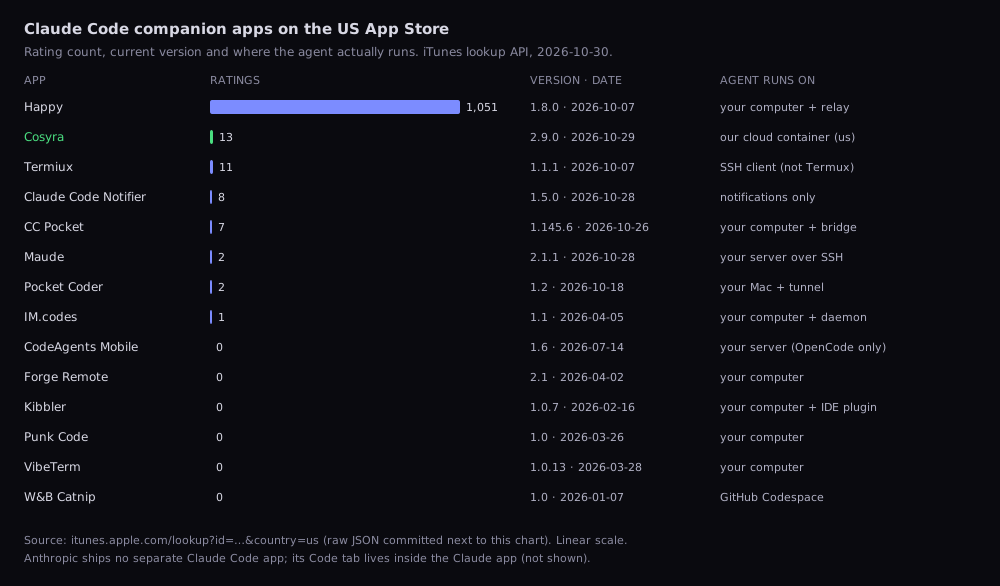
itunes.apple.com/lookup, US storefront. The
raw JSON response is committed next to the chart so anyone can rerun it. Rating counts are a
rough adoption signal, not a quality score.
The one number that stands out: Happy has 1,051 ratings and nothing else on the shelf has more than 13, ours included. Happy is the only third-party companion with real adoption so far. Everything else is a few months old with a handful of reviews.
Group 1: your computer plus a relay
Most of the shelf works like Remote Control without Anthropic in the middle.
You install a daemon or bridge on your Mac or PC, pair the phone with a QR
code, and the app relays your prompts to Claude Code running on that
machine.
Happy is the mature one: free, MIT-licensed,
end-to-end encrypted so the relay sees only encrypted blobs, and it drives Codex
as well as Claude Code. CC Pocket follows the same pattern with an npx bridge. The trade-off is identical across the group: if the laptop sleeps, loses
Wi-Fi, or is in a bag with the lid shut, the phone has nothing to talk to. Our
Cosyra vs Happy comparison
goes deeper on that pattern.
Group 2: your own server over SSH
Maude takes the relay idea to a box you rent or own. You give it SSH access to any Linux or macOS machine, a VPS or a Mac mini under the desk, and it installs its daemon there plus Claude Code, Codex, OpenCode, Grok Build, and Antigravity. Your code stays on your server and Maude is the remote control. As of 2026-10-30 the app needs Maude Pro to unlock: $2.99/week, $29.99/year, or $69.99 lifetime, per its App Store listing. It is two ratings old. You get an always-on host without a laptop, but you are now the sysadmin of that host.
Group 3: someone else's cloud
The last group needs no machine of yours at all. Anthropic's cloud sessions are one. W&B Catnip is another: an iOS client that provisions a GitHub Codespace and runs agents inside it, so the compute bill is whatever GitHub charges for Codespaces (we compared it in Cosyra vs Catnip). We are the third: a per-user Ubuntu container on Azure AKS, reached from our own iOS, Android, and web clients.
A warning while you browse: an app called Termiux sits in the iOS Developer Tools chart under a seller named "TERMUX LIMITED LIABILITY COMPANY". It is not the open-source Termux project, which remains Android-only.
Android: an app that runs the real binary on the phone
Android has one option iOS cannot have. Buddy, an open-source (Apache-2.0) Android app, downloads a small Alpine Linux into its own storage and runs it with proot, then installs Claude Code there with Anthropic's official installer. No Termux, no root, no PC. The latest release was v2.2.17 on 2026-10-29, after 35 releases in its first 22 days.
Read its README before treating it as a coding environment. Buddy's main job is phone automation: a floating bubble that lets an agent read your screen and tap through other apps. Shell access is an opt-in "Linux tools" mode, off by default. Its own docs name the limits: Codex's sandbox cannot run inside its Linux, Android 12 and later can kill its child processes once the phone runs more than about 32 of them, and battery optimisation has to be set to Unrestricted. It is "early" by its author's own description, and its README says iPhone is impossible because iOS does not let apps operate other apps. Proot is also not native, so "Claude Code runs natively on Android" is still not a true sentence. For the full Android picture, including Termux, see Claude Code on Android.
The cloud-container route, and why we built it
Here is the opinion we hold that most relay-app developers would argue with: a phone makes a bad remote control for a laptop. The laptop is the thing you left at home, or the thing in your bag with the lid closed while you stand on a train. Anthropic's own doc says Remote Control and Dispatch need your machine to "stay on." We think most people searching for a Claude Code mobile app want a computer that is not their laptop, one that is always awake, has a real shell, and does not care whether they are on hotel Wi-Fi or a 4G signal in a waiting room.
That is what we ship. Each Cosyra account gets its own Ubuntu 24.04 container with Claude Code, Codex CLI, OpenCode, and Antigravity CLI pre-installed. The app provisions a fresh Ubuntu container on first launch, about 15 seconds in our testing. You bring your own key, so Anthropic bills you directly and we never meter tokens. That is also the honest catch: the Claude app's Code tab and Remote Control need a claude.ai login, and in our container you drive the CLI with an API key in a terminal instead.
The whole setup is three commands:
echo 'export ANTHROPIC_API_KEY="sk-ant-..."' >> ~/.bashrc && source ~/.bashrc
git clone https://github.com/you/your-repo.git && cd your-repo
claude
Close the app and the container hibernates; open it on the platform after work and it resumes right where you left it, files and shell history intact. The same container opens from iPhone, Android, and the web, so a session you start on the couch is waiting on the laptop the next morning.
Pricing, stated plainly: Core is $20/month, Pro is $30/month. No free tier. Eligible new users can start a 7-day free trial in the App Store app. Both plans include 120 hours of compute a month and 30 GB of persistent storage. Details are on our pricing page.
 scan to install
 Which one should you pick?
- Pick the Claude app's Code tab if you already pay for Pro or Max, your work lives on GitHub, and you mostly want to start tasks and review pull requests from the phone. It costs nothing extra and the cloud sessions run while you sleep.
- Pick Remote Control or Happy if a laptop or desktop stays on at home and you want your local files, tools, and MCP servers from the phone. Happy if you also use Codex or want an open-source relay.
- Pick Maude if you already run a VPS or home server and want several agents on it from an iPhone or iPad.
- Pick Buddy if you have a recent 64-bit Android phone, want the agent on the device itself, and are comfortable with early software.
- Pick Cosyra if you use an API key, want a full terminal rather than a task view, need Android as well as iPhone, or have no machine you are willing to keep awake.
Where the alternatives beat us
We would rather you pick the right tool than churn after a week.
- Cost. If you already pay for a Claude plan, the Code tab adds nothing to your bill. Happy is free. Buddy is free. Maude's $69.99 lifetime plan is cheaper than three months of ours. We charge for the container because we run it.
- Local context. Remote Control and the relay apps see your real machine: your dotfiles, your local databases, the MCP servers you have configured. A fresh cloud container starts empty until you clone into it.
- Async work. Anthropic's cloud sessions are built to run a task while you are away and come back with a pull request. Our container hibernates when you close the app, so it is better suited to sessions you drive than to jobs you fire and forget.
- Offline. Buddy keeps the agent's environment on the phone. Ours lives in the cloud, so no signal means no terminal.
Frequently asked questions
Is there an official Claude Code app for iPhone or Android?
No separate one. Anthropic's mobile docs say Claude Code lives in the Code tab of the regular Claude app for iOS and Android, and that app is a client: code runs in Anthropic's cloud or on your own computer, never on the phone. The January 2026 request for a mobile version of Claude Code was closed by a bot as not planned after a period of inactivity, with no maintainer reply.
[source: claude-code issue 20447, "Feature Request: Mobile version of Claude Code (Android/iOS/Web UI)"] · [source: Claude Code on mobile, Anthropic docs]
Will Claude Code ever run natively on an iPad?
There is no sign of it. The request for native Claude Code on iPad and tablets, opened 2026-03-05, was closed automatically as a duplicate three days later with no maintainer response and locked on 2026-03-17. iPad gets the same iOS Claude app as iPhone. Our Claude Code on iPad guide covers the workable routes.
[source: claude-code issue 30918, "[FEATURE] Native Claude Code support on iPad / tablets"]
Can I use the Claude app's Code tab with an Anthropic API key?
No. Cloud sessions, Claude Code on mobile, and Remote Control all require
a claude.ai sign-in on Pro, Max, Team, or Enterprise, and Anthropic says
they are not reachable with a Console API key or a provider such as Amazon
Bedrock. A feature request from 2026-09-20 describes Remote Control
refusing to attach once a session points at a different provider. With an
API key, use SSH or a cloud container where you set ANTHROPIC_API_KEY
yourself.
[source: claude-code issue 95744, "Allow a non-Anthropic model provider alongside the subscription in a Remote Control session"] · [source: Claude Code feature availability, Anthropic docs]
Does the Claude Code tab work on Android, or only iPhone?
Both, as of 2026-10-30. Anthropic's mobile doc links the Claude app for iOS and Android with the same Code tab. Android had a rough start: a January 2026 report described new Code-tab sessions staying empty, closed 2026-02-12, and a May report described losing a prompt by pressing back right after sending it, closed 2026-07-24.
[source: claude-code issue 20854, "Claude Code tab in Claude for Android is a mess"] · [source: claude-code issue 55367, "Claude Code on Android app: prompt loss after back button"]
Can I send a screenshot from my phone into a Claude Code session?
Yes, with Remote Control. Photos attached in the Claude app reach the
local session and are saved under ~/.claude/uploads/; other
files are downloaded to your machine and passed as @ file references.
A June 2026 report that the mobile app could not send images at all was closed
on 2026-07-11, so update the app if attachments fail.
tl;dr
There is no separate Claude Code mobile app. The Claude app's Code tab drives Anthropic's cloud or your own computer, and needs a paid claude.ai plan. Third-party apps are windows onto your laptop (Happy), your server (Maude), or someone's cloud. On Android, Buddy runs the binary in proot on the phone.
Use the Code tab if you pay for Claude and live on GitHub. Use Happy if your laptop is always on. Use Cosyra if you want a real terminal with Claude Code that does not depend on anything at home being awake.
App Store / Google Play / pricing. Core is $20/month, Pro is $30/month. No free tier. Eligible new users can start a 7-day free trial in the App Store app.
scan to install