Short answer. This is about the Cursor Agent CLI,
the
agent terminal binary, not the Cursor editor. The CLI installs on
macOS, Linux, and WSL only, with no iOS or Android build, and it runs as part
of a Cursor subscription rather than on your own provider key. Cosyra is a BYOK
mobile cloud terminal: a per-user Ubuntu 24.04 container with
Claude Code, Codex CLI, OpenCode, and Antigravity CLI pre-installed, reached from native iOS and Android apps. Pick the Cursor CLI
if you code at a desk inside the Cursor ecosystem. Pick Cosyra if you want an
agent that runs from an actual phone, with your own key.
If you're comparing the Cursor editor and its iOS app instead, that's a different page: see Cosyra vs Cursor. Here we're narrow on the terminal agent, because "cursor cli" is its own search and its own trade-off. We read Cursor's CLI docs first-hand on 2026-07-17, installation and authentication, and reconstructed the documented flow below. We wrote this on the couch, phone in hand, no laptop open, which is the exact case a desktop-only CLI can't cover on its own.
This post was written by the Cosyra team. We compared Cosyra against the Cursor Agent CLI based on hands-on testing of Cosyra and first-hand reading of Cursor's official CLI docs, cursor.com/blog/cli, cursor.com/docs/cli/overview, /installation, and /reference/authentication, all fetched 2026-07-17. Cursor pricing verified against cursor.com/pricing on 2026-06-23. We flag clearly below what we tested live versus what we reconstructed from Cursor's published behavior.
tl;dr
Use the Cursor Agent CLI if you live inside Cursor, code at a desk, and want one subscription to cover the editor, the cloud agents, and a terminal agent with no keys to juggle. Use Cosyra if you want to actually code from a phone: a real Ubuntu terminal and four agent CLIs on iOS or Android, BYOK, with no desktop to keep awake. They sit on different axes: subscription-routed-desktop versus BYOK-container-on-a-phone.
App Store · Google Play. Sign up and pick a plan. Eligible new users can start a 7-day free trial in the App Store app.
Want a terminal agent running from your phone today? Our container is a real x86_64 Ubuntu machine reached from a native iOS or Android app, with Claude Code, Codex CLI, OpenCode, and Antigravity CLI already on the PATH, BYOK, no laptop kept open.
App Store · Google Play · Pricing. Sign up and pick a plan, from $20/month.
How do Cosyra and the Cursor CLI compare feature by feature?
Cosyra is a cloud Ubuntu container reached from native iOS and Android apps with AI agents pre-installed; the Cursor Agent CLI is a native binary that installs on a desktop-class machine you supply, tied to a Cursor subscription. Cosyra is BYOK on a flat plan; the Cursor CLI routes any model through your Cursor account. The table below lines them up on fifteen attributes, verified 2026-07-17.
| Feature | Cosyra | Cursor Agent CLI |
|---|---|---|
| Pricing | $20 / month Core or $30 / month Pro | Cursor sub: Pro $20, Pro+ $60, Ultra $200 / month |
| Free tier | None. 7-day free trial for eligible new users in the App Store app | Cursor Hobby: free with limited agent requests |
| OS support | iOS, Android, web | macOS, Linux, WSL, Windows; no mobile build |
| AI agents pre-installed | Claude Code, Codex CLI, OpenCode, Antigravity CLI (BYOK), plus the Cursor CLI | The Cursor agent itself; multi-model via your sub |
| Where the agent runs | In the cloud container; phone is the terminal | On a desktop you supply and keep awake |
| Native phone app | Native iOS and Android apps with a shell | None for the CLI; iOS app supervises cloud agents |
| API key model | BYOK (you pay Anthropic / OpenAI / Google) | Cursor subscription; CURSOR_API_KEY, not raw BYOK |
| Install method | App Store / Google Play, agents pre-installed | curl native binary to ~/.local/bin; no npm path |
| Container sandboxing | Per-user Ubuntu container on Azure AKS | Runs on your host machine; no sandbox of its own |
| Persistent storage | 30 GB cloud, survives device loss | Your machine's disk, tied to that machine |
| Port forwarding | Yes, dev servers reachable from the container | Local host networking; you manage it yourself |
| File sync across devices | Same container from any device | Tied to the machine you installed on |
| Offline capability | No (cloud-only) | No: runs locally but calls hosted models |
| Max session length | Hibernates on idle, resumes on reopen | As long as your machine stays awake |
| Open-source status | Client app closed, orchestration proprietary | Proprietary; native closed-source binary |
Want the phone side of this comparison? We ship a persistent Ubuntu container with four agents pre-installed, reached from a native iOS or Android app, BYOK, two-minute setup, no desktop to keep awake.
App Store · Google Play · Pricing. Sign up and pick a plan. Eligible new users can start a 7-day free trial in the App Store app.
What actually separates these two?
Two axes do the work here, and they're independent. The first is the key model: the Cursor CLI runs any model through your Cursor subscription, so there's nothing to configure but you're inside Cursor's billing; Cosyra is BYOK, so you paste your own provider key and pay the provider directly. The second is where the process runs: the Cursor CLI installs on a desktop-class machine you keep awake, while a Cosyra container is the machine, in the cloud, reached from a phone. The Cursor CLI is strong on the first axis for people already paying for Cursor. Cosyra owns the second axis for people who don't want a laptop in the loop.
We read the CLI docs: where does it actually run?
Here's the piece you can't copy-paste from another blog, and the honest
limits on it. Cursor's installation docs list macOS, Linux, and WSL, plus a
Windows native path. There is no phone build. The installer is a
curl … | bash native binary, not an npm package, and it lands in
~/.local/bin. Authentication is agent login against
a Cursor account, or export CURSOR_API_KEY=… for headless use, with
the key generated in the Cursor Dashboard, a Cursor key, not a raw Anthropic or
OpenAI one. We quoted all of that verbatim from
the installation docs
and the authentication reference on 2026-07-17, and reconstructed the flow below.
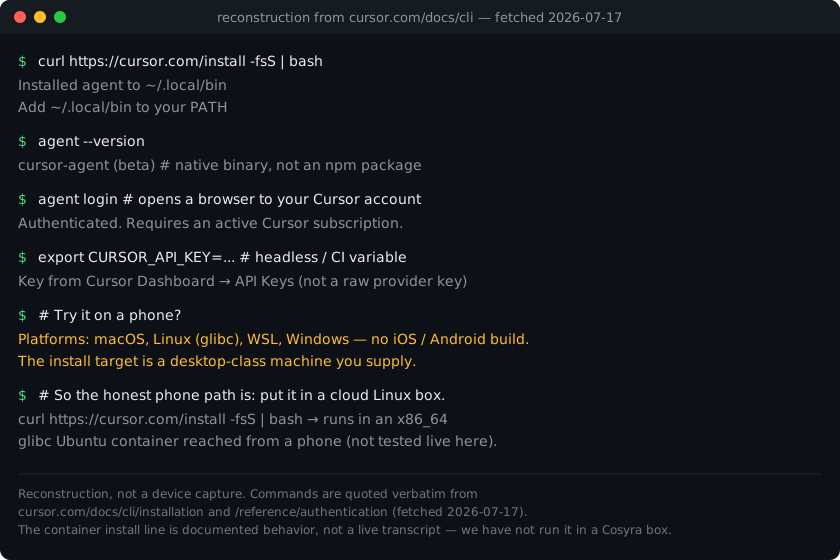
On Cosyra you can skip that install. The workspace is a glibc x86_64 Linux
machine and the Cursor CLI ships in it, as cursor-agent and
agent. The flow above is what Cursor documents for your own
machine. For the steps in the app, with screenshots, see
Cursor CLI on your phone.
$ curl https://cursor.com/install -fsS | bash
# installs the native `agent` binary to ~/.local/bin
$ agent login
# browser auth against a Cursor account (subscription)
$ export CURSOR_API_KEY=...
# headless key from Cursor Dashboard, not a raw provider key
$ # platforms: macOS, Linux, WSL, no iOS / Android build
So the container isn't the differentiator; the Cursor CLI is a normal Linux binary and Linux is what a container is. What you're choosing between is a subscription-routed agent on a desktop you keep open, versus a BYOK box that is the machine and lives in your pocket. On a train with no laptop, that second shape is the only one that answers.
Where does the Cursor CLI beat Cosyra?
The Cursor CLI beats Cosyra on zero key setup, tight editor-plus-CLI-plus-cloud continuity, first-class CI/headless mode, and the sheer size of the Cursor ecosystem. We ship a managed cloud terminal and we still think the Cursor CLI is an excellent tool for the right person. Here's where it's the better pick.
- One subscription, no keys to juggle. The Cursor CLI runs any model as part of your Cursor subscription, so there's no provider account to create and no key to paste. If you already pay for Cursor and you don't want to manage API keys at all, that's genuinely less friction than BYOK. Cosyra hands you a key prompt, Cursor hands you a working agent.
- Editor, CLI, and cloud agents in one loop. If you already live in the Cursor editor, the CLI, the background cloud agents, and the iOS supervisor app share one account and one context. That continuity across surfaces is real, and it's something a standalone container doesn't give you.
- First-class headless / CI mode. The CLI ships
-p/--printfor non-interactive runs and--output-format json, and Cursor markets it for GitHub Actions and scripts. For piping an agent into CI, that's a cleaner story than a hand-driven mobile terminal. See the authentication docs for the headless key flow. - The biggest install base in AI coding. Cursor is the dominant AI editor as of 2026, so the CLI inherits a huge community, more shared configs, and more answers when you get stuck. Popularity isn't correctness, but it does mean fewer dead ends.
Where does Cosyra beat the Cursor CLI?
Cosyra beats the Cursor CLI on running from an actual phone, BYOK and provider choice, a persistent cloud workspace that follows you across devices, and not needing you to keep a machine awake. The trade-off for "one subscription, no setup" is that the CLI runs on a desktop you supply. We'd rather be the machine for you.
It runs from a phone, and the Cursor CLI has no client that does
This is the load-bearing difference. The Cursor CLI's runtime is macOS, Linux, and WSL only; Cursor's mobile surfaces (the native iOS app and the Android PWA) supervise cloud agents and never open a shell on the device. Our native Google Play and App Store apps put a real Ubuntu terminal in your hand. If you want to code from a phone with nothing else on, that's the gap.
BYOK and provider choice, not a subscription that routes for you
Cosyra is bring-your-own-key: you paste your Anthropic, OpenAI, or Google
key and pay the provider directly, with no subscription wrapping the models.
The Cursor CLI is the opposite axis, a CURSOR_API_KEY from the Cursor
Dashboard, models routed through your Cursor plan. Both are valid, and if you
want to run a specific model at provider cost on your own key, across four different
agent CLIs, that's a thing the Cursor CLI doesn't offer and we do.
No desktop to keep awake
A Cursor CLI session runs on a machine that has to stay powered and online; that machine is your responsibility. Our container is the always-on Linux machine, in the cloud, reached from a native app with nothing running at home. The agent keeps working whether your laptop is shut or in another city.
Persistent workspace across devices, no machine to supply
A Cosyra container persists in the cloud and is the same container whether you reach it from an iPhone, an Android tablet, or a laptop browser. Drop your phone, buy a new one, log in, and your repo, your shell history, and your half-finished session are still there. The Cursor CLI's state lives on the machine you installed it on; move machines and you're setting it up again.
An opinion the Cursor crowd will push back on
We think a terminal agent that only installs on a desktop has the mobile story backwards. Most agent work now is the agent doing multi-file edits and running commands while you approve steps, and that job doesn't need a desktop-class keyboard in front of you; it needs the box to be reachable and awake. A lot of excellent engineers will disagree and keep the CLI on a workstation, and for a heavy interactive refactor at a desk they're right. But for kicking off and steering an agent from a phone in a waiting room, "install it on the laptop you left at home" isn't mobile. Cursor's own answer, supervising a cloud agent from the iOS app, is a real story, but it's supervision, not a shell. That's the exact reason we built Cosyra as a container with a native terminal app instead.
Who should pick the Cursor CLI instead of Cosyra?
Pick the Cursor CLI instead of Cosyra if you already pay for Cursor, you want the editor and the CLI to share one account, you want zero key setup, or you're piping an agent into CI. For those profiles the Cursor CLI is the better tool, and we'd tell you so.
Try the Cursor CLI first if you are one of these profiles
- Already a Cursor subscriber at a desk. You pay for Cursor, you code on a laptop, and you want a terminal agent that uses the same account with no new keys. The CLI is the lowest-friction path to that, and a phone isn't your primary surface. That's the right answer for you.
- CI and headless automation. You want to run an agent non-interactively
in GitHub Actions or a script, with JSON output you can parse. Cursor built
--printand--output-formatfor exactly that. Start with the Cursor CLI. - Deep in the Cursor ecosystem. You use the editor, the cloud agents, and the iOS supervisor app, and you want one bill and one context across all of them. That continuity is real, and a standalone container doesn't replace it.
We use terminal-based agents at our desks too, and we use Cosyra when we want an agent on a phone with no laptop to keep open. They aren't mutually exclusive. The Cursor CLI is a normal Linux binary, so if you ever want it in the cloud, a container is the place it goes.
How do you try Cosyra if you're coming from the Cursor CLI?
You try Cosyra from a Cursor CLI background in about two minutes: install from the App Store or Google Play, sign in, and you land in a fresh Ubuntu 24.04 x86_64 container instead of a binary on a laptop you keep open. Four agents are already on the PATH, BYOK, and the session below is what we run on a fresh install.
$ # Install Cosyra, open the app, drop into the container.
$ cat /etc/os-release | head -1
PRETTY_NAME="Ubuntu 24.04 LTS"
$ which claude codex opencode agy
/usr/local/bin/claude
/usr/local/bin/codex
/usr/local/bin/opencode
/usr/local/bin/agy
$ # Paste your own provider key, BYOK, no subscription wrap.
$ claude # or codex, opencode, agy
The big unlock for most people coming from the Cursor CLI: there's no desktop to keep awake, and no subscription wrapping the models. The container is the always-on machine, it hibernates when idle and resumes where you left off, and you reach it the same way from any device with your own key. If you want the pillar view of the category, see the mobile coding terminal guide.
Frequently asked questions
Can you run the Cursor Agent CLI on a phone (iOS or Android)?
Not on the device itself. Cursor's CLI docs list macOS, Linux, and WSL as the install targets, plus a Windows native path. There is no iOS or Android build. Cursor's native iOS app and its Android PWA supervise cloud agents; neither opens a shell or runs the agent binary on the phone. The honest way to reach the Cursor CLI from a phone is to run it inside a cloud Linux machine you connect to. Cosyra is that machine: a persistent Ubuntu 24.04 x86_64 container reached from native iOS and Android apps.
[source: cursor.com/docs/cli/installation lists macOS / Linux / WSL, no mobile build]
Is the Cursor Agent CLI free, or does it need a subscription?
It's tied to a Cursor account, not a raw provider key. Cursor's
authentication docs generate a CURSOR_API_KEY from the Cursor Dashboard,
and the CLI works as part of your Cursor subscription, Hobby (free, limited),
Pro at $20/month, Pro+ at $60/month, or Ultra at $200/month, verified against
cursor.com/pricing on 2026-06-23. Cosyra is a different model: BYOK, so you
paste your own Anthropic, OpenAI, or Google key on a flat plan from $20/month.
[source: cursor.com/docs/cli/reference/authentication, Cursor account key flow]
Does the Cursor Agent CLI install with npm?
No. Unlike @openai/codex, @google/gemini-cli, or
opencode-ai, the Cursor CLI has no npm path. The documented
install is a curl one-liner that drops a native binary into
~/.local/bin: curl https://cursor.com/install -fsS | bash. Because it's a native glibc binary rather than a Node package, the
architecture and libc of the target machine matter, which is why an x86_64
glibc Ubuntu container is the clean place to run it when your only device
is a phone.
[source: cursor.com/docs/cli/installation, curl installer to ~/.local/bin]
What is the Cursor CLI command: agent or cursor-agent?
Both work. Cursor's current docs invoke agent:
agent login, agent --version,
agent update, agent status.
cursor-agent is the older name, and Cursor's installer still creates
it next to agent. A Cosyra workspace ships both. We fetched
cursor.com/docs/cli/overview on 2026-07-17 for the documented commands.
[source: cursor.com/docs/cli/overview invokes the `agent` command]
Can I run the Cursor Agent CLI inside Cosyra?
Yes. The Cursor CLI ships in the Cosyra workspace, so there is nothing to install. Open a terminal and run cursor-agent, or the shorter agent, then sign in to your Cursor account from the browser. We ran it to the sign-in screen in October 2026. Our Cursor CLI on your phone walkthrough has the steps.
[see: Cursor CLI on your phone, the container path for the agent binary]
Four agents pre-installed, BYOK, reached from a phone. We run Claude Code, Codex CLI, OpenCode, and Antigravity CLI in a real x86_64 Ubuntu container, reached from a native iOS or Android app, with no desktop to keep awake. Two-minute setup.
Cursor CLI on your phone · Cosyra vs Cursor (editor) · AI coding agents on mobile · See pricing. Sign up and pick a plan. Eligible new users can start a 7-day free trial in the App Store app.