Short answer. Cosyra vs Paseo comes down to one question: which machine is awake when you open the app on your phone? Paseo is a free, AGPL-3.0 orchestrator with native iOS and Android apps, but it runs a daemon on a machine you own, and your agents execute there. Cosyra is a paid mobile cloud terminal: a per-user Ubuntu 24.04 container with Claude Code, Codex CLI, OpenCode, and Antigravity CLI pre-installed, already running in the cloud. Pick Paseo if you want your code to stay on your own hardware and you have a machine that stays on. Pick Cosyra if you don't want to own that machine at all.
This is the closest architectural rival we've written about in months, and the two products are not competing on features so much as on where the work happens. Paseo is the relay model in its most polished form. We are the cloud container model. Both put an agent on your phone; only one of them needs your laptop lid open to do it.
This post was written by the Cosyra team. We compared Cosyra against Paseo based on hands-on use of our own product and first-hand verification of Paseo's sources — paseo.sh, paseo.sh/download, and the getpaseo/paseo GitHub repo — all re-fetched on 2026-07-22, plus our internal Paseo factsheet. We have not run Paseo's daemon on our own hardware, and we say so rather than implying a test we didn't do. Every Paseo claim below is traceable to one of those three pages.
tl;dr
Use Paseo if you want a free, open-source stack, your code has to stay on your machine, or you want agents running against your real dev environment with the subscriptions you already pay for. Use Cosyra if you don't want to own, power, and reach an always-on machine just to code from your phone. Paseo asks you to supply the computer; we are the computer.
App Store · Google Play. Sign up and pick a plan. Eligible new users can start a 7-day free trial in the App Store app.
Want the agent running with no machine of yours involved? Our container is the always-on Linux box Paseo's daemon would otherwise need from you. Four agent CLIs are already on the PATH, reached from a native iOS or Android app.
App Store · Google Play · Pricing. Sign up and pick a plan, from $20/month.
How do Cosyra and Paseo compare feature by feature?
Cosyra is a cloud Ubuntu container reached from native apps with agents pre-installed; Paseo is a free daemon that orchestrates agent CLIs you install on a machine you own, with clients for phone, desktop, web, and terminal. Paseo's software costs nothing and ours starts at $20/month, but that price difference is doing something specific: our price is the always-on machine and the storage. The table lines them up on thirteen attributes, all Paseo values verified 2026-07-22.
| Feature | Cosyra | Paseo |
|---|---|---|
| Pricing | $20 / month Core or $30 / month Pro | Free (AGPL-3.0); you pay your own machine + agent providers |
| Free tier | None. 7-day free trial for eligible new users in the App Store app | Free forever, all clients |
| OS support | iOS, Android, web | iOS, Android, macOS, Windows, Linux, web, CLI |
| AI agents pre-installed | Claude Code, Codex CLI, OpenCode, Antigravity CLI | None — you install and authenticate them yourself |
| Agents supported | Four, pre-installed and updated by us | At least five CLIs; site claims 34 more providers |
| Where the agent runs | In the cloud container; phone is a terminal | On your own machine; clients connect to the daemon |
| Persistent storage | 30 GB cloud, survives device loss | Your machine's disk; you manage it |
| Offline capability | No (cloud-only) | Yes on your local network, with a local model |
| Container / sandboxing | Per-user Ubuntu container on Azure AKS | Your machine's user space; optional git worktrees |
| Remote reach from phone | Built-in HTTPS, native apps, no tunnel | E2E relay, LAN, your own tunnel, or exposed port |
| Max session length | Hibernates on idle, resumes on reopen | As long as your machine stays awake |
| API key model | BYOK (you pay Anthropic / OpenAI / Google) | Your existing agent CLI credentials, reused as-is |
| Open-source status | Client app closed, orchestration proprietary | Open source, AGPL-3.0, github.com/getpaseo/paseo |
Want the cloud side of this comparison? A persistent Ubuntu 24.04 container with Claude Code, Codex CLI, OpenCode, and Antigravity CLI already on the PATH, on iOS and Android, with nothing to install at home.
App Store · Google Play · Pricing. Sign up and pick a plan. Eligible new users can start a 7-day free trial in the App Store app.
Where does the agent actually run?
Every real difference between these two products falls out of one design decision. Paseo runs a daemon on hardware you own, and the mobile app is a client of that daemon. We run a container in Azure, and the mobile app is a terminal into it. Everything else — pricing, privacy, setup time, what happens when you close your laptop — is downstream of that.
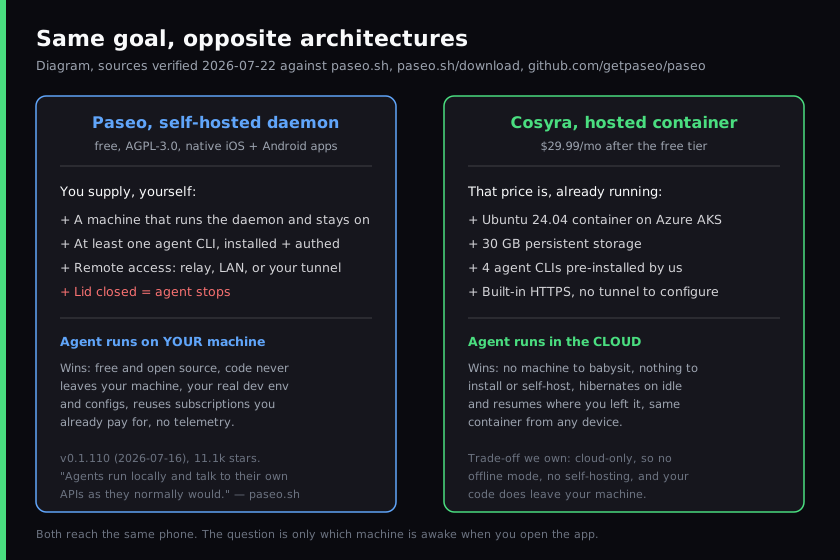
Paseo describes the daemon on its own repo as "a local server called the daemon that manages your coding agents." That sentence is the whole product. The desktop app, the phone app, the web app, and the CLI are all clients talking to it. The agent process itself never moves.
The two official sources disagree on the fifth agent
Here is something you will not find in the other Paseo write-ups, because it took reading both primary sources on the same day. On 2026-07-22 we fetched the getpaseo/paseo README and the paseo.sh FAQ within minutes of each other and found they name a different fifth agent.
- The GitHub README lists Claude Code, Codex, GitHub Copilot, OpenCode, and Pi.
- The paseo.sh FAQ lists Claude Code, Codex, Cursor, OpenCode, and Pi.
We are not calling this a problem — the project ships at a patch-level cadence, v0.1.110 landed on 2026-07-16, and docs drift behind code in every fast-moving repo including ours. We are flagging it because it changes how you should read any agent-count claim about Paseo, including ours. So the safe phrasing, and the one we use throughout this page, is "at least five agent CLIs, including Claude Code, Codex, OpenCode, and Pi." We also decline to turn the homepage's "+34 more" providers line into a verified total of 39 agents, which is what a few aggregator write-ups have done. It is a marketing string on the homepage; we have not enumerated the list, so we do not restate it as a count. If the fifth-agent slot matters to your decision, check the source you plan to rely on rather than trusting any comparison post, ours included.
Where does Paseo beat Cosyra?
Paseo beats us on price, on privacy, on running your actual development environment, and on breadth of agent support. We sell a hosted product and we still think Paseo is the better answer for a large group of developers. Here's where, with the receipts.
- Free, and AGPL-3.0 open source. The site FAQ answers it in four words: "Yes. Paseo is free and open source." The repo is AGPL-3.0 with 11.1k stars as of 2026-07-22. We start at $20/month, and our orchestration is closed. If cost or auditability is the deciding factor, this comparison is already over.
- Your code never leaves your machine. Paseo states it plainly: "Paseo doesn't send your code anywhere. Agents run locally and talk to their own APIs as they normally would." The repo also claims no telemetry, tracking, or forced log-ins. We cannot match this and we won't pretend otherwise — our container is in Azure, which means your code goes there. For regulated work, client code under NDA, or anyone whose threat model excludes third-party hosting, that is disqualifying for us and fine for them.
- It runs your real development environment. The agent executes on your machine, so it sees your local tools, your shell config, your MCP servers, your half-finished branch, the one patched binary you forgot you installed in 2024. A fresh container has none of that. This is the single most underrated advantage in the relay model, and it is the thing our users have to consciously rebuild.
- It reuses subscriptions you already pay for. Because Paseo drives agent CLIs you already installed and authenticated, your existing Claude or Codex plan carries over with no second bill. With us, you are BYOK on top of a subscription.
- Broader agent and platform coverage. At least five agent CLIs against our four pre-installed, plus desktop builds for macOS, Windows, and Linux, a web app, a CLI, and headless npm and Docker installs for servers. Verified on paseo.sh/download 2026-07-22. Our surface is narrower by design.
Where does Cosyra beat Paseo?
We beat Paseo on not needing a machine at all, on setup time, and on what happens when you are away from your desk for a week. The cost of "free and self-hosted" is that you become the operator of an always-on box.
There is no machine to babysit
Paseo's daemon needs a laptop, VM, or dev server that stays awake. Close the lid and the agent stops. That is not a criticism of the implementation, it is what the architecture is — and it is precisely the thing a phone-first developer is choosing between. Our container is the always-on Linux machine, it hibernates when idle, and it resumes right where you left it when you open the app again. Nothing of yours is running at home.
Nothing to install, authenticate, or tunnel
Both of Paseo's official sources are explicit about the prerequisite: "You need at least one agent CLI installed and configured with your credentials." Then you install the daemon, then you arrange remote access — relay, LAN, or a tunnel you configure. None of those steps are optional if the goal is coding from your phone somewhere that isn't your kitchen. We provision a fresh Ubuntu container on first launch, about 15 seconds in our testing, with Claude Code, Codex CLI, OpenCode, and Antigravity CLI already on the PATH.
$ # No daemon, no tunnel, no agent install. Just the app.
$ cat /etc/os-release | head -1
PRETTY_NAME="Ubuntu 24.04 LTS"
$ uname -m
x86_64
$ which claude codex opencode agy
/usr/local/bin/claude
/usr/local/bin/codex
/usr/local/bin/opencode
/usr/local/bin/agy
$ claude
> add jitter to the retry backoff in worker.ts
The same container from any device
Our container persists in the cloud and is the same container from an iPhone, an Android tablet, or a laptop browser. Lose your phone, buy a new one, sign in, and your repo, shell history, and half-finished agent session are still there. With Paseo, that state lives on whichever machine hosts the daemon, and reaching it from elsewhere is a networking task you own.
An opinion Paseo's users will push back on
We think "self-hosted and free" quietly costs more than $20/month for most people, once you price in the machine, its electricity, its patching, and the evening you lose when the tunnel drops while you're on a train with twenty minutes of signal and a good idea. The self-hosting crowd will disagree, and for a homelab owner whose server is already humming, they're right — the marginal cost really is zero. But "free software" and "free stack" are different things, and the gap between them is a computer you are responsible for. That gap is the entire reason we built a hosted container instead of shipping another daemon.
Who should pick Paseo instead of Cosyra?
Pick Paseo if your code can't leave your machine, if you need the agent to run against your real environment, or if you already own an always-on box. For those three profiles Paseo is the better tool and we'd tell you so directly.
Try Paseo first if you are one of these profiles
- Your code can't go to a third party. Client work under NDA, regulated code, or a personal policy against hosted execution. Paseo's local-execution model answers this and ours does not. No amount of container isolation on our side changes the fact that the code is in Azure.
- Your dev environment is the point. If the agent is only useful when it can see your local toolchain, your MCP servers, your unpushed branches, and the specific mess of your working machine, then running it anywhere else is a downgrade. A clean container is a feature until it isn't.
- You already keep a machine on 24/7. If a workstation or home server is powered anyway, Paseo gives you native iOS and Android clients into it for $0/month. Setting up the relay or a tunnel once is a fair trade when the hard part — the always-on computer — is already solved.
These aren't mutually exclusive positions, either. We wrote a broader breakdown of this whole category in relay apps vs cloud containers, where Paseo sits alongside nine other tools that made the same architectural bet. The nearest of those on price and polish is Termly, which is also free and also ships on both stores but routes through a hosted relay instead of asking you to bring a tunnel — we broke that one down separately in Cosyra vs Termly.
How do you choose between them?
The decision framework fits in one question, and it isn't about features. Ask: am I willing to own a computer that stays on? If yes, Paseo is free, open source, private, and runs your real environment — take it. If no, every hour you'd spend on the daemon, the credentials, and the tunnel is the thing we're actually selling, and $20/month is what it costs to not think about any of it from a platform bench with eight minutes before the train.
tl;dr
Use Cosyra if you want an agent on your phone with no machine of your own involved: container already running, four agents pre-installed, no tunnel. Use Paseo if you want free and open source, your code staying on your hardware, and agents running in your real dev environment — and you have a machine that stays awake.
We're the always-on machine, so you don't have to be. A real x86_64 Ubuntu 24.04 container with four agent CLIs pre-installed, reached from a native iOS or Android app. Two-minute setup, no daemon, no tunnel.
App Store · Google Play · Pricing. Sign up and pick a plan. Eligible new users can start a 7-day free trial in the App Store app.
Frequently asked questions
Is Paseo free?
Yes. Paseo is free and open source under AGPL-3.0, verified on the GitHub repo 2026-07-22. The site FAQ answers it verbatim: "Yes. Paseo is free and open source." The same answer adds the condition that matters for cost comparisons: "You need Claude Code, Codex, Cursor, OpenCode, or Pi installed with your own credentials." Paseo doesn't ship the agents, so you bring your own agent subscriptions or API keys, and you supply the machine the daemon runs on.
[source: paseo.sh FAQ, "Is this free?"]
Does my code leave my machine when I use Paseo?
No, and this is Paseo's strongest claim. The paseo.sh FAQ states it plainly: "Paseo doesn't send your code anywhere. Agents run locally and talk to their own APIs as they normally would." The repo adds that there's no telemetry, tracking, or forced log-in. A hosted cloud container like ours cannot match that, because our container is by definition not your machine. If code locality is your hard requirement, Paseo is the honest answer.
[source: paseo.sh FAQ, "Does my code leave my machine?"]
Does Paseo have a mobile app?
Yes, on both platforms, which is unusual in this category. The iOS app is
on the App Store as "Paseo - Pocket Engineer" (app ID 6758887924) and the
Android app ships as Play Store package sh.paseo, with a
direct APK on GitHub releases as well. Both verified 2026-07-22. There are
also macOS, Windows, and Linux desktop builds plus a headless npm and
Docker install for servers.
[source: paseo.sh/download, full platform matrix]
Do I need to keep a computer running to use Paseo from my phone?
Yes. Paseo runs what the repo calls "a local server called the daemon that manages your coding agents," and the phone app is a client of that daemon. The agent process lives on your machine, so if that machine sleeps or shuts down, the agent stops. This is inherent to the architecture rather than a defect. A hosted container removes the requirement, because the container is the always-on machine.
[source: getpaseo/paseo README, daemon description]
What agents does Paseo support?
At least five agent CLIs, including Claude Code, Codex, OpenCode, and Pi. We deliberately stop short of naming the fifth: on 2026-07-22 the GitHub README listed GitHub Copilot in that slot while the paseo.sh FAQ listed Cursor, and we checked both the same day. The site also advertises support for 34 more providers, which we haven't enumerated and don't restate as a verified agent total.
[source: getpaseo/paseo README agent list, cross-checked against the paseo.sh FAQ on 2026-07-22]
Can I connect to Paseo from outside my home network?
Yes, through one of four routes documented on paseo.sh as of 2026-07-22: a hosted end-to-end encrypted relay, a direct connection over your local network, a tunnel you supply yourself such as Tailscale or Cloudflare Tunnel, or exposing the daemon port directly. The site FAQ puts it as: "You can use the hosted relay (end-to-end encrypted), set up your own tunnel, or expose the daemon port directly." Each option is a setup step you own.
[source: paseo.sh FAQ, "Can I connect from outside my network?"]
Four agents, already installed, already running. No daemon on your laptop, no tunnel to configure, no agent CLI to authenticate before you start. Just the app and a container that's awake when you are.
Relay apps vs cloud containers · AI coding agents on mobile · Mobile coding terminal · See pricing. Sign up and pick a plan. Eligible new users can start a 7-day free trial in the App Store app.