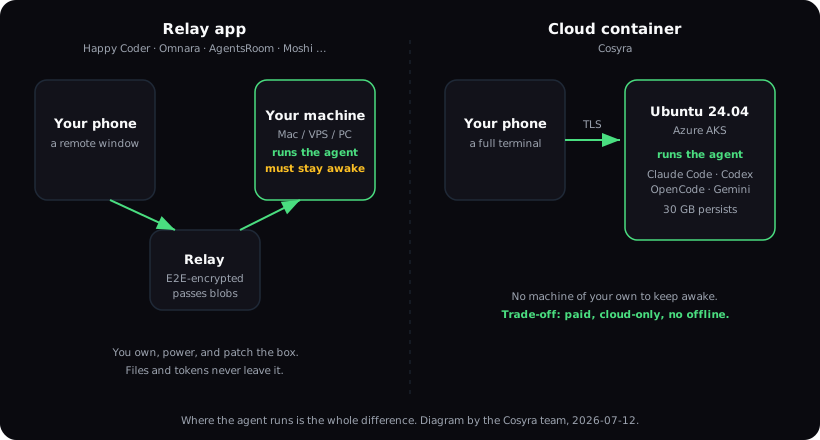
Relay apps vs cloud containers comes down to one question: where does the AI agent actually run? A relay app (Paseo, Happy Coder, Omnara, AgentsRoom, RemoteCode, Onepilot, Moshi, Catnip, VibeTunnel, or Anthropic's own Claude Code Remote Control) keeps the agent on a machine you own and turns your phone into a remote window. A cloud container like Cosyra runs the agent for you in a hosted Ubuntu box, so the phone gets a full terminal and there is no personal machine to keep awake. Neither is strictly better. This guide names all ten relays honestly and shows exactly when each wins.
We built Cosyra, so we have a side in this. But we ran the relay setup ourselves for months first: a Mac mini at home, Tailscale, a relay app on the phone. The honest version of this comparison is the one that tells you when to skip us. If you already keep a server awake, a relay is often free and keeps every byte of your code on your own hardware. Start with the AI coding agents on mobile pillar if you want the setup mechanics first; this page is about the architecture choice underneath them.
Quick decision.
- You already run an always-on Mac, PC, or VPS and want your code to never leave it → pick a relay app. Jump to the ten relays ↓.
- Your phone is your only always-on device, or you don't want to babysit a home machine → pick a cloud container. See where a cloud container wins ↓.
- You want the full decision framework → which should you pick ↓.
What is a relay app?
A relay app is three parts: an agent running on a computer you own, a mobile or web client on your phone, and a relay in the middle that passes messages between them. The agent's compute, your source files, and your API tokens all stay on your machine. The phone never runs a shell; it sends keystrokes and approvals and renders what the agent prints back. Happy Coder's own framing is the clearest: it is a relay, not a computer, and it provides zero compute of its own (verified against the slopus/happy repo, 2026-06-12).
Most relays encrypt that middle hop end-to-end, so the relay operator only ever sees ciphertext. Happy Coder encrypts on-device before sending and lets you self-host the relay server. AgentsRoom uses a TweetNaCl-encrypted relay between phone and desktop. RemoteCode says it "never uploads source code to any server" and only passes encrypted session data between your own devices. That privacy posture is the relay category's real strength: your code lives where you put it.
The catch is the always-on machine. A relay can only reach an agent that is running, so the host (your Mac, your VPS, your Raspberry Pi) has to stay powered, unlocked enough to run the process, and reachable over the network. The first time your home Mac went to sleep mid-session, on the 8:12 train with a half-finished refactor, is the moment the trade-off stops being abstract. We break down the on-device and relay paths further in the best way to run AI agents on a phone.
The clearest proof that this is the shape of the whole category is OpenClaw, the largest open-source AI-agent project on GitHub (383k stars, MIT, as of 2026-07-17). Its native iOS and Android apps shipped in June 2026, and the docs are blunt about what they are: "Android does not host the Gateway" (docs.openclaw.ai/platforms/android). The Gateway (OpenClaw's word for the always-on process that actually runs the agent) lives on a Mac, Linux, or Windows machine you keep powered; the phone pairs to it over a WebSocket and can only browse the workspace read-only. OpenClaw is a personal assistant rather than a coding agent, but the wiring is identical to Happy Coder's: the phone is a node, the compute is somewhere else, and something at home has to stay awake. When a 383k-star project structures itself this way, the always-on machine isn't a quirk of one app; it's the price of the relay model.
What is a cloud container?
A cloud container flips where the agent runs. Instead of your hardware, the
agent lives in a hosted Linux container that a service keeps running for
you. Your phone opens a real terminal into it, not a remote view of another
machine's terminal, but a shell you type into directly. We run Cosyra this
way: each user gets a private Ubuntu 24.04 container on Azure AKS with
Claude Code, Codex CLI, OpenCode, and Antigravity CLI already on PATH, 30 GB of storage that survives between sessions, and native iOS and
Android apps. All four agents are BYOK: you bring your own Anthropic,
OpenAI, or Google key and pay the provider directly.
The win is that there is no second machine in the picture. Nothing at home has to stay awake, because the container is the compute. The cost is equally plain: it is a paid service (from $20/month), it needs a network connection because the container lives in the cloud, and you are running on our infrastructure rather than your own. We say that in the open because it is the exact thing a relay does better. See our full Cosyra vs Termux breakdown for the offline trade-off, which applies here too.
The ten relay apps, compared
Ten products now share the relay architecture. They differ on platform, price, license, and how honest they are about needing your own machine. Here is the whole shelf, with dated facts from our per-tool research. Every "as of" date is when we last verified that row first-hand.
| App | Where the agent runs | Platforms | License | Price |
|---|---|---|---|---|
| Paseo | Your machine (daemon) | iOS, Android, macOS, Windows, Linux, web | AGPL-3.0 (open source) | Free |
| Happy Coder | Your machine (CLI wrapper) | iOS, Android, web | MIT (open source) | Free + in-app purchases |
| Omnara | Your laptop (or their cloud) | iOS, Android | Closed (old repo archived) | Free |
| AgentsRoom | Your desktop (must stay awake) | macOS/Linux/Windows + iOS, Android | Not stated open source | Free ≤3 projects; Pro $9.99/mo |
| RemoteCode | Your Apple-Silicon Mac | iOS/iPadOS only | Unverified | Free on Wi-Fi; Pro $4.99/mo |
| Claude Code Remote Control | Your machine (Claude Code) | Claude app iOS/Android or browser | Proprietary (Anthropic) | Paid Claude plan; no API keys |
| Onepilot | A server you SSH into | iOS only (iOS 18.6+) | Closed source | $6.99/mo or $49.99/yr |
| Moshi | A server you own (SSH + Mosh) | iOS, macOS, watchOS, visionOS, Android | Closed source | Free + in-app purchases |
| Catnip | A GitHub Codespace or local Docker | iOS only | Apache 2.0 (open source) | Free app; you pay Codespaces |
| VibeTunnel | Your Mac (browser view) | macOS/Linux; browser (iOS WIP) | MIT (open source) | Free |
The most complete relay: Paseo
Paseo is the one to beat, and we would rather say so than pretend the shelf
starts at Happy Coder. It is AGPL-3.0, free, and had 11.1k stars on
2026-07-22 when we checked the repo directly. It ships native apps in both
mobile stores (App Store id6758887924, Play Store
sh.paseo), installers for macOS, Windows, and Linux, plus an
npm package and a Docker image for headless servers. No other relay on this
page covers that much surface.
The architecture is the standard relay shape in its most polished form. A daemon runs on a machine you own and handles agent orchestration, a WebSocket API, and an MCP server; the phone, desktop, web, and CLI clients all talk to it. Agents execute against your real filesystem, your configs, and your credentials. Paseo's own site puts the privacy case plainly:
"Paseo doesn't send your code anywhere. Agents run locally and talk to their own APIs as they normally would." Paseo's homepage, verified 2026-07-22.
That is a real advantage and we cannot match it. Your code never touches our infrastructure because it never leaves your hardware. Paseo also drives at least five agent CLIs, including Claude Code, Codex, OpenCode, and Pi — more breadth than the four we pre-install — and it reuses whatever agent subscriptions you already pay for instead of asking you to bring an API key on top. It reports no telemetry.
The trade-off is the same one every relay makes, and it is the only thing that matters when you are choosing: the daemon is the execution environment, so a machine has to stay on. You also install and authenticate the agent CLIs yourself — Paseo's docs and site FAQ both state you need at least one agent CLI configured with your own credentials — and you arrange remote access through their encrypted relay, your LAN, or a tunnel you set up. Here is our opinion, which Paseo's maintainers would reasonably dispute: for a phone-first developer, "keep a laptop awake at home" is not a setup step, it is a permanent operational burden. We spent months on the Mac-mini-plus-Tailscale version of this and the failure mode was never the software. It was a power cut while we were on a train with forty minutes to spare and nothing to connect to.
If you already run an always-on box, Paseo is probably the better tool and it costs nothing. If your phone is the always-on device, the daemon requirement is the wall you hit. The AI coding agents on mobile pillar covers the setup mechanics on both sides of that line.
The closest rival on setup time: Termly
Termly (termly.dev, not the termly.io privacy-policy company) belongs on this shelf and clears one hurdle that most of the others do not: it runs a hosted encrypted relay, so there is no Tailscale to configure and no port to expose. It is free with no in-app purchases, ships on both the App Store and Google Play, and its CLI is MIT-licensed. The daemon requirement is unchanged — its own homepage says "Your Mac runs the code. Your phone mirrors the session." We installed the CLI on 2026-07-23 and wrote up what the tool registry actually contains in Cosyra vs Termly.
Same-machine relays: Happy Coder, Moshi, RemoteCode, VibeTunnel
These four are the purest relays: the agent runs on your own Mac or PC and
the app is a front end. Happy Coder is the most polished and the only one with a real Android app, native voice
relay, and a self-hostable server; it is MIT-licensed and actively maintained
(21,821 stars on 2026-06-12).
Moshi leans on the Mosh protocol so
a session survives sleep, network switches, and app kills, with Apple Watch and
Dynamic Island approvals. RemoteCode is the leanest and cheapest ($4.99/mo for the internet relay) but is iPhone-and-Apple-Silicon-Mac
only. VibeTunnel is the developer's-choice option, MIT, wraps arbitrary commands
with vt, and turns any browser into your Mac's terminal, but it
is still beta and needs a Tailscale tunnel to reach from a phone, weighed
feature by feature in
Cosyra vs VibeTunnel.
Orchestrators and control planes: AgentsRoom, Onepilot
AgentsRoom is more than a relay: it is a desktop multi-agent orchestrator that spawns real CLI processes in your project folders across eight providers, each on its own git worktree, with native iOS and Android companions. The desktop app is the command center and has to stay awake. Onepilot is an iPhone SSH client plus agentic IDE: it installs an agent inside a user-scoped nvm prefix on a server you already run and wires it to a Telegram or Slack channel. Both are BYO-server. They give you nothing to run the agent on.
First-party and Codespaces-backed: Claude Code Remote Control, Omnara, Catnip
Claude Code Remote Control is Anthropic's own feature: it mirrors a Claude Code session running on your machine to the Claude app or browser. It is not a rival product so much as an overlapping approach, and the correct framing is that it and a cloud container solve the same "drive an agent from my phone" job differently. Remote Control keeps Claude local and needs a paid Claude plan (no API keys). Omnara is voice-first remote control for Claude Code and Codex on your laptop; note its old open-source wrapper is archived and the shipping app is closed. Catnip is the odd one out, an open-source iOS app that drives Claude Code inside a GitHub Codespace, so the compute is your Codespace quota rather than your own laptop.
"This version was built as a wrapper around the Claude Code CLI, which became unfeasible to maintain with Claude Code's constant updates." Omnara's own README, explaining why it archived the wrapper (verified 2026-07-10).
We keep that quote around because it is a competitor conceding, in writing,
the maintenance tax of the wrapper approach. It is also why we run the real
upstream claude, codex, opencode, and
agy binaries in the container instead of wrapping them. When Anthropic
ships a new Claude Code build, you get it, and nothing in the middle has to be
re-patched.
Try the cloud-container side. Eligible new users can start a 7-day free trial in the App Store app. App Store / Google Play / Pricing details
Where relay apps win
A relay beats a cloud container in four situations, and we would tell a friend to use one in every one of them:
- You already keep a machine awake. If a Mac mini, desktop, or VPS is already running for other reasons, a relay adds a phone front end for free or a few dollars a month. You are paying for compute you already own.
- Your code must never leave your hardware. The same-machine relays keep source, tokens, and execution on your box; the relay only sees encrypted blobs. For regulated code or personal policy, that is a real advantage a hosted container cannot match.
- You want open source you can self-host. Happy Coder (MIT), VibeTunnel (MIT), and Catnip (Apache 2.0) are auditable, and Happy Coder and VibeTunnel let you run your own relay so no third party is in the path.
- You want it free. Omnara and VibeTunnel are free, Happy Coder and Moshi are free to start, and Claude Code Remote Control is bundled with a Claude plan you may already pay for.
We think keeping a personal machine awake around the clock just to code from a phone is a bad trade for most people. The relay crowd disagrees, and when you already run a home server, they are right; the marginal cost is a phone app, not a monthly bill. State that honestly and the choice gets easy.
Where a cloud container wins
The cloud container earns its subscription in the cases the relay cannot cover:
- The phone is your only always-on device. No Mac at home, a laptop that sleeps in a bag, a work machine you cannot leave a process on. A relay has nothing to connect to. The container is always the compute.
- You want the agent already installed. A relay assumes you have set up Claude Code or Codex on the host. We ship four agents pre-installed, so there is no host to configure and no npm ABI gap to fight the way there is on Android. See Linux container on Android for that specific wall.
- You want a real shell, not a window. A relay renders another
machine's terminal; a container gives your phone a shell it types into directly,
with
apt,git, tmux, and language runtimes on board. - You switch devices. The same container is reachable from iPhone, Android, and web, and its 30 GB of files persist. Start on the couch, continue on the train, finish at the desk, no re-cloning, no re-auth.
Which should you pick?
Here is the decision framework we actually give people who ask, no hedging:
- Pick a relay app if you already run an always-on machine, you want your code to stay on your own hardware, you prefer open source you can audit and self-host, or you want to spend little to nothing. Start with Happy Coder if you want the most polished cross-platform option, RemoteCode if you are all-Apple and cheap, or Claude Code Remote Control if you already pay for a Claude plan and only use Claude Code.
- Pick a cloud container if your phone is your only reliable always-on device, you don't want to own or babysit a home machine, you want the agents pre-installed and a real shell, or you hop between phone, tablet, and desktop and want one persistent environment. That is what we built Cosyra for.
Try a relay first if any of these is true: you keep a desktop running anyway (Happy Coder costs you nothing to test), you have a hard rule that code stays on your hardware (a same-machine relay is the only honest answer), or you are an all-iPhone, all-Mac user who wants the cheapest possible path (RemoteCode at $4.99/mo). If you try one and the always-on machine keeps letting you down (sleeping, dropping off Wi-Fi, getting rebooted), that failure is the signal to move to a hosted container.
Frequently asked questions
Is Paseo free, and does it run my agents in the cloud?
Paseo is free and open source under AGPL-3.0; its site FAQ answers the pricing question with "Yes. Paseo is free and open source." (verified 2026-07-22). It does not run your agents in the cloud. A daemon runs on a machine you own and your agents execute there, against your own filesystem and credentials — Paseo states that it doesn't send your code anywhere. That machine has to stay powered on for the phone app to have anything to connect to.
Which agent CLIs does Paseo support?
At least five, including Claude Code, Codex, OpenCode, and Pi. Paseo's GitHub README and its site FAQ disagree on the fifth as of 2026-07-22 — the README lists GitHub Copilot, the site lists Cursor — so treat the fifth as unsettled. The site also advertises support for 34 more providers, which we have not enumerated. Paseo does not install the agents for you: both sources state you need at least one agent CLI installed and configured with your own credentials.
[source: getpaseo/paseo on GitHub]
Do relay apps like Happy Coder run the AI agent on my phone?
No. A relay app is a window, not a computer. Happy Coder is a CLI wrapper on your own machine plus a mobile app connected by an end-to-end-encrypted relay; the agent's compute, files, and tokens all live on the computer you already own. The phone drives and views the session, but the machine has to be running.
[source: slopus/happy on GitHub]
Is Claude Code Remote Control free?
No. Claude Code Remote Control is included with a paid Claude subscription (Pro, Max, Team, or Enterprise) and is not available on a free account. API keys are not supported, so you cannot use it BYOK. It also needs Claude Code v2.1.51 or later running on a machine you keep awake.
[source: Anthropic Claude Code docs]
Can I use a relay app without keeping my computer on?
Not for the on-your-own-machine relays (Paseo, Happy Coder, Moshi, RemoteCode, AgentsRoom, Onepilot, VibeTunnel, Claude Code Remote Control). The agent runs on your Mac, PC, VPS, or server, so that box has to stay powered and reachable. If it sleeps or drops off the network, the phone has nothing to connect to. A cloud container runs the agent for you, so there is no personal machine to keep awake.
[source: getpaseo/paseo README, daemon architecture]
Does OpenClaw run on my phone?
No. OpenClaw's iOS and Android apps are companion nodes, not the runtime. The agent runs on a Gateway, a Mac, Linux, or Windows (WSL2) machine you keep powered, and the phone pairs to it over a WebSocket. Its own docs say plainly, "Android does not host the Gateway," and workspace browsing from the phone is read-only. OpenClaw is a self-hosted personal assistant (MIT, 383k stars as of 2026-07-17), so it is the same relay architecture as the coding relays here, not a cloud container.
[source: OpenClaw docs, Android platform]
Does VibeTunnel have an iPhone app?
Not on the App Store as of 2026-07-10. VibeTunnel's README lists a native iOS app, but it is work-in-progress and not recommended for production; iOS access today is through TestFlight or the responsive web interface. It is also localhost-only out of the box, so you add Tailscale to reach your Mac's terminal from a phone.
[source: amantus-ai/vibetunnel on GitHub]
What's the difference between a relay app and a cloud dev environment?
A relay app keeps the agent on hardware you own and gives you a phone-shaped remote control for it. A cloud dev environment (a cloud container like Cosyra) runs the agent on hosted infrastructure and gives your phone a full terminal into it. Relays keep your code on your own box and are often free; a cloud container removes the always-on machine but costs a subscription and needs a network connection.
[source: Show HN, Catnip, running Claude Code from your phone]
Which of these apps run on Android?
Happy Coder, AgentsRoom, Omnara, and Moshi list Android builds; Claude Code Remote Control uses the Claude Android app as its remote surface. RemoteCode, Onepilot, and Catnip are iOS-only, and VibeTunnel has no native Android app (browser access only). A cloud container like Cosyra ships native iOS and Android apps.
tl;dr
Use a relay app if you already keep a machine awake and want your code to stay on your own hardware, Happy Coder, Moshi, RemoteCode, AgentsRoom, Onepilot, VibeTunnel, Catnip, Omnara, or Claude Code Remote Control. Use a cloud container if your phone is your only always-on device and you want the agent pre-installed with no machine to babysit. That is Cosyra.
App Store / Google Play. Sign up and pick a plan. Eligible new users can start a 7-day free trial in the App Store app.
Skip the always-on machine. Run Claude Code, Codex, OpenCode, or Antigravity from a hosted container in two minutes, no home server to keep awake.
 scan to install
 See pricing · AI agents on mobile pillar · Mobile terminal pillar