Short answer. Termly is free, ships on both app stores, and takes about a minute to set up. It is also a mirror: your Mac runs the agent and your phone watches. Cosyra starts at $20/month and runs a persistent Ubuntu container in Azure with Claude Code, Codex CLI, OpenCode, and Antigravity CLI already installed. Pick Termly if you own a machine that stays awake and you want your existing setup on your phone for nothing. Pick Cosyra if you would rather not own that machine at all.
We think Termly is the best-built relay app we have looked at, and it is the one we would recommend to a friend who already has a Mac Studio humming in a home office. That is also the exact condition under which the two products stop competing.
This post was written by the Cosyra team. We compared Cosyra against Termly based on hands-on use of our own product and first-hand testing of Termly's CLI, which we installed and ran on 2026-07-23. Store, repo, and pricing facts were re-verified the same day against the App Store lookup API, the Google Play listing, the termly-dev/termly-cli GitHub API, and termly.dev. We did not pair the mobile app to a session, so nothing below describes the app's on-device experience, and we say so rather than implying a test we did not run.
tl;dr
Use Termly if you want to spend nothing, you already have a desktop with your repos and authenticated agent CLIs on it, and that machine can stay awake while you are out. Use Cosyra if the machine is the problem: no desktop to leave running, no Node.js install to maintain, nothing at home to babysit. Termly mirrors a computer you own. We are the computer.
App Store · Google Play. Sign up and pick a plan. Eligible new users can start a 7-day free trial in the App Store app.
No machine of yours in the loop. Our container is the always-on Linux box that Termly's CLI would otherwise ask you to supply. Four agent CLIs are already on the PATH, reached from a native iOS or Android app.
App Store · Google Play · Pricing. Sign up and pick a plan, from $20/month.
How do Cosyra and Termly compare feature by feature?
Termly's software costs nothing and ours starts at $20/month. That gap is not a discount or a margin difference, it is a description of what each product is: our price buys a machine and its storage, and Termly's price assumes you already bought one. The table lines the two up on thirteen attributes. Every Termly value was verified 2026-07-23.
| Feature | Cosyra | Termly |
|---|---|---|
| Pricing | $20 / month Core or $30 / month Pro | Free forever; you pay for your own machine and agent providers |
| Free tier | None. 7-day free trial for eligible new users in the App Store app | Free, no in-app purchases, optional Ko-fi tip |
| OS support | iOS, Android, web | iOS 16+, Android; CLI on macOS, Linux, Windows 10+ (Node.js 18+) |
| AI agents pre-installed | Claude Code, Codex CLI, OpenCode, Antigravity CLI | None — it detects agents you already installed |
| Agents supported | Four, pre-installed and updated by us | 20 enumerated by termly tools list |
| Where the agent runs | In the cloud container; phone is a terminal | On your own desktop; phone mirrors the session |
| Persistent storage | 30 GB cloud, survives device loss | Your machine's disk; you manage it |
| Offline capability | No (cloud-only) | No — the relay needs both ends online |
| Container / sandboxing | Per-user Ubuntu container on Azure AKS | None — the agent runs as you, on your filesystem |
| Remote reach from phone | Built-in HTTPS, native apps, no tunnel | Hosted encrypted relay; no Tailscale or port forwarding |
| Max session length | Hibernates on idle, resumes right where you left it | As long as your machine stays awake and online |
| Concurrent devices | Your container, reachable from any signed-in device | One mobile device per session (README; repo issue #21) |
| Open-source status | Client app closed, orchestration proprietary | CLI is MIT (termly-dev/termly-cli); mobile apps closed |
Want the cloud side of this comparison? A persistent Ubuntu 24.04 container with Claude Code, Codex CLI, OpenCode, and Antigravity CLI already on the PATH, on iOS and Android, with nothing to install at home.
App Store · Google Play · Pricing. Sign up and pick a plan. Eligible new users can start a 7-day free trial in the App Store app.
Where does the agent actually run?
Termly states the answer on its own homepage, and we appreciate the clarity: "Your Mac runs the code. Your phone mirrors the session." The CLI opens a session on your desktop, you scan a QR code, and the app becomes a window onto a process that never leaves your machine. Termly says its relay servers carry encrypted data only and cannot decrypt your code. Those are vendor claims about a closed-source app, so we report them as claims, and we have no evidence against them.
Our model inverts that. The container is a per-user Ubuntu 24.04 x86_64 environment on Azure AKS, provisioned fresh on first launch in about 15 seconds in our testing. Nothing you own is in the path. The phone is not mirroring a terminal somewhere else; it is the only device involved.
Everything else in the table falls out of that one decision. Termly is free because it does not run compute for you. It supports 20 agents because it detects whatever you installed rather than shipping any. It needs your machine awake because that machine is the product. None of that is a flaw in Termly. It is what a relay is, and Termly is a good one. The category comparison is worth reading in full if you are choosing between architectures rather than brands: relay apps vs cloud containers.
Termly publishes three different tool counts, and none of them is 20
Here is something you will not find in other Termly write-ups, because it required installing the thing. On 2026-07-23 we installed the CLI into a throwaway directory rather than globally:
$ npm install --prefix . @termly-dev/cli
added 106 packages in 2s

$ ./node_modules/.bin/termly --version
1.9.5
The published package is small, 174,432 bytes unpacked, and it declares
node: ">=18.0.0". Install was quick and clean apart from one
deprecation warning about uuid@9.0.1, which is already filed on
the repo as issue #48. Then the counts stopped agreeing.
- The termly.dev homepage and the CLI README both say 23+ tools.
-
The CLI's own
--helpbanner says 17+ tools. -
termly tools listenumerates exactly 20.
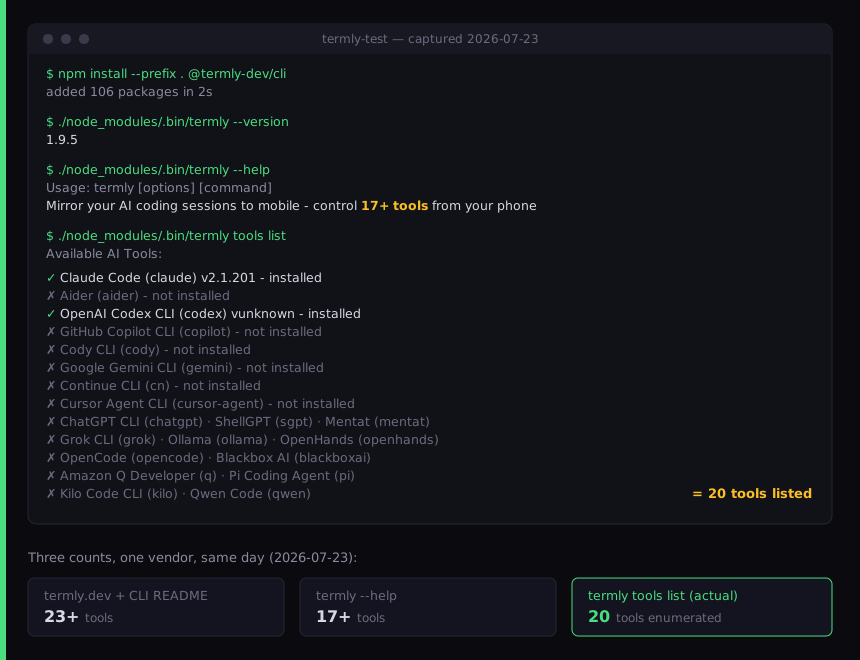
We are not calling this dishonest. Docs drift behind code in every
fast-moving project, ours included, and the repo has commits after the
v1.9.5 release. We flag it because it changes how you should read any
agent-count claim about Termly, including the one in our own table. If a
specific agent is the reason you are choosing Termly, run
termly tools list yourself before you decide. The detection is real:
on our machine it correctly found Claude Code v2.1.201 and OpenAI Codex CLI already
installed and marked the other eighteen as missing.
Where does Termly beat Cosyra?
Five places, and the first one is not close.
1. Price. Termly is free and we are not. The App Store lookup
API returns price: 0.0 for app ID 6754467087 with no in-app purchases,
verified 2026-07-23. There is no qualification to add here. If your budget for
this is zero, the comparison ends at this line.
2. Your real environment, untouched. Your repos, your dotfiles, your local branches, your already-authenticated agent CLIs. Termly attaches to the machine you already work on. We hand you a clean container, which means a migration: clone the repo, add your keys, rebuild your setup. For a large private monorepo with local-only tooling, that migration can be the deciding cost.
3. Breadth of agents. Twenty detected agents against our four pre-installed. If you work in Aider, Cursor Agent CLI, Amazon Q Developer, Kilo Code CLI, or Qwen Code, Termly supports your agent today and we do not ship it.
4. No tunnel to configure. Termly runs a hosted relay, so it works off your local network without Tailscale or port forwarding. That is a genuine advantage over the relay apps that make you bring your own tunnel, and it is why their 60-second setup claim is plausible.
5. An auditable daemon. The CLI is MIT-licensed with 282 stars and 18 forks. You can read exactly what runs on your machine. Our orchestration is proprietary, so you cannot do that with us.
Where does Cosyra beat Termly?
Nothing of yours has to stay awake. This is the one that matters, and it is structural rather than a feature gap. Our container runs on Azure AKS. Termly needs your desktop powered on, unlocked enough to keep the CLI process alive, and online for the entire session. The failure mode is not hypothetical: a laptop that sleeps mid-session takes the agent with it, and third-party guides to running coding agents remotely spend real word count on how to stop your Mac from sleeping. Closing the lid before you leave the house is the wrong habit to have to unlearn.
The phone is the whole computer. With a relay, the phone is a view onto hardware you still have to own, buy, power, and maintain. If your laptop is at the office and you are on a train, Termly has nothing to mirror. We think the phone keyboard is fine for agent-driven coding, and most people who disagree have not tried it — you are writing prompts and approving diffs, not typing out a refactor by hand. Twenty minutes on a train is a real unit of work when the machine is already awake and waiting.
Zero desktop setup. No Node.js 18+, no npm install, no daemon, no machine to configure. We provision the container on first launch, about 15 seconds in our testing, with the agents already on the PATH.
Persistent cloud storage. 30 GB that survives a lost, stolen, or reset phone, and does not depend on any machine you own still existing.
No one-device limit. Termly's README states "One mobile device per session," and repo issue #21 tracks users hitting it. Your container is reachable from any device you sign in on.
Who should pick Termly instead of Cosyra?
Choose Termly if you already own a desktop that stays on, your work lives on that machine, you want to spend nothing, or your agent of choice is one of the sixteen we do not pre-install.
Choose Cosyra if you do not want to own the always-on machine, you want the agents working the moment you open the app, or you need the environment to survive whatever happens to your hardware.
Try Termly first if:
- Your code cannot leave your machine. Client work under a contract that forbids third-party infrastructure rules us out on the first page. Termly's agent runs locally against your own filesystem.
- You have a home server or a desktop that never sleeps. The main cost of the relay model is already paid. Adding Termly is free and takes a minute.
- You want to try the idea before paying for it. Install the CLI, scan the QR code, and find out whether coding from a phone suits you at all. That is a reasonable thing to learn for free, and if the answer is yes but the always-on machine becomes the annoyance, that is the point at which we are worth $20.
How do you choose between them?
One question decides it: when you reach for your phone on the platform at 7:40am, is there a machine of yours that is awake, online, and running a daemon? If the answer is a confident yes, Termly is free and good and you should use it. If the answer is "my laptop is in my bag" or "I would have to remember to leave the desktop on," you are not really comparing features, you are deciding whether to keep a computer running for the rest of your life so that your phone has something to talk to.
That is the honest split. Termly is not a worse version of us and we are not a paid version of Termly. Two different answers to the question of which machine is awake. For the wider landscape, see our roundups of AI coding agents on mobile and the mobile coding terminal, or the closest architectural sibling to this comparison, Cosyra vs Paseo.
The always-on machine, without owning one. A persistent Ubuntu container with four agent CLIs installed, reached from a native iOS or Android app. No daemon, no tunnel, no laptop to leave open.
App Store · Google Play · Pricing. Sign up and pick a plan. Eligible new users can start a 7-day free trial in the App Store app.
Frequently asked questions
Is Termly free?
Yes, genuinely free. The App Store lookup API returns price 0.0 and formattedPrice "Free" for app ID 6754467087, verified 2026-07-23, with no in-app purchases. The termly.dev homepage says "100% free, forever" and "Completely free — no subscriptions, no ads, no paywalls." The only money mentioned anywhere is an optional Ko-fi tip link printed at the bottom of the CLI help text. Cosyra starts at $20/month, so on price alone Termly wins outright and we are not going to pretend otherwise.
[source: Termly on the App Store, price and in-app-purchase fields]
Is the Termly mobile app open source?
No, only the CLI is. This is asked directly on the repo as issue #43,
titled "When open source mobile app?", opened 2026-04-23 and still open as
of 2026-07-23. The security audit in that thread states that the iOS and
Android apps "are not open source" and that "the termly-dev
GitHub organization contains only this CLI repository." The CLI itself is MIT-licensed
with 282 stars and 18 forks. So the desktop daemon can be audited and the app
that talks to it cannot.
[source: termly-cli issue #43, "When open source mobile app?"]
Does Termly work on Android?
Yes. The Google Play listing for package dev.termly.app returns
HTTP 200 and renders as "Termly: Gemini CLI Claude Code" with the description
"Termly mirrors your AI coding sessions from desktop to Android," verified 2026-07-23.
Ignore the CLI README on this point — it still says "Mobile app (iOS/Android)
- coming soon," which is stale. Termly ships on both stores, which is more than
most apps in the relay category manage.
[source: Termly on Google Play, package dev.termly.app]
Can I use Termly on more than one device at a time?
No, and users have filed it as a bug. Repo issue #21 is titled "[BUG] Session access limited to one device per account," and the CLI README states the constraint as "One mobile device per session." In practice that means your phone and your tablet cannot both be attached to the same session. If you routinely start something on a phone and pick it up on an iPad, check the status of that issue before committing to Termly.
[source: termly-cli issue #21, "Session access limited to one device per account"]
Do I need to keep my computer on to use Termly?
Yes, and this is the whole architecture rather than a bug. Termly describes itself as "Your Mac runs the code. Your phone mirrors the session." The agent process lives on your machine; the phone is a view onto it. Sleep the laptop and the session ends. This is not specific to Termly — every relay app in this category shares it, which is why we wrote a separate page comparing relay apps against cloud containers.
[source: termly.dev homepage, "Your Mac runs the code"]
How many AI tools does Termly actually support?
Twenty, as of 2026-07-23, though the vendor publishes three different
numbers. The homepage and the CLI README both say "23+". The CLI's own
help output says "control 17+ tools from your phone". We installed the CLI
and ran termly tools list, which enumerates exactly 20
entries, including Claude Code, Aider, OpenAI Codex CLI, GitHub Copilot
CLI, Google Gemini CLI, Cursor Agent CLI, OpenCode, Amazon Q Developer, Pi
Coding Agent, Kilo Code CLI and Qwen Code. Twenty is still far more agents
than the four we pre-install.
[source: termly-dev/termly-cli README, plus our own 2026-07-23 install]
Four agents, already installed, already awake. No daemon on your laptop, no QR code to rescan, no machine at home that has to stay powered on. Just the app and a container that is running when you are not.
Relay apps vs cloud containers · Claude Code on your phone · OpenCode on your phone · See pricing. Sign up and pick a plan. Eligible new users can start a 7-day free trial in the App Store app.