Grok Build is xAI's terminal coding agent, and its installer accepts three
operating systems: macOS, Linux, and Windows via Git Bash. There is no
iPhone or Android build. So to run Grok Build on your phone, you put it on a
real Linux machine and reach it. The fastest way: install
Cosyra for iOS or
Cosyra for Android, run
curl -fsSL https://x.ai/cli/install.sh | bash in the terminal, sign
in with grok login --device-auth, and launch grok.
Here is each path, what we tested, and one thing xAI's docs get wrong.
Quick decision: pick the path you came for:
- Cloud container (Cosyra): you want
grokactually running somewhere your phone reaches, with nothing left awake at home. Setup in ~5 minutes ↓ - "But I have the Grok app already": the chat app is not the coding agent. Why they are different ↓
- Termux (Android): you want it on-device and need the honest state. The static-binary question ↓
Not sure which fits? The side-by-side comparison ↓ lines up what runs where.
This guide was written by the Cosyra team. Grok Build is days old; the repository was created on 2026-07-14. So we checked everything against primary sources on 2026-07-17 rather than trusting anything written about it: the xai-org/grok-build repo and its in-repo authentication guide, xAI's Grok Build docs, and the installer script itself. Then, rather than assume the install works, we ran it in a clean Ubuntu 24.04 x86_64 container, the same base our containers run.
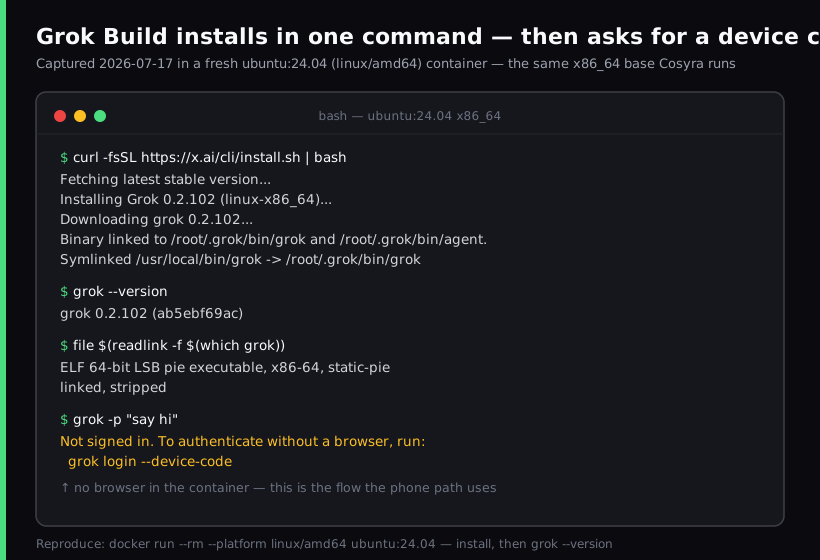
ubuntu:24.04 (linux/amd64) container
on 2026-07-17, the same x86_64 base our containers run. One command, and grok --version reported
grok 0.2.102 (ab5ebf69ac). The interesting part is the last
command: with no credentials, grok does not just fail. It prints
the exact device-code flow you need when there is no browser, which is the situation
you are in on a phone.
What is Grok Build?
Grok Build is xAI's terminal-based AI coding agent. You describe a task and it plans, edits files across a repo, runs commands, and iterates, inside a fullscreen mouse-interactive TUI. Its README calls it "SpaceXAI's coding agent harness and TUI." That is the same shape as Claude Code or Codex CLI, from xAI.
- Command:
grok. Note thatgrok-buildis the repository name, not a command. The installer also links a second command,agent, to the same binary. - Platforms: the installer's own case statement accepts Darwin, Linux, and Windows via Git Bash, and exits with "Unsupported OS" on anything else. It builds for x86_64 and aarch64 only.
- Install: a curl script that drops a native binary. There is no npm package, which matters more than it sounds. See the Termux section.
- Licensing: the harness is Apache-2.0 and written in Rust. The model behind it is not open source, and usage is billed through xAI. Both halves of that sentence matter.
- Version as of 2026-07-17:
0.2.102. This project ships fast: it gained roughly 400 GitHub stars in the six hours we spent writing this, so we date every number here rather than pretending it is stable.
The Grok app on your phone is not the coding agent
This is the mix-up worth clearing up first, because the naming invites it. You may already have Grok installed on your phone. That is the chat app: a conversational assistant, and a mature one. Grok Build is a different product that happens to share a brand. It is a terminal program that reads your repo, writes to your files, and runs shell commands.
Installing the chat app does not give you the coding agent, and no amount of
asking it will make it edit your repo. There is no mobile build of
grok, no cloud-agent web surface from xAI, and no
remote-control product like the ones some competitors ship. The only
official way to run Grok Build is a real terminal on a real machine. The
question is only which machine, and how your phone reaches it.
How can you run Grok Build from a phone?
Two paths work today, and one is unverified: a cloud Ubuntu container where
grok actually runs, SSH to a machine you own and keep awake, and
Termux on Android.
1. Cosyra: install Grok Build in a cloud container
Cosyra is a native iOS and Android terminal connected to a persistent Ubuntu
24.04 x86_64 container. That userland matches what the installer wants, so
the curl script resolves the linux-x86_64 build and
grok runs in the container. Nothing of yours has to stay awake. This
is the path we captured above.
- Works when: you want Grok Build on demand from either platform with no home machine to maintain.
- Breaks when: you have no internet, or you need it to reach resources that only exist on your home network.
- Cost: Core is $20/month and Pro is $30/month. Eligible new users can start a 7-day free trial in the App Store app. See pricing. xAI bills your Grok usage separately.
2. SSH to your own always-on machine
Install Grok Build on a desktop or VM you own, then reach it from a phone SSH client. This works, and xAI clearly expects it: their authentication guide describes device-code auth as being for "headless environments (SSH sessions, Docker containers, remote VMs) where no browser is available locally." It is also how a chunk of the Hacker News thread about Grok Build already uses it. One commenter's whole endorsement of the TUI was that "it works on anything you can get a terminal on, you can use it over SSH, and the UI will be the same no matter where you use it," and another said it was "easiest to use when sshing into a VM."
The cost is the machine. It has to stay awake, stay online, stay reachable from a phone network, and stay patched. If you already run one, this is a fine answer. If you do not, you are buying a maintenance job to solve a connectivity problem.
3. Termux on Android: the honest state
Most guides would tell you Grok Build cannot run on Termux, cite the usual libc argument, and move on. That argument does not hold here, and the real answer is more interesting.
Start with what is definitely true: there is no npm package. The workaround that gets Node-based CLIs onto Termux, letting npm resolve an arm64 build and run it under Node, simply does not exist for Grok Build. It is a native binary from a curl script.
The usual next argument is that prebuilt binaries are glibc-linked while Termux uses Android's Bionic libc, so the binary cannot run. So we checked instead of assuming, and pulled both published binaries apart:
$ file grok-0.2.102-linux-x86_64
ELF 64-bit LSB pie executable, x86-64,
static-pie linked, stripped
$ file grok-0.2.102-linux-aarch64
ELF 64-bit LSB executable, ARM aarch64,
statically linked, stripped
$ readelf -d grok-0.2.102-linux-aarch64 | grep NEEDED
# (no output, zero dynamic dependencies)
Both binaries are statically linked with zero NEEDED entries, and
the linux-aarch64 build genuinely ships. That URL returns HTTP 200,
and it is a 119 MiB file. So the glibc-versus-Bionic dynamic-link mismatch, the
thing that blocks other prebuilt agent CLIs on Termux, is absent here. A statically linked binary brings its own libc.
That removes one blocker. It does not prove the thing runs. Android imposes its own constraints on executing binaries, the aarch64 build is non-PIE where the x86_64 one is PIE, and we have not run it on a handset. So our answer is: unverified, with the usual reason for "no" ruled out. If you test it on-device, we would genuinely like to know. The broader set of Termux trade-offs, including process lifetime and Android killing background sessions, is in Cosyra vs Termux. A cloud x86_64 container, where we did verify it, avoids the question entirely.
How do you run Grok Build on iPhone or Android with Cosyra?
Four steps: install the app, run the install script, sign in with a device
code, and run grok in a repo.
Step 1: Install Cosyra and sign in
Download from the App Store or Google Play. The container is Ubuntu 24.04 x86_64, which is exactly the target the installer looks for.
Step 2: Install Grok Build
Grok Build is not one of the four agents we pre-install, we ship Claude Code, Codex CLI, OpenCode, and Antigravity CLI, but it is one command away. This is the real output from our capture, trimmed.
$ curl -fsSL https://x.ai/cli/install.sh | bash
Fetching latest stable version...
Installing Grok 0.2.102 (linux-x86_64)...
Symlinked /usr/local/bin/grok -> ~/.grok/bin/grok
$ grok --version
grok 0.2.102 (ab5ebf69ac)
The binary lands in ~/.grok/bin and the installer appends that to
your PATH. Two notes from reading the script: you can pin a version by passing
it (| bash -s 0.1.42), and the download is a 146 MiB file on
x86_64, which is worth knowing if you are watching a metered connection.
Because the container is persistent, you pay that download once, not every
session.
One thing to check before you run the installer: a second, unrelated coding
agent also drops a binary named grok into
~/.grok/bin, and neither installer looks for the other, so the
second one you install silently replaces the first. If a grok is
already on this machine, grok --version settles it. xAI's build prints
a version plus a commit hash (0.2.102 (ab5ebf69ac)), the
community CLI prints a plain npm version (1.1.7). We probed
both release channels on 2026-07-20 and wrote up
which grok is which, and why their Linux ARM64 support runs backwards
between them.
Step 3: Sign in with a device code
Here is where xAI's own docs and xAI's own binary disagree, and the binary
is right. The docs page says that in non-browser environments you should use
an API key. But run grok with no credentials and it tells you something
better:
$ grok -p "say hi"
Not signed in. To authenticate without a browser, run:
grok login --device-code
$ grok login --device-auth
→ open the printed URL, enter the code on your laptop
✓ token cached in ~/.grok/auth.json
Use grok login --device-auth (the --device-code alias
is what the error message suggests). It prints a URL and a code; you approve it
on any other device, and the container never needs a browser. Tokens cache in
~/.grok/auth.json and refresh in the background, so this is a one-time
step, not a per-session ritual.
We think the docs are giving the wrong advice here, and xAI would probably
defend it. Recommending XAI_API_KEY for non-browser environments
means pasting a long-lived credential into a shell on a phone keyboard, and leaving
it in the environment afterwards. The device-code flow gets you a refreshing session
token you approved on a device you were already holding. It is less typing and
a better credential. The API key is a fine fallback; it should not be the headline
instruction.
Step 4: Clone a repo and run Grok
$ git clone https://github.com/your-org/your-app.git
$ cd your-app && grok
> Add input validation to the /signup handler
and a test for the empty-email case.
Grok Build opens its fullscreen TUI, plans the change, and shows you the
edits. Reviewing a proposed diff while standing on a platform waiting for a
train is exactly the kind of small, bounded task a phone is good at. You are
reading and approving, not typing paragraphs. If you want it non-interactive
instead, -p takes a prompt directly and
--output-format streaming-json makes the output machine-readable.
Try Cosyra. Plans start at $20/month. The container is the
x86_64 Ubuntu the installer wants, so
curl -fsSL https://x.ai/cli/install.sh | bash just works; we tested
it 2026-07-17.
App Store /
Google Play /
Pricing details
What are the real limits of running Grok Build on a phone?
- No offline mode. The container is in the cloud; no internet, no terminal. A local Android terminal wins here and we are not going to pretend otherwise.
- Two meters, not one. The container has its own cost and xAI bills your Grok usage separately.
- Nowhere to report bugs. Issues and Discussions are both turned off on the repository, so when something breaks there is no public tracker to search or file against. For a tool this young, that is a real cost.
- Check what it uploads before pointing it at secrets. A
wire-level analysis published 2026-07-12, mitmproxy against v0.2.93, and widely discussed on Hacker
News, reported that Grok Build uploads whole repository snapshots to a Google
Cloud Storage bucket named
grok-code-session-traces, including files the agent never read, and that a.envfile's contents were transmitted verbatim and unredacted. The researcher recovered a never-read file from an uploaded git bundle to prove it. We have not reproduced this, and it may have changed since. But it is a reason to think about which repo you clone. - Phone keyboards slow long prompts. Voice dictation and a Bluetooth keyboard help on longer instructions.
Cosyra vs SSH vs Termux for Grok Build
Cosyra runs grok for real with nothing left awake; SSH works if you
already own an always-on machine; Termux is unverified. Verified 2026-07-17.
| Feature | Cosyra | SSH to your machine | Termux |
|---|---|---|---|
| Grok Build actually runs | In the cloud container | On your machine | Unverified |
| Needs a machine kept awake | No | Yes | No |
| Platforms | iOS + Android | iOS + Android (SSH client) | Android only |
| Install path | x.ai script (linux-x86_64) | x.ai script | No npm; static aarch64 binary |
| Browserless sign-in | --device-auth | --device-auth | n/a |
| Setup time | ~5 min | Machine + network setup | Unknown |
| Cost (excl. xAI usage) | From $20/mo | Your hardware + power | Free |
Prefer one of the agents that is pre-installed, or a setup where you bring your own key and pick the model? See Claude Code on phone, OpenCode on phone, and Antigravity on a phone, or the pillar on AI coding agents on mobile, which maps which agents run on the phone versus remote-control something else.
Frequently asked questions
Can you run Grok Build on a phone?
Not directly. Grok Build's installer accepts only Darwin, Linux, and
Windows via Git Bash, and there is no iOS or Android build of the coding
agent. To actually run grok from a phone you install it on a real
Linux machine and reach it: a cloud Ubuntu container (Cosyra), or SSH to a desktop
you keep awake.
[source: xai-org/grok-build: install commands and supported platforms]
Is Grok Build the same as the Grok app on my phone?
No, and this is the most common mix-up. The Grok chat app for iOS and
Android is a conversational assistant. Grok Build is a separate terminal
coding agent, launched with the grok command, that reads and edits
a real repo and runs shell commands. Installing the chat app does not give you
the coding agent.
[source: xAI docs: Grok Build is a CLI installed with a shell script]
How do you authenticate Grok Build without a browser?
Run grok login --device-auth (alias --device-code). It prints a URL and a code you approve on any other device, which is
what you need in a container or over SSH where no local browser can
complete the OAuth round-trip. Tokens land in ~/.grok/auth.json and refresh in the background. XAI_API_KEY also works as a fallback,
but an active session token takes precedence over it.
[source: in-repo authentication guide: device-code auth for headless environments]
Does Grok Build work in Termux on Android?
Unverified, and we will not claim it either way without an on-device test.
There is no npm package, so the npm workaround that gets Node-based agent
CLIs onto Termux does not exist here. But the linux-aarch64 binary
is statically linked with no dynamic library dependencies, so the glibc-versus-Bionic
mismatch that blocks other prebuilt CLIs does not apply in the usual way. That
removes one blocker; it does not prove the binary runs under Android's execution
restrictions.
[source: Termux: Android terminal emulator using Android's Bionic libc]
Is Grok Build open source?
The harness is; the model is not. The xai-org/grok-build
repository is Apache-2.0 and written in Rust, covering the agent harness and
its TUI. The model it talks to is proprietary and usage is billed through xAI.
Saying Grok Build is open source without that split misleads people about what
they can self-host.
[source: xai-org/grok-build: Apache-2.0 harness and TUI, Rust]
What does Grok Build upload from your repo?
More than the files it reads, according to independent research published
2026-07-12. A wire-level analysis using mitmproxy against version 0.2.93
reported that Grok Build uploads whole repository snapshots to a Google
Cloud Storage bucket, including files the agent never touched and
.env files containing secrets. We have not reproduced this and
it may change in later versions, but it is worth knowing before you point any
coding agent at a repo holding production credentials.
[source: wire-level analysis of Grok Build 0.2.93: whole-repo snapshots to grok-code-session-traces]
tl;dr
Grok Build is desktop-only, macOS, Linux, Windows via Git Bash, with no
iPhone or Android build, and the Grok chat app on your phone is a
different product that does not run it. To actually run grok from
a phone, install it in a cloud Ubuntu container (Cosyra):
curl -fsSL https://x.ai/cli/install.sh | bash,
grok login --device-auth, then grok. We verified
that path on Ubuntu 24.04 x86_64 on 2026-07-17. On Termux, there is no npm
path, and while the static aarch64 binary rules out the usual libc
blocker, on-device execution is still unverified.
App Store / Google Play. Plans start at $20/month.
Run Grok Build from your phone. Install Cosyra, run the x.ai install script, sign in with a device code, and go.