Augment Code's Auggie CLI runs in a desktop terminal (installed with
npm install -g @augmentcode/auggie on Node 20+), and its docs name
no iPhone, Android, or Termux support. There is no Auggie mobile app. So to run
auggie from a phone you put it on a real Linux machine and reach
it. The fastest way: install
Cosyra for iOS or
Cosyra for Android, make sure Node 20+ is
present, npm install -g @augmentcode/auggie, run
auggie login, and start auggie. Two things to know
first: it is proprietary and account-based (not BYOK), and Augment has no
free tier. Here is each path.
Quick decision: pick the path you came for.
- Cloud container (Cosyra): you want
auggieactually running somewhere your phone reaches, with no desktop left awake. Setup in ~5 minutes ↓ - What does it cost? You heard there is no free tier and want the honest pricing before you invest. Augment's team pricing ↓
- Termux (Android): you want it on-device and need to know why we can't promise it works. The unverified path ↓
Not sure which fits? The side-by-side comparison ↓ lines the paths up on what runs where, and what each costs.
This guide was written by the Cosyra team. We checked every moving part
first-hand on 2026-07-16: the
@augmentcode/auggie npm package
(version 0.32.0, engines.node >=20.0.0, proprietary license,
binary auggie), the
Auggie CLI docs
(install command, Node 20+, zsh/bash/fish, auggie login, and
the
--print non-interactive mode), and the
Augment pricing page. The
docs name no mobile platform. Versions, prices, and dates below carry that
date. We have not run the install inside a live container for this guide, so
the diagram below is a documented-behavior map, not a screenshot, so we flag
that rather than fake a device capture.
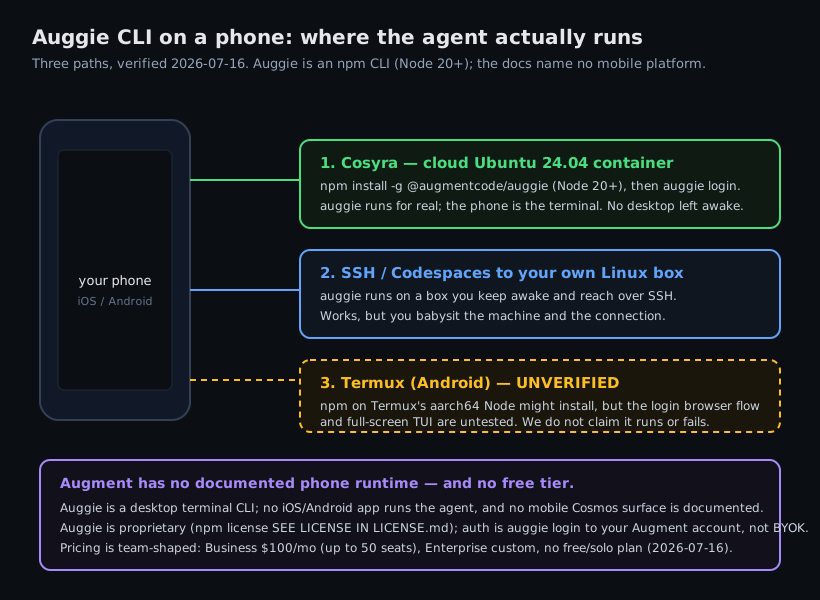
auggie runs, checked
2026-07-16 against Augment's CLI docs and the npm package. Diagram, not a screenshot.
What is the Auggie CLI?
Auggie is Augment Code's terminal-native coding agent, a full-screen TUI
that reads and edits files in your project, streams progress as it works,
and has non-interactive modes (--print, --print --quiet) for CI and scripting. Augment Code, Inc. is a well-funded company (about
$252M raised, a roughly $977M post-money valuation at its April 2024 Series
B, with Adobe, MongoDB, and Snyk among named customers), and in 2026 it
pivoted its center of gravity to Cosmos, a team-scale
agents platform (public preview announced 2026-06-05). Auggie is the CLI
that sits in front of that.
- Install:
npm install -g @augmentcode/auggie, Node 20+, on zsh, bash, or fish. The binary isauggie. - Version: 0.32.0 on npm as of 2026-07-16.
- Auth:
auggie loginto your Augment account, an account login, not a raw model API key. - Source model: proprietary. The npm license field reads
SEE LICENSE IN LICENSE.md; there is no public product repo.
Because it is a desktop CLI that expects a real shell, it has the same mobile problem as every other coding agent: the phone is the wrong place to run the process. The fix is putting the process somewhere real and reaching it from the phone. If you would rather use an agent that is pre-installed and provider-neutral, our most-read guide is OpenCode on phone, and the whole set lives on the AI coding agents on mobile pillar.
Read this first: Augment has no free tier
Before you wire this up, know what you are adopting. As of 2026-07-16, Augment's pricing page shows exactly two plans and no free door:
- Business: $100/month flat, up to 50 seats, with $100 of pooled usage included, the Context Engine, the coding agent, the CLI, MCP, and SOC 2 Type II.
- Enterprise: custom, adding self-hosting, multi-region, SSO/OIDC/SCIM, CMEK, ISO 42001, and dedicated support.
Usage is metered in dollars: the model provider's list-price LLM cost, plus a flat 40% service fee on that LLM usage, plus Cosmos compute time, pooled across the team. That is a deliberate team-and-budget shape. Here is the opinion Augment would push back on: for the developer who just wants to run an agent from a phone on the train, a $100/month, 50-seat plan with no free tier and no solo option is the wrong door. You are buying an org platform to get a CLI. Augment would say that solo, phone-first developer simply is not their customer, and post-Cosmos that is a fair reading of their pricing. Both can be true. If your company already runs Augment, the steps below get its CLI onto your phone; if you are shopping as an individual, weigh the four provider-neutral agents we pre-install first.
How can you run the Auggie CLI from a phone?
Three ways, in order of how well they work without a desktop: a cloud Ubuntu
container where auggie actually runs (Cosyra), SSH or Codespaces
to your own Linux box, and Termux on Android (which we can't promise works).
1. Cosyra: install Auggie in a cloud container
Cosyra is a native iOS and Android terminal connected to a persistent Ubuntu
24.04 x86_64 container. It is a normal Linux box with a shell, so once Node
20+ is present the npm install lands and auggie executes in the container,
so nothing of yours has to stay awake. We ship
four agent CLIs pre-installed
(Claude Code, Codex, OpenCode, Antigravity), and Auggie is a one-command add on
top, with the caveat that it bills through an Augment account, not your own provider
key.
- Works when: you want
auggierunning on demand from either platform with no home machine to maintain. - Breaks when: you have no internet. The container is in the cloud, so an offline train tunnel means no terminal.
- Cost: Core is $20/month and Pro is $30/month. Eligible new users can start a 7-day free trial in the App Store app. See pricing. Your Augment plan is separate.
2. SSH or Codespaces to your own Linux box
Install auggie on a Linux machine you own (a home server, a VPS,
or a GitHub Codespace) and
reach it from a phone SSH client. The CLI runs for real, but you keep that
box awake and manage the connection, which is the babysitting a cloud
container removes.
3. Termux on Android: why we won't promise it
Here is the honest version, because guessing here is how bad advice spreads.
Auggie installs through npm on Node 20+, and Termux can run
an aarch64 Node, so on paper the install might succeed, unlike a glibc-only
native binary that has no chance in Termux's bionic userland. But the auggie login browser-auth flow, the full-screen TUI, and any prebuilt native dependencies
are untested there. So we will not tell you it works or that it fails;
that is a claim only a hands-on device test can make.
If you want to stay on-device, the credible route is a proot glibc distro inside Termux, the same pattern we walk through for a full Debian userland in running a Linux container on Android. Simpler and more reliable: a cloud x86_64 container, where the npm install just runs.
How do you run Auggie on iPhone or Android with Cosyra?
Four steps: install the app, confirm Node 20+, install auggie,
and log in.
Step 1: Install Cosyra and sign in
Download from the App Store or Google Play. You land in a persistent Ubuntu 24.04 x86_64 container, a real Linux box with a full shell.
Step 2: Confirm Node 20+
Auggie needs Node 20 or later. Check the version, and if it is older,
install a current Node with nvm. This is the one prerequisite
people miss, and the npm install fails cleanly without it.
$ node --version
v18.19.1
$ # older than 20, install a current Node
$ nvm install 20 && nvm use 20
$ node --version
v20.11.1
Step 3: Install the Auggie CLI
Auggie is not one of the four agents we pre-install (it is proprietary and account-based, not a provider-neutral BYOK agent), but it is a one-command add:
$ npm install -g @augmentcode/auggie
added 1 package (auggie 0.32.0)
$ auggie --version
0.32.0
Step 4: Log in and start auggie
auggie login opens a browser/device flow to your Augment account
(not a raw model API key). Then clone a repo and run auggie,
interactive, or --print for a one-shot.
$ auggie login
Open this URL to sign in to Augment:
https://augmentcode.com/cli/auth?code=...
✓ Signed in
$ cd your-app && auggie
Auggie · type your request.
auggie streams its work and edits files in place. Because the container
is persistent, you can start a change on the couch, close the app, and pick the
same session back up on an iPad at your desk. The
--print one-shot mode is handy on a phone: type one line, let it
run, read the result.
Try Cosyra. Plans start at $20/month. It is a real Ubuntu 24.04 box with a shell, so the Auggie npm install lands like it does on any Linux machine once Node 20+ is there. App Store / Google Play / Pricing details
What are the real limits of running Auggie on a phone?
- No offline mode. The container is in the cloud; no internet, no terminal.
- Augment account, not raw BYOK.
auggie loginis account-based, and Augment bills usage (LLM list price plus a 40% service fee). If you specifically wanted to run against your own Anthropic or OpenAI key, one of our four pre-installed BYOK agents is the closer fit. - No free tier. Augment's cheapest documented door is the $100/month, up-to-50-seat Business plan; there is no solo option. This is a tool you reach for because your team already pays for it.
- Phone keyboards slow long prompts. Voice dictation and a Bluetooth
keyboard help a lot; the
--printone-shot mode helps more.
Cosyra vs SSH vs Termux for Auggie
Cosyra runs auggie for real with nothing left awake; SSH or Codespaces
works if you already keep a Linux box on; Termux on Android is unverified. The
table lines them up, checked 2026-07-16.
| Feature | Cosyra | SSH / Codespaces | Termux |
|---|---|---|---|
| Auggie actually runs | In the cloud container | On your own Linux box | Unverified (login flow + TUI) |
| Needs a machine you keep awake | No | Yes | n/a |
| Platforms | iOS + Android | Any phone SSH client | Android only |
| Full shell on the phone | Yes | Yes (over SSH) | Yes, but Auggie may not run |
| Setup time | ~5 min | Depends on your box | Uncertain |
| Cost (excl. Augment plan) | From $20/mo | Your box + your time | Free |
Prefer an agent that is pre-installed and provider-neutral? See Claude Code on phone, Codex CLI on phone, Antigravity on a phone, and OpenCode on phone, or the pillar on AI coding agents on mobile.
Frequently asked questions
Can you run the Auggie CLI on a phone?
Not as a native app. Augment's docs name no mobile platform for the Auggie
CLI, and there is no documented phone runtime. Auggie is a desktop
terminal agent installed with npm on Node 20+. The working path from a
phone is to install it in a cloud Linux container (Cosyra), where auggie
genuinely runs and your phone is the terminal, or to SSH from your phone to
your own Linux box that has it installed.
[source: Augment Code Docs, Auggie CLI overview]
How do you install the Auggie CLI?
One npm command: npm install -g @augmentcode/auggie. It needs
Node 20 or later and a compatible shell (zsh, bash, or fish). The
published package is @augmentcode/auggie, version 0.32.0 as
of 2026-07-16, binary auggie. After install, run
auggie login to authenticate to your Augment account.
[source: npm, @augmentcode/auggie package]
Is the Auggie CLI free? What does Augment Code cost?
There is no free tier and no solo plan as of 2026-07-16. Augment's pricing page shows Business at $100/month flat (up to 50 seats, $100 of pooled usage included) and Enterprise (custom). Usage is billed in dollars, the provider's list-price LLM cost plus a 40% service fee plus Cosmos compute, pooled across the team. It is a team-and-budget shape, not a consumer plan.
[source: Augment Code pricing]
Is the Auggie CLI open source?
No. The npm package declares its license as "SEE LICENSE IN LICENSE.md", a proprietary EULA, and there is no public product source repository. You can install and run it, but you cannot read, fork, or self-host the source the way you can with an Apache- or MIT-licensed CLI. Treat it as a closed-source binary distributed through npm.
[source: npm, @augmentcode/auggie license field]
Is the Auggie CLI bring-your-own-key (BYOK)?
Not at the CLI level. Auggie authenticates with auggie login to
your Augment account, not a raw Anthropic, OpenAI, or Google API key. The Augment
platform markets multi-model routing and org-level "bring your own keys," but
the CLI login itself is account-based. That differs from a provider-neutral
BYOK agent where you paste your own key and pay that provider directly, how
Cosyra's four pre-installed agents work.
[source: Augment Code Docs, Auggie CLI authentication]
Does the Auggie CLI work in Termux on Android?
We do not know, and we will not claim either way without a hands-on test.
Auggie installs via npm on Node 20+, so on Termux's aarch64 Node it could
install on paper, but the auggie login browser flow, the full-screen
TUI, and any prebuilt native dependencies are untested there. So it is unverified,
not confirmed and not ruled out. The reliable Android path is a proot glibc
distro inside Termux, or a cloud x86_64 container.
tl;dr
Augment Code's Auggie CLI (auggie) is a desktop npm agent,
npm install -g @augmentcode/auggie, Node 20+, proprietary, no
mobile build and no documented phone runtime. To run it from a phone,
install it in a cloud Ubuntu container (Cosyra), run
auggie login to your Augment account, and start it. It is account-based,
not raw BYOK, and Augment has no free tier (Business is $100/mo). Termux on
Android is unverified. Npm might install, but the login flow and TUI are untested.
App Store / Google Play. Plans start at $20/month.
Run the Auggie CLI from your phone.
Install Cosyra, confirm Node 20+, npm install -g @augmentcode/auggie,
auggie login, and go.