Codebuff on a phone means running the CLI on a Linux machine you reach from
the phone, because Codebuff publishes no mobile app and its npm package
declares only macOS, Linux, and Windows. The path that works: install
Cosyra for iOS or
Cosyra for Android, then run
npm install -g codebuff in the container. We ran that on 2026-07-18
in a clean Ubuntu 24.04 x86_64 box and measured what the install actually costs,
which is not the number npm prints.
Quick decision: pick the path you came for:
- You want the install: four commands, no surprises. Setup ↓
- You are on metered data: the real download is 46.2 MB, not 3.9 MB. What we measured ↓
- You drive agents through tmux: plain
send-keysdrops characters. The tmux problem ↓
Not sure Codebuff is the agent you want? The honest verdict ↓ covers who should pick something else.
This guide was written by the Cosyra team. We checked every claim against primary sources on 2026-07-18 rather than repeating what other pages say: the GitHub repository and its LICENSE file, the npm package metadata, Codebuff's own troubleshooting docs, and a clean container for the install itself. Rather than assume the install works, we ran it.
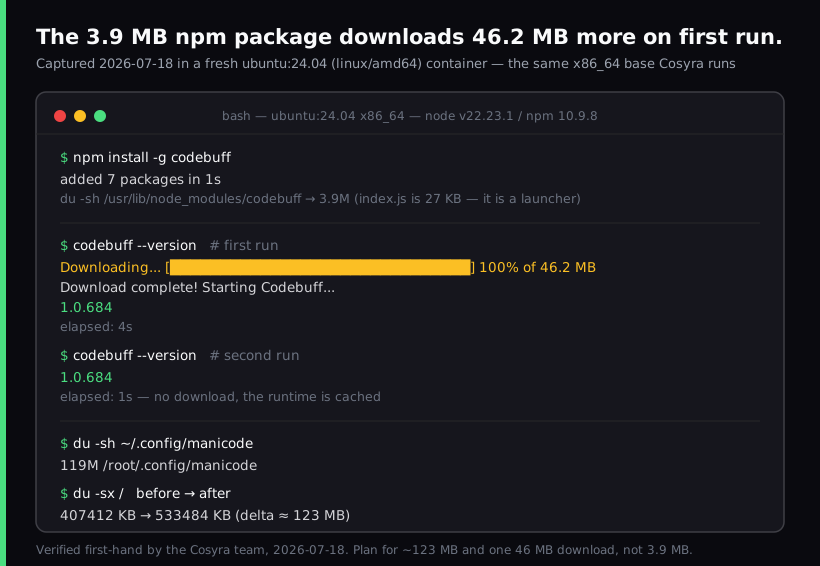
ubuntu:24.04 (linux/amd64) container
with Node v22.23.1 and npm 10.9.8, the same x86_64 base we run. The npm install
reports 3.9 MB. The first launch downloads 46.2 MB more, and total disk usage
grows about 123 MB.
What "Codebuff on a phone" actually means
Codebuff is an agent, not a place to run agents. It competes on which tool writes your code, not on where that tool lives. So the question is never "does Codebuff have an Android build", it does not, but "where is the Linux box, and how do I reach it from the train?"
We checked the npm metadata directly on 2026-07-18: the package declares
os as darwin, linux, and win32, with engines.node set
to >=16. No Android, no iOS. The README documents macOS,
Linux, and Windows through WSL. Anyone telling you Codebuff runs natively on
a phone is guessing.
That leaves three options, and only one of them survives a phone actually being a phone. You can keep a laptop awake at home and SSH in, which works until the lid closes or the IP changes. You can try Termux on Android, which we get to below. Or you can put the agent in a container that stays up whether or not any of your hardware does, which is the shape we build.
The install size nobody documents
Here is the part we could only learn by running it. npm install -g codebuff reports "added 7 packages in 1s" and leaves 3.9 MB on disk. That looks like
one of the lightest agent installs available. It is not.
The published package is a launcher. Its index.js is 27 KB and its
job is to fetch a platform-specific runtime on first use. When we ran
codebuff --version the first time, it printed a progress bar for
a 46.2 MB download, said "Starting Codebuff...", and then printed
1.0.684. That run took 4 seconds. The second run printed the
same version in 1 second with no download, so the runtime is cached rather
than refetched.
Measured on the same box, before and after:
| What | Measured 2026-07-18 |
|---|---|
| npm package on disk | 3.9 MB (7 packages, 1s) |
| First-run download | 46.2 MB |
Cache in ~/.config/manicode | 119 MB |
| Total container disk delta | 407,412 KB → 533,484 KB (≈123 MB) |
| First run vs second run | 4s vs 1s |
We think shipping a 46 MB post-install download with no mention of it in the README is a real problem, and "it is cached after the first run" is not an answer when the environment is fresh. The Codebuff team would likely say the launcher pattern keeps npm installs fast and lets them ship platform builds independently, which is true. Both things are true at once. The practical consequence is that you want that first run to happen on Wi-Fi, not while you are standing on a platform waiting for a train with two bars of signal.
This is also where a persistent container earns its keep. Our containers keep 30 GB of storage per user and resume where you left them, so the 119 MB lands once and is still there next time. An environment that resets means paying the 46.2 MB again.
Setup, step by step
1. Install Cosyra and sign in
Get the app from the App Store or
Google Play and sign in. 1 hour free, no credit card,
no trial signup. The container is Ubuntu 24.04 x86_64, which matches the linux-x64 runtime Codebuff pulls, and Node.js is already installed so there is nothing
to set up before the next step.
2. Install the CLI
npm install -g codebuff
This gives you two binaries, codebuff and cb. On
our test box they landed at /usr/bin/codebuff and
/usr/bin/cb. If you hit a permissions error here, Codebuff's
troubleshooting page covers it; in a container running as your own user it
does not come up.
3. Trigger the runtime download on Wi-Fi
codebuff --version
This is the 46.2 MB step. Do it once, deliberately, while you are on a
connection you do not pay by the megabyte. It should print
1.0.684 or whatever the current build is. The repository carries
600+ tags and ships several releases a week, so treat any version you read here
as a same-day snapshot.
4. Log in through the browser
codebuff loginIt generates a URL with an auth code in it, prints it, and waits. On a phone, copy that URL into your mobile browser and approve there, then come back to the terminal. It does time out. Ours printed "Login timed out. Please try again" when we left it sitting. So have the browser open before you start rather than hunting for it while a timer runs.
The agent needs somewhere to live. Cosyra is a persistent Ubuntu container reached from iOS and Android, with Claude Code, Codex CLI, OpenCode, and Gemini CLI already installed. Codebuff is a fifth you can add with one npm command.
1 hour free, no credit card. See pricing
The tmux problem, and why it matters on a phone
On a phone, tmux is not a preference. It is how a session survives the tunnel, the lock screen, and the moment your carrier hands you to a different tower. Our tmux on phone guide covers that setup on its own.
Codebuff has a documented quirk here. Their troubleshooting page states that
driving it with plain tmux send-keys drops or garbles characters,
and illustrates it with "hello world" arriving as a single
d. The documented fix is to wrap input in bracketed paste
escape sequences so the terminal announces it as a paste, which Codebuff
then handles atomically:
tmux send-keys -t codebuff $'\e[200~hello world\e[201~'
tmux send-keys -t codebuff Enter
We are reporting this from Codebuff's docs rather than our own testing. Scripted tmux automation was outside what we tested on 2026-07-18. If you type into the session by hand, which is what most phone use looks like, this does not affect you. It matters if you script the agent.
What about Termux?
We will not tell you it works, and we will not tell you it does not, because
we did not get a conclusive test. Here is what we did establish by reading
the launcher's source on 2026-07-18: it maps platforms to runtime archives,
and linux-arm64 is one of them. So on Termux's aarch64 Node, the
download step would resolve to a real build rather than failing with "Unsupported
platform."
The open question is execution, not download. Termux runs against Android's Bionic libc rather than glibc, and a prebuilt Linux binary that expects glibc frequently will not start there. Our arm64 container test timed out before it finished, so we have no result to report. If you try it, the failure mode to watch for is the binary downloading fine and then dying on launch.
We are being this careful on purpose. We once published a claim that Termux could not run Claude Code, which turned out to be wrong, and it spread across three of our pages before we caught it. Untested is a fine thing to say out loud.
Who should skip this
Codebuff is worth your time if you want a model-agnostic agent you can point at any OpenRouter model with your own key, and if its multi-agent file selection matches how you think about a codebase. It is genuinely open source under Apache-2.0, and between the 500 free credits for older GitHub accounts and the separate free Freebuff variant, the on-ramp costs less than most paid agents.
Try Codebuff first if:
- You want one config that reaches dozens of models rather than one vendor's.
- You want to read and fork the agent itself. The Apache-2.0 source is right there.
- You already have a laptop you keep awake, in which case you do not need to pay for an environment at all.
Skip it if:
- You want an agent already installed when you open the terminal. We ship four; Codebuff is an npm command on top.
- Your monthly spend matters and $100 is the entry subscription tier. Our Pro is $29.99/mo for the environment, and you bring your own model key.
- You need to work offline. Our container lives in the cloud, so no connection means no terminal, a real trade-off against a local terminal like Termux, and one Codebuff on a laptop does not have.
Comparing agents rather than environments? Our AI coding agent CLIs compared guide puts them side by side, and AI coding agents on mobile is the pillar covering the whole category from a phone. If you want the same walkthrough for an agent we pre-install, start with OpenCode on your phone.
Questions people actually ask
Does Codebuff run on Android or iPhone?
Not natively. The npm package declares os as darwin, linux, and
win32, no Android, no iOS entry, and the README documents macOS, Linux, and
Windows via WSL. Running it from a phone means running the CLI on a Linux machine
and reaching that machine from the phone.
[source: npm registry metadata for codebuff@1.0.684, os and engines fields, verified 2026-07-18]
Why does codebuff exit immediately with no output?
It is a known open report. GitHub issue #284, opened 2025-09-12, describes
the CLI exiting with no output, no errors, and no prompt for both
codebuff and codebuff --version, with no
documented fix in the thread. Codebuff's troubleshooting page points at
conflicting Node and npm installations as the usual cause, which a
single-Node container avoids entirely.
[source: CodebuffAI/codebuff issue #284]
Why does Codebuff keep updating itself forever?
Codebuff documents this as "Endless Auto-Updates" and attributes it to
conflicting Node and npm installations, particularly Homebrew alongside
nvm. The documented fix is to check which node and
which npm, then remove the Homebrew copy and keep one version
manager.
[source: Codebuff docs, troubleshooting, "Endless Auto-Updates"]
Where does Codebuff store its files, and how do I clear them?
In ~/.config/manicode, which is the project's former name
rather than a typo. Codebuff's troubleshooting page names that path as the
local cache to delete when things break, and chat history lives under
~/.config/manicode/projects/<project-name>/chats. We
measured the directory at 119 MB after one first run on 2026-07-18.
[source: Codebuff docs, troubleshooting, "Delete local cache"]
Why do characters get dropped when I drive Codebuff with tmux?
Because Codebuff handles pasted input atomically and plain
tmux send-keys does not announce a paste. Codebuff's docs show
"hello world" arriving as just d and recommend wrapping the text
in bracketed paste escape sequences instead.
[source: Codebuff docs, troubleshooting, "Automating Codebuff with tmux"]
Is Codebuff open source, and is it MIT or Apache-2.0?
Apache-2.0. The LICENSE file in the repository is the Apache License, Version 2.0, and the GitHub API reports the same SPDX identifier. The npm metadata says MIT, which is a packaging mismatch rather than a second license. Cite the repository LICENSE file if the distinction matters.
[source: CodebuffAI/codebuff LICENSE file]
How much does Codebuff cost?
As of 2026-07-18, subscriptions are $100, $200, and $500 per month (described as 1x, 2.5x, and 7x usage), pay-as-you-go is 1 cent per credit, and GitHub accounts older than four months get 500 free credits. Freebuff is a separate, fully free ad-supported product from the same team, so its price is not Codebuff's.
tl;dr
Codebuff has no mobile app, so running it from a phone means running the
CLI on a Linux box you reach from the phone. The install is two commands,
but budget about 123 MB rather than the 3.9 MB npm reports: the package is
a launcher that pulls a 46.2 MB runtime on first use and leaves 119 MB in
~/.config/manicode, all measured on 2026-07-18. Use Codebuff
if you want a model-agnostic, Apache-2.0 agent and already have a machine
to run it on. Use Cosyra if you want the machine itself, persistent,
reachable from iOS and Android, with four agents already installed.
App Store / Google Play. 1 hour free, no credit card.
Give the agent a permanent address. Install Cosyra and get a persistent Ubuntu container that keeps your files, your login, and that 119 MB runtime between sessions.