You can run OpenCode on Android, but not the way most install guides imply.
There is no native Android app, and unlike Claude Code or Gemini CLI, a
plain npm i -g opencode-ai inside Termux does not work reliably:
the launcher misdetects the Termux environment and hands Android-arm64 a Linux-x64
binary. So "OpenCode on Android" means one of four real paths: a cloud Ubuntu
container with OpenCode pre-installed (Cosyra on Google Play, where you just type opencode), the third-party guysoft/opencode-termux native aarch64 build that runs in Termux with no chroot, a Termux proot-distro chroot on-device, or SSH from Termux into your own always-on box. This guide
walks each one with the honest trade-offs.
This is the Android-specific companion to our
OpenCode on your phone walkthrough
(which covers iPhone and Android generically), with a tablet sibling in
OpenCode on iPad. What changes
on Android is that Termux is a genuine on-device option, unlike on iOS, but
OpenCode is the one agent of the four where the Termux story is still
broken, which is the part most posts get wrong. The siblings to this guide
are
Claude Code on Android
and Gemini CLI on Android,
and all three feed into our
Coding on Android pillar, which maps
out everything the OS can run as a dev environment. For the broader picture across
all four mobile AI agents, see
AI coding agents on mobile. One agent worth flagging here: Kilo CLI is built on OpenCode, so it
inherits the same Termux misdetection we describe below. We have not tested
@kilocode/cli in Termux ourselves, and the clean path is the same
cloud container or proot-distro chroot. See
Kilo CLI on your phone.
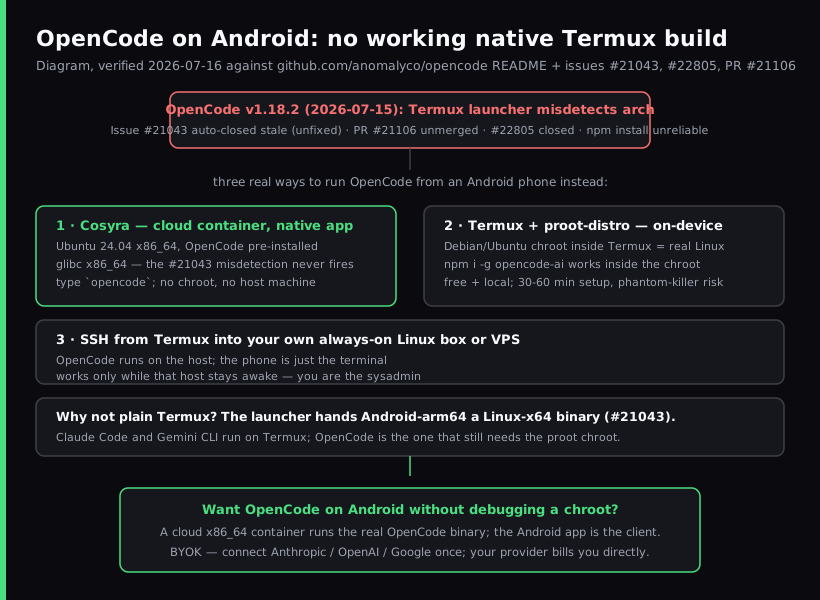
Quick decision. Jump to the part that matches you:
- You want OpenCode running in minutes with nothing to babysit.
A cloud container runs the real binary and you type
opencodefrom the Android app. Cosyra setup ↓ - You want free, local, and on-device. Termux plus
proot-distroruns OpenCode in a chroot. Know the setup cost first. Native Termux build ↓ - Termux reality ↓
- You already keep a box awake. SSH into it from Termux and run OpenCode there. SSH path ↓
Why does plain Termux break OpenCode on Android?
Plain Termux breaks OpenCode because the launcher picks the wrong binary.
OpenCode is distributed as prebuilt binaries via npm
optionalDependencies, one per platform and arch. An
opencode-android-arm64 binary was added after the old postinstall
failure (issue #12515) was fixed, so installs no longer hard-fail. But the launcher
still misdetects Termux as plain Linux and tries to run the Linux-x64 build on
an Android-arm64 device, which fails with an "incompatible binary" error. That
is
anomalyco/opencode issue #21043, opened 2026-04-04 and auto-closed as not-planned on 2026-07-03 for
inactivity, not fixed.
The fix that would have helped, PR #21106, "allow opencode CLI to run in Termux (remove hard exit)", was closed without merging. And the native-Termux feature request (#22805) was closed without a maintainer commitment. That request is worth reading, because the person who filed it points out the thing we keep running into: Claude Code and Gemini CLI both run on Termux, and OpenCode is the holdout that needs a workaround. OpenCode the project is great: about 186,323 GitHub stars as of 2026-07-16, latest release v1.18.2 on 2026-07-15, MIT-licensed, multi-provider. The Termux launcher path is just the rough edge.
Here is an opinion the on-device purists will push back on: for OpenCode
specifically, fighting the Termux misdetection on a phone is not worth it
when the chroot or a cloud container both run the real binary cleanly. We
spent an evening on the couch getting plain Termux to load the right arch
binary and gave up; the
proot-distro route worked, and the cloud container worked with no
setup at all. "On-device or nothing" is a principle, not a workflow.
What are the four real ways to run OpenCode on Android?
There are four real ways to run OpenCode from an Android phone as of
2026-07-20: Cosyra (cloud container with OpenCode pre-installed), the
third-party guysoft/opencode-termux native aarch64 build, Termux
with
proot-distro (an on-device Debian/Ubuntu chroot), and SSH from Termux
into a box you own. We walk each below. We listed only three here until 2026-07-20,
which was our error. The native build has existed since April 2026 and we were
tracking only the upstream repo's issue tracker, where it does not appear.
1. Cosyra (cloud container, native Android app)
This is what we build. The Cosyra Android app opens a persistent Ubuntu
24.04 x86_64 container reached from any Pixel, Galaxy, OnePlus, Nothing, or
foldable. OpenCode is pre-installed alongside Claude Code, Codex CLI, and
Antigravity CLI on Node 20+. Because the container is glibc x86_64, the
opencode Linux-x64 binary is the correct one, so the Termux misdetection
in #21043 and the older arm64 postinstall failure simply do not happen. You get
30 GB of persistent storage, session hibernation that resumes exactly where you
left off, and the same container is reachable from iPhone, iPad, and a browser.
BYOK applies: you connect Anthropic, OpenAI, or Google once and your provider
bills you directly. We do not proxy or meter your model calls.
- Works when: you want the real OpenCode binary with zero setup, full x86_64 Ubuntu compatibility, and the same environment across every device you pick up.
- Breaks when: you have no internet. The container lives in the cloud, so there is no offline mode. That is a genuine trade-off versus a local Termux install.
- Cost: Core is $20/month and Pro is $30/month. See pricing.
2. guysoft/opencode-termux (native aarch64, on-device, free)
The one most guides miss, ours included until this update.
opencode-termux is an
MIT-licensed build system that cross-compiles OpenCode to Android aarch64 so it
runs directly in Termux with no chroot. The hard part it solves is the runtime:
OpenCode compiles to a standalone binary via Bun, and Bun has no official Android
target, so the project cross-compiles Bun itself, WebKit/JavaScriptCore engine
included. Release v0.2.1 (2026-06-25) ships OpenCode 1.17.9 three ways, and the pacman and deb packages
pull in ripgrep for you:
# Option 1: pacman (recommended on Termux)
$ curl -LO https://github.com/guysoft/opencode-termux/releases/latest/download/opencode-aarch64.pkg.tar.xz
$ pacman -U opencode-*-aarch64.pkg.tar.xz
# Option 2: deb
$ dpkg -i opencode-aarch64.deb
# then, either way:
$ opencode
- Works when: you want OpenCode running on-device with no chroot layer and no cloud bill, and you are content on OpenCode 1.17.9.
- Breaks when: you need a feature from a newer release. This
is the real caveat. v0.2.1 packages 1.17.9 while upstream is on 1.18.3 (2026-07-16)
and ships several releases a day, so the gap widens between build refreshes.
The Android 12+ phantom process killer can still end a long session with
signal 9, exactly as it does under proot. - Cost: free, MIT-licensed. The cost is that it is community-maintained by one developer, 151 stars and 7 open issues as of 2026-07-20, so it carries no support guarantee from Anomaly.
One correction worth making since we are citing this project: its README
says Bun marked Android support "not planned" and links Bun issue #9. We
checked that issue on 2026-07-20 and it is an unrelated 2022 ByteBuffer
item, closed as completed. The substance holds. Bun ships no official Android
target, which is why the cross-compile exists. But the citation is wrong, so do
not repeat it.
3. Termux + proot-distro (on-device, free)
Termux is an open-source (GPLv3) Android
terminal emulator with a real package manager. Because plain Termux misdetects
the OpenCode arch (issue #21043), the on-device path that keeps you on the current
upstream release is
proot-distro: install a Debian or Ubuntu chroot inside Termux,
which is a real glibc Linux userland, then install Node 20+ and
npm i -g opencode-ai inside it. If you want the full rundown of the
chroot path versus UserLAnd versus a cloud x86_64 container, see
Linux container on Android.
- Works when: you are on Android, you want a fully local setup
with no cloud bill, and you accept the
proot-distrooverhead. - Breaks when: the Android 12+ phantom process killer terminates
a long session with
signal 9(the same issue we document in the Claude Code on Android guide), or a new OpenCode release changes the chroot path. The misdetection bug is the headline; PR #21106 that would have fixed it was closed without merging, so it never landed. - Cost: free OpenCode binary, free Termux, free proot-distro. The cost is your time when the install path breaks between releases.
4. SSH from Termux into your own box
The classic remote route. Install OpenCode on an always-on Linux box or a
VPS (Hetzner, Scaleway, DigitalOcean) with
npm i -g opencode-ai, then ssh in from Termux inside
a tmux session and run opencode. The agent runs on
the host; the phone is just the terminal. You can also drive
opencode serve over the connection if you prefer the HTTP API to
the TUI.
- Works when: you already have a box you keep awake and you want OpenCode to run on hardware that is yours.
- Breaks when: the host sleeps, or you do not want to be a sysadmin. Patching, firewall rules, and backups are not optional on a box that holds your source and your provider keys.
- Cost: free OpenCode, plus a VPS at roughly $5 to $40/month if you do not already own a box.
How do you set up OpenCode on Android with Cosyra?
You set up OpenCode on Android in about three minutes: install Cosyra from
Google Play, confirm opencode is on the PATH in the Ubuntu container,
connect a provider, clone a repo, and type
opencode. The steps below are exactly what we run on a fresh
Pixel.
Step 1: Install Cosyra from Google Play
Open the Google Play Store and install Cosyra. The Android app runs on Pixel, Samsung Galaxy S and Z foldables, OnePlus, Nothing, and any device on Android 9 or later. Sign in with Google, Apple, or email and the app provisions a fresh Ubuntu 24.04 container with OpenCode, Claude Code, Codex CLI, and Antigravity CLI already installed.
Step 2: Confirm OpenCode is installed
No install step, no chroot, no npm. OpenCode is baked into the image. Verify in one command, and note the arch, which is exactly why the Termux misdetection cannot bite here.
$ opencode --version
1.18.2
$ which opencode
/usr/local/bin/opencode
$ uname -m
x86_64
Step 3: Connect a provider
Run opencode auth and pick the provider you want: Anthropic, OpenAI,
Google, and local backends are all in the list. The flow opens a URL; sign in
on your phone browser and paste the verification code back into the terminal.
Keys persist with the container's home volume, so you do this once per provider
per container.
$ opencode auth
Select provider:
> anthropic
openai
local
Open https://opencode.ai/auth/... on your phone
Code: ****-****
Connected: anthropic
Step 4: Clone a repo and run opencode
$ git clone https://github.com/your-org/your-project.git
Cloning into 'your-project'...
$ cd your-project
$ opencode
opencode 1.18.2
workspace: /home/cosyra/your-project
agent: build (default, edit access)
OpenCode reads the repo, proposes diffs, and waits for your approval before
writing. The default build agent has edit access; the
plan agent (opencode --agent plan) is read-only if you
want to think before touching code. When the screen locks the container
keeps running; reopen the app and the session is exactly where you left it,
which is the whole point of coding from a phone on the train. The phone
keyboard is fine for the natural-language turns, since you are writing one
sentence of intent at a time, not 40-line functions.
Try Cosyra. Plans start at $20/month. Google Play / App Store / Pricing details
How do the Android options compare?
The four paths line up cleanly against what matters for running an agent from a phone: whether the real binary runs, whether you fight the Termux misdetection, whether it needs another machine, whether it works offline, and whether you are on the current release. The table covers the state as of 2026-07-20.
| Feature | Cosyra (Android app) | opencode-termux (native) | Termux + proot-distro | SSH to your box |
|---|---|---|---|---|
| Runs the real OpenCode binary | Yes (pre-installed) | Yes (native aarch64) | Yes (inside chroot) | Yes (on host) |
| Hits Termux misdetection (#21043) | No (x86_64 Ubuntu) | No (purpose-built for Termux) | No (chroot is real Linux) | No |
| Needs another machine | No | No | No | Yes (a host) |
| Works offline | No | Yes | Yes | No |
| Phantom-killer risk | None | Yes (mitigated) | Yes (mitigated) | None |
| Setup time (cold) | ~3 min | One package install | 30–60 min | 30–60 min |
| OpenCode version (2026-07-20) | Current upstream | 1.17.9 (upstream: 1.18.3) | Current upstream | Current upstream |
| Cost (not counting tokens) | From $20/mo | Free (MIT) | Free | VPS ~$5–40/mo |
Choose Cosyra if you want the current binary with nothing to babysit and the
same container across Android, iPhone, iPad, and web. Choose
opencode-termux if you want on-device and free with the least setup
and 1.17.9 is new enough for you. For most day-to-day agent work it is. Choose
Termux + proot-distro if you want on-device and free but need to track upstream
releases, and you accept the chroot overhead and the phantom-killer risk. Choose
the SSH path if you already keep a box awake. For tmux and TUI ergonomics once
you are in a shell, see
TUI apps on phone, part of the
broader
mobile coding terminal pillar.
If you are weighing the whole on-device Termux model against a cloud container,
our
Cosyra vs Termux comparison has the
full trade-off list.
Frequently asked questions
Can you run OpenCode natively on Android in Termux?
Yes, using a community build, though not with the official installer.
Upstream still misdetects Termux as plain Linux and tries to run the
Linux-x64 binary on Android-arm64, giving "incompatible binary" failures;
that is issue #21043 (opened 2026-04-04, auto-closed as not-planned on
2026-07-03 for inactivity, not fixed), and PR #21106, which would have
removed the hard exit, was closed without merging. What fills the gap is
guysoft/opencode-termux, an MIT-licensed project that
cross-compiles OpenCode and the Bun runtime itself, including the
WebKit/JavaScriptCore engine, to Android aarch64, necessary because Bun
has no official Android target. Its latest release v0.2.1 (2026-06-25)
ships OpenCode 1.17.9 as a pacman package, a deb, or a standalone zip, and
includes fixes for Android 11+ crashes. The trade-off is version lag:
1.17.9 against upstream 1.18.3 as of 2026-07-20, and upstream ships
several releases a day. If you want to stay on the current version,
proot-distro or a cloud container runs the standard Linux build instead.
[source: GitHub, guysoft/opencode-termux release v0.2.1, OpenCode 1.17.9 for Android/Termux aarch64] [source: GitHub, anomalyco/opencode issue #21043, "CLI misdetects Android/Termux environment as Linux"]
Why do Claude Code and Gemini CLI work on Termux but OpenCode doesn't?
Because OpenCode ships per-arch prebuilt binaries via npm
optionalDependencies and its launcher picks the wrong one inside
Termux. The native-Termux feature request (#22805) was opened 2026-04-16 explicitly
noting that Claude Code and Gemini CLI both run on Termux while OpenCode needs
the proot-distro workaround; it was closed without a maintainer commitment to
land native support.
[source: GitHub, anomalyco/opencode issue #22805, "[FEATURE]: Termux native support"]
What is the fastest way to get OpenCode on an Android phone?
Install Cosyra from Google Play, sign in, and type opencode.
OpenCode is pre-installed in an Ubuntu 24.04 x86_64 container, so there is
no npm install, no proot chroot, and no arch misdetection. Plans start at
$20/month.
[source: Google Play, Cosyra listing]
Does OpenCode have an official Android app?
No app, but that is a narrower answer than it sounds. The
anomalyco/opencode README lists install paths for macOS, Linux (x64 and
arm64), and Windows only, and there is no native Android or iOS app.
Whether OpenCode runs on Android at all is a separate question, and the
answer is yes: the third-party guysoft/opencode-termux project
(MIT, 151 stars, checked 2026-07-20) cross-compiles OpenCode and the Bun runtime
to Android aarch64, and its latest release v0.2.1 from 2026-06-25 packages OpenCode
1.17.9 as a pacman package, a deb, or a standalone binary you install inside
Termux. That is a native CLI rather than an app, it is community-maintained
rather than official, and it trails upstream's 1.18.3. Your other routes are
a proot-distro chroot, an SSH session to your own box, or a cloud container.
[source: GitHub, anomalyco/opencode README, supported platforms]
Will proot-distro OpenCode survive when I switch apps on Android?
Not guaranteed. Android 12 and later includes a phantom process killer that can send SIGKILL (signal 9) to background processes Termux spawns, which can end a long OpenCode run when you leave the app. You can mitigate it with device settings or adb, but the failure mode is real. A cloud container sidesteps it because the agent runs server-side, not in a process Android manages.
[source: GitHub, termux/termux-app issue #2366, Android 12 phantom process killing]
Is OpenCode free, and what do I pay for on Android?
OpenCode itself is free and MIT-licensed; you pay your model provider directly (BYOK). On Termux + proot the software is free and your only cost is provider tokens. On Cosyra you pay for the cloud container, plus your provider tokens. We do not proxy or meter your model calls.
tl;dr
Three real ways to run OpenCode from an Android phone as of 2026-07-16.
Cosyra (native Android app, OpenCode pre-installed in a persistent Ubuntu
24.04 x86_64 container, no arch misdetection, nothing to babysit). Termux
+
proot-distro (free, on-device, because plain Termux misdetects
the arch per issue #21043 and PR #21106 was closed without merging). SSH from
Termux into your own always-on box. OpenCode is the one agent of the four where
plain Termux still breaks. Claude Code and Gemini CLI do not.
Google Play / App Store. Sign up and pick a plan, from $20/month.
Run OpenCode on your Android phone in three minutes.
Install Cosyra, connect a provider, type opencode.