Coding on an Android tablet works in 2026, but the word "tablet" hides a choice most guides blur. Samsung DeX and Android's desktop mode give you windows, a taskbar and keyboard shortcuts. They do not give you a shell. For that you pick a runtime: Termux (a local ARM64 Linux userland), Android's Linux Terminal (a Debian virtual machine on select devices), or a cloud Linux container reached from an app. That last one is what we build: Cosyra on Google Play gives an Android tablet a persistent Ubuntu 24.04 x86_64 container with Claude Code, Codex CLI, OpenCode and Antigravity CLI pre-installed. Core is $20/month, Pro is $30/month (see pricing).
This guide is the Android sibling of our coding on iPad guide, which is one of the most-read pages on this site. On 2026-10-30 we pulled current Termux package versions, the Termux release feeds, and the Claude Code npm metadata so the numbers below are dated, and we re-read Samsung's and Google's own desktop-mode coverage. If you are on a phone rather than a tablet, start with coding on Android instead.
The four layers of an Android tablet coding setup
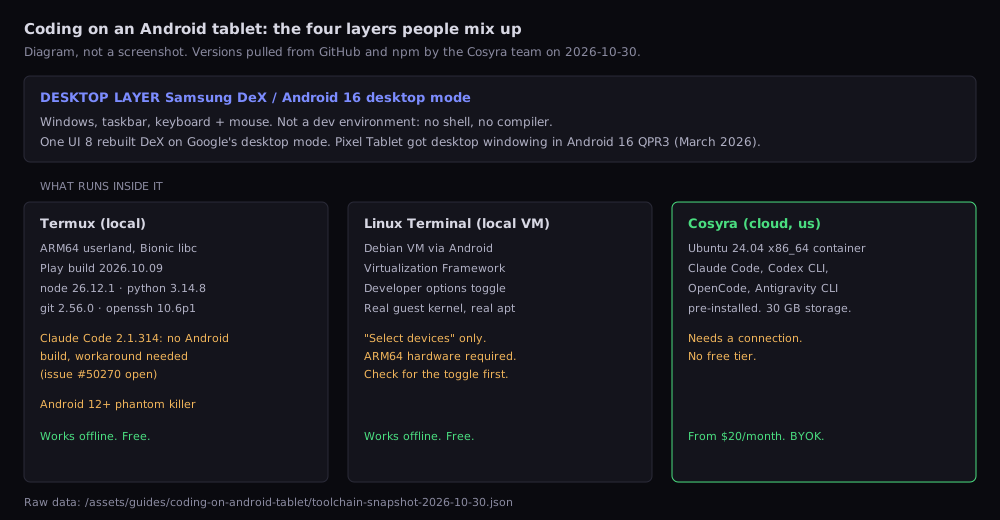
Think of it as a stack. The desktop layer decides how the tablet feels with a keyboard. The runtime layer decides what code can actually execute. You can mix them freely: Termux inside DeX, a cloud terminal inside Pixel desktop mode, or the Linux Terminal on its own. Most frustration we hear about comes from expecting the desktop layer to be the runtime, buying a Galaxy Tab for DeX and then discovering there is no compiler anywhere in it.
Samsung DeX and Android desktop mode: windows, not a shell
Samsung DeX on One UI 8
With One UI 8 (Android 16), Samsung rebuilt DeX on top of Google's Android desktop mode. The coverage of the change is not fully consistent, which tells you something about how much it moved. Android Authority reported on 2025-09-04 that One UI 8 removes the option to switch back to classic DeX and that the desktop-style UI no longer appears on the tablet's own screen, only on a connected display. SamMobile's Tab S11 Ultra coverage the next day describes switching between the One UI tablet interface and DeX with a swipe on the taskbar, plus two features everyone agrees on: Extend Mode, which spreads DeX across the tablet and an external monitor, and four separate virtual workspaces. Check what your own model does before you plan around a standalone desktop on the tablet screen.
What DeX has never been, in its current form, is a development environment. Samsung once shipped Linux on DeX, a full Ubuntu image, and a 2021 review notes that Samsung cancelled the Linux-on-DeX programme after about a year. The keyboard shortcuts are fixed (Alt+Tab, Win+/ for the shortcut list) per Samsung's own keyboard and mouse support page. Useful, but you still need something to type commands into.
Pixel Tablet and Android 16 desktop mode
Google's own desktop mode reached stable Pixels in the Android 16 QPR3 update in March 2026. Heise's write-up of that release says the Pixel Tablet gets desktop windowing with overlapping, resizable windows, and that a tablet connected to an external monitor extends the desktop across both screens. Other manufacturers are expected to follow. Same caveat as DeX: it is a window manager. Pair it with one of the runtimes below.
Termux: a local shell that works offline
Termux is the default answer for a local shell on Android and it is genuinely good. It installs from F-Droid or GitHub (Android 7+) or as a separately versioned Google Play build (Android 11+). The F-Droid track has not had a stable cut since v0.118.3 on 2025-05-22, while the Play track shipped termux-app-googleplay.2026.10.09 on 2026-10-09, both per the release feeds we pulled on 2026-10-30. The package repository moves much faster than the app.
$ pkg install nodejs python git openssh
# versions from termux-packages build.sh, 2026-10-30:
# nodejs 26.12.1, python 3.14.8, git 2.56.0, openssh 10.6p1
$ npm install -g @openai/codex opencode-ai
# npm latest: codex 0.166.0, opencode-ai 1.19.5
$ npm install -g @anthropic-ai/claude-code
# 2.1.314 installs, then: claude native binary not installed
That last line is the catch for AI agent work. Since Claude Code 2.1.113 the
npm package fetches a platform binary, and Node on Termux reports its
platform as android. The package it looks for,
@anthropic-ai/claude-code-linux-arm64-android, returned HTTP
404 when we checked on 2026-10-30, and the tracking issue anthropics/claude-code #50270 was still open with 72 comments. Workarounds exist (pin 2.1.112, run the glibc
binary through glibc-runner, or use a proot-distro Ubuntu), and our Claude Code on Termux fix walks through them. Codex CLI and OpenCode install from npm with the usual ARM64
caveats.
The other catch is Android itself. On Android 12 and later the system kills
phantom processes past 32 and processes using excessive CPU, which surfaces
as
[Process completed (signal 9)] (Termux issue #2366). Android 14+ has a Developer options toggle to disable child process
restrictions; older versions need ADB. A long agent run with a dev server
and a test watcher is exactly the workload that trips it. Our signal 9 fix guide has the per-version steps.
Android's Linux Terminal: a real VM, on some tablets
Android 16 added an official Terminal app backed by a Debian virtual machine through the Android Virtualization Framework. Because it is a VM with its own guest kernel, apt and SSH behave like they do on a server, which proot-based setups only approximate. Google's AOSP documentation is careful about reach: the Linux development environment is available on select devices, runs in a non-protected VM, and is switched on in Developer options. AVF itself is supported only on ARM64 devices.
In practice: open Settings, System, Developer options, and look for Linux development environment. If it is there, this is the most interesting local option on Android today and costs nothing. If it is missing, your tablet does not support it, and no app will add it. Our Linux on Android guide compares it with proot-distro and UserLAnd in more depth, including the 500 to 600 MB Debian image download.
A cloud container: x86_64 Linux on any Android tablet
The third runtime moves the code off the tablet. The tablet becomes a large screen and a keyboard; the shell runs on a real x86_64 Linux machine. You can do this yourself with SSH to a server you rent, or with an app that manages the machine for you. We built Cosyra for the second case. On first launch the app provisions a fresh Ubuntu container, about 15 seconds in our testing, with Claude Code, Codex CLI, OpenCode and Antigravity CLI already installed. Node.js, Python, git, tmux and vim are there too.
$ uname -m
x86_64
$ git clone https://github.com/your-org/api.git && cd api
$ claude
# no platform shim, no phantom killer: the process runs in the container
What this fixes is specific. Claude Code runs as the official Linux build, so the Termux platform problem does not exist. Processes run in the container, so Android's phantom process killer cannot touch them, and the container hibernates and resumes right where you left it. Your files sit in 30 GB of persistent storage, and the same container opens from an iPhone or the web client if you switch devices. You bring your own API key and pay Anthropic, OpenAI or Google directly; Antigravity CLI signs in with a Google account and needs no key at all.
What it costs is also specific. There is no free tier: Core is $20/month and Pro is $30/month, and eligible new users can start a 7-day free trial in the App Store app. There is no offline mode either. On a plane without Wi-Fi, Termux and the Linux Terminal keep working and we do not.
Run Claude Code on your Android tablet without the workarounds. Core is $20/month, Pro is $30/month. No free tier; eligible new users can start a 7-day free trial in the App Store app. Google Play / App Store / Pricing details
Side by side
| As of 2026-10-30 | Termux | Linux Terminal | Cosyra |
|---|---|---|---|
| Where code runs | On the tablet (ARM64, Bionic libc) | On the tablet (Debian VM) | Cloud container (Ubuntu 24.04 x86_64) |
| Price | Free, open source | Free, built in | $20 or $30/month |
| Works offline | Yes | Yes, after image download | No |
| Device support | Android 7+ (F-Droid), 11+ (Play) | Select ARM64 devices only | Any device that runs our app, plus web |
| Claude Code | Workaround needed (#50270 open) | Install it yourself in the VM | Pre-installed |
| Phantom process killer | Affected on Android 12+ | We have not tested this | Not affected |
| Uses tablet RAM and battery | Yes | Yes, VM reserves memory | Only for the terminal app |
How we would set one up today
1. Keyboard and desktop layer first. A tablet with an on-screen keyboard is fine for reviewing an agent's diff and typing a one-line prompt. For writing code by hand, pair a keyboard. Then turn on DeX on a Galaxy Tab, or desktop windowing on a Pixel Tablet with Android 16 QPR3 or later, so a terminal and a browser can sit side by side.
2. Pick the runtime by what you will run. Learning Python, shell scripting, or editing in neovim on the couch: Termux, free, offline, done. You own a tablet that shows the Linux development environment toggle and want a real Debian with apt: use it. You want Claude Code or Codex CLI on long tasks, a workload that needs x86_64 Linux, or one environment shared with your phone: a cloud container.
3. Install the toolchain. In Termux,
pkg install nodejs python git, then the agent CLIs from npm. In
the Linux Terminal, sudo apt install what you need. In Cosyra, add
your API key and type claude, codex,
opencode or agy.
Our take
We think a mid-range Android tablet with a keyboard case is a better agent terminal than most people's laptops, because agent-driven coding is mostly reading diffs and writing short prompts, and an 11-inch screen on a train tray table does that well. Plenty of developers will disagree and say you need a full IDE. For hand-writing large refactors they are right. For directing an agent between stops, the tablet wins on battery and weight, and the runtime question above matters far more than the screen.
Pick Termux if you want free, offline and local, and your tools are happy on ARM64. Pick the Linux Terminal if your tablet supports it and you want a real Debian VM on the device. Pick a cloud container if you run AI coding agents for long stretches, need x86_64, or want the same environment on your phone and tablet.
FAQ
Can I learn to code on an Android tablet?
Yes. Browser-based courses and editors work on an Android tablet, and a terminal app such as Termux gives you Python, Node.js and git locally. The weak point for beginners is the on-screen keyboard: symbols like braces and pipes are buried in layers. A cheap Bluetooth keyboard fixes most of it, and a cloud environment covers anything that needs x86_64 Linux. [source]
Is it possible to do real development work from a tablet?
For web, scripting and backend work, yes, as long as the heavy lifting runs in a shell rather than a tablet-native IDE. Android has no Android Studio, no full desktop VS Code and no Docker. People who code on tablets daily run either Termux locally, a VM on supported devices, or connect to a remote Linux machine and treat the tablet as a screen and keyboard. [source]
Can a Galaxy Tab replace a laptop for development?
For a terminal-centric workflow it can come close. A 2020 write-up of a Galaxy Tab S6 as a daily driver used Termux for ssh, neovim, tmux, Go and Node, Samsung DeX for windows, and code-server in Chrome for a VS Code interface, with heavy work on remote dev servers. The gaps are native desktop apps, some VS Code extensions, and browser dev tools. [source]
Why does Termux keep stopping with signal 9 on my tablet?
Android 12 and later kill phantom processes beyond 32 and processes using excessive CPU, which Termux reports as [Process completed (signal 9)]. On Android 14 and newer, Developer options has a Disable child process restrictions toggle that fixes it. On Android 12 and 13 you need an ADB command. A cloud container is not affected because the processes do not run on the tablet. [source]
Does Samsung DeX have Linux or a terminal built in?
No. Samsung shipped Linux on DeX, a full Ubuntu environment, and cancelled it after about a year. DeX today is a desktop-style window manager. You still install a terminal app such as Termux inside it, or connect to a remote or cloud Linux machine. As of mid-2026 reporting, Samsung did not support the Android Virtualization Framework behind Android's Linux Terminal, so expect that toggle to be missing on most Galaxy Tabs. [source]
How do I turn on the Linux Terminal on an Android tablet?
Enable Developer options (tap Build number seven times), then open Settings, System, Developer options and switch on Linux development environment. The Terminal app then appears in the launcher and downloads a Debian image. Android's documentation says the feature is available on select devices only, so if the toggle is missing, your tablet does not support it. [source]
tl;dr
DeX and Android desktop mode give an Android tablet windows, not a shell. For code, use Termux (free, offline, ARM64, Claude Code needs a workaround), the Linux Terminal if your tablet shows the toggle, or a cloud container like Cosyra if you run AI agents on long tasks.
Google Play / App Store. Core is $20/month, Pro is $30/month. No free tier; eligible new users can start a 7-day free trial in the App Store app. See pricing.
For the wider picture, our mobile coding terminal guide compares every way to get a shell on a phone or tablet, and the guide to AI coding agents on mobile maps each agent across devices. For a specific agent on Android, see Claude Code on Android, Codex CLI on Android or OpenCode on Android.
Turn your Android tablet into an agent terminal. Install Cosyra, add your API key, and run Claude Code, Codex CLI or OpenCode in a persistent Ubuntu container.