You can run Forge (forgecode), the
open-source Rust terminal agent, on your phone today. Forge ships no mobile
app, so you run it on a Linux shell. On Android it works natively: Forge
publishes a forge-aarch64-linux-android binary, so
npm install -g forgecode inside Termux pulls native machine code,
no emulation. On iPhone there is no native build at all, so you reach a cloud
Ubuntu container from a native app: install
Cosyra for iOS or
Cosyra for Android, then
npm install -g forgecode and run forge. Plans
start at $20/month.
This guide was written by the Cosyra team. We installed
forgecode ourselves on 2026-07-26 and inspected exactly which binary
npm ships on each platform, and we cross-checked every claim against Forge's
official GitHub repo (tailcallhq/forgecode)
and
forgecode.dev, verified the same day.
Not the other Forges. This is
tailcallhq/forgecode, the AI coding agent at forgecode.dev.
It is unrelated to Atlassian Forge (the Jira app platform), Laravel Forge
(server provisioning), or Minecraft Forge (the mod loader). Wherever this
guide says "Forge," it means forgecode.
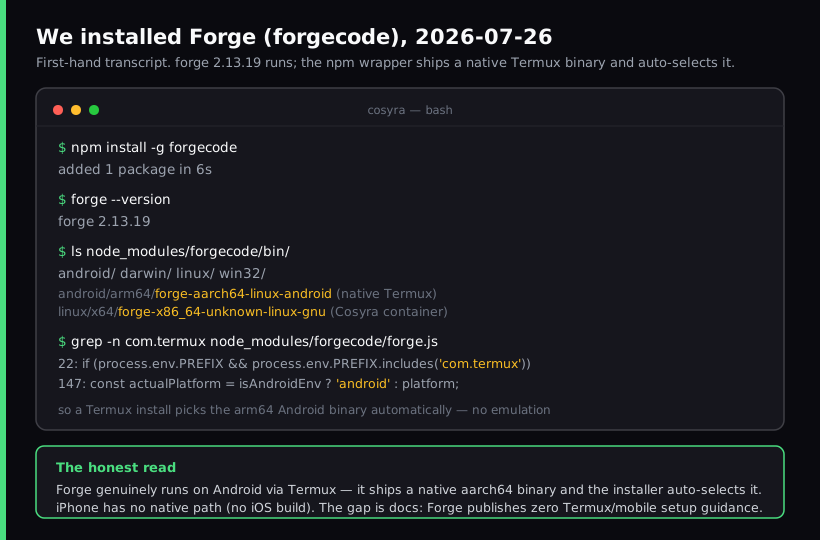
forgecode install, run 2026-07-26. The npm package
carries a native Android binary and picks it automatically under Termux.
What is Forge (forgecode)?
Forge is an open-source AI coding agent for the terminal, published under
Apache-2.0 and written in Rust. Its repo describes it as an "AI enabled pair
programmer for Claude, GPT, O Series, Grok, Deepseek, Gemini and 300+
models." As of 2026-07-26 it sits at v2.13.19 with about 7,500 GitHub stars,
and archived is false, so it is under active development. The tool
is free; the money is an optional hosted-inference subscription layered on top.
We ran forge --help on 2026-07-26. Running forge with
no arguments starts an interactive TUI; forge -p "your prompt" runs
a single headless answer for scripts and CI. There are subcommands for
commit (AI commit messages), suggest (shell commands
from natural language), mcp (Model Context Protocol servers), and
a zsh plugin mode where lines starting with : at the prompt route
to Forge. Models are BYOK through
forge provider login, or you can use Forge's hosted quota.
The opinion we hold that a desktop-first Forge user might push back on: the
most interesting thing about Forge for mobile developers is not a feature it
advertises, it is the forge-aarch64-linux-android binary buried in
its releases. Forge is one of the few terminal agents that actually ships native
ARM64 Android machine code. It just never tells you what to do with it. The docs
and README carry no Termux walkthrough, no note about Android's background-process
limits, no mobile workflow at all. So the tool supports your phone better than
its own documentation admits.
How can you run Forge on a phone?
There are two honest paths, and which one is right depends mostly on whether you carry an iPhone or an Android phone. Both put the actual Forge process on a real Linux shell. Comparison current as of 2026-07-26.
1. Termux on Android: native, free, local
This is the path Forge's docs skip. Install
Termux from F-Droid,
pkg install nodejs, then
npm install -g forgecode. Because Forge ships a native
forge-aarch64-linux-android binary and the npm wrapper detects Termux
(it checks whether the PREFIX environment variable contains com.termux), you get native ARM64 code rather than an x86 translation layer. That is
a real advantage over Node agents that fight Termux's Bionic libc.
- Works when: you are on Android, you want everything local and free, and you accept managing the install yourself.
- Breaks when: Android 12+'s phantom-process killer terminates a long agent run in the background, or you switch to an iPhone, where Termux does not exist. See why Termux is Android-only for the underlying reason.
- Cost: free Termux, free CLI. You pay your model provider, or Forge's hosted quota if you use it.
2. Cosyra: cloud x86_64 container, iPhone and Android
This is what we built: a native iOS and Android terminal connected to a
persistent Ubuntu 24.04 container. Claude Code, Codex CLI, OpenCode, and
Antigravity CLI are already installed; Forge is the one you add. On a clean
container it is a single npm install -g forgecode, which pulls
the forge-x86_64-unknown-linux-gnu binary to match the container's
architecture.
- Works when: you are on iPhone (no native Forge build exists for iOS), or you want the same container from your phone, tablet, and the web, and you do not want a long session killed by Android's process limits.
- Breaks when: you are offline. The container lives in the cloud, so no internet means no terminal. Full trade-off list in Cosyra vs Termux.
- Cost: Core is $20/month and Pro is $30/month. Eligible new users can start a 7-day free trial in the App Store app. Model tokens are billed by your provider. See pricing.
How do you set up Forge on iPhone or Android?
You set up Forge on a phone in about five minutes with Cosyra: install the
app, open the container, install the CLI with npm, authenticate a provider,
and run forge. This is the path that also covers iPhone, so it
is the one we walk through step by step.
Step 1: Install Cosyra and open a container
Download from the App Store or Google Play. Sign in with Apple, Google, or email. On first launch we provision a fresh Ubuntu 24.04 x86_64 container with Node.js, Python, Git, and tmux already on it, about 15 seconds in our testing.
Welcome to Cosyra.
Ubuntu 24.04.1 LTS (x86_64)
Pre-installed: claude, codex, agy, opencode
(forge is not pre-installed, we add it below)
Step 2: Install Forge with npm
Forge is not one of the four agents we ship in the image, so you add it
yourself. The npm package name is forgecode. On our x86_64
container it pulls the forge-x86_64-unknown-linux-gnu binary. When
we ran it on 2026-07-26, forge --version printed
forge 2.13.19. The official
curl -fsSL https://forgecode.dev/cli | sh script works too.
$ npm install -g forgecode
added 1 package in 6s
$ forge --version
forge 2.13.19
Step 3: Authenticate a model provider
Forge is BYOK-capable. Run forge provider login to point it at your
own provider credentials, or use Forge's hosted quota. On a phone we prefer BYOK,
because it keeps billing in one place with the key you already have rather than
a second hosted account.
$ forge provider login
# choose a provider (Anthropic, OpenAI, Google, …) and paste your key
$ forge list models
# lists the models your provider exposes
Step 4: Run forge interactively or one-shot
Run forge to open the interactive TUI, or forge -p for
a single headless answer. forge commit stages and writes an AI-generated
commit message. Keep it inside tmux so a dropped signal on the train
does not kill the session.
$ git clone https://github.com/your-org/your-project.git && cd your-project
$ forge -p "Summarize this repo and flag the riskiest files."
Forge, reading workspace…
$ forge
> Refactor @src/billing/invoice.rs to split the proration math into its own function.
Try Cosyra. Eligible new users can start a 7-day free trial in the App Store app. Claude Code, Codex CLI, OpenCode, and Antigravity CLI come pre-installed; add Forge with one npm command. App Store / Google Play / Pricing details
What can you actually do with Forge on your phone?
The honest pitch for Forge on a phone is a fast Rust terminal agent that reaches 300-plus models on your own key. Two sessions we run from a phone.
Draft a commit message on the couch
You made a few changes on the train and want them committed cleanly. From
the couch, open the container, stage your work, and run
forge commit. Forge reads the diff and writes a message you can
accept or edit. It is a small thing, but it is the kind of task a phone
keyboard handles fine, and it keeps history readable without switching to a
laptop.
Compare Forge against the agents we pre-install
Since Claude Code, Codex CLI, OpenCode, and Antigravity CLI already sit in
the same container, a phone session is a low-stakes place to run the same
prompt through forge and through one of them and see which reasoning
you prefer. We do this when deciding which agent to keep on a repo. If you are
weighing open-source terminal agents, running Forge next to
OpenCode tells you fast which one
fits your workflow. For the cross-agent picture, see the
AI coding agents on mobile pillar.
What are the real limits of running Forge on a phone?
Knowing where Forge stops helps you match it to the right job instead of fighting it.
- No iOS build. There is no
*-apple-iosasset and no App Store listing for Forge. On iPhone you must go through a cloud container or SSH into your own machine. - Zero official mobile docs. Forge ships the Android binary but publishes no Termux setup guide, so the phone workflow is undocumented by the project. This guide fills that gap; the tool itself will not hold your hand.
- Free hosted tier is tight. Forge's hosted inference free tier is roughly 10 to 50 requests/day and adjusts with server load. Fine for trying it, tight for a full day. BYOK sidesteps this.
- Android process limits still apply on Termux. A native binary does not exempt you from Android 12+'s phantom-process killer on long background runs. That is a Termux constraint, not a Forge one, but it hits Forge too.
- No offline mode via Cosyra. The container and the model API both live in the cloud. Termux can run the CLI offline, but the model call still needs a network. See the install-it-yourself CLI pattern for another agent with the same not-pre-installed caveat.
How does Cosyra compare to Termux for Forge?
Termux wins on being free, local, and offline-capable, and it runs Forge's native Android binary. Cosyra wins on covering iPhone, avoiding Android's process killer, and keeping a persistent container across devices. Neither is strictly best. Comparison as of 2026-07-26.
| Feature | Cosyra | Termux |
|---|---|---|
| Forge install | npm, x86_64 Linux binary | npm, native arm64 Android binary |
| Platforms | iOS + Android | Android only |
| Architecture | x86_64 | arm64 (native) |
| Runs offline | No (cloud container) | CLI yes, model call no |
| Long background sessions | Survive (cloud + hibernation) | Android may kill them |
| Persistent across devices | Yes (same container) | No (local to the phone) |
| Price (not counting tokens) | From $20/mo | Free |
Who should pick each option?
Choose Termux if you are on Android, you live in the terminal, and you want
everything local and free, and you are willing to work around the
phantom-process killer on long runs. Choose Cosyra if you are on iPhone,
where Forge has no native build at all, or if you want the same container on
both platforms without a session dying when Android reclaims memory, with
Claude Code, Codex CLI, OpenCode, and Antigravity CLI sitting next to
forge in the same shell. For the head-to-head on the terminal itself,
see Cosyra vs Termux.
For the same walkthrough with the agents we pre-install, see Antigravity on a phone and OpenCode on phone. For another install-it-yourself CLI with the same not-pre-installed caveat, see Aider on phone.
Frequently asked questions
Can you run Forge (forgecode) on your phone?
Yes. Forge is a terminal CLI with no mobile app, so you run it on a real
Linux shell and drive that shell from your phone. On Android it runs
natively under Termux, because Forge ships a
forge-aarch64-linux-android binary. On iPhone there is no native
path, so you reach a cloud Ubuntu container from a native app and install forgecode there.
[source: GitHub, tailcallhq/forgecode releases, per-platform binary assets]
Does Forge have an iPhone or iOS app?
No. As of 2026-07-26, Forge's release assets include Linux, macOS,
Windows, and a native Android binary, but no *-apple-ios build
and no App Store listing. On iPhone or iPad the only paths are a cloud Linux
container or SSH into a machine you own.
[source: GitHub, tailcallhq/forgecode releases, no iOS asset, 2026-07-26]
How do I install Forge on Termux?
Install Termux from F-Droid, run pkg install nodejs, then
npm install -g forgecode. The npm wrapper detects Termux (it
checks whether PREFIX contains com.termux) and
selects the native forge-aarch64-linux-android binary, so there
is no x86 emulation. Forge's own docs give no Termux walkthrough.
[source: npm registry, forgecode package, platform binary wrapper]
How much does Forge cost?
The Forge CLI is open-source and free (Apache-2.0). Forge also sells hosted model inference: Free (roughly 10 to 50 requests/day), Pro $20/month (up to 1,000/day), and Max $100/month (up to 5,000/day), as of 2026-07-26. You can skip the hosted quota and bring your own provider keys instead.
[source: forgecode.dev, pricing tiers announcement]
Does Forge run on Android without emulation?
Yes. Forge publishes a native forge-aarch64-linux-android
binary, so under Termux on an arm64 phone it runs as native machine code, not
through an x86 translation layer. That is unusual for terminal agents and is
a genuine point in Forge's favor for Android-only users.
[source: GitHub, tailcallhq/forgecode releases, aarch64-linux-android asset]
Is Forge (forgecode) open source?
Yes. tailcallhq/forgecode is Apache-2.0 licensed, written in Rust,
with about 7,500 GitHub stars as of 2026-07-26 and
archived set to false, so it is actively developed. The commercial
layer is the optional hosted-inference subscription, not the tool itself.
[source: GitHub API, tailcallhq/forgecode, license + stars + archived]
tl;dr
Forge (forgecode) is an open-source Rust terminal agent with no mobile
app. On Android it runs natively under Termux, because it ships a
forge-aarch64-linux-android binary that npm auto-selects. On iPhone
there is no native build, so you run it in a cloud Linux container. Use Cosyra
if you want Forge on iOS, or a persistent container that Android will not kill
mid-run. Install the app, then
npm install -g forgecode and run forge.
App Store / Google Play. Sign up and pick a plan. Eligible new users can start a 7-day free trial in the App Store app.
Run Forge from your phone. Install Cosyra, add the CLI with
npm, log in your provider, run forge.